Wireless Bridge Gigabit, 1Gbps Point to Point – Features & Prices in Saudi Arabia :
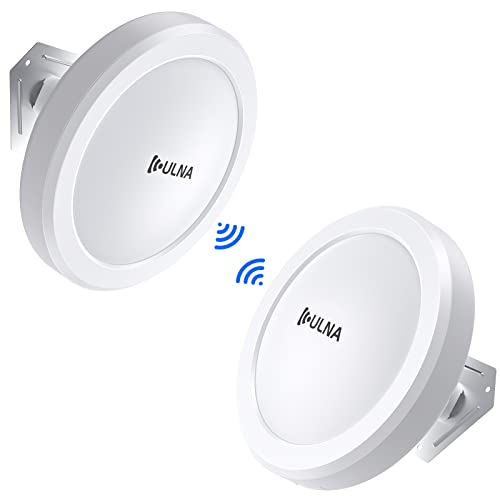
Wireless Bridge Gigabit, 1Gbps Point to Point WiFi Bridge Outdoor Kit with 16dBi High-gain Antenna, ULNA 5.8G Long Range CPE Up to 5KM, Plug and Play, 27dbm, 24V POE Power, Ip65 Waterproof, 2-Pack
Package Dimensions
16.45 x 10.35 x 3.27 inches
Item Weight
3.5 pounds
Manufacturer
ULNA
ASIN
B0BBMQQK6C
Country of Origin
China
Item model number
CPE609
Date First Available
August 23, 2022
Test video – Wireless Bridge Gigabit, 1Gbps Point to Point :
Product highlights :
【High Speed】Wireless bridge set 27 dBm high wireless transmit power extends Wi-Fi building-to-building, transmission speed between 2 bridges max is 1200Mbps. The highest network speed that can be achieved is 433Mbps. Transmission/receiver automatic networking, support ptp/ptmp. WDS networking mode, video network dual compatible
【5KM Transmission Distance】This wifi outdoor bridge built-in 16dBi directional antenna can effectively improve the transmission and reception performance of wireless signals. It supports 5KM long-distance wireless transmission. Wireless outdoor bridge can be widely used in daily life. Ideal for warehouses, gardens, barns, offices, shops, or garages next to your home
【5.8G Technology】The 5.8G frequency adopts 11ac technology, which is better than 2.4G traditional CPE. It has better anti-interference, compatibility, and strong anti-adjacent channel interference. High-quality ABS material can resist rain, thunder, frost, and sun. Good choice for daily use
【Plug and play】CPE609 is powered by a 24V Poe adapter(included) and supports dial pairing without entering the GUI. wifi bridge kit are pre-configured, just connect the Poe power supply to achieve automatic pairing of the two bridges. It not only can help extend your home’s network to the second building but also can be used for monitoring
【Customer Service】Wireless bridge poe suitable for users who need to extend their network from one building to the next building within 5KM. If you have any problem, feel free to contact us, ULNA will do our best to help you solve the problem to your satisfaction
Questions & Answers – Wireless Bridge Gigabit, 1Gbps Point to Point :
➕ What is the price of Wireless Bridge Gigabit, 1Gbps Point to Point in Saudi Arabia ?
The price of Wireless Bridge Gigabit, 1Gbps Point to Point in-store is 640 SAR VAT.
➕ When Wireless Bridge Gigabit, 1Gbps Point to Point was released ?
The release date was August 23, 2022.
➕ What is the price of Wireless Bridge Gigabit, 1Gbps Point to Point cheap used ?
The price of Wireless Bridge Gigabit, 1Gbps Point to Point used is 440 SAR VAT.
➕ What are the main characteristics of Wireless Bridge Gigabit, 1Gbps Point to Point ?
Special specifications :
【High Speed】Wireless bridge set 27 dBm high wireless transmit power extends Wi-Fi building-to-building, transmission speed between 2 bridges max is 1200Mbps. The highest network speed that can be achieved is 433Mbps. Transmission/receiver automatic networking, support ptp/ptmp. WDS networking mode, video network dual compatible
➕ Is it interesting to buy this product ?
The best people who can answer you are customers who have already bought and tested this product (See Customer Reviews). This product is rated 4.8 / 5 on Amazon.
➕ Where to buy Wireless Bridge Gigabit, 1Gbps Point to Point in Saudi Arabia ?
Technical specifications – Wireless Bridge Gigabit, 1Gbps Point to Point :
Brand
ULNA
Wireless Communication Standard
802.11n, 802.11a, 802.11ac
Data Transfer Rate
1000 Megabits Per Second
Frequency Band Class
Single-Band
Color
1000Mbps 5KM
Purchase advice :
Warranty :
Check the duration of the warranty and also the faults and defects it covers. Is it complete or limited? and What is included in the warranty (parts, repairs or both)?
Shipping :
Is delivery offered? And how long does it take to get delivered (Delivery time)
Proof of purchase :
Does the shop give you an invoice ?
After-sales service :
Do they have an after-sales service to have information about the installation or operation (instructions for use). Also in case of problem, it is the seller who takes charge or you must contact the manufacturer or supplier yourself.
_____________________________
12 reviews for Wireless Bridge Gigabit, 1Gbps Point to Point
Rated 5 out of 5
H. B (verified owner)–
Works great but… – Once I got this set up it worked great. However I spent a considerable amount of time trying to get it to work. Let me explain. The MASTER/SLAVE AB switch works backwards than the way a USA user would expect. On this Chinese made unit the MASTER A position is switch to RIGHT. On USA we expect position A to be to LEFT. As long as you make sure you have the right most switch connected as MASTER and left most switch connected as slave this unit works right out of the box.
Rated 5 out of 5
H. R (verified owner)–
Great or adding connectivity to an outbuilding – We used this equipment to provide wifi connectivity to my dad’s barn workshop. There was no practical way to run wiring unless we strung it on fence posts or trenched it a couple hundred feet, so we though this might be a better solution. It works like a charm at that distance – I cannot address the claimed range of much further. There is very little noticeable lag once the signal is established, it works very much like a range extender of the type you’d use in the house, but it has much greater range. It creates a wifi hotspot around the client component so you can log in with your cell phone or computer. If your cell service gives you wifi calling ability this will also extend your cell service via wifi if you have a poor cell signal at the endpoint location.
Rated 4 out of 5
T. Z (verified owner)–
Easy Install & setup but slower speeds – We installed this on a property with some rental Airbnb units. Relatively easy setup. We used this to replace an ancient bridge we had that had slower speed caps. We were able to install with just 2 wood screws each. Basically plug and play as the instructions say! However the speeds are less than we hoped at the receiving end…
Rated 5 out of 5
T. D (verified owner)–
Easy setup – As far as network devices go, this is probably the easiest thing I’ve set up in recent memory. You really don’t need to do anything other than plug them in and select a channel. It worked perfectly right out of the box. I’m using mine to extend my network out to a pole building behind my woods. I plugged an Ethernet cable coming from my main router into the transmitter side, and then on the receiving end I plugged in a wireless access point. That’s it. Just point them at each other and they work. Just note that this isn’t a WiFi access point itself, you need to plug the receiver into something with an Ethernet cable. It could be directly into something like a camera, or it could go into a WiFi router in bridge mode. If I have any complaint, it’s the price. It feels pretty expensive for what it is. It’s a great product, just a little pricey.
Rated 5 out of 5
J. O (verified owner)–
Easy install + Easy Setup = EASY DECISION IMO… – The only thing I wish it had that it doesn’t? A nice little solar panel / batter option, but other than that these things are pretty much perfect in every-way.
Rated 5 out of 5
D. I (verified owner)–
Easy installation – The Gigabit Wireless Bridge was really easy to install. I wanted to use this for our camper because we don’t get a good internet connection when camping. As long as we can use the internet connection from where we are camping and connect the receiving bridge to our router it works well. The trouble is being able to access the main connection.
Rated 5 out of 5
D. I (verified owner)–
Easy installation – The Gigabit Wireless Bridge was really easy to install. I wanted to use this for our camper because we don’t get a good internet connection when camping. As long as we can use the internet connection from where we are camping and connect the receiving bridge to our router it works well. The trouble is being able to access the main connection.
Rated 5 out of 5
H. R (verified owner)–
Great or adding connectivity to an outbuilding – We used this equipment to provide wifi connectivity to my dad’s barn workshop. There was no practical way to run wiring unless we strung it on fence posts or trenched it a couple hundred feet, so we though this might be a better solution. It works like a charm at that distance – I cannot address the claimed range of much further. There is very little noticeable lag once the signal is established, it works very much like a range extender of the type you’d use in the house, but it has much greater range. It creates a wifi hotspot around the client component so you can log in with your cell phone or computer. If your cell service gives you wifi calling ability this will also extend your cell service via wifi if you have a poor cell signal at the endpoint location.
Rated 5 out of 5
J. O (verified owner)–
Easy install + Easy Setup = EASY DECISION IMO… – The only thing I wish it had that it doesn’t? A nice little solar panel / batter option, but other than that these things are pretty much perfect in every-way.
Rated 5 out of 5
H. B (verified owner)–
Works great but… – Once I got this set up it worked great. However I spent a considerable amount of time trying to get it to work. Let me explain. The MASTER/SLAVE AB switch works backwards than the way a USA user would expect. On this Chinese made unit the MASTER A position is switch to RIGHT. On USA we expect position A to be to LEFT. As long as you make sure you have the right most switch connected as MASTER and left most switch connected as slave this unit works right out of the box.
Rated 4 out of 5
T. Z (verified owner)–
Easy Install & setup but slower speeds – We installed this on a property with some rental Airbnb units. Relatively easy setup. We used this to replace an ancient bridge we had that had slower speed caps. We were able to install with just 2 wood screws each. Basically plug and play as the instructions say! However the speeds are less than we hoped at the receiving end…
Rated 5 out of 5
T. D (verified owner)–
Easy setup – As far as network devices go, this is probably the easiest thing I’ve set up in recent memory. You really don’t need to do anything other than plug them in and select a channel. It worked perfectly right out of the box. I’m using mine to extend my network out to a pole building behind my woods. I plugged an Ethernet cable coming from my main router into the transmitter side, and then on the receiving end I plugged in a wireless access point. That’s it. Just point them at each other and they work. Just note that this isn’t a WiFi access point itself, you need to plug the receiver into something with an Ethernet cable. It could be directly into something like a camera, or it could go into a WiFi router in bridge mode. If I have any complaint, it’s the price. It feels pretty expensive for what it is. It’s a great product, just a little pricey.

H. B (verified owner) –
Works great but… – Once I got this set up it worked great. However I spent a considerable amount of time trying to get it to work. Let me explain. The MASTER/SLAVE AB switch works backwards than the way a USA user would expect. On this Chinese made unit the MASTER A position is switch to RIGHT. On USA we expect position A to be to LEFT. As long as you make sure you have the right most switch connected as MASTER and left most switch connected as slave this unit works right out of the box.
H. R (verified owner) –
Great or adding connectivity to an outbuilding – We used this equipment to provide wifi connectivity to my dad’s barn workshop. There was no practical way to run wiring unless we strung it on fence posts or trenched it a couple hundred feet, so we though this might be a better solution. It works like a charm at that distance – I cannot address the claimed range of much further. There is very little noticeable lag once the signal is established, it works very much like a range extender of the type you’d use in the house, but it has much greater range. It creates a wifi hotspot around the client component so you can log in with your cell phone or computer. If your cell service gives you wifi calling ability this will also extend your cell service via wifi if you have a poor cell signal at the endpoint location.
T. Z (verified owner) –
Easy Install & setup but slower speeds – We installed this on a property with some rental Airbnb units. Relatively easy setup. We used this to replace an ancient bridge we had that had slower speed caps. We were able to install with just 2 wood screws each. Basically plug and play as the instructions say! However the speeds are less than we hoped at the receiving end…
T. D (verified owner) –
Easy setup – As far as network devices go, this is probably the easiest thing I’ve set up in recent memory. You really don’t need to do anything other than plug them in and select a channel. It worked perfectly right out of the box. I’m using mine to extend my network out to a pole building behind my woods. I plugged an Ethernet cable coming from my main router into the transmitter side, and then on the receiving end I plugged in a wireless access point. That’s it. Just point them at each other and they work. Just note that this isn’t a WiFi access point itself, you need to plug the receiver into something with an Ethernet cable. It could be directly into something like a camera, or it could go into a WiFi router in bridge mode. If I have any complaint, it’s the price. It feels pretty expensive for what it is. It’s a great product, just a little pricey.
J. O (verified owner) –
Easy install + Easy Setup = EASY DECISION IMO… – The only thing I wish it had that it doesn’t? A nice little solar panel / batter option, but other than that these things are pretty much perfect in every-way.
D. I (verified owner) –
Easy installation – The Gigabit Wireless Bridge was really easy to install. I wanted to use this for our camper because we don’t get a good internet connection when camping. As long as we can use the internet connection from where we are camping and connect the receiving bridge to our router it works well. The trouble is being able to access the main connection.
D. I (verified owner) –
Easy installation – The Gigabit Wireless Bridge was really easy to install. I wanted to use this for our camper because we don’t get a good internet connection when camping. As long as we can use the internet connection from where we are camping and connect the receiving bridge to our router it works well. The trouble is being able to access the main connection.
H. R (verified owner) –
Great or adding connectivity to an outbuilding – We used this equipment to provide wifi connectivity to my dad’s barn workshop. There was no practical way to run wiring unless we strung it on fence posts or trenched it a couple hundred feet, so we though this might be a better solution. It works like a charm at that distance – I cannot address the claimed range of much further. There is very little noticeable lag once the signal is established, it works very much like a range extender of the type you’d use in the house, but it has much greater range. It creates a wifi hotspot around the client component so you can log in with your cell phone or computer. If your cell service gives you wifi calling ability this will also extend your cell service via wifi if you have a poor cell signal at the endpoint location.
J. O (verified owner) –
Easy install + Easy Setup = EASY DECISION IMO… – The only thing I wish it had that it doesn’t? A nice little solar panel / batter option, but other than that these things are pretty much perfect in every-way.
H. B (verified owner) –
Works great but… – Once I got this set up it worked great. However I spent a considerable amount of time trying to get it to work. Let me explain. The MASTER/SLAVE AB switch works backwards than the way a USA user would expect. On this Chinese made unit the MASTER A position is switch to RIGHT. On USA we expect position A to be to LEFT. As long as you make sure you have the right most switch connected as MASTER and left most switch connected as slave this unit works right out of the box.
T. Z (verified owner) –
Easy Install & setup but slower speeds – We installed this on a property with some rental Airbnb units. Relatively easy setup. We used this to replace an ancient bridge we had that had slower speed caps. We were able to install with just 2 wood screws each. Basically plug and play as the instructions say! However the speeds are less than we hoped at the receiving end…
T. D (verified owner) –
Easy setup – As far as network devices go, this is probably the easiest thing I’ve set up in recent memory. You really don’t need to do anything other than plug them in and select a channel. It worked perfectly right out of the box. I’m using mine to extend my network out to a pole building behind my woods. I plugged an Ethernet cable coming from my main router into the transmitter side, and then on the receiving end I plugged in a wireless access point. That’s it. Just point them at each other and they work. Just note that this isn’t a WiFi access point itself, you need to plug the receiver into something with an Ethernet cable. It could be directly into something like a camera, or it could go into a WiFi router in bridge mode. If I have any complaint, it’s the price. It feels pretty expensive for what it is. It’s a great product, just a little pricey.