Wavlink N300 Wi-Fi Range Extender, Wireless Signal – Features & Prices in Saudi Arabia :
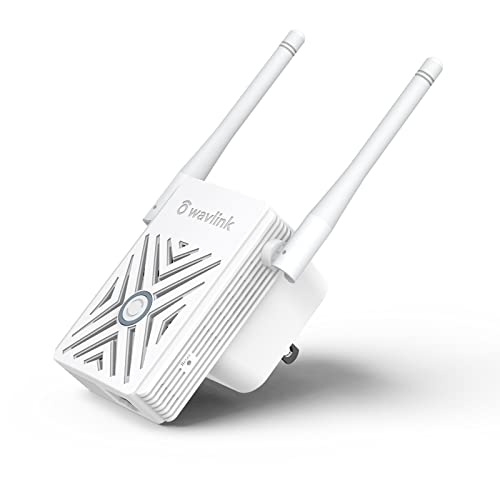
Wavlink N300 Wi-Fi Range Extender, Wireless Signal Booster with Ethernet Port for Home, Covers Up to 1000 Sq.ft and 16 Devices, Supports Repeater/Access Point Modes, Wall Plug Design, 2.4Ghz Only
Product Dimensions
2.95 x 2.09 x 1.61 inches
Item Weight
7 ounces
ASIN
B0B6HVJMZD
Date First Available
July 14, 2022
Manufacturer
WAVLINK
Country of Origin
China
Test video – Wavlink N300 Wi-Fi Range Extender, Wireless Signal :
Product highlights :
{Boost Signal throughout the Home}: Fully expand the limited wifi to every corner of your home– basement, bedroom, restroom, garage or the attic, where wireless signal can’t reach before. Supports coverage up to 1000 sq.ft and connection up to 16 devices with 2.4Ghz/300Mbps—ideal for smooth online experience.
{2 Working Modes for Choose}: This Wi-Fi range extender supports repeater/ access point(AP) modes. It helps expand the router’s existing Wi-Fi coverage to the original signal “dead zones” as a wireless repeater; or create a new network via the Ethernet port as an access point.
{Better Performance with 3dBi Antennas}: Dual external antennas with MIMO technology provide optimal Wi-Fi coverage and reliable connections, helping your devices stay connected anywhere as network reaches with no WiFi dead zone. Adjustable design for more flexible deployment.The device work as the wifi range extender to get a larger wifi coverage,and it could not increase the speed of the host router/modem.
{Easy Setup in Minutes}: With our smart setup wizard, you can easily set up and configure your wireless network of the extender in a few steps. WPS button for quickly expanding your router’s Wi-Fi. And intelligent signal indicator helps to find the desired location for a stable Wi-Fi connection.
{Compatiblity & Warranty}: Works with any Wi-Fi router/ access point and Wi-Fi-enabled device. We provide 12-month worry free warranty(extra 6 months for registered members) and life-long technical support, just feel free to contact us if you have any problem.
tip:If during set up when it gets to reset, if it doesn’t but gives an error like page won’t load, you are not talking to the extender, your device has switched to another wifi point and is trying to go online. The set up wizard looks like a web page but isn’t. You have to be offline to set it up.
Questions & Answers – Wavlink N300 Wi-Fi Range Extender, Wireless Signal :
➕ What is the price of Wavlink N300 Wi-Fi Range Extender, Wireless Signal in Saudi Arabia ?
The price of Wavlink N300 Wi-Fi Range Extender, Wireless Signal in-store is 50 SAR VAT.
➕ When Wavlink N300 Wi-Fi Range Extender, Wireless Signal was released ?
The release date was July 14, 2022.
➕ What is the price of Wavlink N300 Wi-Fi Range Extender, Wireless Signal cheap used ?
The price of Wavlink N300 Wi-Fi Range Extender, Wireless Signal used is 40 SAR VAT.
➕ What are the main characteristics of Wavlink N300 Wi-Fi Range Extender, Wireless Signal ?
Special specifications :
{Boost Signal throughout the Home}: Fully expand the limited wifi to every corner of your home– basement, bedroom, restroom, garage or the attic, where wireless signal can’t reach before. Supports coverage up to 1000 sq.ft and connection up to 16 devices with 2.4Ghz/300Mbps—ideal for smooth online experience.
➕ Is it interesting to buy this product ?
The best people who can answer you are customers who have already bought and tested this product (See Customer Reviews). This product is rated 3.8 / 5 on Amazon.
➕ Where to buy Wavlink N300 Wi-Fi Range Extender, Wireless Signal in Saudi Arabia ?
Technical specifications – Wavlink N300 Wi-Fi Range Extender, Wireless Signal :
Brand
WAVLINK
Included Components
Cassette
Item Dimensions LxWxH
2.95 x 2.09 x 1.61 inches
Compatible Devices
Router
Range
1000 Square Feet
Purchase advice :
Warranty :
Check the duration of the warranty and also the faults and defects it covers. Is it complete or limited? and What is included in the warranty (parts, repairs or both)?
Shipping :
Is delivery offered? And how long does it take to get delivered (Delivery time)
Proof of purchase :
Does the shop give you an invoice ?
After-sales service :
Do they have an after-sales service to have information about the installation or operation (instructions for use). Also in case of problem, it is the seller who takes charge or you must contact the manufacturer or supplier yourself.
_____________________________
16 reviews for Wavlink N300 Wi-Fi Range Extender, Wireless Signal
Rated 4 out of 5
O. J (verified owner)–
Does the job, but the signal is not steady – I have been using this wifi signal booster for a few weeks now and it does work! However, I have found that the signal is not steady especially if something is blocking it in front. For the price, it works absolutely fine. Just beware of where you’re putting it.
Rated 4 out of 5
C. S (verified owner)–
Easy to setup and configure. Works wonderfully, but with one big caveat for me. – This Wi-Fi range extender was extremely easy to setup and configure (It took me more time to open the package and take the photos). I have it up and running in less than 10 minutes.
Rated 3 out of 5
J. C (verified owner)–
Good for IOT or guest WIFI networks, but wouldn’t reconnect to my main router after a reboot. – The Wavlink N300 Wi-Fi Range Extender is a quick and easy way to extend your 2.4gHz network to reach the remote corners of your house. It is easy to set up if you’re familiar with normal router setup procedures (connect to its wifi or via ethernet cable, then access the router configuration through a browser). It will normally create a wifi SSID that’s different from your original wifi, but you can just force it to use the same name.
Rated 4 out of 5
K. G (verified owner)–
Can’t get it to work **Update below** – First off, I’m a decent “computer guy”. I’d rate myself in the 90th percentile of amateur computer knowledge, and I understand what this device is supposed to do and how it does it.
Rated 4 out of 5
L. O (verified owner)–
Great little wifi extender – Great little wifi extender at a very good price. Usually I have installed wifi Access Points ( much pricier) to perform the same function this littel device does. That is to extend and exsisting wifi signal out futher than the base AP will do. This one does a very nice job of doing that but at a limited range. The instructions are vary vague, you must have expereince with setting up such devices or you will probably not get it working with only the info that is provided. But bang for the buck it is once you get it going. So far has been online and doing it job for about 2 weeks, and has yet to drop out. A Good buy.
Rated 1 out of 5
E. N (verified owner)–
Technical Support – Paired this with my Wavlink Wireless Router and it made the signal weaker and slower, returned next day!
Rated 4 out of 5
O. J (verified owner)–
Does the job, but the signal is not steady – I have been using this wifi signal booster for a few weeks now and it does work! However, I have found that the signal is not steady especially if something is blocking it in front. For the price, it works absolutely fine. Just beware of where you’re putting it.
Rated 5 out of 5
R. Z (verified owner)–
I am not a tech person …. – But I got it up and running in minutes. I needed wireless in an outbuilding that had a network cable. The advice from other reviewer to attach to laptop with a network cable was right, followed steps in the quick start guide, set up into access point mode, plugged into wall socket & attached network cable, got my phone and there was new network. If I can do it it ain’t hard.
Rated 4 out of 5
B. M (verified owner)–
It worked, after some tinkering. – First plugged it in, the SSID wouldn’t show up in my WIFI list. Tried a couple devices and nothing. Reset the device to factory, still no SSID. So, I connected my laptop via Ethernet cable, found the device and was able to set it up and it worked great after that. I wouldn’t recommend this for Laptop, phone or tablet use, but it would work great for IOT devices that are having trouble connecting to your network. It isn’t very fast, but the 2.4 Ghz was on par with my name brand repeater.
Rated 4 out of 5
K. G (verified owner)–
Can’t get it to work **Update below** – First off, I’m a decent “computer guy”. I’d rate myself in the 90th percentile of amateur computer knowledge, and I understand what this device is supposed to do and how it does it.
Rated 5 out of 5
R. Z (verified owner)–
I am not a tech person …. – But I got it up and running in minutes. I needed wireless in an outbuilding that had a network cable. The advice from other reviewer to attach to laptop with a network cable was right, followed steps in the quick start guide, set up into access point mode, plugged into wall socket & attached network cable, got my phone and there was new network. If I can do it it ain’t hard.
Rated 4 out of 5
C. S (verified owner)–
Easy to setup and configure. Works wonderfully, but with one big caveat for me. – This Wi-Fi range extender was extremely easy to setup and configure (It took me more time to open the package and take the photos). I have it up and running in less than 10 minutes.
Rated 4 out of 5
B. M (verified owner)–
It worked, after some tinkering. – First plugged it in, the SSID wouldn’t show up in my WIFI list. Tried a couple devices and nothing. Reset the device to factory, still no SSID. So, I connected my laptop via Ethernet cable, found the device and was able to set it up and it worked great after that. I wouldn’t recommend this for Laptop, phone or tablet use, but it would work great for IOT devices that are having trouble connecting to your network. It isn’t very fast, but the 2.4 Ghz was on par with my name brand repeater.
Rated 1 out of 5
E. N (verified owner)–
Technical Support – Paired this with my Wavlink Wireless Router and it made the signal weaker and slower, returned next day!
Rated 4 out of 5
L. O (verified owner)–
Great little wifi extender – Great little wifi extender at a very good price. Usually I have installed wifi Access Points ( much pricier) to perform the same function this littel device does. That is to extend and exsisting wifi signal out futher than the base AP will do. This one does a very nice job of doing that but at a limited range. The instructions are vary vague, you must have expereince with setting up such devices or you will probably not get it working with only the info that is provided. But bang for the buck it is once you get it going. So far has been online and doing it job for about 2 weeks, and has yet to drop out. A Good buy.
Rated 3 out of 5
J. C (verified owner)–
Good for IOT or guest WIFI networks, but wouldn’t reconnect to my main router after a reboot. – The Wavlink N300 Wi-Fi Range Extender is a quick and easy way to extend your 2.4gHz network to reach the remote corners of your house. It is easy to set up if you’re familiar with normal router setup procedures (connect to its wifi or via ethernet cable, then access the router configuration through a browser). It will normally create a wifi SSID that’s different from your original wifi, but you can just force it to use the same name.

O. J (verified owner) –
Does the job, but the signal is not steady – I have been using this wifi signal booster for a few weeks now and it does work! However, I have found that the signal is not steady especially if something is blocking it in front. For the price, it works absolutely fine. Just beware of where you’re putting it.
C. S (verified owner) –
Easy to setup and configure. Works wonderfully, but with one big caveat for me. – This Wi-Fi range extender was extremely easy to setup and configure (It took me more time to open the package and take the photos). I have it up and running in less than 10 minutes.
J. C (verified owner) –
Good for IOT or guest WIFI networks, but wouldn’t reconnect to my main router after a reboot. – The Wavlink N300 Wi-Fi Range Extender is a quick and easy way to extend your 2.4gHz network to reach the remote corners of your house. It is easy to set up if you’re familiar with normal router setup procedures (connect to its wifi or via ethernet cable, then access the router configuration through a browser). It will normally create a wifi SSID that’s different from your original wifi, but you can just force it to use the same name.
K. G (verified owner) –
Can’t get it to work **Update below** – First off, I’m a decent “computer guy”. I’d rate myself in the 90th percentile of amateur computer knowledge, and I understand what this device is supposed to do and how it does it.
L. O (verified owner) –
Great little wifi extender – Great little wifi extender at a very good price. Usually I have installed wifi Access Points ( much pricier) to perform the same function this littel device does. That is to extend and exsisting wifi signal out futher than the base AP will do. This one does a very nice job of doing that but at a limited range. The instructions are vary vague, you must have expereince with setting up such devices or you will probably not get it working with only the info that is provided. But bang for the buck it is once you get it going. So far has been online and doing it job for about 2 weeks, and has yet to drop out. A Good buy.
E. N (verified owner) –
Technical Support – Paired this with my Wavlink Wireless Router and it made the signal weaker and slower, returned next day!
O. J (verified owner) –
Does the job, but the signal is not steady – I have been using this wifi signal booster for a few weeks now and it does work! However, I have found that the signal is not steady especially if something is blocking it in front. For the price, it works absolutely fine. Just beware of where you’re putting it.
R. Z (verified owner) –
I am not a tech person …. – But I got it up and running in minutes. I needed wireless in an outbuilding that had a network cable. The advice from other reviewer to attach to laptop with a network cable was right, followed steps in the quick start guide, set up into access point mode, plugged into wall socket & attached network cable, got my phone and there was new network. If I can do it it ain’t hard.
B. M (verified owner) –
It worked, after some tinkering. – First plugged it in, the SSID wouldn’t show up in my WIFI list. Tried a couple devices and nothing. Reset the device to factory, still no SSID. So, I connected my laptop via Ethernet cable, found the device and was able to set it up and it worked great after that. I wouldn’t recommend this for Laptop, phone or tablet use, but it would work great for IOT devices that are having trouble connecting to your network. It isn’t very fast, but the 2.4 Ghz was on par with my name brand repeater.
K. G (verified owner) –
Can’t get it to work **Update below** – First off, I’m a decent “computer guy”. I’d rate myself in the 90th percentile of amateur computer knowledge, and I understand what this device is supposed to do and how it does it.
R. Z (verified owner) –
I am not a tech person …. – But I got it up and running in minutes. I needed wireless in an outbuilding that had a network cable. The advice from other reviewer to attach to laptop with a network cable was right, followed steps in the quick start guide, set up into access point mode, plugged into wall socket & attached network cable, got my phone and there was new network. If I can do it it ain’t hard.
C. S (verified owner) –
Easy to setup and configure. Works wonderfully, but with one big caveat for me. – This Wi-Fi range extender was extremely easy to setup and configure (It took me more time to open the package and take the photos). I have it up and running in less than 10 minutes.
B. M (verified owner) –
It worked, after some tinkering. – First plugged it in, the SSID wouldn’t show up in my WIFI list. Tried a couple devices and nothing. Reset the device to factory, still no SSID. So, I connected my laptop via Ethernet cable, found the device and was able to set it up and it worked great after that. I wouldn’t recommend this for Laptop, phone or tablet use, but it would work great for IOT devices that are having trouble connecting to your network. It isn’t very fast, but the 2.4 Ghz was on par with my name brand repeater.
E. N (verified owner) –
Technical Support – Paired this with my Wavlink Wireless Router and it made the signal weaker and slower, returned next day!
L. O (verified owner) –
Great little wifi extender – Great little wifi extender at a very good price. Usually I have installed wifi Access Points ( much pricier) to perform the same function this littel device does. That is to extend and exsisting wifi signal out futher than the base AP will do. This one does a very nice job of doing that but at a limited range. The instructions are vary vague, you must have expereince with setting up such devices or you will probably not get it working with only the info that is provided. But bang for the buck it is once you get it going. So far has been online and doing it job for about 2 weeks, and has yet to drop out. A Good buy.
J. C (verified owner) –
Good for IOT or guest WIFI networks, but wouldn’t reconnect to my main router after a reboot. – The Wavlink N300 Wi-Fi Range Extender is a quick and easy way to extend your 2.4gHz network to reach the remote corners of your house. It is easy to set up if you’re familiar with normal router setup procedures (connect to its wifi or via ethernet cable, then access the router configuration through a browser). It will normally create a wifi SSID that’s different from your original wifi, but you can just force it to use the same name.