
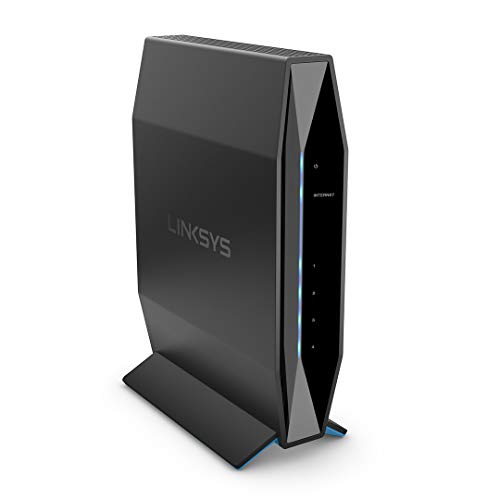
Description
Linksys AX1800 Wi-Fi 6 Router Home Networking, – Features & Prices in Saudi Arabia :
Linksys AX1800 Wi-Fi 6 Router Home Networking, Dual Band Wireless AX Gigabit WiFi Router, Speeds up to 1.8 Gbps and coverage up to 1,500 sq ft, Parental Controls, maximum 20 devices (E7350)
Product Dimensions
1.85 x 4.53 x 3 inches
Item Weight
1.64 pounds
ASIN
B08FBNH7MV
Item model number
E7350
Date First Available
August 17, 2020
Manufacturer
Linksys
Country of Origin
China
Test video – Linksys AX1800 Wi-Fi 6 Router Home Networking, :
Product highlights :
Questions & Answers – Linksys AX1800 Wi-Fi 6 Router Home Networking, :
Technical specifications – Linksys AX1800 Wi-Fi 6 Router Home Networking, :
Brand
Linksys
Model Name
AX1800 Speed
Frequency Band Class
Dual-Band
Wireless Communication Standard
802.11ax
Compatible Devices
IPhone, Tablet, Television, Gaming System, Xbox, Playstation, Nest and Alexa Devices
Included Components
,
Connectivity Technology
Wi-Fi, Ethernet
Item Weight
1.64 Pounds
Operating System
RouterOS
Security Protocol
WPA2-PSK
Purchase advice :
-
Warranty :
Check the duration of the warranty and also the faults and defects it covers. Is it complete or limited? and What is included in the warranty (parts, repairs or both)?
-
Shipping :
Is delivery offered? And how long does it take to get delivered (Delivery time)
-
Proof of purchase :
Does the shop give you an invoice ?
-
After-sales service :
Do they have an after-sales service to have information about the installation or operation (instructions for use). Also in case of problem, it is the seller who takes charge or you must contact the manufacturer or supplier yourself.
_____________________________

B. H (verified owner) –
Linksys E7530 – Had a linksys router 15 years ago.
B. H (verified owner) –
Linksys E7530 – Had a linksys router 15 years ago.
K. K (verified owner) –
Good cheap browser, 5Ghz range is too short, 2.4 Ghz is better – As the headline, it is a good Linksys router, easy to configure. Like that the 5 Ghz and 2.4 Ghz bands have different names (even though you can change it of course). Easier this way to setup fast devices, with only 2.4 Ghz ones like smart plugs and WIFI garage doors.
L. Z (verified owner) –
Great compact system – Purchased this for my aunts house and it was easy to install and blends into the decor of her office.
C. G (verified owner) –
Works when it works – The router works fine when it actually works but that’s the issue. Getting it to work is a tedious process. You have to use your computer and access the Linksys router page with the provided network access log in credentials. At first I was able to set it up and create my own 2.4 and 5Ghz networks. After that I upgraded the firmware and all was well. A few days later I had to reset my cable modem due to an outage and the router would not pick up the internet signal. I had to go through the router setup process once again and it took several tries to get it back online. A few days later I unplugged everything and had the same issue. When the router was rebooted it was lost and couldn’t get an internet signal from the cable modem. I got a TP Link Router instead and the thing just continues to get online after every reboot. My old Netgear that’s almost 10 years old connects to the internet without any issues. I’ve come to the conclusion that Linksys quality just isn’t what it used to be. They are now owned by Belkin and to No surprise I recall an old Belkin router that was down more than up. Sadly I won’t be purchasing any Linksys products in the near future. They look sleek and have a good reputation due to their name but this isn’t the same Linksys as in the past. I owned a WRT54G router before when Cisco owned them and it was a solid router. The only downside is couldn’t get the higher speeds provided by Docsis 3.0 cable modems, otherwise it was a solid router. I have this 3 stars because when it works it’s a solid router but problem is it’s very flaky. We all need a reliable connection and the ability to get back online quickly after a reset. Unfortunately this doesn’t do it for me.
C. G (verified owner) –
Works when it works – The router works fine when it actually works but that’s the issue. Getting it to work is a tedious process. You have to use your computer and access the Linksys router page with the provided network access log in credentials. At first I was able to set it up and create my own 2.4 and 5Ghz networks. After that I upgraded the firmware and all was well. A few days later I had to reset my cable modem due to an outage and the router would not pick up the internet signal. I had to go through the router setup process once again and it took several tries to get it back online. A few days later I unplugged everything and had the same issue. When the router was rebooted it was lost and couldn’t get an internet signal from the cable modem. I got a TP Link Router instead and the thing just continues to get online after every reboot. My old Netgear that’s almost 10 years old connects to the internet without any issues. I’ve come to the conclusion that Linksys quality just isn’t what it used to be. They are now owned by Belkin and to No surprise I recall an old Belkin router that was down more than up. Sadly I won’t be purchasing any Linksys products in the near future. They look sleek and have a good reputation due to their name but this isn’t the same Linksys as in the past. I owned a WRT54G router before when Cisco owned them and it was a solid router. The only downside is couldn’t get the higher speeds provided by Docsis 3.0 cable modems, otherwise it was a solid router. I have this 3 stars because when it works it’s a solid router but problem is it’s very flaky. We all need a reliable connection and the ability to get back online quickly after a reset. Unfortunately this doesn’t do it for me.
T. E (verified owner) –
Bought this my senior friend – I bought this for a friend to set up their own wifi connection because one they had a crappy service from his previous ISP and now has signed up with another on an Obama plan called ACPbenefits.org for low income households receiving some assistance as proof to qualify that will only cost them 5.00 a month for 25 Mbps “outstanding” (this goes for cell phones too). Although the new iSP will only supply their modem free, the router costs another 12.00 a month month after month for eternity (1 yr is 144.00 per yr), so I hopped on Amazon to find a Linksys router. I knew the brand name from working with IT professionals and had a couple myself without any problems and landed on this one which has a tower design, which is really nice it won’t take up a lot of space in a small apartment and it’s 802.11 IEEE which represents the data through speed. An 801 change to 802 is a major upgrade in wifi data movement when streaming. I especially like that it has the WPS button feature that makes syncing your devices to it a snap. He had the ISP technician set it up since he was installing the modem and where he was getting max 7 mbps previously he is now getting 20-22 mbps consistently (this is also how he gets phone service because their in a remote valley area and no towers there). I also know Linksys has great support too. This is not paticular model does not have it’s firmware updated through the ISP which means you will need to do it your self not really a big deal you just log into their site and look for an firmware update. Call support if you need help with it and their glad to assist you.
L. Z (verified owner) –
Great compact system – Purchased this for my aunts house and it was easy to install and blends into the decor of her office.
J. D (verified owner) –
Need to read this for it to work – So I’m really good at this 20 plus years and I almost gave up. So the fix. Don’t use Chrome safari or those good browsers to try to access router it won’t work. App is not supported and doungbit via wifi is almost impossible. You have to use Microsoft edge it is the only way to do the initial setup you need to do it with the black wire provided connect it to any of the black ports while the yellow is connected to your existing modem/router, goddbless and Goodluck!
K. D (verified owner) –
Very simple to set up – We had a router go out on us in one of our buildings. I order this Linksys and it is perfect. It is small so it fits on our narrow shelf quite nicely. It was extremely simple and quick to set up, even on the old dinosaur of a computer I used to set it up from. I would definitely recommend this router.
T. E (verified owner) –
Bought this my senior friend – I bought this for a friend to set up their own wifi connection because one they had a crappy service from his previous ISP and now has signed up with another on an Obama plan called ACPbenefits.org for low income households receiving some assistance as proof to qualify that will only cost them 5.00 a month for 25 Mbps “outstanding” (this goes for cell phones too). Although the new iSP will only supply their modem free, the router costs another 12.00 a month month after month for eternity (1 yr is 144.00 per yr), so I hopped on Amazon to find a Linksys router. I knew the brand name from working with IT professionals and had a couple myself without any problems and landed on this one which has a tower design, which is really nice it won’t take up a lot of space in a small apartment and it’s 802.11 IEEE which represents the data through speed. An 801 change to 802 is a major upgrade in wifi data movement when streaming. I especially like that it has the WPS button feature that makes syncing your devices to it a snap. He had the ISP technician set it up since he was installing the modem and where he was getting max 7 mbps previously he is now getting 20-22 mbps consistently (this is also how he gets phone service because their in a remote valley area and no towers there). I also know Linksys has great support too. This is not paticular model does not have it’s firmware updated through the ISP which means you will need to do it your self not really a big deal you just log into their site and look for an firmware update. Call support if you need help with it and their glad to assist you.
J. D (verified owner) –
Need to read this for it to work – So I’m really good at this 20 plus years and I almost gave up. So the fix. Don’t use Chrome safari or those good browsers to try to access router it won’t work. App is not supported and doungbit via wifi is almost impossible. You have to use Microsoft edge it is the only way to do the initial setup you need to do it with the black wire provided connect it to any of the black ports while the yellow is connected to your existing modem/router, goddbless and Goodluck!
K. D (verified owner) –
Very simple to set up – We had a router go out on us in one of our buildings. I order this Linksys and it is perfect. It is small so it fits on our narrow shelf quite nicely. It was extremely simple and quick to set up, even on the old dinosaur of a computer I used to set it up from. I would definitely recommend this router.
H. I (verified owner) –
Makes a great wifi bridge, better tha using extenders. – The interface is super easy to use and makes programming fool proof. I plugged this into my LAN port, selected bridge mode and it filled in the settings from my main router. That’s it I was done and up and running. It has a standard bridge mode which is Ethernet wired and it also has a wireless bridge mode. For the money this was an incredible bargain.
K. K (verified owner) –
Good cheap browser, 5Ghz range is too short, 2.4 Ghz is better – As the headline, it is a good Linksys router, easy to configure. Like that the 5 Ghz and 2.4 Ghz bands have different names (even though you can change it of course). Easier this way to setup fast devices, with only 2.4 Ghz ones like smart plugs and WIFI garage doors.
H. I (verified owner) –
Makes a great wifi bridge, better tha using extenders. – The interface is super easy to use and makes programming fool proof. I plugged this into my LAN port, selected bridge mode and it filled in the settings from my main router. That’s it I was done and up and running. It has a standard bridge mode which is Ethernet wired and it also has a wireless bridge mode. For the money this was an incredible bargain.