
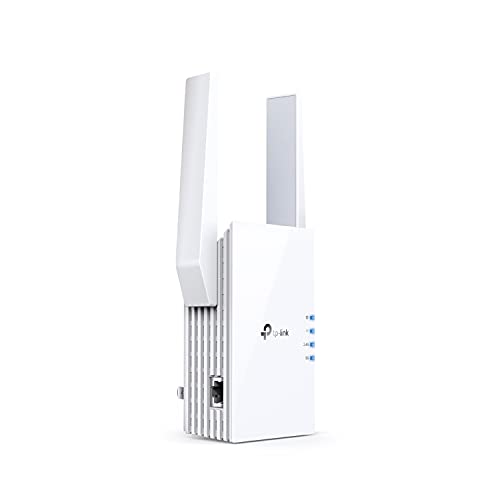
Description
TP-Link AX1800 WiFi 6 Extender(RE605X)-Internet Booster, Covers – Features & Prices in Saudi Arabia :
TP-Link AX1800 WiFi 6 Extender(RE605X)-Internet Booster, Covers up to 1500 sq.ft and 30 Devices,Dual Band Repeater up to 1.8Gbps Speed, AP Mode, Gigabit Port
Product Dimensions
6.23 x 3.83 x 1.81 inches
Item Weight
9.6 ounces
ASIN
B08TLM5PRB
Item model number
RE605X
Date First Available
April 27, 2021
Manufacturer
TP-Link
Test video – TP-Link AX1800 WiFi 6 Extender(RE605X)-Internet Booster, Covers :
Product highlights :
Questions & Answers – TP-Link AX1800 WiFi 6 Extender(RE605X)-Internet Booster, Covers :
Technical specifications – TP-Link AX1800 WiFi 6 Extender(RE605X)-Internet Booster, Covers :
Purchase advice :
-
Warranty :
Check the duration of the warranty and also the faults and defects it covers. Is it complete or limited? and What is included in the warranty (parts, repairs or both)?
-
Shipping :
Is delivery offered? And how long does it take to get delivered (Delivery time)
-
Proof of purchase :
Does the shop give you an invoice ?
-
After-sales service :
Do they have an after-sales service to have information about the installation or operation (instructions for use). Also in case of problem, it is the seller who takes charge or you must contact the manufacturer or supplier yourself.
_____________________________
O. L (verified owner) –
Good signal – Works well, places (garage) where wifi was weak before has very good signal now.
Z. G (verified owner) –
EXCELLENT … WORKS PERFECTLY !!!! – I live in an older home with thick sturdy walls which is wonderful … until it comes to WIFI getting from one part of the house to the others. I would unknowingly be using my data on my phone and get notice saying it was almost used up. I wasn’t on the wifi … YIKES !! … and then I came across this and I must admit I was apprehensive … but it was on sale so I figured I’d give it a try … I have not had any fluctuation in my signal since installing. … YES … worth every penny !!!!
E. J (verified owner) –
The reviews are correct this time! – I performed off Amazon reviews for the best WiFi booster and this model came up in the top 5 for many tech blogs and websites. I previously had a Netgear EX7500. It was decent, but it seemed to freeze about once a week. So, I would just unplug it, wait 10 seconds, plug it back in and was good for while. That got old for a while, so i decided to change to a newer/better model. The reviews were actually spot on for this. It was very easy to set up. You can either extend the current SSID or it creates a separate one with EXT at the end. The signal is much stronger than my previous Netgear. My Firestick was getting about 40Mbps with the previous Netgear, but now it’s consistently 150Mbps+. Also, I have performed speed tests all over my home and I have zero dead spots. I went to the furthest part of my house and I still get 120Mbps. (My house is slightly under 2000 sq feet. My ISP router is on the back corner of my home due to geometry of my home and where the fiber could best come into my home office.) I am very happy!
P. G (verified owner) –
Works great – Easy to install and works great
R. N (verified owner) –
Works good – I had to locate this TP-Link AX1800 Wi-FI Range Extender (Model RE600X) about 25ft (more than the 16ft they recommended) away from the wireless router, but still managed to get it to connect to the router. Plus, even though the recommended “Tether” app said my router is not one mesh compatible, it connected to the main network name so I don’t have to change the main network names in the extended area. Also, the Tether app has a feature called “Location Assistant” to test location signal strength. The test said mine is in a great location and has perfect signal.strength. Now both my phone and computer have strong wi-fi signals in the extended area or about 30-40ft away from the main router.
F. F (verified owner) –
Long Reboot Time, But Otherwise a Good Purchase – NOTE: The RE600X extender has a very long reboot time, at least as compared to the old TP-Link RE220 extender it replaces. About 4 minutes. I initially thought the unit was defective because the power LED would flash forever, but it’s just a long reboot time span with this unit.
F. F (verified owner) –
Long Reboot Time, But Otherwise a Good Purchase – NOTE: The RE600X extender has a very long reboot time, at least as compared to the old TP-Link RE220 extender it replaces. About 4 minutes. I initially thought the unit was defective because the power LED would flash forever, but it’s just a long reboot time span with this unit.
L. P (verified owner) –
WiFi resets – The extender is easy to set up and provides good coverage.
Z. G (verified owner) –
EXCELLENT … WORKS PERFECTLY !!!! – I live in an older home with thick sturdy walls which is wonderful … until it comes to WIFI getting from one part of the house to the others. I would unknowingly be using my data on my phone and get notice saying it was almost used up. I wasn’t on the wifi … YIKES !! … and then I came across this and I must admit I was apprehensive … but it was on sale so I figured I’d give it a try … I have not had any fluctuation in my signal since installing. … YES … worth every penny !!!!
L. P (verified owner) –
WiFi resets – The extender is easy to set up and provides good coverage.
E. J (verified owner) –
The reviews are correct this time! – I performed off Amazon reviews for the best WiFi booster and this model came up in the top 5 for many tech blogs and websites. I previously had a Netgear EX7500. It was decent, but it seemed to freeze about once a week. So, I would just unplug it, wait 10 seconds, plug it back in and was good for while. That got old for a while, so i decided to change to a newer/better model. The reviews were actually spot on for this. It was very easy to set up. You can either extend the current SSID or it creates a separate one with EXT at the end. The signal is much stronger than my previous Netgear. My Firestick was getting about 40Mbps with the previous Netgear, but now it’s consistently 150Mbps+. Also, I have performed speed tests all over my home and I have zero dead spots. I went to the furthest part of my house and I still get 120Mbps. (My house is slightly under 2000 sq feet. My ISP router is on the back corner of my home due to geometry of my home and where the fiber could best come into my home office.) I am very happy!
P. R (verified owner) –
Perfect for Linux or ANY Operating System – With this you get super high speed wireless internet without having to deal with ANY drivers at all !
P. G (verified owner) –
Works great – Easy to install and works great
R. N (verified owner) –
Works good – I had to locate this TP-Link AX1800 Wi-FI Range Extender (Model RE600X) about 25ft (more than the 16ft they recommended) away from the wireless router, but still managed to get it to connect to the router. Plus, even though the recommended “Tether” app said my router is not one mesh compatible, it connected to the main network name so I don’t have to change the main network names in the extended area. Also, the Tether app has a feature called “Location Assistant” to test location signal strength. The test said mine is in a great location and has perfect signal.strength. Now both my phone and computer have strong wi-fi signals in the extended area or about 30-40ft away from the main router.
O. L (verified owner) –
Good signal – Works well, places (garage) where wifi was weak before has very good signal now.
P. R (verified owner) –
Perfect for Linux or ANY Operating System – With this you get super high speed wireless internet without having to deal with ANY drivers at all !