
Description
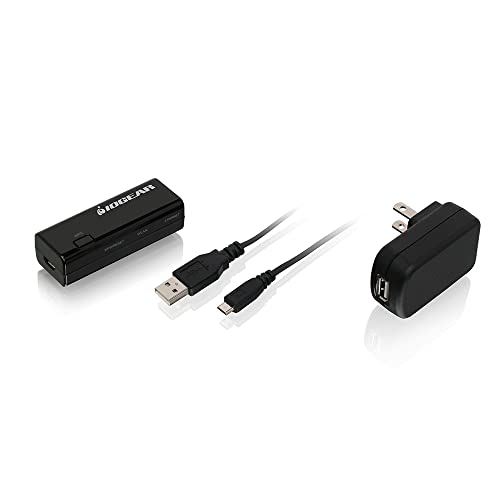
IOGEAR Universal Ethernet to Wi-Fi N Adapter – Features & Prices in Saudi Arabia :
IOGEAR Universal Ethernet to Wi-Fi N Adapter – Speeds of up to 300Mbps on 2.4GHz – Push-button Wi-Fi Protected Setup (WPS) – Supports WEP, WPA, WPA2, TKIP and AES encryption – GWU637
Wireless Type
802.11bgn
Series
IOGEAR
Item model number
GWU637
Hardware Platform
PC;Mac
Item Weight
0.8 ounces
Product Dimensions
2.56 x 0.75 x 1 inches
Item Dimensions LxWxH
2.56 x 0.75 x 1 inches
Color
Black
Voltage
5 Volts
Manufacturer
IOGEAR
ASIN
B018YPWORE
Country of Origin
China
Is Discontinued By Manufacturer
No
Date First Available
December 5, 2015
Test video – IOGEAR Universal Ethernet to Wi-Fi N Adapter :
Product highlights :
Questions & Answers – IOGEAR Universal Ethernet to Wi-Fi N Adapter :
Technical specifications – IOGEAR Universal Ethernet to Wi-Fi N Adapter :
Brand
IOGEAR
Hardware Interface
Ethernet
Color
Black
Compatible Devices
PC, Mac
Item Dimensions LxWxH
2.56 x 0.75 x 1 inches
Data Link Protocol
802_11_BGN
Data Transfer Rate
300 Megabits Per Second
Item Weight
0.05 Pounds
Purchase advice :
-
Warranty :
Check the duration of the warranty and also the faults and defects it covers. Is it complete or limited? and What is included in the warranty (parts, repairs or both)?
-
Shipping :
Is delivery offered? And how long does it take to get delivered (Delivery time)
-
Proof of purchase :
Does the shop give you an invoice ?
-
After-sales service :
Do they have an after-sales service to have information about the installation or operation (instructions for use). Also in case of problem, it is the seller who takes charge or you must contact the manufacturer or supplier yourself.
_____________________________
S. M (verified owner) –
Slightly complicated to set up (for a wifi work phone) but it did work – I needed the IOGEAR Ethernet-2-WiFi Universal Wireless Adapter, GWU637,Black so I can connect my Work Phone to my cellphone hotspot – as a backup if my Home Wifi goes down or there is a blackout) and it DOES work. I connected to my Tmobile Hotspot and everything worked fine. The setup though is a little complicated and cumbersome. I’d advice you to read the instructions and follow each step carefully. I gave it four stars because it works for my purpose – connecting VOIP workphone to my cellphone hotspot. I took off a star for the slightly complicated setup and the fact I bought it at a higher price $48 and I see that it’s $10 cheaper now.
Z. C (verified owner) –
Needs a bit of work to get it going – This device promises to solve a simple problem, and ultimately can be made to deliver, but if you are completely disinterested in engaging with some computer-eze (is that a word? should be) upfront, it’s probably best to pick an alternative.
S. M (verified owner) –
Slightly complicated to set up (for a wifi work phone) but it did work – I needed the IOGEAR Ethernet-2-WiFi Universal Wireless Adapter, GWU637,Black so I can connect my Work Phone to my cellphone hotspot – as a backup if my Home Wifi goes down or there is a blackout) and it DOES work. I connected to my Tmobile Hotspot and everything worked fine. The setup though is a little complicated and cumbersome. I’d advice you to read the instructions and follow each step carefully. I gave it four stars because it works for my purpose – connecting VOIP workphone to my cellphone hotspot. I took off a star for the slightly complicated setup and the fact I bought it at a higher price $48 and I see that it’s $10 cheaper now.
C. F (verified owner) –
Works as expected with one small but important instruction issue – Worked perfectly using WPS setup. I used this method because I have other older IOGEAR wifi adapters that look different but work almost exactly the same and I have used them for years. BUT the instructions have one small but important error. It says that after WPS is running on your router “press the WPS button on the” adapter. It should say “press and hold the WPS button on the adapter until the WPS/Reset and Ethernet LEDs turn on and blink” If you just press and release the WPS button normally nothing happens and worse the LEDs are then in the state which indicates pairing is completed. After doing the WPS procedure correctly the unit works perfectly.
L. E (verified owner) –
Works with Security Camera System – Used to turn ethernet only NVR to wireless. Update the firmware before setting it up! Follow setup instructions in the user manual. Everything works smoothly. The adapter does run hot. Hopefully that won’t cause any issues moving forward.
L. M (verified owner) –
Needs a firmware update before it will work, but otherwise is as-expected – These units are shipping needing a firmware update out of the box before you can complete the configuration process in either Chrome or Edge browsers. I did not test Firefox. The unit was obviously made before IE was fully deprecated. A quick google search for the model number and firmware update takes you right to the page on IOGear’s site with the one and only firmware update for this unit, which was specifically made to fix the bug that prevents configuration in Chrome or Edge. Once that firmware was applied, the unit took the configuration and started working normally, with no issues. Used this to get my early PS4 to leverage my wireless N network, and it worked fine. Not getting true wireless N speeds, which is likely a mix of PS4 hardware and this device not fully leveraging MIMO, but I saw a 3-4x real-world speed increase, which is fine for the price.
Z. C (verified owner) –
Needs a bit of work to get it going – This device promises to solve a simple problem, and ultimately can be made to deliver, but if you are completely disinterested in engaging with some computer-eze (is that a word? should be) upfront, it’s probably best to pick an alternative.
F. O (verified owner) –
Amazing! – I have a pretty nice “office” set up in my bedroom… big desk, dual monitors and plenty of space for my office phone and desk supplies etc… but I haven’t used it once in the 2 years I’ve been working from home. Instead I work from the living room couch, because I have an internet phone that isn’t WiFi capable, ethernet only, and our cable outlet is in the living room. It’s terrible for my back, it’s distracting (tv, my fiance, cats… lol) all I have for surface space is an awkward side table and my laptop is just that… on my lap, which is bad for it AND for me. I figured I had 2 options: Pay $600 for the Wi-Fi adapter that is made for this particular phone or get an extremely long ethernet cord to run through the entire apartment, into my bedroom. Neither option was appealing enough to do. Then I ordered this device. I had low expectations, nothing seems to work with this phone. I purposely ordered from Amazon because I thought it probably wouldn’t work and I’d have to return it. I followed the very simple instructions to connect the device to my WiFi, plugged it into the ethernet port of my phone and boom: it worked! Affordable, effortless setup AND it really works? I know… shocking right. Definitely recommend if you need to use an Ethernet device in a place you otherwise cant!
L. M (verified owner) –
Needs a firmware update before it will work, but otherwise is as-expected – These units are shipping needing a firmware update out of the box before you can complete the configuration process in either Chrome or Edge browsers. I did not test Firefox. The unit was obviously made before IE was fully deprecated. A quick google search for the model number and firmware update takes you right to the page on IOGear’s site with the one and only firmware update for this unit, which was specifically made to fix the bug that prevents configuration in Chrome or Edge. Once that firmware was applied, the unit took the configuration and started working normally, with no issues. Used this to get my early PS4 to leverage my wireless N network, and it worked fine. Not getting true wireless N speeds, which is likely a mix of PS4 hardware and this device not fully leveraging MIMO, but I saw a 3-4x real-world speed increase, which is fine for the price.
L. E (verified owner) –
Works with Security Camera System – Used to turn ethernet only NVR to wireless. Update the firmware before setting it up! Follow setup instructions in the user manual. Everything works smoothly. The adapter does run hot. Hopefully that won’t cause any issues moving forward.
F. O (verified owner) –
Amazing! – I have a pretty nice “office” set up in my bedroom… big desk, dual monitors and plenty of space for my office phone and desk supplies etc… but I haven’t used it once in the 2 years I’ve been working from home. Instead I work from the living room couch, because I have an internet phone that isn’t WiFi capable, ethernet only, and our cable outlet is in the living room. It’s terrible for my back, it’s distracting (tv, my fiance, cats… lol) all I have for surface space is an awkward side table and my laptop is just that… on my lap, which is bad for it AND for me. I figured I had 2 options: Pay $600 for the Wi-Fi adapter that is made for this particular phone or get an extremely long ethernet cord to run through the entire apartment, into my bedroom. Neither option was appealing enough to do. Then I ordered this device. I had low expectations, nothing seems to work with this phone. I purposely ordered from Amazon because I thought it probably wouldn’t work and I’d have to return it. I followed the very simple instructions to connect the device to my WiFi, plugged it into the ethernet port of my phone and boom: it worked! Affordable, effortless setup AND it really works? I know… shocking right. Definitely recommend if you need to use an Ethernet device in a place you otherwise cant!
C. F (verified owner) –
Works as expected with one small but important instruction issue – Worked perfectly using WPS setup. I used this method because I have other older IOGEAR wifi adapters that look different but work almost exactly the same and I have used them for years. BUT the instructions have one small but important error. It says that after WPS is running on your router “press the WPS button on the” adapter. It should say “press and hold the WPS button on the adapter until the WPS/Reset and Ethernet LEDs turn on and blink” If you just press and release the WPS button normally nothing happens and worse the LEDs are then in the state which indicates pairing is completed. After doing the WPS procedure correctly the unit works perfectly.