VONETS WiFi Bridge 2.4GHz Wireless Ethernet Bridge – Features & Prices in Saudi Arabia :
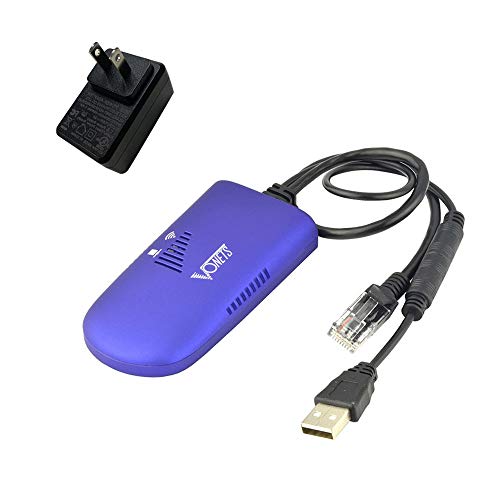
VONETS WiFi Bridge 2.4GHz Wireless Ethernet Bridge Signal Repeater WiFi Hotspot with 5V/2A USB Power Adapter RJ45 to WiFi Convert for DVR, Monitoring, IP Printer, Network Device VAP11G-300
Product Dimensions
3.54 x 1.77 x 0.59 inches
Item Weight
4.6 ounces
ASIN
B07QXNWRWJ
Item model number
VAP11G-300
Is Discontinued By Manufacturer
No
Date First Available
April 23, 2019
Manufacturer
Shenzhen Houtian Network Communication Technology Co.,Ltd
Country of Origin
China
Test video – VONETS WiFi Bridge 2.4GHz Wireless Ethernet Bridge :
Product highlights :
【WiFi Bridge/Repeater】Industrial mini 2.4GHz WiFi Bridge Repeater Wireless Ethernet Bridge RJ45 to WiFi Adapter WiFi Hotspot Signal extend cover; can achieve Wireless to Wired or Wired to Wireless function (WiFi to Ethernet or Ethernet to WiFi convert); support WiFi 802.11b/g/n, WiFi rate:300Mbps.
【Multiple Application Methods】WiFi Bridge: can smart control the device’s WiFi mode ( IP layer or MAC layer transparent transmission); WiFi Repeater (extend the distance of WiFi transfer); WiFi Access Point hotspots. One 10/100Mbps adaptive Ethernet port (one 30cm cable with 1 male DC port and 1 male USB port).
【Connect Wired Device to WiFi】Good Partner for monitoring, electronic scales, DVR, IP camera, medical devices, IoT devices, video transmission, Industrial PLC, AGV, PS3, Network Printer, Robot and more Network devices and applications. Point-to-Point Transmission: maximum can be up to 80 meters when without obstacle and small data, then less than 50 meters when used for video transmission.
【Power&Parameters】USB or DC optional powered mode, powered by wide voltage DC5V-15V(Typical Standard 5V/2A, ripple less than 100mV), With a 5V/2A USB power supply adapter; the average power consumption is less than 2.5W; WiFi Tx Power:14.5dBm/16dBm optional(Enhanced Power), 2*1.5dBi internal antennas.
【Function&Note】 Support SSA signal strength detection reporting function, motion detection function and memory hotspot(Up to 100) automatic matching connection function, realize to WiFi motion applications. Please pay attention three power methods(USB, power hole, power plug) can’t be powered together, or the device may be damaged.
➕ What is the price of VONETS WiFi Bridge 2.4GHz Wireless Ethernet Bridge in Saudi Arabia ?
The price of VONETS WiFi Bridge 2.4GHz Wireless Ethernet Bridge in-store is 120 SAR VAT.
➕ When VONETS WiFi Bridge 2.4GHz Wireless Ethernet Bridge was released ?
The release date was April 23, 2019.
➕ What is the price of VONETS WiFi Bridge 2.4GHz Wireless Ethernet Bridge cheap used ?
The price of VONETS WiFi Bridge 2.4GHz Wireless Ethernet Bridge used is 80 SAR VAT.
➕ What are the main characteristics of VONETS WiFi Bridge 2.4GHz Wireless Ethernet Bridge ?
Special specifications :
【WiFi Bridge/Repeater】Industrial mini 2.4GHz WiFi Bridge Repeater Wireless Ethernet Bridge RJ45 to WiFi Adapter WiFi Hotspot Signal extend cover; can achieve Wireless to Wired or Wired to Wireless function (WiFi to Ethernet or Ethernet to WiFi convert); support WiFi 802.11b/g/n, WiFi rate:300Mbps.
➕ Is it interesting to buy this product ?
The best people who can answer you are customers who have already bought and tested this product (See Customer Reviews). This product is rated 3.9 / 5 on Amazon.
➕ Where to buy VONETS WiFi Bridge 2.4GHz Wireless Ethernet Bridge in Saudi Arabia ?
Check the duration of the warranty and also the faults and defects it covers. Is it complete or limited? and What is included in the warranty (parts, repairs or both)?
Shipping :
Is delivery offered? And how long does it take to get delivered (Delivery time)
Proof of purchase :
Does the shop give you an invoice ?
After-sales service :
Do they have an after-sales service to have information about the installation or operation (instructions for use). Also in case of problem, it is the seller who takes charge or you must contact the manufacturer or supplier yourself.
_____________________________
12 reviews for VONETS WiFi Bridge 2.4GHz Wireless Ethernet Bridge
Rated 1 out of 5
O. O (verified owner)–
Unreliable connections – I spent an entire day trying to get this to work. Just for reference, I am pretty good with technology. I can make almost anything work – and I gave this everything I had. I read web articles, watched YouTube videos, and when all else failed, I did a ton of trial and error. My MacBook Pro would not connect to the device’s configuration page – at all. I finally booted up an old Windows 7 machine and got that to connect. Sometimes – and even this was wildly unreliable. Sometimes it would connect, sometimes it wouldn’t. Once I got it to connect to the hotspot – same thing. Sometimes it would connect, sometimes it wouldn’t. Sometimes it would have okay speed. Sometimes it had next to no speed at all – but once it was connected to a hotspot, the configuration page became even more unreliable, so trying to figure out what went wrong was usually a complete guess. It was so finicky that I finally decided to just return it and be done with it. Also, it cannot connect at speeds above 100 Mbps. Normally that wouldn’t be a problem, because this thing isn’t likely to exceed those speeds, but one of my other devices will only connect at speeds of 1Gbps and above – and that happens to be the device that I was hoping to use with this. But I finally figured out a way around this obstacle, but the unreliability was a deal breaker in the end. Nobody could say I didn’t try!
Rated 2 out of 5
S. G (verified owner)–
Not reliable – It isn’t the easiest to setup, it doesn’t use WPS. My personal experience with it is that it loses connectivity to the wireless router constantly even though it is not moved, it then gets a new IP address each time which can create its own set of problems. I hooked it to a printer that has a 10/100 network connection and it takes forever for print jobs to get to the printer when it is connected to the Vonets device. There is always a bit of a lag when adding another network device that the data has to go thru, but this is much slower than it should be.
Rated 4 out of 5
Z. O (verified owner)–
Does what I needed – I moved and found that could not put my cable router near the entertainment center for physical wiring. I bought this for the Tivo box. I connected it to my computer and configured for the WiFi network. I then connected it to the Tivo box and it fits the bill perfectly. I will add a small switch to connect in my old Blueray player as well. Haven’t tried that yet. I also left the repeater on and it adds a strong signal for that end of the house. I deducted a star for the same complaints others have. The directions are terrible. I have some experience and had no trouble. But, I cannot see someone without experience following the directions. The lights are bright and pretty frenetic. The whole thing is vented, which makes it hard to cover the lights. That said, it does its function well. Ask a tech savvy friend to set it up if the directions deter you.
Rated 2 out of 5
S. G (verified owner)–
Not reliable – It isn’t the easiest to setup, it doesn’t use WPS. My personal experience with it is that it loses connectivity to the wireless router constantly even though it is not moved, it then gets a new IP address each time which can create its own set of problems. I hooked it to a printer that has a 10/100 network connection and it takes forever for print jobs to get to the printer when it is connected to the Vonets device. There is always a bit of a lag when adding another network device that the data has to go thru, but this is much slower than it should be.
Rated 5 out of 5
O. C (verified owner)–
Exelente equipo – Tengo en mi escritorio un telefono Mitel y tenia que tirar todos los dias un cable desde mi sala hasta mi cuarto para poderle dar conexion. Con este aditamento lo hice wireless y ya no tengo cables por el piso.
Rated 5 out of 5
K. E (verified owner)–
This is going to be an amazing backup! – I am so excited! I am working from home now during the pandemic, and I set up some backup systems in place just to make that it goes as uninterruptedly as possible such as having a Jackery for backup power and putting some extra GB on my cell phone plan in case my home internet goes down. The one weakness of my setup was that the VOIP Cisco 8841 phone supplied by the company could not connect wirelessly. Sure enough, there was an internet outage at my home Friday, and I had to have coworkers take over my call responsibilities. No more! This morning I configured this in less than 5 minutes to the WIFI from my cell phone used as a hotspot. I just plugged the ethernet cable into the port on my laptop and easily followed the configuration instructions which were little more than going to the address in the instruction booklet and selecting the name of my hotspot network. I unplugged my router from my phone’s power injector and plugged this into the power injector in its place. My phone recognized it was online and let me log in and make a call. Now I could theoretically work from anywhere my cell phone can get a signal! I powered the unit by plugging its USB lead into a small power bank for convenience. The lead from the AC adapter is short though you could always use it with USB extension if desired. There is also a hole that looks like it is where the power should go, but I didn’t need and have not figured out how to use that. So you can imagine how easy this is to configure if I am no brighter that that! Also, I just unplugged it for about 15 minutes, and when I plugged it back in, it remembered its configuration. What a helpful device in these trying times!
Rated 5 out of 5
O. C (verified owner)–
Exelente equipo – Tengo en mi escritorio un telefono Mitel y tenia que tirar todos los dias un cable desde mi sala hasta mi cuarto para poderle dar conexion. Con este aditamento lo hice wireless y ya no tengo cables por el piso.
Rated 4 out of 5
Z. O (verified owner)–
Does what I needed – I moved and found that could not put my cable router near the entertainment center for physical wiring. I bought this for the Tivo box. I connected it to my computer and configured for the WiFi network. I then connected it to the Tivo box and it fits the bill perfectly. I will add a small switch to connect in my old Blueray player as well. Haven’t tried that yet. I also left the repeater on and it adds a strong signal for that end of the house. I deducted a star for the same complaints others have. The directions are terrible. I have some experience and had no trouble. But, I cannot see someone without experience following the directions. The lights are bright and pretty frenetic. The whole thing is vented, which makes it hard to cover the lights. That said, it does its function well. Ask a tech savvy friend to set it up if the directions deter you.
This is going to be an amazing backup! – I am so excited! I am working from home now during the pandemic, and I set up some backup systems in place just to make that it goes as uninterruptedly as possible such as having a Jackery for backup power and putting some extra GB on my cell phone plan in case my home internet goes down. The one weakness of my setup was that the VOIP Cisco 8841 phone supplied by the company could not connect wirelessly. Sure enough, there was an internet outage at my home Friday, and I had to have coworkers take over my call responsibilities. No more! This morning I configured this in less than 5 minutes to the WIFI from my cell phone used as a hotspot. I just plugged the ethernet cable into the port on my laptop and easily followed the configuration instructions which were little more than going to the address in the instruction booklet and selecting the name of my hotspot network. I unplugged my router from my phone’s power injector and plugged this into the power injector in its place. My phone recognized it was online and let me log in and make a call. Now I could theoretically work from anywhere my cell phone can get a signal! I powered the unit by plugging its USB lead into a small power bank for convenience. The lead from the AC adapter is short though you could always use it with USB extension if desired. There is also a hole that looks like it is where the power should go, but I didn’t need and have not figured out how to use that. So you can imagine how easy this is to configure if I am no brighter that that! Also, I just unplugged it for about 15 minutes, and when I plugged it back in, it remembered its configuration. What a helpful device in these trying times!
Rated 1 out of 5
O. O (verified owner)–
Unreliable connections – I spent an entire day trying to get this to work. Just for reference, I am pretty good with technology. I can make almost anything work – and I gave this everything I had. I read web articles, watched YouTube videos, and when all else failed, I did a ton of trial and error. My MacBook Pro would not connect to the device’s configuration page – at all. I finally booted up an old Windows 7 machine and got that to connect. Sometimes – and even this was wildly unreliable. Sometimes it would connect, sometimes it wouldn’t. Once I got it to connect to the hotspot – same thing. Sometimes it would connect, sometimes it wouldn’t. Sometimes it would have okay speed. Sometimes it had next to no speed at all – but once it was connected to a hotspot, the configuration page became even more unreliable, so trying to figure out what went wrong was usually a complete guess. It was so finicky that I finally decided to just return it and be done with it. Also, it cannot connect at speeds above 100 Mbps. Normally that wouldn’t be a problem, because this thing isn’t likely to exceed those speeds, but one of my other devices will only connect at speeds of 1Gbps and above – and that happens to be the device that I was hoping to use with this. But I finally figured out a way around this obstacle, but the unreliability was a deal breaker in the end. Nobody could say I didn’t try!

O. O (verified owner) –
Unreliable connections – I spent an entire day trying to get this to work. Just for reference, I am pretty good with technology. I can make almost anything work – and I gave this everything I had. I read web articles, watched YouTube videos, and when all else failed, I did a ton of trial and error. My MacBook Pro would not connect to the device’s configuration page – at all. I finally booted up an old Windows 7 machine and got that to connect. Sometimes – and even this was wildly unreliable. Sometimes it would connect, sometimes it wouldn’t. Once I got it to connect to the hotspot – same thing. Sometimes it would connect, sometimes it wouldn’t. Sometimes it would have okay speed. Sometimes it had next to no speed at all – but once it was connected to a hotspot, the configuration page became even more unreliable, so trying to figure out what went wrong was usually a complete guess. It was so finicky that I finally decided to just return it and be done with it. Also, it cannot connect at speeds above 100 Mbps. Normally that wouldn’t be a problem, because this thing isn’t likely to exceed those speeds, but one of my other devices will only connect at speeds of 1Gbps and above – and that happens to be the device that I was hoping to use with this. But I finally figured out a way around this obstacle, but the unreliability was a deal breaker in the end. Nobody could say I didn’t try!
S. G (verified owner) –
Not reliable – It isn’t the easiest to setup, it doesn’t use WPS. My personal experience with it is that it loses connectivity to the wireless router constantly even though it is not moved, it then gets a new IP address each time which can create its own set of problems. I hooked it to a printer that has a 10/100 network connection and it takes forever for print jobs to get to the printer when it is connected to the Vonets device. There is always a bit of a lag when adding another network device that the data has to go thru, but this is much slower than it should be.
Z. O (verified owner) –
Does what I needed – I moved and found that could not put my cable router near the entertainment center for physical wiring. I bought this for the Tivo box. I connected it to my computer and configured for the WiFi network. I then connected it to the Tivo box and it fits the bill perfectly. I will add a small switch to connect in my old Blueray player as well. Haven’t tried that yet. I also left the repeater on and it adds a strong signal for that end of the house. I deducted a star for the same complaints others have. The directions are terrible. I have some experience and had no trouble. But, I cannot see someone without experience following the directions. The lights are bright and pretty frenetic. The whole thing is vented, which makes it hard to cover the lights. That said, it does its function well. Ask a tech savvy friend to set it up if the directions deter you.
S. G (verified owner) –
Not reliable – It isn’t the easiest to setup, it doesn’t use WPS. My personal experience with it is that it loses connectivity to the wireless router constantly even though it is not moved, it then gets a new IP address each time which can create its own set of problems. I hooked it to a printer that has a 10/100 network connection and it takes forever for print jobs to get to the printer when it is connected to the Vonets device. There is always a bit of a lag when adding another network device that the data has to go thru, but this is much slower than it should be.
O. C (verified owner) –
Exelente equipo – Tengo en mi escritorio un telefono Mitel y tenia que tirar todos los dias un cable desde mi sala hasta mi cuarto para poderle dar conexion. Con este aditamento lo hice wireless y ya no tengo cables por el piso.
K. E (verified owner) –
This is going to be an amazing backup! – I am so excited! I am working from home now during the pandemic, and I set up some backup systems in place just to make that it goes as uninterruptedly as possible such as having a Jackery for backup power and putting some extra GB on my cell phone plan in case my home internet goes down. The one weakness of my setup was that the VOIP Cisco 8841 phone supplied by the company could not connect wirelessly. Sure enough, there was an internet outage at my home Friday, and I had to have coworkers take over my call responsibilities. No more! This morning I configured this in less than 5 minutes to the WIFI from my cell phone used as a hotspot. I just plugged the ethernet cable into the port on my laptop and easily followed the configuration instructions which were little more than going to the address in the instruction booklet and selecting the name of my hotspot network. I unplugged my router from my phone’s power injector and plugged this into the power injector in its place. My phone recognized it was online and let me log in and make a call. Now I could theoretically work from anywhere my cell phone can get a signal! I powered the unit by plugging its USB lead into a small power bank for convenience. The lead from the AC adapter is short though you could always use it with USB extension if desired. There is also a hole that looks like it is where the power should go, but I didn’t need and have not figured out how to use that. So you can imagine how easy this is to configure if I am no brighter that that! Also, I just unplugged it for about 15 minutes, and when I plugged it back in, it remembered its configuration. What a helpful device in these trying times!
O. C (verified owner) –
Exelente equipo – Tengo en mi escritorio un telefono Mitel y tenia que tirar todos los dias un cable desde mi sala hasta mi cuarto para poderle dar conexion. Con este aditamento lo hice wireless y ya no tengo cables por el piso.
Z. O (verified owner) –
Does what I needed – I moved and found that could not put my cable router near the entertainment center for physical wiring. I bought this for the Tivo box. I connected it to my computer and configured for the WiFi network. I then connected it to the Tivo box and it fits the bill perfectly. I will add a small switch to connect in my old Blueray player as well. Haven’t tried that yet. I also left the repeater on and it adds a strong signal for that end of the house. I deducted a star for the same complaints others have. The directions are terrible. I have some experience and had no trouble. But, I cannot see someone without experience following the directions. The lights are bright and pretty frenetic. The whole thing is vented, which makes it hard to cover the lights. That said, it does its function well. Ask a tech savvy friend to set it up if the directions deter you.
L. M (verified owner) –
Versatile, useful, affordable. – Versatile, useful, affordable.
K. E (verified owner) –
This is going to be an amazing backup! – I am so excited! I am working from home now during the pandemic, and I set up some backup systems in place just to make that it goes as uninterruptedly as possible such as having a Jackery for backup power and putting some extra GB on my cell phone plan in case my home internet goes down. The one weakness of my setup was that the VOIP Cisco 8841 phone supplied by the company could not connect wirelessly. Sure enough, there was an internet outage at my home Friday, and I had to have coworkers take over my call responsibilities. No more! This morning I configured this in less than 5 minutes to the WIFI from my cell phone used as a hotspot. I just plugged the ethernet cable into the port on my laptop and easily followed the configuration instructions which were little more than going to the address in the instruction booklet and selecting the name of my hotspot network. I unplugged my router from my phone’s power injector and plugged this into the power injector in its place. My phone recognized it was online and let me log in and make a call. Now I could theoretically work from anywhere my cell phone can get a signal! I powered the unit by plugging its USB lead into a small power bank for convenience. The lead from the AC adapter is short though you could always use it with USB extension if desired. There is also a hole that looks like it is where the power should go, but I didn’t need and have not figured out how to use that. So you can imagine how easy this is to configure if I am no brighter that that! Also, I just unplugged it for about 15 minutes, and when I plugged it back in, it remembered its configuration. What a helpful device in these trying times!
O. O (verified owner) –
Unreliable connections – I spent an entire day trying to get this to work. Just for reference, I am pretty good with technology. I can make almost anything work – and I gave this everything I had. I read web articles, watched YouTube videos, and when all else failed, I did a ton of trial and error. My MacBook Pro would not connect to the device’s configuration page – at all. I finally booted up an old Windows 7 machine and got that to connect. Sometimes – and even this was wildly unreliable. Sometimes it would connect, sometimes it wouldn’t. Once I got it to connect to the hotspot – same thing. Sometimes it would connect, sometimes it wouldn’t. Sometimes it would have okay speed. Sometimes it had next to no speed at all – but once it was connected to a hotspot, the configuration page became even more unreliable, so trying to figure out what went wrong was usually a complete guess. It was so finicky that I finally decided to just return it and be done with it. Also, it cannot connect at speeds above 100 Mbps. Normally that wouldn’t be a problem, because this thing isn’t likely to exceed those speeds, but one of my other devices will only connect at speeds of 1Gbps and above – and that happens to be the device that I was hoping to use with this. But I finally figured out a way around this obstacle, but the unreliability was a deal breaker in the end. Nobody could say I didn’t try!
L. M (verified owner) –
Versatile, useful, affordable. – Versatile, useful, affordable.