USB C Docking Station to Dual HDMI – Features & Prices in Saudi Arabia :
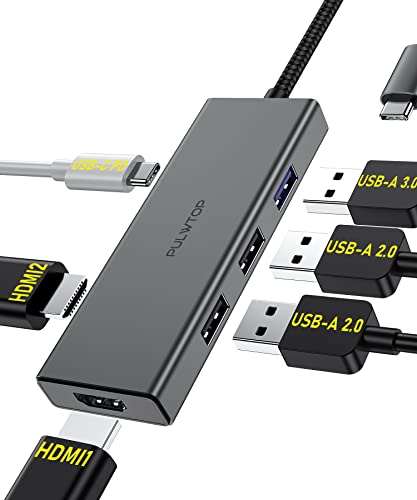
USB C Docking Station to Dual HDMI Adapter, 6 in 1 USB C Hub Dual HDMI Monitors for Windows, USB C Adapter with Dual HDMI, 3 USB Port, PD Compatible for Dell XPS 13/15, Lenovo Yoga, etc
Package Dimensions
5.16 x 2.56 x 0.67 inches
Item Weight
2.39 ounces
ASIN
B0BB2K4K65
Item model number
BD193G
Date First Available
August 18, 2022
Manufacturer
PULWTOP
Country of Origin
China
Test video – USB C Docking Station to Dual HDMI :
Product highlights :
【6 IN 1 USB C Docking Station for Windons/Mac】USB C Adapter USB C Dual HDMI Adapter USB C Docking Station for Windows and MAC Laptops. Convert your usb c port into 6 ports:2 HDMI (4K 30Hz), 1 USB 3.0 and 2 USB 2.0 , 100w pd.
【Plug and Play】6 in 1 USB C Hub Dual HDMI With Advance Chip Expand your work opportunities and provide you more stable performance. No need any drivers or software, just plug and play. Support both SST and MST mode. Support Triple display for your Windows laptops. Please note that if you use it to connect macbooks, it only support mirror mode without triple display.
【4K HD Display Docking Station】Cystal 4K Video and 2 HDMI Use HDMI port to enter mirror mode for usb c laptops or extended mode and transfer vivid 4K Ultra HD @ 60Hz or Full HD 1080p @ 60Hz video with 3D effect from laptop screen to a monitor, projector, HDTV, etc. Stream movies, presentations or video games on your monitors in one click: 2 HDMI ports can be used simultaneously, resolution up to 4K@30Hz.
【Super Speed Data Transfer】This Docking Station is equipped with 1*USB 3.0 port the transfer speed is up to 5Gbps, which is 10 times that of USB 2.0, connect to a smartphone/tablet/hard drive, and complete data transfer in seconds. 2*USB 2.0 port, provide a stable connection for your wireless mouse or keyboard, the transmission speed can reach 480Mbps.The Docking station for HP also provides an audio and microphone combo port for your use.
【Strong Compatibility】Strong Compatibility Compatible with Dell XPS13/15,Lenovo Yoga 720/910/920/930,Microsoft Surface Book 2/ Surface Go/ Surface Laptop 3,Dell Latitude 13 7000/Latitude 13 E7370 etc.
Questions & Answers – USB C Docking Station to Dual HDMI :
➕ What is the price of USB C Docking Station to Dual HDMI in Saudi Arabia ?
The price of USB C Docking Station to Dual HDMI in-store is 150 SAR VAT.
➕ When USB C Docking Station to Dual HDMI was released ?
The release date was August 18, 2022.
➕ What is the price of USB C Docking Station to Dual HDMI cheap used ?
The price of USB C Docking Station to Dual HDMI used is 100 SAR VAT.
➕ What are the main characteristics of USB C Docking Station to Dual HDMI ?
Special specifications :
【6 IN 1 USB C Docking Station for Windons/Mac】USB C Adapter USB C Dual HDMI Adapter USB C Docking Station for Windows and MAC Laptops. Convert your usb c port into 6 ports:2 HDMI (4K 30Hz), 1 USB 3.0 and 2 USB 2.0 , 100w pd.
➕ Is it interesting to buy this product ?
The best people who can answer you are customers who have already bought and tested this product (See Customer Reviews). This product is rated 4.6 / 5 on Amazon.
➕ Where to buy USB C Docking Station to Dual HDMI in Saudi Arabia ?
Technical specifications – USB C Docking Station to Dual HDMI :
Brand
PULWTOP
Color
6 in 1 docking station
Hardware Interface
HDMI, USB 3.2 Gen 1, USB 2.0
Compatible Devices
Microsoft Surface 3, Microsoft Surface Go
Total USB Ports
3
Number of Ports
6
Total HDMI Ports
2
Wattage
100 watts
Purchase advice :
Warranty :
Check the duration of the warranty and also the faults and defects it covers. Is it complete or limited? and What is included in the warranty (parts, repairs or both)?
Shipping :
Is delivery offered? And how long does it take to get delivered (Delivery time)
Proof of purchase :
Does the shop give you an invoice ?
After-sales service :
Do they have an after-sales service to have information about the installation or operation (instructions for use). Also in case of problem, it is the seller who takes charge or you must contact the manufacturer or supplier yourself.
_____________________________
https://www.youtube.com/www.youtube.com/wat
16 reviews for USB C Docking Station to Dual HDMI
Rated 5 out of 5
B. H (verified owner)–
Portable & Easy to Use at GREAT Price! – This is super convenient and so inexpensive! No driver downloads required like the pricey name-brand one at my office, just plug & play! It’s portable so if I’m going on a business trip I can tote it in a backpack/purse and connect to the hotel TV monitor (there’s an HDMI port per photo). Look at how excited my boss-cat is to see me be more productive at home! He especially loves that I can connect to the printer (grey wire plugged into USB port in photo)!
Rated 5 out of 5
B. H (verified owner)–
Portable & Easy to Use at GREAT Price! – This is super convenient and so inexpensive! No driver downloads required like the pricey name-brand one at my office, just plug & play! It’s portable so if I’m going on a business trip I can tote it in a backpack/purse and connect to the hotel TV monitor (there’s an HDMI port per photo). Look at how excited my boss-cat is to see me be more productive at home! He especially loves that I can connect to the printer (grey wire plugged into USB port in photo)!
Rated 4 out of 5
T. H (verified owner)–
Almost perfect – I needed a hub like this since my newest computer came with a single Thunderbolt 4 port.
Rated 5 out of 5
I. C (verified owner)–
Excellent 14 in 1 USB docking station. It works perfect with my laptop. – Absolutely love my new 14 in 1 USB docking station. It works perfectly with my MAC pro laptop and has plenty of USB ports to use. I have several computer monitors, a wireless mouse and keyboard, laptop and countless of other devices that works with this device. I highly recommend it and would purchase again.
Rated 5 out of 5
P. R (verified owner)–
Form fit is solid winning feature – Standout item at the price point. The form fit is really nice. Solid connection to the computer both form and function done well.
Rated 5 out of 5
P. R (verified owner)–
Form fit is solid winning feature – Standout item at the price point. The form fit is really nice. Solid connection to the computer both form and function done well.
Rated 5 out of 5
I. C (verified owner)–
Excellent 14 in 1 USB docking station. It works perfect with my laptop. – Absolutely love my new 14 in 1 USB docking station. It works perfectly with my MAC pro laptop and has plenty of USB ports to use. I have several computer monitors, a wireless mouse and keyboard, laptop and countless of other devices that works with this device. I highly recommend it and would purchase again.
Rated 5 out of 5
L. R (verified owner)–
Docking works perfect – This docking station turns my home office into a user friendly work space with 2 monitors, key board and wireless mouse. Truly a life saver.
Rated 5 out of 5
S. I (verified owner)–
Overcomes the Air having only two ports to let me do all my tasks – First, this hub does not block the mag safe port on my 13″ MacBook Air M2. Plus, it offers a variety of ports that accomodate all my needs. See photo showing the use of a USB C port to connect my monitor with excellent images, and use an ethernet cable, a wireless mouse, and a card reader to input photos. It’s sturdy enough to attach a multi-USB hub, for additional needs. I do wish it had an SD card slot, which I would use often, while not needing the mike/audio-jack, with the jack on the other side of the Air.
Rated 5 out of 5
P. T (verified owner)–
USB-C docking station – Plug and play. Works great.
Rated 4 out of 5
T. H (verified owner)–
Almost perfect – I needed a hub like this since my newest computer came with a single Thunderbolt 4 port.
Rated 5 out of 5
P. T (verified owner)–
USB-C docking station – Plug and play. Works great.
Rated 5 out of 5
L. B (verified owner)–
Great value – This docking station is awesome, it’s worked great for me this far and was a fraction of the price of my old Dell docking station. Awesome product for the price!
Rated 5 out of 5
L. R (verified owner)–
Docking works perfect – This docking station turns my home office into a user friendly work space with 2 monitors, key board and wireless mouse. Truly a life saver.
Rated 5 out of 5
S. I (verified owner)–
Overcomes the Air having only two ports to let me do all my tasks – First, this hub does not block the mag safe port on my 13″ MacBook Air M2. Plus, it offers a variety of ports that accomodate all my needs. See photo showing the use of a USB C port to connect my monitor with excellent images, and use an ethernet cable, a wireless mouse, and a card reader to input photos. It’s sturdy enough to attach a multi-USB hub, for additional needs. I do wish it had an SD card slot, which I would use often, while not needing the mike/audio-jack, with the jack on the other side of the Air.
Rated 5 out of 5
L. B (verified owner)–
Great value – This docking station is awesome, it’s worked great for me this far and was a fraction of the price of my old Dell docking station. Awesome product for the price!


B. H (verified owner) –
Portable & Easy to Use at GREAT Price! – This is super convenient and so inexpensive! No driver downloads required like the pricey name-brand one at my office, just plug & play! It’s portable so if I’m going on a business trip I can tote it in a backpack/purse and connect to the hotel TV monitor (there’s an HDMI port per photo). Look at how excited my boss-cat is to see me be more productive at home! He especially loves that I can connect to the printer (grey wire plugged into USB port in photo)!
B. H (verified owner) –
Portable & Easy to Use at GREAT Price! – This is super convenient and so inexpensive! No driver downloads required like the pricey name-brand one at my office, just plug & play! It’s portable so if I’m going on a business trip I can tote it in a backpack/purse and connect to the hotel TV monitor (there’s an HDMI port per photo). Look at how excited my boss-cat is to see me be more productive at home! He especially loves that I can connect to the printer (grey wire plugged into USB port in photo)!
T. H (verified owner) –
Almost perfect – I needed a hub like this since my newest computer came with a single Thunderbolt 4 port.
I. C (verified owner) –
Excellent 14 in 1 USB docking station. It works perfect with my laptop. – Absolutely love my new 14 in 1 USB docking station. It works perfectly with my MAC pro laptop and has plenty of USB ports to use. I have several computer monitors, a wireless mouse and keyboard, laptop and countless of other devices that works with this device. I highly recommend it and would purchase again.
P. R (verified owner) –
Form fit is solid winning feature – Standout item at the price point. The form fit is really nice. Solid connection to the computer both form and function done well.
P. R (verified owner) –
Form fit is solid winning feature – Standout item at the price point. The form fit is really nice. Solid connection to the computer both form and function done well.
I. C (verified owner) –
Excellent 14 in 1 USB docking station. It works perfect with my laptop. – Absolutely love my new 14 in 1 USB docking station. It works perfectly with my MAC pro laptop and has plenty of USB ports to use. I have several computer monitors, a wireless mouse and keyboard, laptop and countless of other devices that works with this device. I highly recommend it and would purchase again.
L. R (verified owner) –
Docking works perfect – This docking station turns my home office into a user friendly work space with 2 monitors, key board and wireless mouse. Truly a life saver.
S. I (verified owner) –
Overcomes the Air having only two ports to let me do all my tasks – First, this hub does not block the mag safe port on my 13″ MacBook Air M2. Plus, it offers a variety of ports that accomodate all my needs. See photo showing the use of a USB C port to connect my monitor with excellent images, and use an ethernet cable, a wireless mouse, and a card reader to input photos. It’s sturdy enough to attach a multi-USB hub, for additional needs. I do wish it had an SD card slot, which I would use often, while not needing the mike/audio-jack, with the jack on the other side of the Air.
P. T (verified owner) –
USB-C docking station – Plug and play. Works great.
T. H (verified owner) –
Almost perfect – I needed a hub like this since my newest computer came with a single Thunderbolt 4 port.
P. T (verified owner) –
USB-C docking station – Plug and play. Works great.
L. B (verified owner) –
Great value – This docking station is awesome, it’s worked great for me this far and was a fraction of the price of my old Dell docking station. Awesome product for the price!
L. R (verified owner) –
Docking works perfect – This docking station turns my home office into a user friendly work space with 2 monitors, key board and wireless mouse. Truly a life saver.
S. I (verified owner) –
Overcomes the Air having only two ports to let me do all my tasks – First, this hub does not block the mag safe port on my 13″ MacBook Air M2. Plus, it offers a variety of ports that accomodate all my needs. See photo showing the use of a USB C port to connect my monitor with excellent images, and use an ethernet cable, a wireless mouse, and a card reader to input photos. It’s sturdy enough to attach a multi-USB hub, for additional needs. I do wish it had an SD card slot, which I would use often, while not needing the mike/audio-jack, with the jack on the other side of the Air.
L. B (verified owner) –
Great value – This docking station is awesome, it’s worked great for me this far and was a fraction of the price of my old Dell docking station. Awesome product for the price!