TP-Link TL-SX105 | 5 Port 10G/Multi-Gig Unmanaged – Features & Prices in Saudi Arabia :
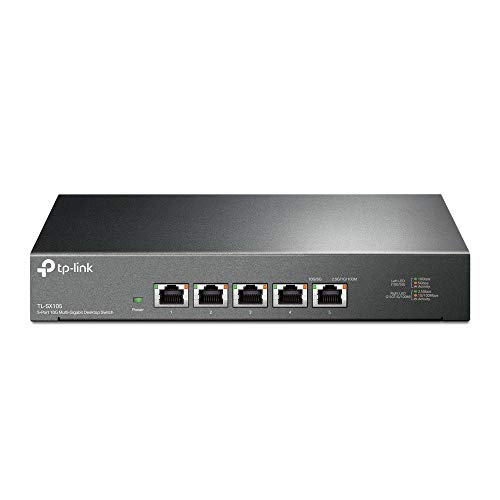
TP-Link TL-SX105 | 5 Port 10G/Multi-Gig Unmanaged Ethernet Switch | Desktop/Wall-Mount | Plug & Play | Fanless | Sturdy Metal Casing | Limited Lifetime Protection | Speed Auto-Negotiation
Product Dimensions
8.9 x 5.2 x 0.98 inches
Item Weight
3.49 pounds
ASIN
B09CYNHL4S
Item model number
TL-SX105
Date First Available
August 25, 2021
Manufacturer
TP-Link
Country of Origin
Vietnam
Test video – TP-Link TL-SX105 | 5 Port 10G/Multi-Gig Unmanaged :
Product highlights :
【Five 10Gbps Ports for Lightning-Fast Connections】5× 10-Gigabit ports unlock the highest performance with 10G/multi-gig bandwidth and provide up to 100 Gbps of switching capacity.
【Auto-Negotiation】Auto-negotiation intelligently senses the link speeds and adjusts between 5-speeds (100Mb/1G/2.5G/5G/10G) for compatibility and optimal performance for all your devices, including 2.5G/5G/10G WiFi 6 AP, 10G NAS, 10G PCIe Adapter/NIC, 10G Server, gaming computer, 8K video, and more.
【Reliable and Quiet】IEEE 802.3X flow control provides reliable data transfer and a fanless design ensures quiet operation.
【Plug and Play】Easy setup with no software installation or configuration needed.
【Sturdy Metal Case】Durable metal casing and desktop/wall-mounting design are well-suited for different environments.
➕ What is the price of TP-Link TL-SX105 | 5 Port 10G/Multi-Gig Unmanaged in Saudi Arabia ?
The price of TP-Link TL-SX105 | 5 Port 10G/Multi-Gig Unmanaged in-store is 1090 SAR VAT.
➕ When TP-Link TL-SX105 | 5 Port 10G/Multi-Gig Unmanaged was released ?
The release date was August 25, 2021.
➕ What is the price of TP-Link TL-SX105 | 5 Port 10G/Multi-Gig Unmanaged cheap used ?
The price of TP-Link TL-SX105 | 5 Port 10G/Multi-Gig Unmanaged used is 760 SAR VAT.
➕ What are the main characteristics of TP-Link TL-SX105 | 5 Port 10G/Multi-Gig Unmanaged ?
Special specifications :
【Five 10Gbps Ports for Lightning-Fast Connections】5× 10-Gigabit ports unlock the highest performance with 10G/multi-gig bandwidth and provide up to 100 Gbps of switching capacity.
➕ Is it interesting to buy this product ?
The best people who can answer you are customers who have already bought and tested this product (See Customer Reviews). This product is rated 4 / 5 on Amazon.
➕ Where to buy TP-Link TL-SX105 | 5 Port 10G/Multi-Gig Unmanaged in Saudi Arabia ?
Installation Guide, Power Cord, Rubber Feet, TL-SX105
Compatible Devices
Desktop
Switch Type
Metal
Purchase advice :
Warranty :
Check the duration of the warranty and also the faults and defects it covers. Is it complete or limited? and What is included in the warranty (parts, repairs or both)?
Shipping :
Is delivery offered? And how long does it take to get delivered (Delivery time)
Proof of purchase :
Does the shop give you an invoice ?
After-sales service :
Do they have an after-sales service to have information about the installation or operation (instructions for use). Also in case of problem, it is the seller who takes charge or you must contact the manufacturer or supplier yourself.
_____________________________
10 reviews for TP-Link TL-SX105 | 5 Port 10G/Multi-Gig Unmanaged
H. H (verified owner)–
– Ports are dying after couple of weeks/months of barely any uptime on V1 one after an other, mostly showing no activity on ports after a power cycle. TP-Link knows that and release silently a V2. They do nothing to help people on their forum, don’t answer email and don’t even answer RMA request.
Rated 4 out of 5
G. I (verified owner)–
This is a basic switch with 8 flexible ports (100,1000,2.5G,5G,10G) – easy to set up and use – This is a basic, no frills switch with 8 ports that will auto-configure to 100, 1000, 2.5G, 5G, or 10G. LED’s above each connector socket let you know what the speed is. They’re not blindingly bright, in fact, I’d call them a bit dim. They show link speed, but don’t blink on port activity. There’s no way to know if there is any port activity.
Rated 4 out of 5
N. T (verified owner)–
It works good but the fan should be better (especially not so noisy) – I like this switch, it is fast and so far reliable… well, I just have it for two weeks yet so no real long term experiance.
Rated 5 out of 5
E. T (verified owner)–
Finally, An Easy Way to Get More Than 1 Gigabit – Upgraded my home Internet to 2 gigabit fiber, and home fileserver with SSD storage, so I bought the TP-Link 8-port TL-SG108-M2 and 5-port TL-SG105-M2 to upgrade my home network to multi-gigabit speed. It was easy to swap my old gigabit switches with these TP-Link 2.5 giggers, using my existing ethernet cables.
H. H (verified owner)–
– Ports are dying after couple of weeks/months of barely any uptime on V1 one after an other, mostly showing no activity on ports after a power cycle. TP-Link knows that and release silently a V2. They do nothing to help people on their forum, don’t answer email and don’t even answer RMA request.
Rated 4 out of 5
O. G (verified owner)–
10GB switch but noisy out of the box. – Switch works but is very noisy. Fan is erratic at speeding up every few seconds. Replaced stock fan with a Noctua NF-A4x20 FLX, Premium Quiet Fan, 3-Pin and switch is now super quiet.
Rated 4 out of 5
N. T (verified owner)–
It works good but the fan should be better (especially not so noisy) – I like this switch, it is fast and so far reliable… well, I just have it for two weeks yet so no real long term experiance.
Rated 4 out of 5
G. I (verified owner)–
This is a basic switch with 8 flexible ports (100,1000,2.5G,5G,10G) – easy to set up and use – This is a basic, no frills switch with 8 ports that will auto-configure to 100, 1000, 2.5G, 5G, or 10G. LED’s above each connector socket let you know what the speed is. They’re not blindingly bright, in fact, I’d call them a bit dim. They show link speed, but don’t blink on port activity. There’s no way to know if there is any port activity.
Rated 4 out of 5
O. G (verified owner)–
10GB switch but noisy out of the box. – Switch works but is very noisy. Fan is erratic at speeding up every few seconds. Replaced stock fan with a Noctua NF-A4x20 FLX, Premium Quiet Fan, 3-Pin and switch is now super quiet.
Rated 5 out of 5
E. T (verified owner)–
Finally, An Easy Way to Get More Than 1 Gigabit – Upgraded my home Internet to 2 gigabit fiber, and home fileserver with SSD storage, so I bought the TP-Link 8-port TL-SG108-M2 and 5-port TL-SG105-M2 to upgrade my home network to multi-gigabit speed. It was easy to swap my old gigabit switches with these TP-Link 2.5 giggers, using my existing ethernet cables.

H. H (verified owner) –
– Ports are dying after couple of weeks/months of barely any uptime on V1 one after an other, mostly showing no activity on ports after a power cycle. TP-Link knows that and release silently a V2. They do nothing to help people on their forum, don’t answer email and don’t even answer RMA request.
G. I (verified owner) –
This is a basic switch with 8 flexible ports (100,1000,2.5G,5G,10G) – easy to set up and use – This is a basic, no frills switch with 8 ports that will auto-configure to 100, 1000, 2.5G, 5G, or 10G. LED’s above each connector socket let you know what the speed is. They’re not blindingly bright, in fact, I’d call them a bit dim. They show link speed, but don’t blink on port activity. There’s no way to know if there is any port activity.
N. T (verified owner) –
It works good but the fan should be better (especially not so noisy) – I like this switch, it is fast and so far reliable… well, I just have it for two weeks yet so no real long term experiance.
E. T (verified owner) –
Finally, An Easy Way to Get More Than 1 Gigabit – Upgraded my home Internet to 2 gigabit fiber, and home fileserver with SSD storage, so I bought the TP-Link 8-port TL-SG108-M2 and 5-port TL-SG105-M2 to upgrade my home network to multi-gigabit speed. It was easy to swap my old gigabit switches with these TP-Link 2.5 giggers, using my existing ethernet cables.
H. H (verified owner) –
– Ports are dying after couple of weeks/months of barely any uptime on V1 one after an other, mostly showing no activity on ports after a power cycle. TP-Link knows that and release silently a V2. They do nothing to help people on their forum, don’t answer email and don’t even answer RMA request.
O. G (verified owner) –
10GB switch but noisy out of the box. – Switch works but is very noisy. Fan is erratic at speeding up every few seconds. Replaced stock fan with a Noctua NF-A4x20 FLX, Premium Quiet Fan, 3-Pin and switch is now super quiet.
N. T (verified owner) –
It works good but the fan should be better (especially not so noisy) – I like this switch, it is fast and so far reliable… well, I just have it for two weeks yet so no real long term experiance.
G. I (verified owner) –
This is a basic switch with 8 flexible ports (100,1000,2.5G,5G,10G) – easy to set up and use – This is a basic, no frills switch with 8 ports that will auto-configure to 100, 1000, 2.5G, 5G, or 10G. LED’s above each connector socket let you know what the speed is. They’re not blindingly bright, in fact, I’d call them a bit dim. They show link speed, but don’t blink on port activity. There’s no way to know if there is any port activity.
O. G (verified owner) –
10GB switch but noisy out of the box. – Switch works but is very noisy. Fan is erratic at speeding up every few seconds. Replaced stock fan with a Noctua NF-A4x20 FLX, Premium Quiet Fan, 3-Pin and switch is now super quiet.
E. T (verified owner) –
Finally, An Easy Way to Get More Than 1 Gigabit – Upgraded my home Internet to 2 gigabit fiber, and home fileserver with SSD storage, so I bought the TP-Link 8-port TL-SG108-M2 and 5-port TL-SG105-M2 to upgrade my home network to multi-gigabit speed. It was easy to swap my old gigabit switches with these TP-Link 2.5 giggers, using my existing ethernet cables.