
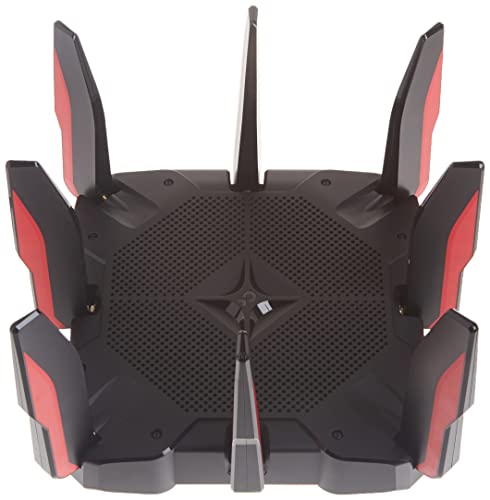
Description
TP-Link Archer AX11000 Tri-Band Wi-Fi 6 Router – Features & Prices in Saudi Arabia :
TP-Link Archer AX11000 Tri-Band Wi-Fi 6 Router
Product Dimensions
14.37 x 11.42 x 4.72 inches
Item Weight
2.61 pounds
ASIN
B082Z71VT2
Item model number
Archer AX11000
Date First Available
September 19, 2020
Manufacturer
TP-Link
Test video – TP-Link Archer AX11000 Tri-Band Wi-Fi 6 Router :
Product highlights :
Questions & Answers – TP-Link Archer AX11000 Tri-Band Wi-Fi 6 Router :
Technical specifications – TP-Link Archer AX11000 Tri-Band Wi-Fi 6 Router :
Brand
TP-Link
Frequency Band Class
Tri-Band
Wireless Communication Standard
802.11n, 802.11ax, 802.11b, 802.11ac, 802.11g
Compatible Devices
Personal Computer
Frequency
5 GHz
Connectivity Technology
Wi-Fi
Item Weight
2.61 Pounds
Security Protocol
WPA, WPA2, WPA3, WPA/WPA2-Enterprise (802.1x)
Number of Ports
8
Control Method
App
Purchase advice :
-
Warranty :
Check the duration of the warranty and also the faults and defects it covers. Is it complete or limited? and What is included in the warranty (parts, repairs or both)?
-
Shipping :
Is delivery offered? And how long does it take to get delivered (Delivery time)
-
Proof of purchase :
Does the shop give you an invoice ?
-
After-sales service :
Do they have an after-sales service to have information about the installation or operation (instructions for use). Also in case of problem, it is the seller who takes charge or you must contact the manufacturer or supplier yourself.
_____________________________
H. R (verified owner) –
– Excelente producto, alcance muy amplio, facil de instalar y programar, esteticamente muy bonito.
P. G (verified owner) –
High End Router But Has Serious Issue – Recently purchased the TP-Link Archer AX11000 router for around $280 off Amazon (retail is $399). I just upgraded my internet service to Spectrum 1GB and after having issues with Spectrum’s own router interfacing with my solar panels and car charger, I went all-out and bought this router. I really don’t care whether it’s a so-called “Gaming Router” or the goofy appearance, it’s what it’s supposed to deliver is what counts.
P. B (verified owner) –
Need to set QOS settings manually – I recently up graded to 1gb internet service and old router would not handle the new upload and down load speeds. So I was looking for a the least expensive option to replace it. did some checking out of reviews the good bad and ugly and decided to get this. Got everything hook up set logged in set up passwords for wifi as a not I really do not use wifi for much also bought cat 8 cable to hook every thing up with. (as a note my speed test connect directly to modem is about 940-960mbps download and 38-42mbps up load) Any ways after my Gaming Stream Computer was connect to internet via ethernet cables I did a speed test and boy was I disappointed only 494-525mbps down and 30-35mbps up…
A. J (verified owner) –
– I bought this thinking I would get fast speeds, be able to do more than one thing at a time, be able to cover all areas of my meek 1000 sq foot wood constructed townhouse etc. Nope. Not at all. I get speeds of between 150-200 when I’m paying for 1.5 g, I can’t use zoom and the room I’m trying to use it from is about 4 feet above where the router is. Yeah, I have lots of devices, but mostly damn lights and stuff which don’t take alot of bandwidth. This is RIDICULOUS. I paid just about 500 after tax for a device that doesn’t even make a good boat anchor. Honestly this SUCKS SUCKS SUCKS. DONT BY THIS GARBAGE. Oh. And if you change any settings on the router, you NOW have to absolutely reconnect ever single device that was using this stupid thing. But the customer service jerks don’t tell you that. I am just FURIOUS. This is mega stupid and annoying. I’ve had this for four months and it hasn’t work right one day!
A. G (verified owner) –
Switched from Netgear – I bought this router to replace my Netgear Nighthawk R7000 (AC1900) router which I had just bought in the first quarter of this year (2022). My house is 3400+ sq. ft. and I also bought the Netgear AX8 extender to reach all parts of my house. Even with all of this, the Netgear would drop connection constantly. Buffering was horrible. Constant router restarts and bouncing back and forth between 2.4Ghz and 5Ghz just to get a solid connection. Many times, the 5Ghz was unusable. You would connect and just freeze. I read several reviews online regarding these issues (and the notoriously bad Netgear TS, which I experienced first hand) and decided that it was time to try another router to see if this was going to be the fix. BOY WAS IT!!!!! The TP Link router works like a dream. No disconnects. No resets. No jumping from one band to another. No changing channels, just plain and simple WiFi with no user intervention. Now I’ll let you know, I have 7 Ring cameras, 3 Apple TV devices, 1 Amazon Fire stick, 3 Cell phones, 1 iPad, 8 laptops (2 Macbooks), 1 Server running Windows Server 2022 with Hyper-V hosting 3 Windows Servers, 3 Windows 10 clients and 1 CentOS client, 1 Server running Ubuntu Server 20.04, 1 NAS hosting movies and music for streaming (SMB, DLNA), 1 WiFi attached Washer and Dryer, 1 HP Printer, 1 Wifi attached double oven, 2 SONOS speakers, 2 WiFi thermostats, and 1 WiFi garage door opener. The TP Link handles all of this with no issues. I have a fiber ISP which is giving me 1 Gbps service. Netgear speed tests on this same service was never higher than 400Mbps in either direction. TP Link router is doing 900 Down and 720 up. I could not be happier with the difference in these two products. I did not re-attach the extender and TP Link is still servicing everything I have. I have tried to be in Netgear’s corner, but these results do not lie. Not to mention there are 8 1Gbps ethernet ports on the back of this device which makes connecting devices directly to it no problem. I have not tried the USB port as of yet but if it performs like the rest of this router has then I’m sure that I’ll have no problems.
P. B (verified owner) –
Need to set QOS settings manually – I recently up graded to 1gb internet service and old router would not handle the new upload and down load speeds. So I was looking for a the least expensive option to replace it. did some checking out of reviews the good bad and ugly and decided to get this. Got everything hook up set logged in set up passwords for wifi as a not I really do not use wifi for much also bought cat 8 cable to hook every thing up with. (as a note my speed test connect directly to modem is about 940-960mbps download and 38-42mbps up load) Any ways after my Gaming Stream Computer was connect to internet via ethernet cables I did a speed test and boy was I disappointed only 494-525mbps down and 30-35mbps up…
A. J (verified owner) –
– I bought this thinking I would get fast speeds, be able to do more than one thing at a time, be able to cover all areas of my meek 1000 sq foot wood constructed townhouse etc. Nope. Not at all. I get speeds of between 150-200 when I’m paying for 1.5 g, I can’t use zoom and the room I’m trying to use it from is about 4 feet above where the router is. Yeah, I have lots of devices, but mostly damn lights and stuff which don’t take alot of bandwidth. This is RIDICULOUS. I paid just about 500 after tax for a device that doesn’t even make a good boat anchor. Honestly this SUCKS SUCKS SUCKS. DONT BY THIS GARBAGE. Oh. And if you change any settings on the router, you NOW have to absolutely reconnect ever single device that was using this stupid thing. But the customer service jerks don’t tell you that. I am just FURIOUS. This is mega stupid and annoying. I’ve had this for four months and it hasn’t work right one day!
H. R (verified owner) –
– Excelente producto, alcance muy amplio, facil de instalar y programar, esteticamente muy bonito.
A. G (verified owner) –
Switched from Netgear – I bought this router to replace my Netgear Nighthawk R7000 (AC1900) router which I had just bought in the first quarter of this year (2022). My house is 3400+ sq. ft. and I also bought the Netgear AX8 extender to reach all parts of my house. Even with all of this, the Netgear would drop connection constantly. Buffering was horrible. Constant router restarts and bouncing back and forth between 2.4Ghz and 5Ghz just to get a solid connection. Many times, the 5Ghz was unusable. You would connect and just freeze. I read several reviews online regarding these issues (and the notoriously bad Netgear TS, which I experienced first hand) and decided that it was time to try another router to see if this was going to be the fix. BOY WAS IT!!!!! The TP Link router works like a dream. No disconnects. No resets. No jumping from one band to another. No changing channels, just plain and simple WiFi with no user intervention. Now I’ll let you know, I have 7 Ring cameras, 3 Apple TV devices, 1 Amazon Fire stick, 3 Cell phones, 1 iPad, 8 laptops (2 Macbooks), 1 Server running Windows Server 2022 with Hyper-V hosting 3 Windows Servers, 3 Windows 10 clients and 1 CentOS client, 1 Server running Ubuntu Server 20.04, 1 NAS hosting movies and music for streaming (SMB, DLNA), 1 WiFi attached Washer and Dryer, 1 HP Printer, 1 Wifi attached double oven, 2 SONOS speakers, 2 WiFi thermostats, and 1 WiFi garage door opener. The TP Link handles all of this with no issues. I have a fiber ISP which is giving me 1 Gbps service. Netgear speed tests on this same service was never higher than 400Mbps in either direction. TP Link router is doing 900 Down and 720 up. I could not be happier with the difference in these two products. I did not re-attach the extender and TP Link is still servicing everything I have. I have tried to be in Netgear’s corner, but these results do not lie. Not to mention there are 8 1Gbps ethernet ports on the back of this device which makes connecting devices directly to it no problem. I have not tried the USB port as of yet but if it performs like the rest of this router has then I’m sure that I’ll have no problems.
P. G (verified owner) –
High End Router But Has Serious Issue – Recently purchased the TP-Link Archer AX11000 router for around $280 off Amazon (retail is $399). I just upgraded my internet service to Spectrum 1GB and after having issues with Spectrum’s own router interfacing with my solar panels and car charger, I went all-out and bought this router. I really don’t care whether it’s a so-called “Gaming Router” or the goofy appearance, it’s what it’s supposed to deliver is what counts.