
Description
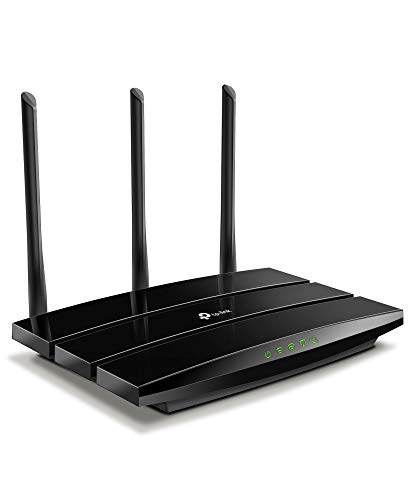
TP-Link AC1900 Smart WiFi Router (Archer A8) – Features & Prices in Saudi Arabia :
TP-Link AC1900 Smart WiFi Router (Archer A8) -High Speed MU-MIMO Wireless Router, Dual Band Router for Wireless Internet, Gigabit, Supports Guest WiFi
Wireless Type
802.11n, 802.11b, 802.11a, 802.11ac, 802.11g
Series
TP-link AC1900
Item model number
Archer A8
Operating System
Internet Explorer 11+, Firefox 12.0+, Chrome 20.0+, Safari 4.0+, or other JavaScript-enabled browserCable or DSL Modem (if needed)Subscription with an internet service provider (for internet access)
Item Weight
14.6 ounces
Product Dimensions
9.57 x 6.32 x 1.28 inches
Item Dimensions LxWxH
9.57 x 6.32 x 1.28 inches
Color
Black
Voltage
100240 Volts
Manufacturer
TP-Link
ASIN
B08C3YBBHM
Country of Origin
Vietnam
Date First Available
July 2, 2020
Test video – TP-Link AC1900 Smart WiFi Router (Archer A8) :
Product highlights :
Questions & Answers – TP-Link AC1900 Smart WiFi Router (Archer A8) :
Technical specifications – TP-Link AC1900 Smart WiFi Router (Archer A8) :
Brand
TP-Link
Series
TP-link AC1900
Frequency Band Class
Dual-Band
Wireless Type
802.11n, 802.11b, 802.11a, 802.11ac, 802.11g
Compatible Devices
Gaming Console, Personal Computer, Smart Television
Frequency
5 GHz
Included Components
Power Adapter, RJ45 Ethernet Cable, Quick Installation Guide
Connectivity Technology
Wi-Fi, Ethernet
Color
Black
Antenna Type
Fixed
Purchase advice :
-
Warranty :
Check the duration of the warranty and also the faults and defects it covers. Is it complete or limited? and What is included in the warranty (parts, repairs or both)?
-
Shipping :
Is delivery offered? And how long does it take to get delivered (Delivery time)
-
Proof of purchase :
Does the shop give you an invoice ?
-
After-sales service :
Do they have an after-sales service to have information about the installation or operation (instructions for use). Also in case of problem, it is the seller who takes charge or you must contact the manufacturer or supplier yourself.
_____________________________
N. T (verified owner) –
Perfect router that is a great value for money – I was looking for a dual band, separate 2.4 and 5Ghz router since my google router messes my smart home devices and disconnects them. I reverted to tp-link having owned 2 of their previous routers and they did not disappoint. Not only this is economical, but the range is as good as my two pack google mesh. And all my smart home devices connected with no problem. The only disadvantage is it doesn’t have a stand(can’t freestand), so you’d have to mount them in the wall or just let it rest against a wall.
B. G (verified owner) –
Pleasantly Surprised, great cheap router to throw into AP Mode – (DISCLAIMER: I am either a complete snob about what goes on my network, or I am using hardware held together by duct tape and prayers. There is no in-between. Take my niche experience with a grain of salt.)
O. K (verified owner) –
so far so good – our ISP router failed and I bought this 1 day shipping as a replacement. so far better speeds, less dead zones and no connection issues since I installed it. Have a mesh repeater RE215 connected to it using OneMesh pretty seamlessly. plastic housing was a little lighter than i expected (it feels light/cheap, but you don’t really handle a router so that wouldn’t matter much). definate upgrade, and more than we need right now. Heres hoping to another 8 years before replacement.
P. E (verified owner) –
Router For Digital Mixer Owners (XR18 Internal Wi-Fi is a joke) see update – So if you know anything about “wireless” controlled stage box mixers, like my Behringer XR18, you know that all the great features and abilities don’t include reliable internal Wi-Fi. In 2002 you’d think they could come up with an upgrade. But alas, single band and a signal that loves to disappear is what I’m stuck with… BUT NO MORE! So I just got this a few days ago and have everything working great in the living room. I’ll modify and update this review as I get some real world experience with the router. For now (7/22) everything seems great and ready to rock. The XR “how to” videos out there were helpful but still left me with some head scratching and googling to do along the way. I’m not exactly a network/computer guy. But really, I figured it out without too much really trouble.
B. G (verified owner) –
Pleasantly Surprised, great cheap router to throw into AP Mode – (DISCLAIMER: I am either a complete snob about what goes on my network, or I am using hardware held together by duct tape and prayers. There is no in-between. Take my niche experience with a grain of salt.)
N. T (verified owner) –
Perfect router that is a great value for money – I was looking for a dual band, separate 2.4 and 5Ghz router since my google router messes my smart home devices and disconnects them. I reverted to tp-link having owned 2 of their previous routers and they did not disappoint. Not only this is economical, but the range is as good as my two pack google mesh. And all my smart home devices connected with no problem. The only disadvantage is it doesn’t have a stand(can’t freestand), so you’d have to mount them in the wall or just let it rest against a wall.
R. Z (verified owner) –
Good low budget router – This is a good low priced router suitable for 3000 Sq Ft or smaller homes. It supported 50+ WiFi devices in my home without any issues. WPA3 did not work with any of my WiFi switches, plugs, sockets, cameras, Echo devices, bulbs, WiFi extenders. Had to set A8 to WPA2. Marginally better than Archer A7 and C7
R. Z (verified owner) –
Good low budget router – This is a good low priced router suitable for 3000 Sq Ft or smaller homes. It supported 50+ WiFi devices in my home without any issues. WPA3 did not work with any of my WiFi switches, plugs, sockets, cameras, Echo devices, bulbs, WiFi extenders. Had to set A8 to WPA2. Marginally better than Archer A7 and C7
G. F (verified owner) –
Decent and affordable for those not wanting to spend over $100 – I had my last router, a netgear for over 7 years. While there was nothing wrong with my old router, it was likely outdated and I wanted a bit better wifi for my security cameras and doorbells. After researching I found the Archer 7 came highly recommended on many reviews and write ups, when I went to buy it, the archer 8 had a discount which made it just 5 bucks more so I went ahead and got the newest model, the 8. So far so good. I did end up increasing my isp speed, and everything seems to work well, my laptops were kinda funky having trouble connecting after startup, though after some updates and tweaks, it appears fixed, that all said, I would recommend this router for anyone who wanted a decent router but didn’t want to spend upwards of $100
O. K (verified owner) –
so far so good – our ISP router failed and I bought this 1 day shipping as a replacement. so far better speeds, less dead zones and no connection issues since I installed it. Have a mesh repeater RE215 connected to it using OneMesh pretty seamlessly. plastic housing was a little lighter than i expected (it feels light/cheap, but you don’t really handle a router so that wouldn’t matter much). definate upgrade, and more than we need right now. Heres hoping to another 8 years before replacement.
P. E (verified owner) –
Router For Digital Mixer Owners (XR18 Internal Wi-Fi is a joke) see update – So if you know anything about “wireless” controlled stage box mixers, like my Behringer XR18, you know that all the great features and abilities don’t include reliable internal Wi-Fi. In 2002 you’d think they could come up with an upgrade. But alas, single band and a signal that loves to disappear is what I’m stuck with… BUT NO MORE! So I just got this a few days ago and have everything working great in the living room. I’ll modify and update this review as I get some real world experience with the router. For now (7/22) everything seems great and ready to rock. The XR “how to” videos out there were helpful but still left me with some head scratching and googling to do along the way. I’m not exactly a network/computer guy. But really, I figured it out without too much really trouble.
G. F (verified owner) –
Decent and affordable for those not wanting to spend over $100 – I had my last router, a netgear for over 7 years. While there was nothing wrong with my old router, it was likely outdated and I wanted a bit better wifi for my security cameras and doorbells. After researching I found the Archer 7 came highly recommended on many reviews and write ups, when I went to buy it, the archer 8 had a discount which made it just 5 bucks more so I went ahead and got the newest model, the 8. So far so good. I did end up increasing my isp speed, and everything seems to work well, my laptops were kinda funky having trouble connecting after startup, though after some updates and tweaks, it appears fixed, that all said, I would recommend this router for anyone who wanted a decent router but didn’t want to spend upwards of $100