
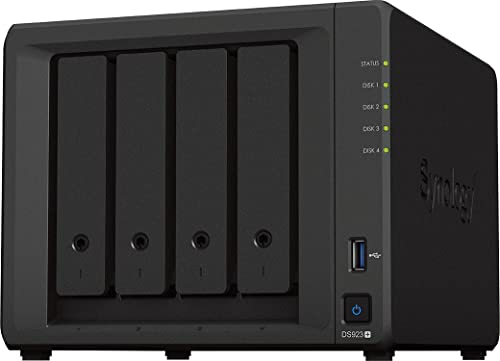
Description
Synology 4-Bay DiskStation DS923+ (Diskless) – Features & Prices in Saudi Arabia :
Synology 4-Bay DiskStation DS923+ (Diskless)
Hard Drive
80 GB Mechanical Hard Disk
Series
DS923+
Item model number
DS923+
Item Weight
8.11 pounds
Package Dimensions
11.34 x 10.47 x 9.65 inches
Color
Black
Hard Drive Interface
USB 3.0
Hard Drive Rotational Speed
7200 RPM
Manufacturer
Synology
ASIN
B0BM7KDN6R
Country of Origin
Taiwan
Date First Available
November 16, 2022
Test video – Synology 4-Bay DiskStation DS923+ (Diskless) :
Product highlights :
Questions & Answers – Synology 4-Bay DiskStation DS923+ (Diskless) :
Technical specifications – Synology 4-Bay DiskStation DS923+ (Diskless) :
Purchase advice :
-
Warranty :
Check the duration of the warranty and also the faults and defects it covers. Is it complete or limited? and What is included in the warranty (parts, repairs or both)?
-
Shipping :
Is delivery offered? And how long does it take to get delivered (Delivery time)
-
Proof of purchase :
Does the shop give you an invoice ?
-
After-sales service :
Do they have an after-sales service to have information about the installation or operation (instructions for use). Also in case of problem, it is the seller who takes charge or you must contact the manufacturer or supplier yourself.
_____________________________

E. I (verified owner) –
Good upgrade – Best upgrade after using DS418 for 5+ Years
O. M (verified owner) –
No hardware video decoding. Ryzen chip comes with 2x10GbE build int but Synology nerfed it 1GbE – Hard pass on this one – The CPU they chose for this system has 2x 10GbE and Synology chose not to use in in favor of 1GbE and they are making you pay to add 10GbE back – A quick Google search online will show you the specifications for their CPU. They also chose a version of Ryzen that has no GPU so no hardware decoding for Plex or other streaming – Something Synology’s older 920+ has… There are cheaper alternatives that have those features or save money and go with the 920+ get hardware video decoding, and save money…
H. G (verified owner) –
Very capable unit built for prosumers or business. – I had a DS918+ and just upgraded to this unit, im loving the fact it can support 10 GbE (with add in card) and and storage pools on SSD (albeit only Synology SSD). I did not use the iGPU in the DS918+ so the loss of the GPU does not matter to me personally, though it is a valid criticism. I really appreciate that ECC memory is the standard in these units now, I dont think this is talked about enough but Id rather have this than the iGPU. But thats just me. My one complaint is the fact that you cant use just any NVMe drive for a storage pool, they MUST be Synology brand. And I get that reliability is the name of the game now, but I do strongly feel they should let users take their own risk. I’d much rather run a 4TB NVMe drive than the 800GB Synology one, because they cost the SAME. I understand they make robust drives built for intensive read/write cycles. But, I feel the consumer should have a choice. If one wants reliability and support, then let them buy the Synology SSD, if not, then let them be free. This will be the perfect unit if Synology lets users use any NVMe SSD. Overall, great unit and HDD migration from the 918 to 923 was easy!
O. M (verified owner) –
No hardware video decoding. Ryzen chip comes with 2x10GbE build int but Synology nerfed it 1GbE – Hard pass on this one – The CPU they chose for this system has 2x 10GbE and Synology chose not to use in in favor of 1GbE and they are making you pay to add 10GbE back – A quick Google search online will show you the specifications for their CPU. They also chose a version of Ryzen that has no GPU so no hardware decoding for Plex or other streaming – Something Synology’s older 920+ has… There are cheaper alternatives that have those features or save money and go with the 920+ get hardware video decoding, and save money…
H. G (verified owner) –
Very capable unit built for prosumers or business. – I had a DS918+ and just upgraded to this unit, im loving the fact it can support 10 GbE (with add in card) and and storage pools on SSD (albeit only Synology SSD). I did not use the iGPU in the DS918+ so the loss of the GPU does not matter to me personally, though it is a valid criticism. I really appreciate that ECC memory is the standard in these units now, I dont think this is talked about enough but Id rather have this than the iGPU. But thats just me. My one complaint is the fact that you cant use just any NVMe drive for a storage pool, they MUST be Synology brand. And I get that reliability is the name of the game now, but I do strongly feel they should let users take their own risk. I’d much rather run a 4TB NVMe drive than the 800GB Synology one, because they cost the SAME. I understand they make robust drives built for intensive read/write cycles. But, I feel the consumer should have a choice. If one wants reliability and support, then let them buy the Synology SSD, if not, then let them be free. This will be the perfect unit if Synology lets users use any NVMe SSD. Overall, great unit and HDD migration from the 918 to 923 was easy!
E. I (verified owner) –
Good upgrade – Best upgrade after using DS418 for 5+ Years