ScreenBeam MoCA 2.5 Network Adapter for Higher – Features & Prices in Saudi Arabia :
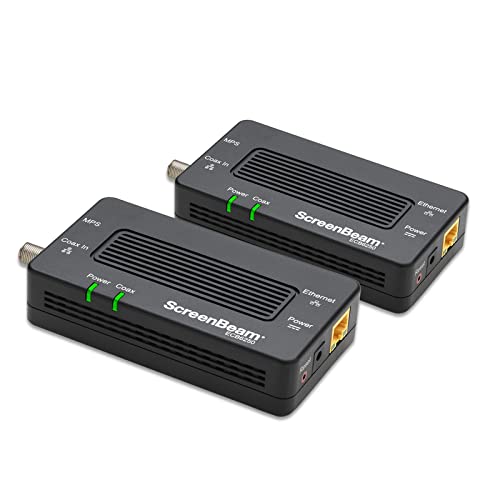
ScreenBeam MoCA 2.5 Network Adapter for Higher Speed Internet, Ethernet Over Coax – Starter Kit (Model: ECB6250K02)
Product Dimensions
5.4 x 2.6 x 1.1 inches
Item Weight
10.4 ounces
ASIN
B088KV2YYL
Item model number
ECB6250K02
Date First Available
May 13, 2020
Manufacturer
Actiontec, Inc
Country of Origin
China
Test video – ScreenBeam MoCA 2.5 Network Adapter for Higher :
Product highlights :
GET BETTER WIFI – Same product, new look and brand. Create 2.5 GBPS ethernet over coax connection between your access point and your router by connecting one MoCA Adapter to your Router and one to your WiFi Access Point or Extender in another room..Power Adapter: Input 100-240V @0.6A. Output 5VDC @2.0A
BETTER GAMING, BETTER STREAMING – Increased speed and bandwidth of your network for pristine 4K and HD video, online gaming, working from home, and other demanding applications. Our products are Carrier-Grade.
USE EXISTING COAX WIRING TO CREATE AN ETHERNET NETWORK to achieve a fast, reliable Ethernet connection between a router and any device with an Ethernet port. MoCA 2.5 technology outperforms wireless for speed, latency, reliability, and security.
INCREASE SPEED and COVERAGE OF WIFI NETWORK – With the reliability of a wired network, MoCA 2.5 technology upgrades your network for latency, reliability, and more. MoCA adapters use the same coaxial cables as your cable TV or fiber-optic service.
ADVANCED SECURITY and EASY SETUP – With new MOCA Protected Setup (MPS) technology, get additional security on your home network, allowing for secure connection of additional adapters. Re-configuring your router with the adapter is not required.
MOCA CAPABILITY – Router needs built-in MoCA capabilities or provided to the router by an added MoCA adapter. Most routers and modem/routers need a MoCA Adapter. A MoCA Adapter is needed for each device connecting back to the router using MoCA.
➕ What is the price of ScreenBeam MoCA 2.5 Network Adapter for Higher in Saudi Arabia ?
The price of ScreenBeam MoCA 2.5 Network Adapter for Higher in-store is 510 SAR VAT.
➕ When ScreenBeam MoCA 2.5 Network Adapter for Higher was released ?
The release date was May 13, 2020.
➕ What is the price of ScreenBeam MoCA 2.5 Network Adapter for Higher cheap used ?
The price of ScreenBeam MoCA 2.5 Network Adapter for Higher used is 350 SAR VAT.
➕ What are the main characteristics of ScreenBeam MoCA 2.5 Network Adapter for Higher ?
Special specifications :
GET BETTER WIFI – Same product, new look and brand. Create 2.5 GBPS ethernet over coax connection between your access point and your router by connecting one MoCA Adapter to your Router and one to your WiFi Access Point or Extender in another room..Power Adapter: Input 100-240V @0.6A. Output 5VDC @2.0A
➕ Is it interesting to buy this product ?
The best people who can answer you are customers who have already bought and tested this product (See Customer Reviews). This product is rated 4.4 / 5 on Amazon.
➕ Where to buy ScreenBeam MoCA 2.5 Network Adapter for Higher in Saudi Arabia ?
Check the duration of the warranty and also the faults and defects it covers. Is it complete or limited? and What is included in the warranty (parts, repairs or both)?
Shipping :
Is delivery offered? And how long does it take to get delivered (Delivery time)
Proof of purchase :
Does the shop give you an invoice ?
After-sales service :
Do they have an after-sales service to have information about the installation or operation (instructions for use). Also in case of problem, it is the seller who takes charge or you must contact the manufacturer or supplier yourself.
_____________________________
10 reviews for ScreenBeam MoCA 2.5 Network Adapter for Higher
B. K (verified owner)–
– good product wifi is good through these
Rated 4 out of 5
O. P (verified owner)–
Works as advertised with one caveat – Very easy to install and use and worked immediately (getting >850mbps to Comcast through this).
Rated 5 out of 5
K. I (verified owner)–
Exceeded my expectations. – I have a Netgear Orbi mesh system (RBR50V2) and a Motorola DOCSIS 3.1 cable modem. I’ve been using the Orbi Satellite plugged into my streaming device (Nvidia Shield) to watch movies from my NAS. Best I could do is maybe 45Mbps via WiFi. It was okay but not great to stream movies. I had difficulty with some 4K versions and YouTube would not play on the highest resolution. I have no practical way to get a hard wire to the Shield I’ve tried powerline systems with varying degrees of success but my house wiring must not be great as I’ve had a lot of issues with them disconnecting etc.. I figured I’d give these a try the ScreenBeam Bonded MoCA 2.5. I didn’t have high hopes as everything I tried in the past didn’t work that well. My Streaming device has some stout walls the WiFi signal has difficulty going though. I followed the directions and was up in running in a few minutes. I did install a POE filter (not provided) on the cable splitter (provided) on exit side going to the cable modem. This is what was suggested in the directions. I have a cable outlet by my streaming device so I installed the second ScreenBeam there and hooked up the ethernet cable to the Nvidia Shield. Imagine my surprise when I got a consistent 10X faster speed. I pay for a gigabit service to the home. Hardwired to my router I see ~ 950Mbps. Getting 800+ Mbps though the ScreenBeam is pretty amazing. Easy to install and speeds far exceed what I was expecting.
B. K (verified owner)–
– good product wifi is good through these
Rated 5 out of 5
K. I (verified owner)–
Exceeded my expectations. – I have a Netgear Orbi mesh system (RBR50V2) and a Motorola DOCSIS 3.1 cable modem. I’ve been using the Orbi Satellite plugged into my streaming device (Nvidia Shield) to watch movies from my NAS. Best I could do is maybe 45Mbps via WiFi. It was okay but not great to stream movies. I had difficulty with some 4K versions and YouTube would not play on the highest resolution. I have no practical way to get a hard wire to the Shield I’ve tried powerline systems with varying degrees of success but my house wiring must not be great as I’ve had a lot of issues with them disconnecting etc.. I figured I’d give these a try the ScreenBeam Bonded MoCA 2.5. I didn’t have high hopes as everything I tried in the past didn’t work that well. My Streaming device has some stout walls the WiFi signal has difficulty going though. I followed the directions and was up in running in a few minutes. I did install a POE filter (not provided) on the cable splitter (provided) on exit side going to the cable modem. This is what was suggested in the directions. I have a cable outlet by my streaming device so I installed the second ScreenBeam there and hooked up the ethernet cable to the Nvidia Shield. Imagine my surprise when I got a consistent 10X faster speed. I pay for a gigabit service to the home. Hardwired to my router I see ~ 950Mbps. Getting 800+ Mbps though the ScreenBeam is pretty amazing. Easy to install and speeds far exceed what I was expecting.
Rated 5 out of 5
Z. E (verified owner)–
Bad Tech Support, Conflicts with DocSis 3.1, But I Got it to Work! – These devices have issues when using with a DocSis 3.1 router. Also be warned that their India based technical support is horrendous. That said, here are the steps their tech support didn’t know and how I got the adapters working with a DocSis 3.1 router.
Rated 4 out of 5
D. E (verified owner)–
Does not work with Verizon M3100 via MOCA out of the box – but can work – Does not work with Verizon M3100 via MOCA out of the box. You will need a MOCA 2.5 Adapter as the ActionTec WCB6200 (sold by Screenbeam) is MOCA 2.0 only and MOCA 2.5 is not backward compatible. I used the Motorola MM1025 since it was the best value at the time of writing. Another smaller challenge is the WCB6200 factory firmware supports only bridge mode (using multiple SSIDs on the same subnet). For repeater mode download the latest firmware (at the time of this writing) 1.1.10.20re. This broadcasts only the SSID of the base router, not the bridge extender, and connects with the repeater when in proximity.
Rated 4 out of 5
D. E (verified owner)–
Does not work with Verizon M3100 via MOCA out of the box – but can work – Does not work with Verizon M3100 via MOCA out of the box. You will need a MOCA 2.5 Adapter as the ActionTec WCB6200 (sold by Screenbeam) is MOCA 2.0 only and MOCA 2.5 is not backward compatible. I used the Motorola MM1025 since it was the best value at the time of writing. Another smaller challenge is the WCB6200 factory firmware supports only bridge mode (using multiple SSIDs on the same subnet). For repeater mode download the latest firmware (at the time of this writing) 1.1.10.20re. This broadcasts only the SSID of the base router, not the bridge extender, and connects with the repeater when in proximity.
Rated 5 out of 5
Z. E (verified owner)–
Bad Tech Support, Conflicts with DocSis 3.1, But I Got it to Work! – These devices have issues when using with a DocSis 3.1 router. Also be warned that their India based technical support is horrendous. That said, here are the steps their tech support didn’t know and how I got the adapters working with a DocSis 3.1 router.
Rated 4 out of 5
O. P (verified owner)–
Works as advertised with one caveat – Very easy to install and use and worked immediately (getting >850mbps to Comcast through this).

B. K (verified owner) –
– good product wifi is good through these
O. P (verified owner) –
Works as advertised with one caveat – Very easy to install and use and worked immediately (getting >850mbps to Comcast through this).
K. I (verified owner) –
Exceeded my expectations. – I have a Netgear Orbi mesh system (RBR50V2) and a Motorola DOCSIS 3.1 cable modem. I’ve been using the Orbi Satellite plugged into my streaming device (Nvidia Shield) to watch movies from my NAS. Best I could do is maybe 45Mbps via WiFi. It was okay but not great to stream movies. I had difficulty with some 4K versions and YouTube would not play on the highest resolution. I have no practical way to get a hard wire to the Shield I’ve tried powerline systems with varying degrees of success but my house wiring must not be great as I’ve had a lot of issues with them disconnecting etc.. I figured I’d give these a try the ScreenBeam Bonded MoCA 2.5. I didn’t have high hopes as everything I tried in the past didn’t work that well. My Streaming device has some stout walls the WiFi signal has difficulty going though. I followed the directions and was up in running in a few minutes. I did install a POE filter (not provided) on the cable splitter (provided) on exit side going to the cable modem. This is what was suggested in the directions. I have a cable outlet by my streaming device so I installed the second ScreenBeam there and hooked up the ethernet cable to the Nvidia Shield. Imagine my surprise when I got a consistent 10X faster speed. I pay for a gigabit service to the home. Hardwired to my router I see ~ 950Mbps. Getting 800+ Mbps though the ScreenBeam is pretty amazing. Easy to install and speeds far exceed what I was expecting.
B. K (verified owner) –
– good product wifi is good through these
K. I (verified owner) –
Exceeded my expectations. – I have a Netgear Orbi mesh system (RBR50V2) and a Motorola DOCSIS 3.1 cable modem. I’ve been using the Orbi Satellite plugged into my streaming device (Nvidia Shield) to watch movies from my NAS. Best I could do is maybe 45Mbps via WiFi. It was okay but not great to stream movies. I had difficulty with some 4K versions and YouTube would not play on the highest resolution. I have no practical way to get a hard wire to the Shield I’ve tried powerline systems with varying degrees of success but my house wiring must not be great as I’ve had a lot of issues with them disconnecting etc.. I figured I’d give these a try the ScreenBeam Bonded MoCA 2.5. I didn’t have high hopes as everything I tried in the past didn’t work that well. My Streaming device has some stout walls the WiFi signal has difficulty going though. I followed the directions and was up in running in a few minutes. I did install a POE filter (not provided) on the cable splitter (provided) on exit side going to the cable modem. This is what was suggested in the directions. I have a cable outlet by my streaming device so I installed the second ScreenBeam there and hooked up the ethernet cable to the Nvidia Shield. Imagine my surprise when I got a consistent 10X faster speed. I pay for a gigabit service to the home. Hardwired to my router I see ~ 950Mbps. Getting 800+ Mbps though the ScreenBeam is pretty amazing. Easy to install and speeds far exceed what I was expecting.
Z. E (verified owner) –
Bad Tech Support, Conflicts with DocSis 3.1, But I Got it to Work! – These devices have issues when using with a DocSis 3.1 router. Also be warned that their India based technical support is horrendous. That said, here are the steps their tech support didn’t know and how I got the adapters working with a DocSis 3.1 router.
D. E (verified owner) –
Does not work with Verizon M3100 via MOCA out of the box – but can work – Does not work with Verizon M3100 via MOCA out of the box. You will need a MOCA 2.5 Adapter as the ActionTec WCB6200 (sold by Screenbeam) is MOCA 2.0 only and MOCA 2.5 is not backward compatible. I used the Motorola MM1025 since it was the best value at the time of writing. Another smaller challenge is the WCB6200 factory firmware supports only bridge mode (using multiple SSIDs on the same subnet). For repeater mode download the latest firmware (at the time of this writing) 1.1.10.20re. This broadcasts only the SSID of the base router, not the bridge extender, and connects with the repeater when in proximity.
D. E (verified owner) –
Does not work with Verizon M3100 via MOCA out of the box – but can work – Does not work with Verizon M3100 via MOCA out of the box. You will need a MOCA 2.5 Adapter as the ActionTec WCB6200 (sold by Screenbeam) is MOCA 2.0 only and MOCA 2.5 is not backward compatible. I used the Motorola MM1025 since it was the best value at the time of writing. Another smaller challenge is the WCB6200 factory firmware supports only bridge mode (using multiple SSIDs on the same subnet). For repeater mode download the latest firmware (at the time of this writing) 1.1.10.20re. This broadcasts only the SSID of the base router, not the bridge extender, and connects with the repeater when in proximity.
Z. E (verified owner) –
Bad Tech Support, Conflicts with DocSis 3.1, But I Got it to Work! – These devices have issues when using with a DocSis 3.1 router. Also be warned that their India based technical support is horrendous. That said, here are the steps their tech support didn’t know and how I got the adapters working with a DocSis 3.1 router.
O. P (verified owner) –
Works as advertised with one caveat – Very easy to install and use and worked immediately (getting >850mbps to Comcast through this).