
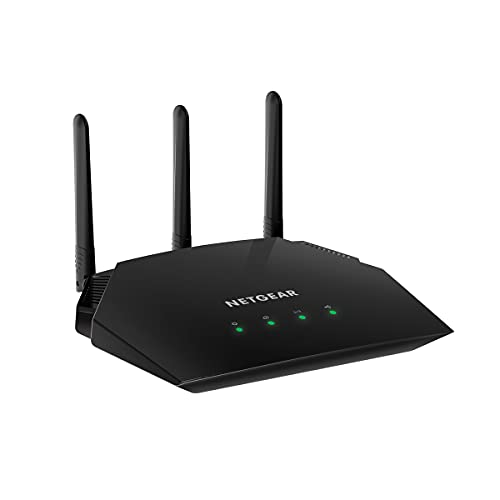
Description
NETGEAR Wireless Desktop Access Point (WAC124) – – Features & Prices in Saudi Arabia :
NETGEAR Wireless Desktop Access Point (WAC124) – WiFi 5 Dual-Band AC2000 Speed | 4 x 1G Ethernet Ports | Up to 64 Devices | WPA2 Security | Desktop | MU-MIMO | Supports 3 SSIDs | 802.11ac
Wireless Type
802.11a/b/g/n/ac
Series
WAC124-100NAS
Item model number
WAC124-100NAS
Item Weight
13.3 ounces
Product Dimensions
9.27 x 5.94 x 2.14 inches
Item Dimensions LxWxH
9.27 x 5.94 x 2.14 inches
Color
Black
Manufacturer
Netgear
ASIN
B07L1QMDKF
Is Discontinued By Manufacturer
No
Date First Available
November 21, 2018
Test video – NETGEAR Wireless Desktop Access Point (WAC124) – :
Product highlights :
Questions & Answers – NETGEAR Wireless Desktop Access Point (WAC124) – :
Technical specifications – NETGEAR Wireless Desktop Access Point (WAC124) – :
Brand
NETGEAR
Series
WAC124-100NAS
Frequency Band Class
Dual-Band
Wireless Type
802.11a/b/g/n/ac
Compatible Devices
iPhone, Laptop, Gaming Console
Included Components
,
Connectivity Technology
Wi-Fi, Ethernet
Color
Black
Item Weight
0.83 Pounds
Security Protocol
WPA2-PSK
Purchase advice :
-
Warranty :
Check the duration of the warranty and also the faults and defects it covers. Is it complete or limited? and What is included in the warranty (parts, repairs or both)?
-
Shipping :
Is delivery offered? And how long does it take to get delivered (Delivery time)
-
Proof of purchase :
Does the shop give you an invoice ?
-
After-sales service :
Do they have an after-sales service to have information about the installation or operation (instructions for use). Also in case of problem, it is the seller who takes charge or you must contact the manufacturer or supplier yourself.
_____________________________
F. F (verified owner) –
Block Netgear.com for local access, compatible with OpenWRT and DDWRT. – I grew up with DD-WRT routers but gave up that life after bricking a third one at our last house. I use this as an access point with a wired backhaul from our house to a barn. It wanted me to signup for a Netgear account which I refuse to do because nobody needs another place to have their data stolen from. There is a workaround, but it is a bit of a pain to deal with by blocking Netgear.com or cycling the ethernet connection during setup. Luckily, this is a set it and forget it item, so I’m willing to deal with it for the excellent price of the Amazon Warehouse returned version (which was still new for less than half the price).
F. F (verified owner) –
Block Netgear.com for local access, compatible with OpenWRT and DDWRT. – I grew up with DD-WRT routers but gave up that life after bricking a third one at our last house. I use this as an access point with a wired backhaul from our house to a barn. It wanted me to signup for a Netgear account which I refuse to do because nobody needs another place to have their data stolen from. There is a workaround, but it is a bit of a pain to deal with by blocking Netgear.com or cycling the ethernet connection during setup. Luckily, this is a set it and forget it item, so I’m willing to deal with it for the excellent price of the Amazon Warehouse returned version (which was still new for less than half the price).
C. L (verified owner) –
Works BUT NOT easy to configure. – Beware, If you bought this product for only the wireless access point capability (meaning, you already have a router), you will have issues at first. During initial setup, a firmware update will execute. This firmware update changes the default setting from AP to a router. This of course will cause a conflict with your existing router. To make it even more difficult, it will want you to sign on to its internet site to continue the configuration. However, because of the router conflict, your internet connection won’t work. Its very persistent until you physically unplug your lan cable from the WAN/Internet port. After that, you can login using the admin login/password. Then under advanced options, you can change to AP (disabling the router capabilities). You will then lose your internet connection again as it updates. Once you plug your Lan cable back in and reestablish your internet connection, you need to use your netgear login/password and can now change the ssid and its password. Fun! 🙂 I will say the wireless single is decent (2.4 and 5 ghz).
E. C (verified owner) –
Mostly functional but the user interface is from 2005 – The installation experience of this Netgear product leaves a lot to be desired:
C. L (verified owner) –
Works BUT NOT easy to configure. – Beware, If you bought this product for only the wireless access point capability (meaning, you already have a router), you will have issues at first. During initial setup, a firmware update will execute. This firmware update changes the default setting from AP to a router. This of course will cause a conflict with your existing router. To make it even more difficult, it will want you to sign on to its internet site to continue the configuration. However, because of the router conflict, your internet connection won’t work. Its very persistent until you physically unplug your lan cable from the WAN/Internet port. After that, you can login using the admin login/password. Then under advanced options, you can change to AP (disabling the router capabilities). You will then lose your internet connection again as it updates. Once you plug your Lan cable back in and reestablish your internet connection, you need to use your netgear login/password and can now change the ssid and its password. Fun! 🙂 I will say the wireless single is decent (2.4 and 5 ghz).
E. C (verified owner) –
Mostly functional but the user interface is from 2005 – The installation experience of this Netgear product leaves a lot to be desired: