Minisopuru USB C Hub – 4 Port – Features & Prices in Saudi Arabia :
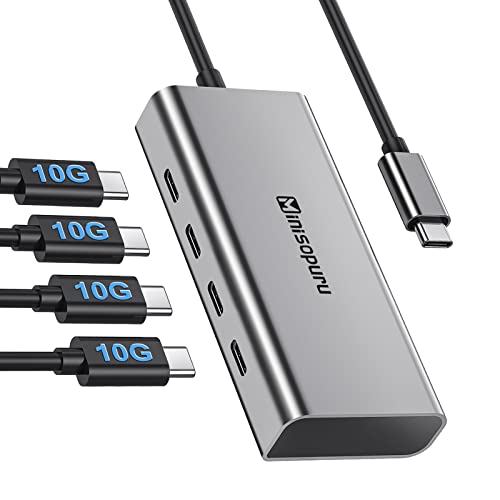
Minisopuru USB C Hub – 4 Port USB C Hub for Laptop, Data Transfer Only (Not Support Power and Video) USB C to USB C Hub 10Gbps USB Hub Multiport Adapter for MacBook Pro,Chromebook, iMac, MacBook Air
Package Dimensions
5.08 x 2.6 x 0.67 inches
Item Weight
2.89 ounces
Manufacturer
minisopuru
ASIN
B0B3J1WPN6
Country of Origin
China
Date First Available
June 8, 2022
Test video – Minisopuru USB C Hub – 4 Port :
Product highlights :
⚡【Extra 4 USB C Data Ports】: Equipped with 4 USB3.2 Gen1 data ports, the Minisopuru USB C Hub can easily connect multiple USB C devices to the laptop and quickly transfer files. A single USB C port connects more Type-C external devices including hard drives, flash drives, mice, etc. ( # Note: The USB C port cannot charge the laptop. #)
⚡【10Gbps Superspeed Transmission】: USB C Hub expands a single Type-c port into 4 USB C ports up to 10Gbps, transferring or backing up your data easily and quickly. Complete work efficiently in seconds, Minisopuru USB C to USB c Hub is compatible with USB2.0. Please note that to achieve 10Gbps speed, you need to configure the corresponding data cable.
⚡【Plug and Play】: This USB C HUB is equipped with multiple USB c ports to make the device more diverse to meet daily needs. Easy to use, plug and play, no need to install additional drives to expand multiple USB c ports. The USB C port ONLY supports data transfer, NOT computer power charging and video output.
⚡【Strong Compatibility】: USB-c hub works for all devices configured with a USB c port. Compatible with: Macbook pro 16 inch, 2021/2020/2019/2018/2017/2016 Macbook Pro, 2020/2018 Macbook Air, 2021/2019/2017 iMac, 2021/2020/2018 iPad Pro, Microsoft Surface Laptop 3/Surface Pro 8/ Go, Chromebook, Google PixelBook Go, Galaxy Tab Pro S, HP Spectre Convertible, Razer Blade, Huawei Matebook, Thunderbolt 3/4, USB4 devices.
【NOTE BEFORE PURCHASE】: This USB c hub multiport adapter ONLY supports data transfer, NOT support Power Delivery and DisplayPort Transmission, which is mean it cannot connect with the monitor and CAN NOT support Power Delivery, not compatible with the charger adapter. ( # We recommend not inserting three external hard drives at the same time. # )
Questions & Answers – Minisopuru USB C Hub – 4 Port :
➕ What is the price of Minisopuru USB C Hub – 4 Port in Saudi Arabia ?
The price of Minisopuru USB C Hub – 4 Port in-store is 100 SAR VAT.
➕ When Minisopuru USB C Hub – 4 Port was released ?
The release date was June 8, 2022.
➕ What is the price of Minisopuru USB C Hub – 4 Port cheap used ?
The price of Minisopuru USB C Hub – 4 Port used is 70 SAR VAT.
➕ What are the main characteristics of Minisopuru USB C Hub – 4 Port ?
Special specifications :
⚡【Extra 4 USB C Data Ports】: Equipped with 4 USB3.2 Gen1 data ports, the Minisopuru USB C Hub can easily connect multiple USB C devices to the laptop and quickly transfer files. A single USB C port connects more Type-C external devices including hard drives, flash drives, mice, etc. ( # Note: The USB C port cannot charge the laptop. #)
➕ Is it interesting to buy this product ?
The best people who can answer you are customers who have already bought and tested this product (See Customer Reviews). This product is rated 4.3 / 5 on Amazon.
➕ Where to buy Minisopuru USB C Hub – 4 Port in Saudi Arabia ?
Technical specifications – Minisopuru USB C Hub – 4 Port :
Brand
minisopuru
Color
Grey
Hardware Interface
USB, USB Type C, Thunderbolt, USB 2.0
Compatible Devices
Tablets, Monitors, Laptops
Data Transfer Rate
10 Gigabits Per Second
Purchase advice :
Warranty :
Check the duration of the warranty and also the faults and defects it covers. Is it complete or limited? and What is included in the warranty (parts, repairs or both)?
Shipping :
Is delivery offered? And how long does it take to get delivered (Delivery time)
Proof of purchase :
Does the shop give you an invoice ?
After-sales service :
Do they have an after-sales service to have information about the installation or operation (instructions for use). Also in case of problem, it is the seller who takes charge or you must contact the manufacturer or supplier yourself.
_____________________________
16 reviews for Minisopuru USB C Hub – 4 Port
Rated 5 out of 5
D. M (verified owner)–
Must have for iMac – Design of this hub integrates well with the iMac. Solid construction and matching colors are a plus!
Rated 5 out of 5
Z. A (verified owner)–
ABSOLUTE NECESSITY FOR NEW iMAC’S. – Great design. Top of the hub has a recessed top to allow iMac base to fit snugly in keeping it from sliding around. I still have need of USB drives and this makes it easy. I run Parallels On my Mac and there is a provision to allow the use of the hub with both Mac and Windows software.
Rated 5 out of 5
J. B (verified owner)–
Nice addition – Yes
Rated 5 out of 5
J. B (verified owner)–
Perfect Match! – Perfect Match! Love that they didn’t put their logo on the face of the unit like I’ve seen on other ones. Now it’s hidden where the iMac sits in out of view. The bottom rubbers are grippy so you iMac doesn’t slide around so easily.
Rated 5 out of 5
P. C (verified owner)–
Beautiful little gem – Excellent device. Plug and play
Rated 5 out of 5
K. E (verified owner)–
Great accessory for an iMac. – It fits under the foot of my iMac and looks like it’s a part of it, with no noticeable cords. All the functions I need and works as good as described. Another major feature is it holds an interior SSD, so I setup a backup schedule and my iMac backs up to it. Because it’s only going to be used for backup I installed a name brand SSD that’s not as fast as gamers would want, so it was a great deal cheaper.
Rated 4 out of 5
K. B (verified owner)–
Fast download – Didn’t work for all my sd cards but the ones it did it was fast at downloading. Great product.
Rated 5 out of 5
D. M (verified owner)–
Must have for iMac – Design of this hub integrates well with the iMac. Solid construction and matching colors are a plus!
Rated 5 out of 5
J. B (verified owner)–
Perfect Match! – Perfect Match! Love that they didn’t put their logo on the face of the unit like I’ve seen on other ones. Now it’s hidden where the iMac sits in out of view. The bottom rubbers are grippy so you iMac doesn’t slide around so easily.
Rated 4 out of 5
K. B (verified owner)–
Fast download – Didn’t work for all my sd cards but the ones it did it was fast at downloading. Great product.
Rated 5 out of 5
P. C (verified owner)–
Beautiful little gem – Excellent device. Plug and play
Rated 4 out of 5
O. L (verified owner)–
There’s a lot to complain about, but it works well. – The bad:
Rated 4 out of 5
O. L (verified owner)–
There’s a lot to complain about, but it works well. – The bad:
Rated 5 out of 5
J. B (verified owner)–
Nice addition – Yes
Rated 5 out of 5
K. E (verified owner)–
Great accessory for an iMac. – It fits under the foot of my iMac and looks like it’s a part of it, with no noticeable cords. All the functions I need and works as good as described. Another major feature is it holds an interior SSD, so I setup a backup schedule and my iMac backs up to it. Because it’s only going to be used for backup I installed a name brand SSD that’s not as fast as gamers would want, so it was a great deal cheaper.
Rated 5 out of 5
Z. A (verified owner)–
ABSOLUTE NECESSITY FOR NEW iMAC’S. – Great design. Top of the hub has a recessed top to allow iMac base to fit snugly in keeping it from sliding around. I still have need of USB drives and this makes it easy. I run Parallels On my Mac and there is a provision to allow the use of the hub with both Mac and Windows software.

D. M (verified owner) –
Must have for iMac – Design of this hub integrates well with the iMac. Solid construction and matching colors are a plus!
Z. A (verified owner) –
ABSOLUTE NECESSITY FOR NEW iMAC’S. – Great design. Top of the hub has a recessed top to allow iMac base to fit snugly in keeping it from sliding around. I still have need of USB drives and this makes it easy. I run Parallels On my Mac and there is a provision to allow the use of the hub with both Mac and Windows software.
J. B (verified owner) –
Nice addition – Yes
J. B (verified owner) –
Perfect Match! – Perfect Match! Love that they didn’t put their logo on the face of the unit like I’ve seen on other ones. Now it’s hidden where the iMac sits in out of view. The bottom rubbers are grippy so you iMac doesn’t slide around so easily.
P. C (verified owner) –
Beautiful little gem – Excellent device. Plug and play
K. E (verified owner) –
Great accessory for an iMac. – It fits under the foot of my iMac and looks like it’s a part of it, with no noticeable cords. All the functions I need and works as good as described. Another major feature is it holds an interior SSD, so I setup a backup schedule and my iMac backs up to it. Because it’s only going to be used for backup I installed a name brand SSD that’s not as fast as gamers would want, so it was a great deal cheaper.
K. B (verified owner) –
Fast download – Didn’t work for all my sd cards but the ones it did it was fast at downloading. Great product.
D. M (verified owner) –
Must have for iMac – Design of this hub integrates well with the iMac. Solid construction and matching colors are a plus!
J. B (verified owner) –
Perfect Match! – Perfect Match! Love that they didn’t put their logo on the face of the unit like I’ve seen on other ones. Now it’s hidden where the iMac sits in out of view. The bottom rubbers are grippy so you iMac doesn’t slide around so easily.
K. B (verified owner) –
Fast download – Didn’t work for all my sd cards but the ones it did it was fast at downloading. Great product.
P. C (verified owner) –
Beautiful little gem – Excellent device. Plug and play
O. L (verified owner) –
There’s a lot to complain about, but it works well. – The bad:
O. L (verified owner) –
There’s a lot to complain about, but it works well. – The bad:
J. B (verified owner) –
Nice addition – Yes
K. E (verified owner) –
Great accessory for an iMac. – It fits under the foot of my iMac and looks like it’s a part of it, with no noticeable cords. All the functions I need and works as good as described. Another major feature is it holds an interior SSD, so I setup a backup schedule and my iMac backs up to it. Because it’s only going to be used for backup I installed a name brand SSD that’s not as fast as gamers would want, so it was a great deal cheaper.
Z. A (verified owner) –
ABSOLUTE NECESSITY FOR NEW iMAC’S. – Great design. Top of the hub has a recessed top to allow iMac base to fit snugly in keeping it from sliding around. I still have need of USB drives and this makes it easy. I run Parallels On my Mac and there is a provision to allow the use of the hub with both Mac and Windows software.