Jlink WiFi 6 Router – 5Ghz 1.8 – Features & Prices in Saudi Arabia :
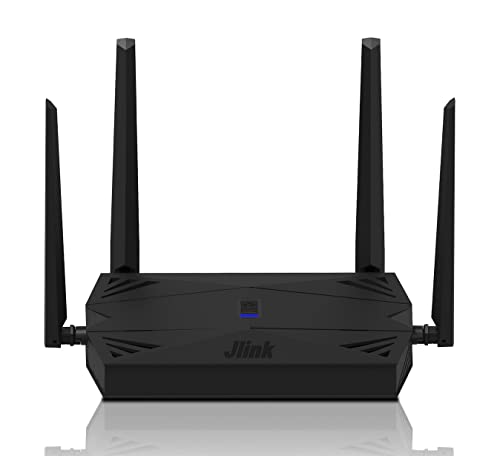
Jlink WiFi 6 Router – 5Ghz 1.8 Gbps Wireless Router AX1800 Smart WiFi Router, 8-Stream 8K Computer Router for Home Internet & Gaming, Dual Band Gigabit Router Up to 1700 sq. ft, TWT, WPA3, 128 devices
Package Dimensions
10.98 x 10.79 x 1.81 inches
Item Weight
1.59 pounds
ASIN
B09YH69WN5
Item model number
UNR030Z
Date First Available
April 21, 2022
Manufacturer
Unionman Technology Co., Ltd
Country of Origin
China
Test video – Jlink WiFi 6 Router – 5Ghz 1.8 :
Product highlights :
Dual-Band 5G WiFi 6 with 1.8 Gbps Wireless Speeds – AX1800 dual band WiFi router with faster speeds up to 1.8 Gbps. Enjoy a smooth and stable 5Ghz, 2.4Ghz compliant WiFi connection. Jlink WiFi 6 router allows you to access the fastest internet at home or in the office, for video streaming or gaming, and you won’t need to worry about a slow network anymore.
Connect 128 devices simultaneously with Advanced WPA3 IPV6 Wireless Security – Jlink wireless router is able to communicate more data to up to 128 devices and achieve a coverage of up to 1700 sq. ft simultaneously by using TWT technology, which allows your device not to constantly search for data signals. This also greatly increases battery life. The smart WiFi router also features WPA3 +IPV6 encryption protocol to guarantee your password and network security are as solid as a rock.
Standard 8-Stream WiFi Router with MU-MIMO – Jlink computer router communicates data to multiple devices simultaneously with revolutionary MU-MIMO tech, which allows your whole family to connect without slowing down. 8 WiFi streams deliver high performance and reliability for enjoying uninterrupted video calls, 8K movies and more on all your devices at the same time.
OFDMA Technology & 1000Mbps Wired Internet Speeds – Jlink Dual Band Gigabit Router simultaneously talks to all your streaming, gaming, mobile and smart home devices that are connected to your network while also reducing lag using revolutionary OFDMA technology. This enhances your home networks by providing greater capacity to connect more devices ( Quantity of admin interfaces: 4 ports, 1 Gigabit WAN Port, 3 Gigabit LAN Ports).
Smart Matching & Easy to Set Up – You can set it up with the web browser in just 5 minutes. We’ve provided an extra network cable; Storage Memory of up to 256MB; The ABS material of our wireless router allows you to purchase with confidence (Note: Incompatible with Alexa or other apps).
➕ What is the price of Jlink WiFi 6 Router - 5Ghz 1.8 in Saudi Arabia ?
The price of Jlink WiFi 6 Router – 5Ghz 1.8 in-store is 110 SAR VAT.
➕ When Jlink WiFi 6 Router - 5Ghz 1.8 was released ?
The release date was April 21, 2022.
➕ What is the price of Jlink WiFi 6 Router - 5Ghz 1.8 cheap used ?
The price of Jlink WiFi 6 Router – 5Ghz 1.8 used is 70 SAR VAT.
➕ What are the main characteristics of Jlink WiFi 6 Router - 5Ghz 1.8 ?
Special specifications :
Dual-Band 5G WiFi 6 with 1.8 Gbps Wireless Speeds – AX1800 dual band WiFi router with faster speeds up to 1.8 Gbps. Enjoy a smooth and stable 5Ghz, 2.4Ghz compliant WiFi connection. Jlink WiFi 6 router allows you to access the fastest internet at home or in the office, for video streaming or gaming, and you won’t need to worry about a slow network anymore.
➕ Is it interesting to buy this product ?
The best people who can answer you are customers who have already bought and tested this product (See Customer Reviews). This product is rated 3.8 / 5 on Amazon.
➕ Where to buy Jlink WiFi 6 Router - 5Ghz 1.8 in Saudi Arabia ?
Power Adapter, RJ45 Ethernet Cable, Wireless Router, Quick Installation Guide
Connectivity Technology
Wi-Fi
Operating System
,
Security Protocol
WPA3, IPV6
Number of Ports
4
Control Method
Touch
Purchase advice :
Warranty :
Check the duration of the warranty and also the faults and defects it covers. Is it complete or limited? and What is included in the warranty (parts, repairs or both)?
Shipping :
Is delivery offered? And how long does it take to get delivered (Delivery time)
Proof of purchase :
Does the shop give you an invoice ?
After-sales service :
Do they have an after-sales service to have information about the installation or operation (instructions for use). Also in case of problem, it is the seller who takes charge or you must contact the manufacturer or supplier yourself.
_____________________________
10 reviews for Jlink WiFi 6 Router – 5Ghz 1.8
Rated 3 out of 5
M. B (verified owner)–
Hard to complain about a $40 Wifi6 router – I knew what to expect. And I got that. Very inexpensive outer case. GUI is very basic, many things that I wanted to change or at least have eyes on were completely not available. No way to manually flash the firmware. Gave it 24 hours to stabilize and I was not able to pull more than half of my subscribed data rates. Plugging directly into the modem with an end user device I was getting over what I expected. The company’s website is either not working or looks like it was designed by someone for a class project. Still it did work and I paid $40 for it
Rated 4 out of 5
S. R (verified owner)–
Not to bad – I hooked up to verify it works and check the speeds. Overall pretty impressive for the money.
Rated 4 out of 5
H. R (verified owner)–
A moderately usable router – I bought this router to try WiFi 6 to see if that would change my speed to my work computer and other devices in my home. Initially this router actually decreased speed and reliability throughout the house but I do have it placed at the far end of my home. Devices would drop connection, and videos would buffer on smart TVs. I added my previous mesh network router and satellite devices as access points and found the wireless coverage for the entire network to be what we need. The benefit I get from having more network ports on the back of the router allows me to have my work computer hardwired and I have not had any issues with poor signal for a work meeting since installing the router. My previous mesh router only had 1 Ethernet port. This router has 3 available Ethernet ports.
Rated 3 out of 5
M. B (verified owner)–
Hard to complain about a $40 Wifi6 router – I knew what to expect. And I got that. Very inexpensive outer case. GUI is very basic, many things that I wanted to change or at least have eyes on were completely not available. No way to manually flash the firmware. Gave it 24 hours to stabilize and I was not able to pull more than half of my subscribed data rates. Plugging directly into the modem with an end user device I was getting over what I expected. The company’s website is either not working or looks like it was designed by someone for a class project. Still it did work and I paid $40 for it
Rated 5 out of 5
F. G (verified owner)–
Repeater for existing network – My husband got this to work as a repeater for an existing network. He says that from unboxing to setup it took five minutes. He says the user interface was straightforward and easy to use. It is currently working great and he will update the review if anything changes.
Rated 5 out of 5
F. G (verified owner)–
Repeater for existing network – My husband got this to work as a repeater for an existing network. He says that from unboxing to setup it took five minutes. He says the user interface was straightforward and easy to use. It is currently working great and he will update the review if anything changes.
Rated 4 out of 5
A. K (verified owner)–
Excellent, cost-effective router; signal degradation when walls are involved, though – I use this router in bridge mode, which means that my main ISP router does all the heavy lifting (serving DHCP, etc.), and this router just passes that information through. You can also set it up as a full-fledged router where it is a DHCP server, or as a repeater, where it picks up your existing WiFi signal and rebroadcasts it to extend the range. My main need was to extend WiFi access to a part of the house that did not have it, specifically my work-from-home wife’s office. This router connects to my primary router via Ethernet.
Rated 4 out of 5
A. K (verified owner)–
Excellent, cost-effective router; signal degradation when walls are involved, though – I use this router in bridge mode, which means that my main ISP router does all the heavy lifting (serving DHCP, etc.), and this router just passes that information through. You can also set it up as a full-fledged router where it is a DHCP server, or as a repeater, where it picks up your existing WiFi signal and rebroadcasts it to extend the range. My main need was to extend WiFi access to a part of the house that did not have it, specifically my work-from-home wife’s office. This router connects to my primary router via Ethernet.
Rated 4 out of 5
H. R (verified owner)–
A moderately usable router – I bought this router to try WiFi 6 to see if that would change my speed to my work computer and other devices in my home. Initially this router actually decreased speed and reliability throughout the house but I do have it placed at the far end of my home. Devices would drop connection, and videos would buffer on smart TVs. I added my previous mesh network router and satellite devices as access points and found the wireless coverage for the entire network to be what we need. The benefit I get from having more network ports on the back of the router allows me to have my work computer hardwired and I have not had any issues with poor signal for a work meeting since installing the router. My previous mesh router only had 1 Ethernet port. This router has 3 available Ethernet ports.
Rated 4 out of 5
S. R (verified owner)–
Not to bad – I hooked up to verify it works and check the speeds. Overall pretty impressive for the money.

M. B (verified owner) –
Hard to complain about a $40 Wifi6 router – I knew what to expect. And I got that. Very inexpensive outer case. GUI is very basic, many things that I wanted to change or at least have eyes on were completely not available. No way to manually flash the firmware. Gave it 24 hours to stabilize and I was not able to pull more than half of my subscribed data rates. Plugging directly into the modem with an end user device I was getting over what I expected. The company’s website is either not working or looks like it was designed by someone for a class project. Still it did work and I paid $40 for it
S. R (verified owner) –
Not to bad – I hooked up to verify it works and check the speeds. Overall pretty impressive for the money.
H. R (verified owner) –
A moderately usable router – I bought this router to try WiFi 6 to see if that would change my speed to my work computer and other devices in my home. Initially this router actually decreased speed and reliability throughout the house but I do have it placed at the far end of my home. Devices would drop connection, and videos would buffer on smart TVs. I added my previous mesh network router and satellite devices as access points and found the wireless coverage for the entire network to be what we need. The benefit I get from having more network ports on the back of the router allows me to have my work computer hardwired and I have not had any issues with poor signal for a work meeting since installing the router. My previous mesh router only had 1 Ethernet port. This router has 3 available Ethernet ports.
M. B (verified owner) –
Hard to complain about a $40 Wifi6 router – I knew what to expect. And I got that. Very inexpensive outer case. GUI is very basic, many things that I wanted to change or at least have eyes on were completely not available. No way to manually flash the firmware. Gave it 24 hours to stabilize and I was not able to pull more than half of my subscribed data rates. Plugging directly into the modem with an end user device I was getting over what I expected. The company’s website is either not working or looks like it was designed by someone for a class project. Still it did work and I paid $40 for it
F. G (verified owner) –
Repeater for existing network – My husband got this to work as a repeater for an existing network. He says that from unboxing to setup it took five minutes. He says the user interface was straightforward and easy to use. It is currently working great and he will update the review if anything changes.
F. G (verified owner) –
Repeater for existing network – My husband got this to work as a repeater for an existing network. He says that from unboxing to setup it took five minutes. He says the user interface was straightforward and easy to use. It is currently working great and he will update the review if anything changes.
A. K (verified owner) –
Excellent, cost-effective router; signal degradation when walls are involved, though – I use this router in bridge mode, which means that my main ISP router does all the heavy lifting (serving DHCP, etc.), and this router just passes that information through. You can also set it up as a full-fledged router where it is a DHCP server, or as a repeater, where it picks up your existing WiFi signal and rebroadcasts it to extend the range. My main need was to extend WiFi access to a part of the house that did not have it, specifically my work-from-home wife’s office. This router connects to my primary router via Ethernet.
A. K (verified owner) –
Excellent, cost-effective router; signal degradation when walls are involved, though – I use this router in bridge mode, which means that my main ISP router does all the heavy lifting (serving DHCP, etc.), and this router just passes that information through. You can also set it up as a full-fledged router where it is a DHCP server, or as a repeater, where it picks up your existing WiFi signal and rebroadcasts it to extend the range. My main need was to extend WiFi access to a part of the house that did not have it, specifically my work-from-home wife’s office. This router connects to my primary router via Ethernet.
H. R (verified owner) –
A moderately usable router – I bought this router to try WiFi 6 to see if that would change my speed to my work computer and other devices in my home. Initially this router actually decreased speed and reliability throughout the house but I do have it placed at the far end of my home. Devices would drop connection, and videos would buffer on smart TVs. I added my previous mesh network router and satellite devices as access points and found the wireless coverage for the entire network to be what we need. The benefit I get from having more network ports on the back of the router allows me to have my work computer hardwired and I have not had any issues with poor signal for a work meeting since installing the router. My previous mesh router only had 1 Ethernet port. This router has 3 available Ethernet ports.
S. R (verified owner) –
Not to bad – I hooked up to verify it works and check the speeds. Overall pretty impressive for the money.