IOGEAR 4×2 USB 3.0 Peripheral Sharing Switch – Features & Prices in Saudi Arabia :
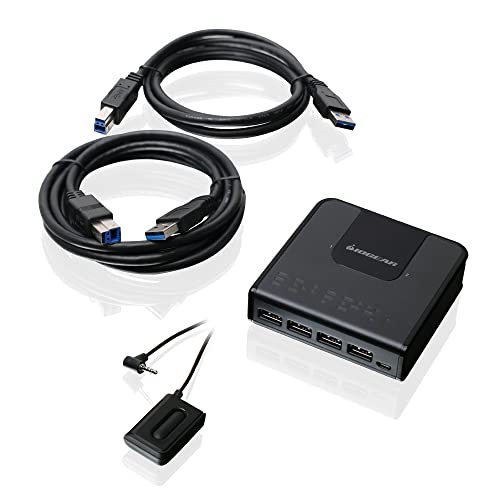
IOGEAR 4×2 USB 3.0 Peripheral Sharing Switch – Share 4 USB Devices Between 2 Computers – LED Indicators – Cables n Remote Included – PC – MAC – Printer – Scanner – Mouse/Keyboard and More – GUS432
Operation Mode
OFF-NONE-ON
Current Rating
5 Amps
Operating Voltage
120 Volts
Contact Type
Normally Closed
Connector Type
Usb 3.0
Brand
IOGEAR
Material
Chrome
Item Dimensions LxWxH
3.75 x 1.06 x 3.75 inches
Mounting Type
Panel Mount
Actuator Type
Push Button
Contact Material
Plastic
International Protection Rating
IP00
Number of Positions
4
Specification Met
No
Lower Temperature Rating
32 Degrees Fahrenheit
Upper Temperature Rating
100 Degrees Fahrenheit
Control Method
Remote
Color
Black
Unit Count
1.0 Count
Number of Items
1
Series
2×4 USB 3.0 Sharing Switch
Item model number
GUS432
Operating System
Windows; Linix; Mac OS
Item Weight
4.3 ounces
Product Dimensions
3.75 x 1.06 x 3.75 inches
Manufacturer
IOGEAR
ASIN
B00Y3CTEG2
Country of Origin
China
Is Discontinued By Manufacturer
No
Date First Available
May 20, 2015
Test video – IOGEAR 4×2 USB 3.0 Peripheral Sharing Switch :
Product highlights :
Share four USB peripheral devices between two computers
Easily switch devices from on computer to another with the press of a button
USB 3. 0 compliant, supporting data transfer rates of up to 5Gbps
LED indicates which computer is active
Over-current protection
Supports hot-plugging which allows easily add or remove computers connected to the installation without having to power down the switch
➕ What is the price of IOGEAR 4x2 USB 3.0 Peripheral Sharing Switch in Saudi Arabia ?
The price of IOGEAR 4×2 USB 3.0 Peripheral Sharing Switch in-store is 220 SAR VAT.
➕ When IOGEAR 4x2 USB 3.0 Peripheral Sharing Switch was released ?
The release date was May 20, 2015.
➕ What is the price of IOGEAR 4x2 USB 3.0 Peripheral Sharing Switch cheap used ?
The price of IOGEAR 4×2 USB 3.0 Peripheral Sharing Switch used is 150 SAR VAT.
➕ What are the main characteristics of IOGEAR 4x2 USB 3.0 Peripheral Sharing Switch ?
Special specifications :
Share four USB peripheral devices between two computers
➕ Is it interesting to buy this product ?
The best people who can answer you are customers who have already bought and tested this product (See Customer Reviews). This product is rated 4.3 / 5 on Amazon.
➕ Where to buy IOGEAR 4x2 USB 3.0 Peripheral Sharing Switch in Saudi Arabia ?
Check the duration of the warranty and also the faults and defects it covers. Is it complete or limited? and What is included in the warranty (parts, repairs or both)?
Shipping :
Is delivery offered? And how long does it take to get delivered (Delivery time)
Proof of purchase :
Does the shop give you an invoice ?
After-sales service :
Do they have an after-sales service to have information about the installation or operation (instructions for use). Also in case of problem, it is the seller who takes charge or you must contact the manufacturer or supplier yourself.
_____________________________
14 reviews for IOGEAR 4×2 USB 3.0 Peripheral Sharing Switch
Rated 5 out of 5
K. M (verified owner)–
Works great to support multiple laptop setup – This is exactly what I needed. 4 USB ports and sets up 2 separate laptops. Excellent for sharing mouse, keyboard, etc!
Rated 5 out of 5
N. F (verified owner)–
The best USB device switch – This is from my second purchase. My current one is wearing out after a massive amount of usage.
Rated 4 out of 5
E. A (verified owner)–
Works great, pretty reliable – I’ve used this switcher between a MacBook and Win7 desktop and then Win10 Dell laptop and Win7 desktop. The MacBook and laptop were connected through a Dell usb-c powered dock. The desktop has an Asus Z170A motherboard, connected to a usb 3.0 port. I have the unit powered with the mini-usb plug. It switches a backlit Ducky keyboard and Razer mouse between two machines.
Rated 4 out of 5
K. M (verified owner)–
Useful but has some flaws in it’s layout and price. – I got this to switch the mic on my Astro a50s between my PS5 and my PC and it works well for that so far but I have some issues with how the device’s input layout, predominantly the external power input being on the front of the device and the button to switch inputs being feed from the back of it. In some setups I’m sure this is fine but I feel that the majority of people will want the switch to be connected to the front and the ability to connect a dedicated power source in the back of the device. Also $40 is very steep for a usb switch that has an 8 year old design with no USB 3 compatibility and while IOGEAR does offer an newer version that one will run you $80 which is frankly unacceptable and I am lucky I did not need this for a USB 3 device. The build quality also feels middling for a $40 item, with the worst part being the button’s cable, it is very thin and feels like I could accidently pull it out or rip it most cheep wired ear buds come with wires that feel strong than this switch which is the only way to switch outputs so if this cable breaks you are out of luck as there is no switch on the device it’s self. The one reason I bought this over cheaper options is many of those $20 dollar usb switches seems to have no room for electrical protection and thus might short out the devices you have hooked up to them and several reviews back my theory on those cheaper switches up. I really wish companies would make this type of switch in a 1in to 2out or 2in to 2out configuration as I don’t need that many slots. Overall I would recommend this only if you don’t need USB 3 compatibility AND want to play it safe with potential the devices you hook up, really want/need a device with a wired switch, or if it goes on sale for less than $30.
Rated 5 out of 5
T. J (verified owner)–
Very Nice Product – Can switch between computers in a snap and works flawlessly. —- (UPDATE: It’s 11/05/22 and the issue I’m having has been happening for months now. The problem is it stops working from time to time. The pc will suddenly not recognize both the keyboard and the mouse and then starts working again in a couple of seconds. Could it be because I switch from one pc to another a lot? Whatever the issue is, it’s becoming harder and harder to use and be efficient while working. Can’t remember exactly if I’ve had this for a year or two but it’s time to look for another one. Thought I will get more than 2 years from it though
Rated 4 out of 5
E. A (verified owner)–
Works great, pretty reliable – I’ve used this switcher between a MacBook and Win7 desktop and then Win10 Dell laptop and Win7 desktop. The MacBook and laptop were connected through a Dell usb-c powered dock. The desktop has an Asus Z170A motherboard, connected to a usb 3.0 port. I have the unit powered with the mini-usb plug. It switches a backlit Ducky keyboard and Razer mouse between two machines.
Rated 4 out of 5
A. B (verified owner)–
Works great with Corsair K95 – I bought this to use my Corsair K95 and Logitech G502 on my work laptop and personal computer. It’s worth noting, before I started using the micro USB power port, any action involving long clicks (highlighting text, dragging windows) would randomly not work. Also an occasional keystroke wouldn’t register. Providing dedicated power has resolved all these issues.
Rated 4 out of 5
A. B (verified owner)–
Works great with Corsair K95 – I bought this to use my Corsair K95 and Logitech G502 on my work laptop and personal computer. It’s worth noting, before I started using the micro USB power port, any action involving long clicks (highlighting text, dragging windows) would randomly not work. Also an occasional keystroke wouldn’t register. Providing dedicated power has resolved all these issues.
Rated 5 out of 5
K. M (verified owner)–
Works great to support multiple laptop setup – This is exactly what I needed. 4 USB ports and sets up 2 separate laptops. Excellent for sharing mouse, keyboard, etc!
Rated 4 out of 5
K. M (verified owner)–
Useful but has some flaws in it’s layout and price. – I got this to switch the mic on my Astro a50s between my PS5 and my PC and it works well for that so far but I have some issues with how the device’s input layout, predominantly the external power input being on the front of the device and the button to switch inputs being feed from the back of it. In some setups I’m sure this is fine but I feel that the majority of people will want the switch to be connected to the front and the ability to connect a dedicated power source in the back of the device. Also $40 is very steep for a usb switch that has an 8 year old design with no USB 3 compatibility and while IOGEAR does offer an newer version that one will run you $80 which is frankly unacceptable and I am lucky I did not need this for a USB 3 device. The build quality also feels middling for a $40 item, with the worst part being the button’s cable, it is very thin and feels like I could accidently pull it out or rip it most cheep wired ear buds come with wires that feel strong than this switch which is the only way to switch outputs so if this cable breaks you are out of luck as there is no switch on the device it’s self. The one reason I bought this over cheaper options is many of those $20 dollar usb switches seems to have no room for electrical protection and thus might short out the devices you have hooked up to them and several reviews back my theory on those cheaper switches up. I really wish companies would make this type of switch in a 1in to 2out or 2in to 2out configuration as I don’t need that many slots. Overall I would recommend this only if you don’t need USB 3 compatibility AND want to play it safe with potential the devices you hook up, really want/need a device with a wired switch, or if it goes on sale for less than $30.
Rated 5 out of 5
T. J (verified owner)–
Very Nice Product – Can switch between computers in a snap and works flawlessly. —- (UPDATE: It’s 11/05/22 and the issue I’m having has been happening for months now. The problem is it stops working from time to time. The pc will suddenly not recognize both the keyboard and the mouse and then starts working again in a couple of seconds. Could it be because I switch from one pc to another a lot? Whatever the issue is, it’s becoming harder and harder to use and be efficient while working. Can’t remember exactly if I’ve had this for a year or two but it’s time to look for another one. Thought I will get more than 2 years from it though
Rated 5 out of 5
N. F (verified owner)–
The best USB device switch – This is from my second purchase. My current one is wearing out after a massive amount of usage.
Rated 5 out of 5
G. G (verified owner)–
This just works! – Had this since 2016 and in late 2022 it still works perfectly. I have experienced similar issues that others mention in the reviews with it sometimes not recognizing my PC or Laptop when I hit the button. Typically I have to toggle it back and forth once or twice or wait a few seconds and it begins working again. Not a huge issue and overall I got my moneys worth and it still works 6 years later!
Rated 5 out of 5
G. G (verified owner)–
This just works! – Had this since 2016 and in late 2022 it still works perfectly. I have experienced similar issues that others mention in the reviews with it sometimes not recognizing my PC or Laptop when I hit the button. Typically I have to toggle it back and forth once or twice or wait a few seconds and it begins working again. Not a huge issue and overall I got my moneys worth and it still works 6 years later!

K. M (verified owner) –
Works great to support multiple laptop setup – This is exactly what I needed. 4 USB ports and sets up 2 separate laptops. Excellent for sharing mouse, keyboard, etc!
N. F (verified owner) –
The best USB device switch – This is from my second purchase. My current one is wearing out after a massive amount of usage.
E. A (verified owner) –
Works great, pretty reliable – I’ve used this switcher between a MacBook and Win7 desktop and then Win10 Dell laptop and Win7 desktop. The MacBook and laptop were connected through a Dell usb-c powered dock. The desktop has an Asus Z170A motherboard, connected to a usb 3.0 port. I have the unit powered with the mini-usb plug. It switches a backlit Ducky keyboard and Razer mouse between two machines.
K. M (verified owner) –
Useful but has some flaws in it’s layout and price. – I got this to switch the mic on my Astro a50s between my PS5 and my PC and it works well for that so far but I have some issues with how the device’s input layout, predominantly the external power input being on the front of the device and the button to switch inputs being feed from the back of it. In some setups I’m sure this is fine but I feel that the majority of people will want the switch to be connected to the front and the ability to connect a dedicated power source in the back of the device. Also $40 is very steep for a usb switch that has an 8 year old design with no USB 3 compatibility and while IOGEAR does offer an newer version that one will run you $80 which is frankly unacceptable and I am lucky I did not need this for a USB 3 device. The build quality also feels middling for a $40 item, with the worst part being the button’s cable, it is very thin and feels like I could accidently pull it out or rip it most cheep wired ear buds come with wires that feel strong than this switch which is the only way to switch outputs so if this cable breaks you are out of luck as there is no switch on the device it’s self. The one reason I bought this over cheaper options is many of those $20 dollar usb switches seems to have no room for electrical protection and thus might short out the devices you have hooked up to them and several reviews back my theory on those cheaper switches up. I really wish companies would make this type of switch in a 1in to 2out or 2in to 2out configuration as I don’t need that many slots. Overall I would recommend this only if you don’t need USB 3 compatibility AND want to play it safe with potential the devices you hook up, really want/need a device with a wired switch, or if it goes on sale for less than $30.
T. J (verified owner) –
Very Nice Product – Can switch between computers in a snap and works flawlessly. —- (UPDATE: It’s 11/05/22 and the issue I’m having has been happening for months now. The problem is it stops working from time to time. The pc will suddenly not recognize both the keyboard and the mouse and then starts working again in a couple of seconds. Could it be because I switch from one pc to another a lot? Whatever the issue is, it’s becoming harder and harder to use and be efficient while working. Can’t remember exactly if I’ve had this for a year or two but it’s time to look for another one. Thought I will get more than 2 years from it though
E. A (verified owner) –
Works great, pretty reliable – I’ve used this switcher between a MacBook and Win7 desktop and then Win10 Dell laptop and Win7 desktop. The MacBook and laptop were connected through a Dell usb-c powered dock. The desktop has an Asus Z170A motherboard, connected to a usb 3.0 port. I have the unit powered with the mini-usb plug. It switches a backlit Ducky keyboard and Razer mouse between two machines.
A. B (verified owner) –
Works great with Corsair K95 – I bought this to use my Corsair K95 and Logitech G502 on my work laptop and personal computer. It’s worth noting, before I started using the micro USB power port, any action involving long clicks (highlighting text, dragging windows) would randomly not work. Also an occasional keystroke wouldn’t register. Providing dedicated power has resolved all these issues.
A. B (verified owner) –
Works great with Corsair K95 – I bought this to use my Corsair K95 and Logitech G502 on my work laptop and personal computer. It’s worth noting, before I started using the micro USB power port, any action involving long clicks (highlighting text, dragging windows) would randomly not work. Also an occasional keystroke wouldn’t register. Providing dedicated power has resolved all these issues.
K. M (verified owner) –
Works great to support multiple laptop setup – This is exactly what I needed. 4 USB ports and sets up 2 separate laptops. Excellent for sharing mouse, keyboard, etc!
K. M (verified owner) –
Useful but has some flaws in it’s layout and price. – I got this to switch the mic on my Astro a50s between my PS5 and my PC and it works well for that so far but I have some issues with how the device’s input layout, predominantly the external power input being on the front of the device and the button to switch inputs being feed from the back of it. In some setups I’m sure this is fine but I feel that the majority of people will want the switch to be connected to the front and the ability to connect a dedicated power source in the back of the device. Also $40 is very steep for a usb switch that has an 8 year old design with no USB 3 compatibility and while IOGEAR does offer an newer version that one will run you $80 which is frankly unacceptable and I am lucky I did not need this for a USB 3 device. The build quality also feels middling for a $40 item, with the worst part being the button’s cable, it is very thin and feels like I could accidently pull it out or rip it most cheep wired ear buds come with wires that feel strong than this switch which is the only way to switch outputs so if this cable breaks you are out of luck as there is no switch on the device it’s self. The one reason I bought this over cheaper options is many of those $20 dollar usb switches seems to have no room for electrical protection and thus might short out the devices you have hooked up to them and several reviews back my theory on those cheaper switches up. I really wish companies would make this type of switch in a 1in to 2out or 2in to 2out configuration as I don’t need that many slots. Overall I would recommend this only if you don’t need USB 3 compatibility AND want to play it safe with potential the devices you hook up, really want/need a device with a wired switch, or if it goes on sale for less than $30.
T. J (verified owner) –
Very Nice Product – Can switch between computers in a snap and works flawlessly. —- (UPDATE: It’s 11/05/22 and the issue I’m having has been happening for months now. The problem is it stops working from time to time. The pc will suddenly not recognize both the keyboard and the mouse and then starts working again in a couple of seconds. Could it be because I switch from one pc to another a lot? Whatever the issue is, it’s becoming harder and harder to use and be efficient while working. Can’t remember exactly if I’ve had this for a year or two but it’s time to look for another one. Thought I will get more than 2 years from it though
N. F (verified owner) –
The best USB device switch – This is from my second purchase. My current one is wearing out after a massive amount of usage.
G. G (verified owner) –
This just works! – Had this since 2016 and in late 2022 it still works perfectly. I have experienced similar issues that others mention in the reviews with it sometimes not recognizing my PC or Laptop when I hit the button. Typically I have to toggle it back and forth once or twice or wait a few seconds and it begins working again. Not a huge issue and overall I got my moneys worth and it still works 6 years later!
G. G (verified owner) –
This just works! – Had this since 2016 and in late 2022 it still works perfectly. I have experienced similar issues that others mention in the reviews with it sometimes not recognizing my PC or Laptop when I hit the button. Typically I have to toggle it back and forth once or twice or wait a few seconds and it begins working again. Not a huge issue and overall I got my moneys worth and it still works 6 years later!