HyperDrive USB C Hub, Type C Adapter – Features & Prices in Saudi Arabia :
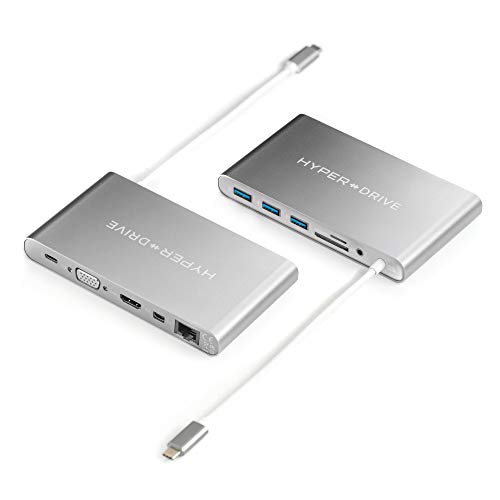
HyperDrive USB C Hub, Type C Adapter for MacBook Pro, Laptop USB-C Devices, Ultimate 11-in-1 Surface PC Docking Station w Power Delivery Charging, USBC 5Gbps Data, 4K HDMI, 3xUSB 3.1 Ports, VGA, etc
Brand
Hyper
Item model number
GN30B-GRAY
Hardware Platform
Laptop, PC
Operating System
Mac OS
Item Weight
7.7 ounces
Product Dimensions
3.03 x 0.07 x 5.39 inches
Item Dimensions LxWxH
3.03 x 0.07 x 5.39 inches
Color
Space Gray
Batteries
1 Lithium Polymer batteries required. (included)
Manufacturer
Sanho
ASIN
B076524XFW
Is Discontinued By Manufacturer
No
Date First Available
October 25, 2017
Test video – HyperDrive USB C Hub, Type C Adapter :
Product highlights :
Universally Versatile: Allow MacBook, PC(Surface-Microsoft, HP, Dell, Lenovo, etc) and most USB-C devices to work with popular legacy connections
Most Compact 11-in-1 Type-C Multi-Port Adapter: Turns a single USB-C connection into 11 ports (thunderbolt hub USB- C with power delivery, VGA, HDMI, Mini DisplayPort, Gigabit Ethernet, 3 x USB 3.1, SD, microSD, audio jack)
USB-C Power Delivery: Allows MacBook/PC/device charging while using the hub
4K Video: Connect MacBook, PC and most USB-C devices to HDMI, mini DisplayPort, VGA displays, up to 4K video resolution Connect up to 1 x 4K@30Hz display on Mac/PC or 2 x 1080p@60Hz displays on PC
Aluminum: Aluminum enclosure with built- in 170mm/6.7″ flexible USB-C connector cable, available in the same (Space Gray or Silver) color & appearance as MacBook & MacBook Pro
Questions & Answers – HyperDrive USB C Hub, Type C Adapter :
➕ What is the price of HyperDrive USB C Hub, Type C Adapter in Saudi Arabia ?
The price of HyperDrive USB C Hub, Type C Adapter in-store is 480 SAR VAT.
➕ When HyperDrive USB C Hub, Type C Adapter was released ?
The release date was October 25, 2017.
➕ What is the price of HyperDrive USB C Hub, Type C Adapter cheap used ?
The price of HyperDrive USB C Hub, Type C Adapter used is 330 SAR VAT.
➕ What are the main characteristics of HyperDrive USB C Hub, Type C Adapter ?
Special specifications :
Universally Versatile: Allow MacBook, PC(Surface-Microsoft, HP, Dell, Lenovo, etc) and most USB-C devices to work with popular legacy connections
➕ Is it interesting to buy this product ?
The best people who can answer you are customers who have already bought and tested this product (See Customer Reviews). This product is rated 3.9 / 5 on Amazon.
➕ Where to buy HyperDrive USB C Hub, Type C Adapter in Saudi Arabia ?
Check the duration of the warranty and also the faults and defects it covers. Is it complete or limited? and What is included in the warranty (parts, repairs or both)?
Shipping :
Is delivery offered? And how long does it take to get delivered (Delivery time)
Proof of purchase :
Does the shop give you an invoice ?
After-sales service :
Do they have an after-sales service to have information about the installation or operation (instructions for use). Also in case of problem, it is the seller who takes charge or you must contact the manufacturer or supplier yourself.
_____________________________
16 reviews for HyperDrive USB C Hub, Type C Adapter
Rated 3 out of 5
F. T (verified owner)–
Not up to their usual standards . – I bought this because of my experience with this company . I returned it because after several days it would freeze . I had to unplug it and restart it , I also noticed that the unit felt very warm , unusually so . I know I could call them to troubleshoot but I don’t want to do that with a new item as I believe they would have me do the same thing I did do several times .. Reboot it , and I feel this should not be necessary for the price , it was not cheap . It had some very nice features but the cord needs to be longer as I use a platform for my laptop . They should make the cord longer or provide two cords , a longer one as another company I use does . Problem solved . Of course they would have to make the cord detachable . I think I would have returned the item for this reason alone as it was irritating to have to set the hub on a shelf of some sort . This is a very good company , I have Hyper batteries that have lasted for years . I hope they will fix the issues with this hub but as for me it didn’t work .
Rated 4 out of 5
N. N (verified owner)–
All great except the audio quality. – I work from my Macbook Pro at my desk with a monitor, keyboard, mouse and headphones hooked up to it. Throughout my workday, I unplug the laptop to run to a meeting or take it home for the night. I’ve been really happy with the HyperDrive for this use case. It’s so nice to set my laptop down and only plug 1 thing in.
Rated 3 out of 5
J. K (verified owner)–
HDMI issues noted with HyperDrive USB C Hub – I bought two of these devices, one each for my MacBook Pro, Laptop USB-C Devices — no issues with the first one, it operates great. The second device, however, has intermittent issues with the HDMI connection. On occasion, I must unplug the HDMI wire and then replug it into the HyperDrive to correct color distortions on my second monitor. Frustrating for sure. Also, I was surprised at how hot the HyperDrive gets, make sure it has lots of ventilation.
Rated 5 out of 5
D. I (verified owner)–
Very convenient dock with very minor occasional (potential) glitches – All of my colleagues have as many as 4 connectors they need to put into their MacBooks in the morning. With this hub, I just need to connect one. For me it is a hub for Ethernet, HDMI, a wireless mouse, USB, occasional phone charging with USB, and power to the MacBook. There is lots of room to spare as well for even more functionality that I don’t currently utilize.
Rated 4 out of 5
K. I (verified owner)–
Incredibly complete adapter – This adapter is incredibly complete and fits all my needs. I have only used a few of the port options, but so far so good. I had to by an additional adapter as I made the mistake of not recognizing the my Macbook ports, but otherwise I have been pleased with my purchased to date. The four stars is only because I have not used all the available ports to review.
Rated 4 out of 5
K. I (verified owner)–
Incredibly complete adapter – This adapter is incredibly complete and fits all my needs. I have only used a few of the port options, but so far so good. I had to by an additional adapter as I made the mistake of not recognizing the my Macbook ports, but otherwise I have been pleased with my purchased to date. The four stars is only because I have not used all the available ports to review.
Rated 4 out of 5
T. D (verified owner)–
Good combination of Ports – HyperDrive’s hub adds to a group of niche products that attempt to handle the issues created by Apple’s move to “only USB C” ports. I just switched from a 2013 i7 MBP to a 2019 MBP i9 and the move came with issues. As a long-time Mac user with a lot of critical peripherals, it’s hard to sort out the best way to attach backup drives, hi-res monitors and other devices. USB hubs appear to be the main option for handling this issue. Due to the power issues with some peripherals, it’s not as easy as plugging everything into the hub and everything just works… even when using powered USB hubs. This is my second USB C hub and they all seem to crave more power than a new MacBook Pro can provide, esp. when attaching monitors. When someone comes up with a USB C hub that provides independent power to the connected peripherals I suspect that many of the issues will go away. This hub doesn’t seem to allow two independent power sources. Once one works out the nuances of each attached device, though, the HyperDrive works like a charm.
Rated 3 out of 5
J. K (verified owner)–
HDMI issues noted with HyperDrive USB C Hub – I bought two of these devices, one each for my MacBook Pro, Laptop USB-C Devices — no issues with the first one, it operates great. The second device, however, has intermittent issues with the HDMI connection. On occasion, I must unplug the HDMI wire and then replug it into the HyperDrive to correct color distortions on my second monitor. Frustrating for sure. Also, I was surprised at how hot the HyperDrive gets, make sure it has lots of ventilation.
Rated 4 out of 5
J. M (verified owner)–
Works great, heats up. – It’s good, works as described. Tested all ports but the network cable that I don’t need.
Rated 5 out of 5
D. I (verified owner)–
Very convenient dock with very minor occasional (potential) glitches – All of my colleagues have as many as 4 connectors they need to put into their MacBooks in the morning. With this hub, I just need to connect one. For me it is a hub for Ethernet, HDMI, a wireless mouse, USB, occasional phone charging with USB, and power to the MacBook. There is lots of room to spare as well for even more functionality that I don’t currently utilize.
Rated 4 out of 5
L. R (verified owner)–
Works as intended – I was looking for an adapter that could handle both HDMI and ethernet for my MacBook Pro and it does that with a few other extra ports. There are key things to note about it though, it supports pass through charging only at 45 watts so it does charge the computer, just at half the speed then plugging it straight in. Also the cord to plug in to the computer is built in, and only about 6 inches long, so it looks like it becomes damaged over time depending on how much you plan on carrying it with you.
Rated 4 out of 5
L. R (verified owner)–
Works as intended – I was looking for an adapter that could handle both HDMI and ethernet for my MacBook Pro and it does that with a few other extra ports. There are key things to note about it though, it supports pass through charging only at 45 watts so it does charge the computer, just at half the speed then plugging it straight in. Also the cord to plug in to the computer is built in, and only about 6 inches long, so it looks like it becomes damaged over time depending on how much you plan on carrying it with you.
Rated 4 out of 5
T. D (verified owner)–
Good combination of Ports – HyperDrive’s hub adds to a group of niche products that attempt to handle the issues created by Apple’s move to “only USB C” ports. I just switched from a 2013 i7 MBP to a 2019 MBP i9 and the move came with issues. As a long-time Mac user with a lot of critical peripherals, it’s hard to sort out the best way to attach backup drives, hi-res monitors and other devices. USB hubs appear to be the main option for handling this issue. Due to the power issues with some peripherals, it’s not as easy as plugging everything into the hub and everything just works… even when using powered USB hubs. This is my second USB C hub and they all seem to crave more power than a new MacBook Pro can provide, esp. when attaching monitors. When someone comes up with a USB C hub that provides independent power to the connected peripherals I suspect that many of the issues will go away. This hub doesn’t seem to allow two independent power sources. Once one works out the nuances of each attached device, though, the HyperDrive works like a charm.
Rated 3 out of 5
F. T (verified owner)–
Not up to their usual standards . – I bought this because of my experience with this company . I returned it because after several days it would freeze . I had to unplug it and restart it , I also noticed that the unit felt very warm , unusually so . I know I could call them to troubleshoot but I don’t want to do that with a new item as I believe they would have me do the same thing I did do several times .. Reboot it , and I feel this should not be necessary for the price , it was not cheap . It had some very nice features but the cord needs to be longer as I use a platform for my laptop . They should make the cord longer or provide two cords , a longer one as another company I use does . Problem solved . Of course they would have to make the cord detachable . I think I would have returned the item for this reason alone as it was irritating to have to set the hub on a shelf of some sort . This is a very good company , I have Hyper batteries that have lasted for years . I hope they will fix the issues with this hub but as for me it didn’t work .
Rated 4 out of 5
N. N (verified owner)–
All great except the audio quality. – I work from my Macbook Pro at my desk with a monitor, keyboard, mouse and headphones hooked up to it. Throughout my workday, I unplug the laptop to run to a meeting or take it home for the night. I’ve been really happy with the HyperDrive for this use case. It’s so nice to set my laptop down and only plug 1 thing in.
Rated 4 out of 5
J. M (verified owner)–
Works great, heats up. – It’s good, works as described. Tested all ports but the network cable that I don’t need.


F. T (verified owner) –
Not up to their usual standards . – I bought this because of my experience with this company . I returned it because after several days it would freeze . I had to unplug it and restart it , I also noticed that the unit felt very warm , unusually so . I know I could call them to troubleshoot but I don’t want to do that with a new item as I believe they would have me do the same thing I did do several times .. Reboot it , and I feel this should not be necessary for the price , it was not cheap . It had some very nice features but the cord needs to be longer as I use a platform for my laptop . They should make the cord longer or provide two cords , a longer one as another company I use does . Problem solved . Of course they would have to make the cord detachable . I think I would have returned the item for this reason alone as it was irritating to have to set the hub on a shelf of some sort . This is a very good company , I have Hyper batteries that have lasted for years . I hope they will fix the issues with this hub but as for me it didn’t work .
N. N (verified owner) –
All great except the audio quality. – I work from my Macbook Pro at my desk with a monitor, keyboard, mouse and headphones hooked up to it. Throughout my workday, I unplug the laptop to run to a meeting or take it home for the night. I’ve been really happy with the HyperDrive for this use case. It’s so nice to set my laptop down and only plug 1 thing in.
J. K (verified owner) –
HDMI issues noted with HyperDrive USB C Hub – I bought two of these devices, one each for my MacBook Pro, Laptop USB-C Devices — no issues with the first one, it operates great. The second device, however, has intermittent issues with the HDMI connection. On occasion, I must unplug the HDMI wire and then replug it into the HyperDrive to correct color distortions on my second monitor. Frustrating for sure. Also, I was surprised at how hot the HyperDrive gets, make sure it has lots of ventilation.
D. I (verified owner) –
Very convenient dock with very minor occasional (potential) glitches – All of my colleagues have as many as 4 connectors they need to put into their MacBooks in the morning. With this hub, I just need to connect one. For me it is a hub for Ethernet, HDMI, a wireless mouse, USB, occasional phone charging with USB, and power to the MacBook. There is lots of room to spare as well for even more functionality that I don’t currently utilize.
K. I (verified owner) –
Incredibly complete adapter – This adapter is incredibly complete and fits all my needs. I have only used a few of the port options, but so far so good. I had to by an additional adapter as I made the mistake of not recognizing the my Macbook ports, but otherwise I have been pleased with my purchased to date. The four stars is only because I have not used all the available ports to review.
K. I (verified owner) –
Incredibly complete adapter – This adapter is incredibly complete and fits all my needs. I have only used a few of the port options, but so far so good. I had to by an additional adapter as I made the mistake of not recognizing the my Macbook ports, but otherwise I have been pleased with my purchased to date. The four stars is only because I have not used all the available ports to review.
T. D (verified owner) –
Good combination of Ports – HyperDrive’s hub adds to a group of niche products that attempt to handle the issues created by Apple’s move to “only USB C” ports. I just switched from a 2013 i7 MBP to a 2019 MBP i9 and the move came with issues. As a long-time Mac user with a lot of critical peripherals, it’s hard to sort out the best way to attach backup drives, hi-res monitors and other devices. USB hubs appear to be the main option for handling this issue. Due to the power issues with some peripherals, it’s not as easy as plugging everything into the hub and everything just works… even when using powered USB hubs. This is my second USB C hub and they all seem to crave more power than a new MacBook Pro can provide, esp. when attaching monitors. When someone comes up with a USB C hub that provides independent power to the connected peripherals I suspect that many of the issues will go away. This hub doesn’t seem to allow two independent power sources. Once one works out the nuances of each attached device, though, the HyperDrive works like a charm.
J. K (verified owner) –
HDMI issues noted with HyperDrive USB C Hub – I bought two of these devices, one each for my MacBook Pro, Laptop USB-C Devices — no issues with the first one, it operates great. The second device, however, has intermittent issues with the HDMI connection. On occasion, I must unplug the HDMI wire and then replug it into the HyperDrive to correct color distortions on my second monitor. Frustrating for sure. Also, I was surprised at how hot the HyperDrive gets, make sure it has lots of ventilation.
J. M (verified owner) –
Works great, heats up. – It’s good, works as described. Tested all ports but the network cable that I don’t need.
D. I (verified owner) –
Very convenient dock with very minor occasional (potential) glitches – All of my colleagues have as many as 4 connectors they need to put into their MacBooks in the morning. With this hub, I just need to connect one. For me it is a hub for Ethernet, HDMI, a wireless mouse, USB, occasional phone charging with USB, and power to the MacBook. There is lots of room to spare as well for even more functionality that I don’t currently utilize.
L. R (verified owner) –
Works as intended – I was looking for an adapter that could handle both HDMI and ethernet for my MacBook Pro and it does that with a few other extra ports. There are key things to note about it though, it supports pass through charging only at 45 watts so it does charge the computer, just at half the speed then plugging it straight in. Also the cord to plug in to the computer is built in, and only about 6 inches long, so it looks like it becomes damaged over time depending on how much you plan on carrying it with you.
L. R (verified owner) –
Works as intended – I was looking for an adapter that could handle both HDMI and ethernet for my MacBook Pro and it does that with a few other extra ports. There are key things to note about it though, it supports pass through charging only at 45 watts so it does charge the computer, just at half the speed then plugging it straight in. Also the cord to plug in to the computer is built in, and only about 6 inches long, so it looks like it becomes damaged over time depending on how much you plan on carrying it with you.
T. D (verified owner) –
Good combination of Ports – HyperDrive’s hub adds to a group of niche products that attempt to handle the issues created by Apple’s move to “only USB C” ports. I just switched from a 2013 i7 MBP to a 2019 MBP i9 and the move came with issues. As a long-time Mac user with a lot of critical peripherals, it’s hard to sort out the best way to attach backup drives, hi-res monitors and other devices. USB hubs appear to be the main option for handling this issue. Due to the power issues with some peripherals, it’s not as easy as plugging everything into the hub and everything just works… even when using powered USB hubs. This is my second USB C hub and they all seem to crave more power than a new MacBook Pro can provide, esp. when attaching monitors. When someone comes up with a USB C hub that provides independent power to the connected peripherals I suspect that many of the issues will go away. This hub doesn’t seem to allow two independent power sources. Once one works out the nuances of each attached device, though, the HyperDrive works like a charm.
F. T (verified owner) –
Not up to their usual standards . – I bought this because of my experience with this company . I returned it because after several days it would freeze . I had to unplug it and restart it , I also noticed that the unit felt very warm , unusually so . I know I could call them to troubleshoot but I don’t want to do that with a new item as I believe they would have me do the same thing I did do several times .. Reboot it , and I feel this should not be necessary for the price , it was not cheap . It had some very nice features but the cord needs to be longer as I use a platform for my laptop . They should make the cord longer or provide two cords , a longer one as another company I use does . Problem solved . Of course they would have to make the cord detachable . I think I would have returned the item for this reason alone as it was irritating to have to set the hub on a shelf of some sort . This is a very good company , I have Hyper batteries that have lasted for years . I hope they will fix the issues with this hub but as for me it didn’t work .
N. N (verified owner) –
All great except the audio quality. – I work from my Macbook Pro at my desk with a monitor, keyboard, mouse and headphones hooked up to it. Throughout my workday, I unplug the laptop to run to a meeting or take it home for the night. I’ve been really happy with the HyperDrive for this use case. It’s so nice to set my laptop down and only plug 1 thing in.
J. M (verified owner) –
Works great, heats up. – It’s good, works as described. Tested all ports but the network cable that I don’t need.