
Description
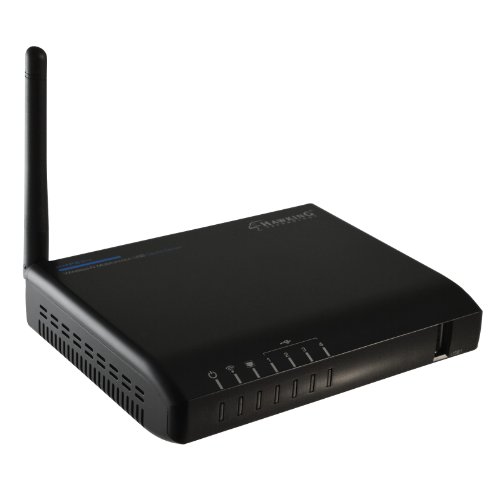
Hawking Technology 4-Port Wireless-N Multifunction USB Printer – Features & Prices in Saudi Arabia :
Hawking Technology 4-Port Wireless-N Multifunction USB Printer and Device Server (HMPS2U),Black
RAM
16 MB
Wireless Type
802.11bgn
Hardware Platform
PC;Mac
Item Weight
6.1 ounces
Product Dimensions
9.6 x 6.9 x 2.75 inches
Item Dimensions LxWxH
9.6 x 6.9 x 2.75 inches
Color
Black
Flash Memory Size
4
Manufacturer
Hawking Technology
ASIN
B00AKXOVG6
Is Discontinued By Manufacturer
No
Date First Available
December 8, 2012
Test video – Hawking Technology 4-Port Wireless-N Multifunction USB Printer :
Product highlights :
Questions & Answers – Hawking Technology 4-Port Wireless-N Multifunction USB Printer :
Technical specifications – Hawking Technology 4-Port Wireless-N Multifunction USB Printer :
Purchase advice :
-
Warranty :
Check the duration of the warranty and also the faults and defects it covers. Is it complete or limited? and What is included in the warranty (parts, repairs or both)?
-
Shipping :
Is delivery offered? And how long does it take to get delivered (Delivery time)
-
Proof of purchase :
Does the shop give you an invoice ?
-
After-sales service :
Do they have an after-sales service to have information about the installation or operation (instructions for use). Also in case of problem, it is the seller who takes charge or you must contact the manufacturer or supplier yourself.
_____________________________
K. H (verified owner) –
– Requirio de algo de configuracion pero nada del otro mundo, tengo conectadas 2 impresoras y un scanner lo usamos tanto mi esposa como yo desde cualquier punto de la casa, inclusive hemos podido enviar impresiones por el celular, genial!
E. N (verified owner) –
Decent Wireless N Print Server – Finally a Wireless N print server that 75% of the people don’t think is awful. Granted this product only had two reviews but neither were all that negative so I gave it a try. So far it works well. Setup is easy but seemed more complicated than it should be. The manual has a few awkward sentences, probably lost in translation. User interface is simple enough. I use a Canon MP-600 to print. Unlike my old print server, a D-link wireless G Rangebooster, the Hawking shows the real print status of my printer and not some random error (even tho it would still print), shows the ink levels, etc. just as if I had the Canon plugged directly in to the computer. And this print server will utilize the scan features of my printer (the Dlink wouldn’t support it). The only knock on the scanning is you can’t scan to PDF.
K. H (verified owner) –
– Requirio de algo de configuracion pero nada del otro mundo, tengo conectadas 2 impresoras y un scanner lo usamos tanto mi esposa como yo desde cualquier punto de la casa, inclusive hemos podido enviar impresiones por el celular, genial!
E. N (verified owner) –
Decent Wireless N Print Server – Finally a Wireless N print server that 75% of the people don’t think is awful. Granted this product only had two reviews but neither were all that negative so I gave it a try. So far it works well. Setup is easy but seemed more complicated than it should be. The manual has a few awkward sentences, probably lost in translation. User interface is simple enough. I use a Canon MP-600 to print. Unlike my old print server, a D-link wireless G Rangebooster, the Hawking shows the real print status of my printer and not some random error (even tho it would still print), shows the ink levels, etc. just as if I had the Canon plugged directly in to the computer. And this print server will utilize the scan features of my printer (the Dlink wouldn’t support it). The only knock on the scanning is you can’t scan to PDF.
P. J (verified owner) –
Works pretty well for me. Manual certainly could be better. – I’ve been using this device for 2 weeks now on a simple home network of 3 computers sharing an older Epson printer and an older Canon scanner. The distance being covered (print server to computers) is not over about 20 feet so connectivity has not been an issue.
J. D (verified owner) –
– When it is working, it is very handy, saves on length of cables. Sometimes have to reboot device and computer to get operating correctly though.
P. J (verified owner) –
Works pretty well for me. Manual certainly could be better. – I’ve been using this device for 2 weeks now on a simple home network of 3 computers sharing an older Epson printer and an older Canon scanner. The distance being covered (print server to computers) is not over about 20 feet so connectivity has not been an issue.
F. N (verified owner) –
Challenging setup and buggy software – This server is not really plug and play and some technical experience is needed. After installing the software on my Windows 10 laptop, to configure the WIFi setup a web browser window opens. My machine defaults to Edge for this, and I was unable to open the “config” tab. It would flash open and close. I had to go into the Windows control panel, and change the default program for web browser to Chrome. Then I was able to get in. The point is that a novice user would probably not know what to do and need to contact tech support. Then, the config dialogue indicated that the server wasn’t connected to my WIFi when in fact it was. A few days later, after Windows did an update, the Hawking control center went into a loop where it kept asking me to restart my computer when I tried to load it. After a restart, it did the same thing over and ove. I eventually deinstalled the software and downloaded it from the Hawking website and reinstalled. Not sure if it’s a newer version than what was included on the installation CD or not. It seems to be working now but I’ve had to restart the computer occasionally to get it to connect to the Hawking.
J. D (verified owner) –
– When it is working, it is very handy, saves on length of cables. Sometimes have to reboot device and computer to get operating correctly though.
F. N (verified owner) –
Challenging setup and buggy software – This server is not really plug and play and some technical experience is needed. After installing the software on my Windows 10 laptop, to configure the WIFi setup a web browser window opens. My machine defaults to Edge for this, and I was unable to open the “config” tab. It would flash open and close. I had to go into the Windows control panel, and change the default program for web browser to Chrome. Then I was able to get in. The point is that a novice user would probably not know what to do and need to contact tech support. Then, the config dialogue indicated that the server wasn’t connected to my WIFi when in fact it was. A few days later, after Windows did an update, the Hawking control center went into a loop where it kept asking me to restart my computer when I tried to load it. After a restart, it did the same thing over and ove. I eventually deinstalled the software and downloaded it from the Hawking website and reinstalled. Not sure if it’s a newer version than what was included on the installation CD or not. It seems to be working now but I’ve had to restart the computer occasionally to get it to connect to the Hawking.