Gryphon Guardian Mesh WiFi Router – Parental – Features & Prices in Saudi Arabia :
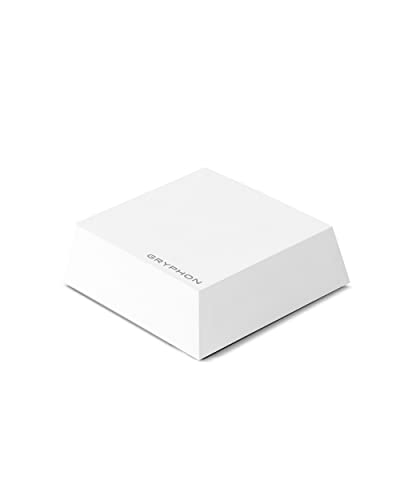
Gryphon Guardian Mesh WiFi Router – Parental Control System with Next-Gen Firewall & Content Filters – Dual-Band 1.2 Gbps, Covers 1800 sq. ft. per Mesh Router – Replace or Add-to Existing Network
Product Dimensions
4 x 4 x 1 inches
Item Weight
15.5 ounces
ASIN
B082YGNKJH
Item model number
GRYG1-UK
Is Discontinued By Manufacturer
No
Date First Available
December 20, 2019
Manufacturer
Gryphon Online Safety, Inc.
Test video – Gryphon Guardian Mesh WiFi Router – Parental :
Product highlights :
AFFORDABLE CONNECTIVITY & SECURITY – Beef up your mesh network’s coverage, add extra security to your system, and get access to advanced parental controls with the super flexible and inexpensive Gryphon Guardian. Use independently for small spaces or add onto your existing home network
COMPREHENSIVE PARENTAL CONTROLS – Schedule screen time, monitor online search and create a safe Internet experience by managing all your family’s smart devices and apps in one central location. Use Gryphon Guardian as an independent mesh router with flexible parental control features or as an add-on to your existing network (4)
WIFI WHERE YOU NEED IT – Enjoy reliable connectivity throughout your whole apartment or improve WiFi speeds in rooms far from your modem as simultaneous AC1200 dual-band radios and 2×2 MU-MIMO deliver up to 1,800 sq. ft. of coverage off a single Gryphon Guardian router (1) (2)
NEXT-GENERATION FIREWALL – Protect every device in your home with this WiFi mesh system’s modern malware and ransomware protection, 24/7 intelligent intrusion detection to guard against hackers, and automatic protection from phishing scams (3)
SIMPLE SETUP & SMARTPHONE CONTROL – The Gryphon Connect app provides you with a single solution for managing your WiFi network, parental controls, device access, and app use (4) (5)
➕ What is the price of Gryphon Guardian Mesh WiFi Router – Parental in Saudi Arabia ?
The price of Gryphon Guardian Mesh WiFi Router – Parental in-store is 310 SAR VAT.
➕ When Gryphon Guardian Mesh WiFi Router – Parental was released ?
The release date was December 20, 2019.
➕ What is the price of Gryphon Guardian Mesh WiFi Router – Parental cheap used ?
The price of Gryphon Guardian Mesh WiFi Router – Parental used is 220 SAR VAT.
➕ What are the main characteristics of Gryphon Guardian Mesh WiFi Router – Parental ?
Special specifications :
AFFORDABLE CONNECTIVITY & SECURITY – Beef up your mesh network’s coverage, add extra security to your system, and get access to advanced parental controls with the super flexible and inexpensive Gryphon Guardian. Use independently for small spaces or add onto your existing home network
➕ Is it interesting to buy this product ?
The best people who can answer you are customers who have already bought and tested this product (See Customer Reviews). This product is rated 4.2 / 5 on Amazon.
➕ Where to buy Gryphon Guardian Mesh WiFi Router – Parental in Saudi Arabia ?
Bluetooth, 5 GHz Radio Frequency, 802.11bgn, 2.4 GHz Radio Frequency
Compatible Devices
Smartphone
Frequency
5 GHz
Connectivity Technology
Wi-Fi
Color
white
Operating System
Android
Security Protocol
WPA-PSK
Number of Ports
2
Purchase advice :
Warranty :
Check the duration of the warranty and also the faults and defects it covers. Is it complete or limited? and What is included in the warranty (parts, repairs or both)?
Shipping :
Is delivery offered? And how long does it take to get delivered (Delivery time)
Proof of purchase :
Does the shop give you an invoice ?
After-sales service :
Do they have an after-sales service to have information about the installation or operation (instructions for use). Also in case of problem, it is the seller who takes charge or you must contact the manufacturer or supplier yourself.
_____________________________
10 reviews for Gryphon Guardian Mesh WiFi Router – Parental
E. H (verified owner)–
– I was really excited when I found this so I ordered it. I set my Virgin Hub 3.0 to modem mode and connect this with Cat6 Lan cable and used this as the router. The parental controls are really good but the signal strength and quality is worse than the much maligned Virgin 3.0 Hub, I had been tinkering with placement and configuration with no joy. The final straw for me was yesterday when I was tryring to advertise something I was selling and the pictures I uploaded did not display on my laptop, Mac or phone, I tried other ads on the site and they did not display. I contacted the site to log a bug and I was told they had no issues. I disconnected my phone from Wifi and everything works, for some reason Gryphon just decided to block images.
B. C (verified owner)–
– Purchased this as Sky’s parental controls which you get via ‘Broadband Buddy’ no longer seem to work, nor do Sky seem to want to fix it. As much as I hate the idea of censoring my Internet I do want a bit of control to ensure it’s used at the right times and in a safe way. There aren’t many options out there, but this sounded promising.
E. H (verified owner)–
– I was really excited when I found this so I ordered it. I set my Virgin Hub 3.0 to modem mode and connect this with Cat6 Lan cable and used this as the router. The parental controls are really good but the signal strength and quality is worse than the much maligned Virgin 3.0 Hub, I had been tinkering with placement and configuration with no joy. The final straw for me was yesterday when I was tryring to advertise something I was selling and the pictures I uploaded did not display on my laptop, Mac or phone, I tried other ads on the site and they did not display. I contacted the site to log a bug and I was told they had no issues. I disconnected my phone from Wifi and everything works, for some reason Gryphon just decided to block images.
Rated 4 out of 5
S. A (verified owner)–
This Product Review is the Only User Manual You Will Get – This is a fantastic product, with fantastic software that comes with it. But it comes with a 3 x 3 inch note card in the box, that tells you to load software on your mobile phone in order to learn how to install it. The software won’t let you past step 1 until it gets a handshake with the unit, so you can’t scroll forward to understand the installation before you begin (and its instructions past page 1 could be summarized, “just plug it in and wait for the light to stop blinking”). There are a couple of long talking-head YouTube videos that say essentially the same thing, “Plug it in”. Um, so what does the red blinking light mean? Red steady light? White blinking light? White steady? There are many up-front questions that an adult would want to know by reading a user manual, including how to use the software (which is very good, but which will take you a journey of tech-adolescent discovery, many hours long, to figure out what it does). But the manual does not exist.
E. B (verified owner)–
– A colleague of mine pointed this out to me, and I’d been considering for some time. I wasn’t happy with the parental control options on my kids’ gadgets, and I wanted to make sure that they practised. “safe browsing”.
Rated 5 out of 5
A. T (verified owner)–
This is quite simply the greatest consumer router in the world. – As a senior network engineer and cybersecurity expert I am exposed to a lot of firewalls/routers/NGFW and UTM appliances. So when I tell you something is great, you can bet it is great! First we will run through the hardware of this device, followed by the setup/configuration of it, then the testing and result of it. Sit back and get ready for the ride!
Rated 4 out of 5
S. A (verified owner)–
This Product Review is the Only User Manual You Will Get – This is a fantastic product, with fantastic software that comes with it. But it comes with a 3 x 3 inch note card in the box, that tells you to load software on your mobile phone in order to learn how to install it. The software won’t let you past step 1 until it gets a handshake with the unit, so you can’t scroll forward to understand the installation before you begin (and its instructions past page 1 could be summarized, “just plug it in and wait for the light to stop blinking”). There are a couple of long talking-head YouTube videos that say essentially the same thing, “Plug it in”. Um, so what does the red blinking light mean? Red steady light? White blinking light? White steady? There are many up-front questions that an adult would want to know by reading a user manual, including how to use the software (which is very good, but which will take you a journey of tech-adolescent discovery, many hours long, to figure out what it does). But the manual does not exist.
E. B (verified owner)–
– A colleague of mine pointed this out to me, and I’d been considering for some time. I wasn’t happy with the parental control options on my kids’ gadgets, and I wanted to make sure that they practised. “safe browsing”.
Rated 5 out of 5
A. T (verified owner)–
This is quite simply the greatest consumer router in the world. – As a senior network engineer and cybersecurity expert I am exposed to a lot of firewalls/routers/NGFW and UTM appliances. So when I tell you something is great, you can bet it is great! First we will run through the hardware of this device, followed by the setup/configuration of it, then the testing and result of it. Sit back and get ready for the ride!
B. C (verified owner)–
– Purchased this as Sky’s parental controls which you get via ‘Broadband Buddy’ no longer seem to work, nor do Sky seem to want to fix it. As much as I hate the idea of censoring my Internet I do want a bit of control to ensure it’s used at the right times and in a safe way. There aren’t many options out there, but this sounded promising.


E. H (verified owner) –
– I was really excited when I found this so I ordered it. I set my Virgin Hub 3.0 to modem mode and connect this with Cat6 Lan cable and used this as the router. The parental controls are really good but the signal strength and quality is worse than the much maligned Virgin 3.0 Hub, I had been tinkering with placement and configuration with no joy. The final straw for me was yesterday when I was tryring to advertise something I was selling and the pictures I uploaded did not display on my laptop, Mac or phone, I tried other ads on the site and they did not display. I contacted the site to log a bug and I was told they had no issues. I disconnected my phone from Wifi and everything works, for some reason Gryphon just decided to block images.
B. C (verified owner) –
– Purchased this as Sky’s parental controls which you get via ‘Broadband Buddy’ no longer seem to work, nor do Sky seem to want to fix it. As much as I hate the idea of censoring my Internet I do want a bit of control to ensure it’s used at the right times and in a safe way. There aren’t many options out there, but this sounded promising.
E. H (verified owner) –
– I was really excited when I found this so I ordered it. I set my Virgin Hub 3.0 to modem mode and connect this with Cat6 Lan cable and used this as the router. The parental controls are really good but the signal strength and quality is worse than the much maligned Virgin 3.0 Hub, I had been tinkering with placement and configuration with no joy. The final straw for me was yesterday when I was tryring to advertise something I was selling and the pictures I uploaded did not display on my laptop, Mac or phone, I tried other ads on the site and they did not display. I contacted the site to log a bug and I was told they had no issues. I disconnected my phone from Wifi and everything works, for some reason Gryphon just decided to block images.
S. A (verified owner) –
This Product Review is the Only User Manual You Will Get – This is a fantastic product, with fantastic software that comes with it. But it comes with a 3 x 3 inch note card in the box, that tells you to load software on your mobile phone in order to learn how to install it. The software won’t let you past step 1 until it gets a handshake with the unit, so you can’t scroll forward to understand the installation before you begin (and its instructions past page 1 could be summarized, “just plug it in and wait for the light to stop blinking”). There are a couple of long talking-head YouTube videos that say essentially the same thing, “Plug it in”. Um, so what does the red blinking light mean? Red steady light? White blinking light? White steady? There are many up-front questions that an adult would want to know by reading a user manual, including how to use the software (which is very good, but which will take you a journey of tech-adolescent discovery, many hours long, to figure out what it does). But the manual does not exist.
E. B (verified owner) –
– A colleague of mine pointed this out to me, and I’d been considering for some time. I wasn’t happy with the parental control options on my kids’ gadgets, and I wanted to make sure that they practised. “safe browsing”.
A. T (verified owner) –
This is quite simply the greatest consumer router in the world. – As a senior network engineer and cybersecurity expert I am exposed to a lot of firewalls/routers/NGFW and UTM appliances. So when I tell you something is great, you can bet it is great! First we will run through the hardware of this device, followed by the setup/configuration of it, then the testing and result of it. Sit back and get ready for the ride!
S. A (verified owner) –
This Product Review is the Only User Manual You Will Get – This is a fantastic product, with fantastic software that comes with it. But it comes with a 3 x 3 inch note card in the box, that tells you to load software on your mobile phone in order to learn how to install it. The software won’t let you past step 1 until it gets a handshake with the unit, so you can’t scroll forward to understand the installation before you begin (and its instructions past page 1 could be summarized, “just plug it in and wait for the light to stop blinking”). There are a couple of long talking-head YouTube videos that say essentially the same thing, “Plug it in”. Um, so what does the red blinking light mean? Red steady light? White blinking light? White steady? There are many up-front questions that an adult would want to know by reading a user manual, including how to use the software (which is very good, but which will take you a journey of tech-adolescent discovery, many hours long, to figure out what it does). But the manual does not exist.
E. B (verified owner) –
– A colleague of mine pointed this out to me, and I’d been considering for some time. I wasn’t happy with the parental control options on my kids’ gadgets, and I wanted to make sure that they practised. “safe browsing”.
A. T (verified owner) –
This is quite simply the greatest consumer router in the world. – As a senior network engineer and cybersecurity expert I am exposed to a lot of firewalls/routers/NGFW and UTM appliances. So when I tell you something is great, you can bet it is great! First we will run through the hardware of this device, followed by the setup/configuration of it, then the testing and result of it. Sit back and get ready for the ride!
B. C (verified owner) –
– Purchased this as Sky’s parental controls which you get via ‘Broadband Buddy’ no longer seem to work, nor do Sky seem to want to fix it. As much as I hate the idea of censoring my Internet I do want a bit of control to ensure it’s used at the right times and in a safe way. There aren’t many options out there, but this sounded promising.