GL.iNet GL-A1300 (Slate Plus) Wireless VPN Encrypted is available in Saudi Arabia.
Find out all you need to know about GL.iNet GL-A1300 (Slate Plus) Wireless VPN Encrypted before buying : Price, Test video, Datasheet, Similar products.
GL.iNet GL-A1300 (Slate Plus) Wireless VPN Encrypted – Features & Prices in Saudi Arabia :
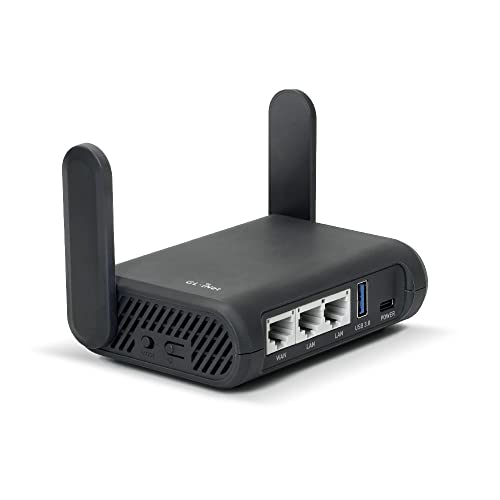
GL.iNet GL-A1300 (Slate Plus) Wireless VPN Encrypted Travel Router– Easy to Setup, Connect to Hotel WiFi & Captive Portal, Phone Tethering, Range Extender, Assess Point, Pocket-Sized, Open Source, NAS
Product Dimensions
4.65 x 3.35 x 1.18 inches
Item Weight
15 ounces
ASIN
B0B4ZSR2PX
Item model number
GL-A1300
Date First Available
June 24, 2022
Manufacturer
GL Technologies
Country of Origin
China
Test video – GL.iNet GL-A1300 (Slate Plus) Wireless VPN Encrypted :
Product highlights :
【DUAL BAND AC WIRELESS ROUTER】 Dual band network with wireless speed 400Mbps(2.4G)+867Mbps(5G), Tethering Compatible. A highly stable and powerful IPQ4018 @717MHz CPU.
【OPEN SOURCE & PROGRAMMABLE】 Slate Plus runs on the latest OpenWrt 21.02 operating system and significantly reduced signal interference. You can customize the router and install applications based on your preferences.
【VPN CLIENT & SERVER】 OpenVPN and WireGuard pre-installed, compatible with 30+ VPN service providers. Max. VPN speed of 28 Mbps (OpenVPN); 190 Mbps (WireGuard)
【NETWORK STORAGE】Our network storage feature supports SAMBA and WebDav protocols. By plugging an external USB hard drive into the router, you can create a private network storage to store and share your documents.
【CAN BE WIDELY USED】 No matter you are at hotel, café, airport, restaurant, RV or other places, you could connect the router to the public WiFi hotspot and secure your connected devices. It is small and light, 118 x 84 x 33 mm (L*W*H) / 429g, which is very convenient to carry around while working or travelling.
【VPN INTERNET KILL SWITCH】 This is a countermeasure concept of activating a single shut off mechanism for all Internet traffic. If this feature is enabled, the router needs to run the a VPN client(OpenVPN or WireGuard) all the time, if any of the VPN client isn’t running, the devices connected to the router are Not Allowed to access the Internet.
➕ What is the price of GL.iNet GL-A1300 (Slate Plus) Wireless VPN Encrypted in Saudi Arabia ?
The price of GL.iNet GL-A1300 (Slate Plus) Wireless VPN Encrypted in-store is 350 SAR VAT.
➕ When GL.iNet GL-A1300 (Slate Plus) Wireless VPN Encrypted was released ?
The release date was June 24, 2022.
➕ What is the price of GL.iNet GL-A1300 (Slate Plus) Wireless VPN Encrypted cheap used ?
The price of GL.iNet GL-A1300 (Slate Plus) Wireless VPN Encrypted used is 240 SAR VAT.
➕ What are the main characteristics of GL.iNet GL-A1300 (Slate Plus) Wireless VPN Encrypted ?
Special specifications :
【DUAL BAND AC WIRELESS ROUTER】 Dual band network with wireless speed 400Mbps(2.4G)+867Mbps(5G), Tethering Compatible. A highly stable and powerful IPQ4018 @717MHz CPU.
➕ Is it interesting to buy this product ?
The best people who can answer you are customers who have already bought and tested this product (See Customer Reviews). This product is rated 4.6 / 5 on Amazon.
➕ Where to buy GL.iNet GL-A1300 (Slate Plus) Wireless VPN Encrypted in Saudi Arabia ?
Check the duration of the warranty and also the faults and defects it covers. Is it complete or limited? and What is included in the warranty (parts, repairs or both)?
Shipping :
Is delivery offered? And how long does it take to get delivered (Delivery time)
Proof of purchase :
Does the shop give you an invoice ?
After-sales service :
Do they have an after-sales service to have information about the installation or operation (instructions for use). Also in case of problem, it is the seller who takes charge or you must contact the manufacturer or supplier yourself.
_____________________________
12 reviews for GL.iNet GL-A1300 (Slate Plus) Wireless VPN Encrypted
Rated 5 out of 5
B. R (verified owner)–
I liked it so much that I bought a second one! – I love this thing so much that I bought a second one. I leave one at home behind my main router to act as a WireGuard VPN server and as an AdGuard Home DNS, so I can block ads on all devices on my home network. The second one is used as a travel router with a WireGuard VPN client for when I’m at a hotel, and can have a little file server for media.
Rated 5 out of 5
B. N (verified owner)–
This little guy is awesome. – Tons of features in one tiny package, perfect for total network geeking, while traveling.
Rated 5 out of 5
B. N (verified owner)–
This little guy is awesome. – Tons of features in one tiny package, perfect for total network geeking, while traveling.
Rated 5 out of 5
R. O (verified owner)–
Great little powerhouse router in a tiny package – WOW this little guy is a powerhouse. The broadcast range is amazing. It pushes out as far as my ASUS TUF. Putting this in the 4Runner to provide onsite wi-fi to my astro-photography rig when boondocking. It even powered up a 4tb Seagate USB3 hard drive. A real spinning hard drive. That will allow me to have NAS onsite in the middle of nowhere.
Rated 5 out of 5
B. R (verified owner)–
I liked it so much that I bought a second one! – I love this thing so much that I bought a second one. I leave one at home behind my main router to act as a WireGuard VPN server and as an AdGuard Home DNS, so I can block ads on all devices on my home network. The second one is used as a travel router with a WireGuard VPN client for when I’m at a hotel, and can have a little file server for media.
Rated 3 out of 5
C. A (verified owner)–
Difficult setup and configuration for a travel router – I’m not a network guru but I’ve been getting wireless routers to do what I want since my first WRT54G in the early 2000s. This GL-A1300 is probably the least friendly router I’ve ever configured. All I want to do is turn off the SSID broadcast but that option is grayed out. Why? After an hour of looking, I’ve found no clue. The “help” built into the admin interface offers no real information, and the website documentation for the product is simply a copy of the admin interface. I found the TP-Link TL-WR902AC travel router far easier to setup and so I recommend it over the GL-A1300.
Rated 4 out of 5
L. I (verified owner)–
Feature rich travel router that will satisfy both beginners and advanced users – I got this router so when ever i traveled i didn’t have to re-setup wifi on every one of my devices and so i could use an open vpn in between.
Rated 4 out of 5
L. I (verified owner)–
Feature rich travel router that will satisfy both beginners and advanced users – I got this router so when ever i traveled i didn’t have to re-setup wifi on every one of my devices and so i could use an open vpn in between.
Rated 5 out of 5
R. O (verified owner)–
Great little powerhouse router in a tiny package – WOW this little guy is a powerhouse. The broadcast range is amazing. It pushes out as far as my ASUS TUF. Putting this in the 4Runner to provide onsite wi-fi to my astro-photography rig when boondocking. It even powered up a 4tb Seagate USB3 hard drive. A real spinning hard drive. That will allow me to have NAS onsite in the middle of nowhere.
Rated 5 out of 5
A. R (verified owner)–
Lots of features, flexible uses – WiFi repeater
Rated 5 out of 5
A. R (verified owner)–
Lots of features, flexible uses – WiFi repeater
Rated 3 out of 5
C. A (verified owner)–
Difficult setup and configuration for a travel router – I’m not a network guru but I’ve been getting wireless routers to do what I want since my first WRT54G in the early 2000s. This GL-A1300 is probably the least friendly router I’ve ever configured. All I want to do is turn off the SSID broadcast but that option is grayed out. Why? After an hour of looking, I’ve found no clue. The “help” built into the admin interface offers no real information, and the website documentation for the product is simply a copy of the admin interface. I found the TP-Link TL-WR902AC travel router far easier to setup and so I recommend it over the GL-A1300.

B. R (verified owner) –
I liked it so much that I bought a second one! – I love this thing so much that I bought a second one. I leave one at home behind my main router to act as a WireGuard VPN server and as an AdGuard Home DNS, so I can block ads on all devices on my home network. The second one is used as a travel router with a WireGuard VPN client for when I’m at a hotel, and can have a little file server for media.
B. N (verified owner) –
This little guy is awesome. – Tons of features in one tiny package, perfect for total network geeking, while traveling.
B. N (verified owner) –
This little guy is awesome. – Tons of features in one tiny package, perfect for total network geeking, while traveling.
R. O (verified owner) –
Great little powerhouse router in a tiny package – WOW this little guy is a powerhouse. The broadcast range is amazing. It pushes out as far as my ASUS TUF. Putting this in the 4Runner to provide onsite wi-fi to my astro-photography rig when boondocking. It even powered up a 4tb Seagate USB3 hard drive. A real spinning hard drive. That will allow me to have NAS onsite in the middle of nowhere.
B. R (verified owner) –
I liked it so much that I bought a second one! – I love this thing so much that I bought a second one. I leave one at home behind my main router to act as a WireGuard VPN server and as an AdGuard Home DNS, so I can block ads on all devices on my home network. The second one is used as a travel router with a WireGuard VPN client for when I’m at a hotel, and can have a little file server for media.
C. A (verified owner) –
Difficult setup and configuration for a travel router – I’m not a network guru but I’ve been getting wireless routers to do what I want since my first WRT54G in the early 2000s. This GL-A1300 is probably the least friendly router I’ve ever configured. All I want to do is turn off the SSID broadcast but that option is grayed out. Why? After an hour of looking, I’ve found no clue. The “help” built into the admin interface offers no real information, and the website documentation for the product is simply a copy of the admin interface. I found the TP-Link TL-WR902AC travel router far easier to setup and so I recommend it over the GL-A1300.
L. I (verified owner) –
Feature rich travel router that will satisfy both beginners and advanced users – I got this router so when ever i traveled i didn’t have to re-setup wifi on every one of my devices and so i could use an open vpn in between.
L. I (verified owner) –
Feature rich travel router that will satisfy both beginners and advanced users – I got this router so when ever i traveled i didn’t have to re-setup wifi on every one of my devices and so i could use an open vpn in between.
R. O (verified owner) –
Great little powerhouse router in a tiny package – WOW this little guy is a powerhouse. The broadcast range is amazing. It pushes out as far as my ASUS TUF. Putting this in the 4Runner to provide onsite wi-fi to my astro-photography rig when boondocking. It even powered up a 4tb Seagate USB3 hard drive. A real spinning hard drive. That will allow me to have NAS onsite in the middle of nowhere.
A. R (verified owner) –
Lots of features, flexible uses – WiFi repeater
A. R (verified owner) –
Lots of features, flexible uses – WiFi repeater
C. A (verified owner) –
Difficult setup and configuration for a travel router – I’m not a network guru but I’ve been getting wireless routers to do what I want since my first WRT54G in the early 2000s. This GL-A1300 is probably the least friendly router I’ve ever configured. All I want to do is turn off the SSID broadcast but that option is grayed out. Why? After an hour of looking, I’ve found no clue. The “help” built into the admin interface offers no real information, and the website documentation for the product is simply a copy of the admin interface. I found the TP-Link TL-WR902AC travel router far easier to setup and so I recommend it over the GL-A1300.