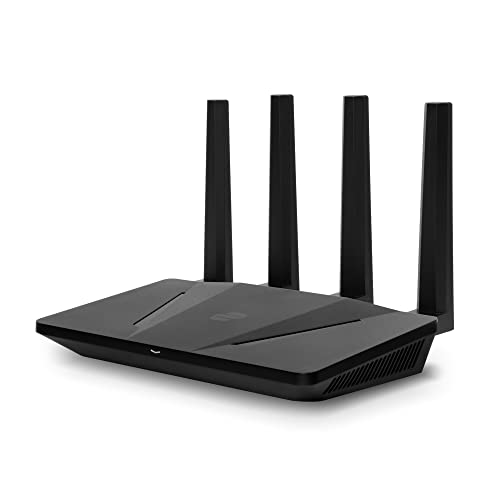
ExpressVPN Aircove Wi-Fi 6 Router | Dual-Band – Features & Prices in Saudi Arabia :
ExpressVPN Aircove Wi-Fi 6 Router | Dual-Band Gigabit Wireless VPN Router for Home | Built-in ExpressVPN Protection | High-Speed Coverage for All Your Devices | Easy 5-Minute Setup
Product Dimensions
9.7 x 2.3 x 8.1 inches
Item Weight
1.81 pounds
ASIN
B09VBXLGJR
Item model number
Aircove-AX1800
Date First Available
March 25, 2022
Manufacturer
ExpressVPN
Country of Origin
China
Test video – ExpressVPN Aircove Wi-Fi 6 Router | Dual-Band :
https://www.youtube.com/www.youtube.com/wat
Product highlights :
World-class, built-in VPN: Exclusively developed by ExpressVPN, Aircove brings all the benefits of the #1 trusted VPN service to your whole home network (when used with an active ExpressVPN subscription, sold separately).
Always-on protection for the entire family: Any device that connects to Aircove enjoys instant ExpressVPN protection 24/7. This includes smart TVs, voice assistants, and other smart home devices that usually aren’t compatible with VPN software.
Connect to multiple VPN locations at once: Sort your devices into groups, each with its own VPN location. Watch a match in the U.K., do your banking locally, and even set some devices to use no VPN at all.
Fast Wi-Fi 6 speeds: Aircove provides dual-band Wi-Fi speeds of up to 1,200 Mbps (up to 600 Mbps for 2.4GHz and up to 1,200 Mbps for 5GHz), with VPN disconnected.
Even when the VPN is in use, Aircove offers speeds of up to 180 Mbps for multiple devices simultaneously. (For reference, 4K streaming typically requires download speeds of 25Mbps, while HD requires 5Mbps.)
Whole-home coverage: Enjoy up to 1,600 sq. ft. of fast and stable wireless coverage with enough bandwidth for dozens of devices.
➕ What is the price of ExpressVPN Aircove Wi-Fi 6 Router | Dual-Band in Saudi Arabia ?
The price of ExpressVPN Aircove Wi-Fi 6 Router | Dual-Band in-store is 760 SAR VAT.
➕ When ExpressVPN Aircove Wi-Fi 6 Router | Dual-Band was released ?
The release date was March 25, 2022.
➕ What is the price of ExpressVPN Aircove Wi-Fi 6 Router | Dual-Band cheap used ?
The price of ExpressVPN Aircove Wi-Fi 6 Router | Dual-Band used is 530 SAR VAT.
➕ What are the main characteristics of ExpressVPN Aircove Wi-Fi 6 Router | Dual-Band ?
Special specifications :
World-class, built-in VPN: Exclusively developed by ExpressVPN, Aircove brings all the benefits of the #1 trusted VPN service to your whole home network (when used with an active ExpressVPN subscription, sold separately).
➕ Is it interesting to buy this product ?
The best people who can answer you are customers who have already bought and tested this product (See Customer Reviews). This product is rated 3.9 / 5 on Amazon.
➕ Where to buy ExpressVPN Aircove Wi-Fi 6 Router | Dual-Band in Saudi Arabia ?
Check the duration of the warranty and also the faults and defects it covers. Is it complete or limited? and What is included in the warranty (parts, repairs or both)?
Shipping :
Is delivery offered? And how long does it take to get delivered (Delivery time)
Proof of purchase :
Does the shop give you an invoice ?
After-sales service :
Do they have an after-sales service to have information about the installation or operation (instructions for use). Also in case of problem, it is the seller who takes charge or you must contact the manufacturer or supplier yourself.
_____________________________
10 reviews for ExpressVPN Aircove Wi-Fi 6 Router | Dual-Band
Rated 3 out of 5
D. F (verified owner)–
Would not stay connected. – Setup was really easy as they said but kept disconnecting.. It would not stay connected even when my laptop was brought in close to it. No option for a replacement at the black Friday price. So I returned it.
Rated 4 out of 5
S. C (verified owner)–
Not Easy to Setup – Once you get it to work, it’s amazingly great. With that said, it’s not easy to set up. The instructions that come with it don’t work, and when I communicated with tech support, they acknowledged that the youtube video and shipped instructions didn’t work. Their only customer support is digital. You can’t talk to a human being. I strongly recommend having two computers working on two different routers at the same time to get it to work. Once I did that, it allowed me to take the steps they recommend (not on their router) and install them on the computer that was on their router. If it wasn’t to challenging to make work, I would give it a five.
Rated 4 out of 5
O. K (verified owner)–
gateway is 192.168.132.1. If you change to 192.168.1.1 it doesnt work properly after daily reboot – The hard way I learned to not change the default gateway IP from 192.168.132.1 to 192.168.1.1 is the fact that after adding some number of devices (~12) this router will hardly accept reconnections. I had to factory reset, restart it, and re-add most devices to the No-VPN group to avoid issues with disconnect-reconnect e.g Ring Camera, myQ Garage Door Opener, and Rheem Water Boiler, Alexa Echo Dot.
Rated 4 out of 5
O. K (verified owner)–
gateway is 192.168.132.1. If you change to 192.168.1.1 it doesnt work properly after daily reboot – The hard way I learned to not change the default gateway IP from 192.168.132.1 to 192.168.1.1 is the fact that after adding some number of devices (~12) this router will hardly accept reconnections. I had to factory reset, restart it, and re-add most devices to the No-VPN group to avoid issues with disconnect-reconnect e.g Ring Camera, myQ Garage Door Opener, and Rheem Water Boiler, Alexa Echo Dot.
Rated 3 out of 5
D. F (verified owner)–
Would not stay connected. – Setup was really easy as they said but kept disconnecting.. It would not stay connected even when my laptop was brought in close to it. No option for a replacement at the black Friday price. So I returned it.
Rated 4 out of 5
T. S (verified owner)–
Five minute setup claim was unrealistic – The router appears to be working just fine now, but it was a long 2-1/2 hour ordeal with four service requests to get it running. I had to update the firmware just to proceed with setup. After working with three other techs, I could access the device but was denied connection to ExpressVPN to activate the service. Finally, the fourth guy had me make an obscure change and I am finally in business. Here is what he had me modify in case anyone else runs into this connectivity issue: On the dashboard, go to Network Settings > Internet Settings> Advanced Settings > MTU drop-down size > 1500 (default) changed to 1472. This may not be necessary for everyone, and maybe some people really can have theirs up and running in five minutes. Looking forward to many years of service with this modem.
Rated 4 out of 5
T. S (verified owner)–
Five minute setup claim was unrealistic – The router appears to be working just fine now, but it was a long 2-1/2 hour ordeal with four service requests to get it running. I had to update the firmware just to proceed with setup. After working with three other techs, I could access the device but was denied connection to ExpressVPN to activate the service. Finally, the fourth guy had me make an obscure change and I am finally in business. Here is what he had me modify in case anyone else runs into this connectivity issue: On the dashboard, go to Network Settings > Internet Settings> Advanced Settings > MTU drop-down size > 1500 (default) changed to 1472. This may not be necessary for everyone, and maybe some people really can have theirs up and running in five minutes. Looking forward to many years of service with this modem.
Rated 5 out of 5
F. G (verified owner)–
ExpressVPN Aircove router in-depth review – My initial two months of using the Aircove router from ExpressVPN have been very positive, and I recommend it as a general-purpose secure router that is extremely simple to set up.
Rated 5 out of 5
F. G (verified owner)–
ExpressVPN Aircove router in-depth review – My initial two months of using the Aircove router from ExpressVPN have been very positive, and I recommend it as a general-purpose secure router that is extremely simple to set up.
Rated 4 out of 5
S. C (verified owner)–
Not Easy to Setup – Once you get it to work, it’s amazingly great. With that said, it’s not easy to set up. The instructions that come with it don’t work, and when I communicated with tech support, they acknowledged that the youtube video and shipped instructions didn’t work. Their only customer support is digital. You can’t talk to a human being. I strongly recommend having two computers working on two different routers at the same time to get it to work. Once I did that, it allowed me to take the steps they recommend (not on their router) and install them on the computer that was on their router. If it wasn’t to challenging to make work, I would give it a five.

D. F (verified owner) –
Would not stay connected. – Setup was really easy as they said but kept disconnecting.. It would not stay connected even when my laptop was brought in close to it. No option for a replacement at the black Friday price. So I returned it.
S. C (verified owner) –
Not Easy to Setup – Once you get it to work, it’s amazingly great. With that said, it’s not easy to set up. The instructions that come with it don’t work, and when I communicated with tech support, they acknowledged that the youtube video and shipped instructions didn’t work. Their only customer support is digital. You can’t talk to a human being. I strongly recommend having two computers working on two different routers at the same time to get it to work. Once I did that, it allowed me to take the steps they recommend (not on their router) and install them on the computer that was on their router. If it wasn’t to challenging to make work, I would give it a five.
O. K (verified owner) –
gateway is 192.168.132.1. If you change to 192.168.1.1 it doesnt work properly after daily reboot – The hard way I learned to not change the default gateway IP from 192.168.132.1 to 192.168.1.1 is the fact that after adding some number of devices (~12) this router will hardly accept reconnections. I had to factory reset, restart it, and re-add most devices to the No-VPN group to avoid issues with disconnect-reconnect e.g Ring Camera, myQ Garage Door Opener, and Rheem Water Boiler, Alexa Echo Dot.
O. K (verified owner) –
gateway is 192.168.132.1. If you change to 192.168.1.1 it doesnt work properly after daily reboot – The hard way I learned to not change the default gateway IP from 192.168.132.1 to 192.168.1.1 is the fact that after adding some number of devices (~12) this router will hardly accept reconnections. I had to factory reset, restart it, and re-add most devices to the No-VPN group to avoid issues with disconnect-reconnect e.g Ring Camera, myQ Garage Door Opener, and Rheem Water Boiler, Alexa Echo Dot.
D. F (verified owner) –
Would not stay connected. – Setup was really easy as they said but kept disconnecting.. It would not stay connected even when my laptop was brought in close to it. No option for a replacement at the black Friday price. So I returned it.
T. S (verified owner) –
Five minute setup claim was unrealistic – The router appears to be working just fine now, but it was a long 2-1/2 hour ordeal with four service requests to get it running. I had to update the firmware just to proceed with setup. After working with three other techs, I could access the device but was denied connection to ExpressVPN to activate the service. Finally, the fourth guy had me make an obscure change and I am finally in business. Here is what he had me modify in case anyone else runs into this connectivity issue: On the dashboard, go to Network Settings > Internet Settings> Advanced Settings > MTU drop-down size > 1500 (default) changed to 1472. This may not be necessary for everyone, and maybe some people really can have theirs up and running in five minutes. Looking forward to many years of service with this modem.
T. S (verified owner) –
Five minute setup claim was unrealistic – The router appears to be working just fine now, but it was a long 2-1/2 hour ordeal with four service requests to get it running. I had to update the firmware just to proceed with setup. After working with three other techs, I could access the device but was denied connection to ExpressVPN to activate the service. Finally, the fourth guy had me make an obscure change and I am finally in business. Here is what he had me modify in case anyone else runs into this connectivity issue: On the dashboard, go to Network Settings > Internet Settings> Advanced Settings > MTU drop-down size > 1500 (default) changed to 1472. This may not be necessary for everyone, and maybe some people really can have theirs up and running in five minutes. Looking forward to many years of service with this modem.
F. G (verified owner) –
ExpressVPN Aircove router in-depth review – My initial two months of using the Aircove router from ExpressVPN have been very positive, and I recommend it as a general-purpose secure router that is extremely simple to set up.
F. G (verified owner) –
ExpressVPN Aircove router in-depth review – My initial two months of using the Aircove router from ExpressVPN have been very positive, and I recommend it as a general-purpose secure router that is extremely simple to set up.
S. C (verified owner) –
Not Easy to Setup – Once you get it to work, it’s amazingly great. With that said, it’s not easy to set up. The instructions that come with it don’t work, and when I communicated with tech support, they acknowledged that the youtube video and shipped instructions didn’t work. Their only customer support is digital. You can’t talk to a human being. I strongly recommend having two computers working on two different routers at the same time to get it to work. Once I did that, it allowed me to take the steps they recommend (not on their router) and install them on the computer that was on their router. If it wasn’t to challenging to make work, I would give it a five.