
Description
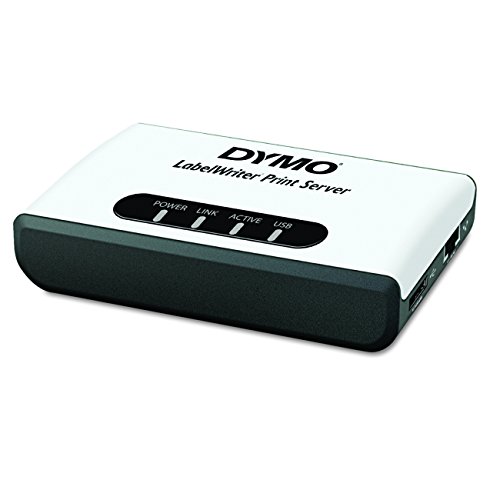
DYMO 1750630 LabelWriter Print Server – Features & Prices in Saudi Arabia :
DYMO 1750630 LabelWriter Print Server
Product Dimensions
2.13 x 6.88 x 9 inches
Item Weight
9 ounces
ASIN
B001PKUUHM
Item model number
1750630
Is Discontinued By Manufacturer
No
Date First Available
August 3, 2017
Manufacturer
Dymo-CoStar Corp
Country of Origin
Taiwan
Test video – DYMO 1750630 LabelWriter Print Server :
Product highlights :
Questions & Answers – DYMO 1750630 LabelWriter Print Server :
Technical specifications – DYMO 1750630 LabelWriter Print Server :
Brand
DYMO
Printing Technology
Thermal
Special Feature
Wireless
Color
White
Printer Output
Monochrome
Operating System
Linux, Windows, Mac
Item Weight
0.56 Pounds
Included Components
Includes printer server^installation CD^A/C adapter^1-year limited warranty
Style
Print Server
Print media
Labels
Purchase advice :
-
Warranty :
Check the duration of the warranty and also the faults and defects it covers. Is it complete or limited? and What is included in the warranty (parts, repairs or both)?
-
Shipping :
Is delivery offered? And how long does it take to get delivered (Delivery time)
-
Proof of purchase :
Does the shop give you an invoice ?
-
After-sales service :
Do they have an after-sales service to have information about the installation or operation (instructions for use). Also in case of problem, it is the seller who takes charge or you must contact the manufacturer or supplier yourself.
_____________________________
S. H (verified owner) –
Works as expected, in a home network environment – Once you get the print server on your network & connect your DYMO LabelWriter, it should be smooth sailing. It should go without saying, but be sure to have the DYMO Label Software (or DYMO Connect for Desktop) already installed on any machine(s) you’ll be using the DYMO printer with.
F. D (verified owner) –
Setup is not for beginners – I’ve been dealing with PDFs for a LONG time now but I’ve never seen anyone screw up a PDF like Dymo has done. It MANDATES that you have Adobe FLASH installed and if you don’t, you simply can’t read the install instructions. You expect that when you’ve done certain things that it’ll all connect but what it doesn’t tell you is that you need to reboot after every step. Then, and only then, it works like a charm. Found that out after a frustrating hour. Installed with a second machine doing the reboots: took 2 minutes! Now that it’s installed, it seems to work but you’ll get gray hairs getting there, pretty much guaranteed!
L. R (verified owner) –
There are no instructions to install on Windows 10 – Please update your manual for windows 10. I spent way too much time trying to get this to work using Vista’s directions (since this is all there is) I talked with Amazon tech support and they said the print server doesn’t work with windows 10. I couldn’t find a manual on Amazon that would show me setting up for win 10. If I had the directions or if someone would have been able to help me get setup, I would have kept this. Now I’ll have to find another solution. What a waste of time.
T. M (verified owner) –
Be aware this is ancient technology and dymo doesnt really make newer – I have a 2018 MacBook Pro with Catalina and It seems there is zero hope this will ever work my computer. I can’t even install the most up to date software. It does come with a CD but I haven’t had a computer with a CD drive in a very long time. Also you have to hook it directly up to your internet with an ETHERNET CABLE like it a REAL SERVER in a SERVER FARM or something or other. it is the size a maybe a pack of high-end cigarettes but they want you to treat it like you are wiring it for Google, except the technology is from when I was in college in the 90’s. I also bought a NON wireless dymo printer to go with it, hoping I could get it on my network. Well the Dymo software for that only goes through Sierra so the advice is to make custom labels in MSWord to print out. So still thinking Dymo was a good brand I looked at their wireless “newer” printer. HAHAHAHA you have to connect to it via an IP address that you are magically supposed to know how to find and login as an admin to your wireless network. They suggest not changing the baseline admin password. Probably because you will never be able to use that fine piece of cutting edge technology again. I gave up and am now waiting for a Brother Label Printer. What a waste of time.
P. S (verified owner) –
I freakin love these things! – I run a company providing IT support for a living – so we deal with medical clients that ALL have Dymo printers. I got sick and tired of Dymo glitches constantly creating support tickets for the same stupid issues. In desperation, I finally tried putting the Dymo 450 Turbo on this little print server to see if the problems would go away. I’ve been using them for two years and haven’t had a SINGLE problem with ANY DYMO connected via print server. We’re making this standard equipment for all our new dymo’s now. Set it up and forget it!
F. D (verified owner) –
Setup is not for beginners – I’ve been dealing with PDFs for a LONG time now but I’ve never seen anyone screw up a PDF like Dymo has done. It MANDATES that you have Adobe FLASH installed and if you don’t, you simply can’t read the install instructions. You expect that when you’ve done certain things that it’ll all connect but what it doesn’t tell you is that you need to reboot after every step. Then, and only then, it works like a charm. Found that out after a frustrating hour. Installed with a second machine doing the reboots: took 2 minutes! Now that it’s installed, it seems to work but you’ll get gray hairs getting there, pretty much guaranteed!
S. H (verified owner) –
Works as expected, in a home network environment – Once you get the print server on your network & connect your DYMO LabelWriter, it should be smooth sailing. It should go without saying, but be sure to have the DYMO Label Software (or DYMO Connect for Desktop) already installed on any machine(s) you’ll be using the DYMO printer with.
P. S (verified owner) –
I freakin love these things! – I run a company providing IT support for a living – so we deal with medical clients that ALL have Dymo printers. I got sick and tired of Dymo glitches constantly creating support tickets for the same stupid issues. In desperation, I finally tried putting the Dymo 450 Turbo on this little print server to see if the problems would go away. I’ve been using them for two years and haven’t had a SINGLE problem with ANY DYMO connected via print server. We’re making this standard equipment for all our new dymo’s now. Set it up and forget it!
L. R (verified owner) –
There are no instructions to install on Windows 10 – Please update your manual for windows 10. I spent way too much time trying to get this to work using Vista’s directions (since this is all there is) I talked with Amazon tech support and they said the print server doesn’t work with windows 10. I couldn’t find a manual on Amazon that would show me setting up for win 10. If I had the directions or if someone would have been able to help me get setup, I would have kept this. Now I’ll have to find another solution. What a waste of time.
T. M (verified owner) –
Be aware this is ancient technology and dymo doesnt really make newer – I have a 2018 MacBook Pro with Catalina and It seems there is zero hope this will ever work my computer. I can’t even install the most up to date software. It does come with a CD but I haven’t had a computer with a CD drive in a very long time. Also you have to hook it directly up to your internet with an ETHERNET CABLE like it a REAL SERVER in a SERVER FARM or something or other. it is the size a maybe a pack of high-end cigarettes but they want you to treat it like you are wiring it for Google, except the technology is from when I was in college in the 90’s. I also bought a NON wireless dymo printer to go with it, hoping I could get it on my network. Well the Dymo software for that only goes through Sierra so the advice is to make custom labels in MSWord to print out. So still thinking Dymo was a good brand I looked at their wireless “newer” printer. HAHAHAHA you have to connect to it via an IP address that you are magically supposed to know how to find and login as an admin to your wireless network. They suggest not changing the baseline admin password. Probably because you will never be able to use that fine piece of cutting edge technology again. I gave up and am now waiting for a Brother Label Printer. What a waste of time.
N. K (verified owner) –
No more problems with losing printer setup – I was having trouble with various workstations losing connectivity to print to a labelwriter shared from a computer on our network. Connecting via the Dymo printserver, no more problems!
N. K (verified owner) –
No more problems with losing printer setup – I was having trouble with various workstations losing connectivity to print to a labelwriter shared from a computer on our network. Connecting via the Dymo printserver, no more problems!