Bluetooth Audio Adapter for Music Streaming Sound – Features & Prices in Saudi Arabia :
Bluetooth Audio Adapter for Music Streaming Sound System, Esinkin Wireless Audio Adapter Works with Smartphones and Tablets, Wireless Adapter for Speakers
Wireless Type
Bluetooth
Item model number
W29-us
Item Weight
3.52 ounces
Product Dimensions
1.97 x 1.97 x 0.94 inches
Item Dimensions LxWxH
1.97 x 1.97 x 0.94 inches
Color
Black
Manufacturer
esinkin
ASIN
B016NUTG5K
Is Discontinued By Manufacturer
No
Date First Available
October 15, 2015
Test video – Bluetooth Audio Adapter for Music Streaming Sound :
Product highlights :
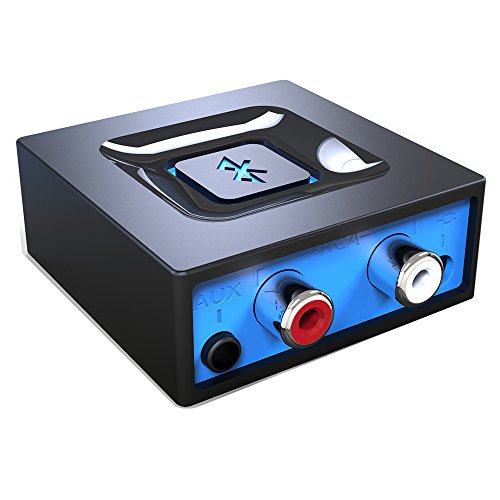
Listen music wireless: Connect with computer speakers, home stereo systems or other speaker systems via the 3.5 mm or RCA cable, then pair with the Bluetooth audio devices such as smartphones or tablet for streaming music.
Easy setup and automatic reconnect: Pair your device to the adapter once with a single button press. It can reconnect automatically with the previously paired device.
Wireless range: Indoors(without obstacles) connect rang up 30-40 ft (10-12 m).
Works with most device: Bluetooth enabled device including smartphones, tablets, computers, laptops upon and any powered PC speakers, home stereo systems and A/V receivers.
NOTE: This adapter doesn’t have built-in battery, power by AC to DC power adapter or USB cable. This product is a bluetooth receiver ONLY, not a bluetooth transmitter. Only to give Bluetooth capabilities to an existing stereo / powered speaker / PA.
Questions & Answers – Bluetooth Audio Adapter for Music Streaming Sound :
➕ What is the price of Bluetooth Audio Adapter for Music Streaming Sound in Saudi Arabia ?
The price of Bluetooth Audio Adapter for Music Streaming Sound in-store is 90 SAR VAT.
➕ When Bluetooth Audio Adapter for Music Streaming Sound was released ?
The release date was October 15, 2015.
➕ What is the price of Bluetooth Audio Adapter for Music Streaming Sound cheap used ?
The price of Bluetooth Audio Adapter for Music Streaming Sound used is 60 SAR VAT.
➕ What are the main characteristics of Bluetooth Audio Adapter for Music Streaming Sound ?
Special specifications :
Listen music wireless: Connect with computer speakers, home stereo systems or other speaker systems via the 3.5 mm or RCA cable, then pair with the Bluetooth audio devices such as smartphones or tablet for streaming music.
➕ Is it interesting to buy this product ?
The best people who can answer you are customers who have already bought and tested this product (See Customer Reviews). This product is rated 4.5 / 5 on Amazon.
➕ Where to buy Bluetooth Audio Adapter for Music Streaming Sound in Saudi Arabia ?
Technical specifications – Bluetooth Audio Adapter for Music Streaming Sound :
Brand
esinkin
Hardware Interface
Bluetooth, 3.5mm Audio
Color
Black
Compatible Devices
Tablet, Smartphone
Item Dimensions LxWxH
1.97 x 1.97 x 0.94 inches
Data Link Protocol
Bluetooth
Item Weight
0.1 Kilograms
Purchase advice :
Warranty :
Check the duration of the warranty and also the faults and defects it covers. Is it complete or limited? and What is included in the warranty (parts, repairs or both)?
Shipping :
Is delivery offered? And how long does it take to get delivered (Delivery time)
Proof of purchase :
Does the shop give you an invoice ?
After-sales service :
Do they have an after-sales service to have information about the installation or operation (instructions for use). Also in case of problem, it is the seller who takes charge or you must contact the manufacturer or supplier yourself.
_____________________________
10 reviews for Bluetooth Audio Adapter for Music Streaming Sound
Rated 5 out of 5
N. B (verified owner)–
Big bang for not much bucks – I have a late 2005 Onkyo receiver that I use at my second job for breaking up the boredom and, via a turntable, sampling records while I work sorting through thousands of storage boxes of old LPs. The unit runs just fine but sometimes, I wished that I could stream content from my iPhone, but the receiver doesn’t have Bluetooth compatibility… until now.
Rated 5 out of 5
N. B (verified owner)–
Big bang for not much bucks – I have a late 2005 Onkyo receiver that I use at my second job for breaking up the boredom and, via a turntable, sampling records while I work sorting through thousands of storage boxes of old LPs. The unit runs just fine but sometimes, I wished that I could stream content from my iPhone, but the receiver doesn’t have Bluetooth compatibility… until now.
Rated 4 out of 5
M. A (verified owner)–
iOS “Headphone Safety” & “Low Volume” Problem – Write-ups panned the low volume output and consequent low sound quality of the device … which was my experience in setting up this unit with a legacy amplifier and speakers. Credit Jeff for his August 2021 review who identified how to improve this issue.
Rated 5 out of 5
R. M (verified owner)–
Extremely Useful – Well worth buying if you are looking to make non-wireless audio equipment wireless, using Bluetooth technology. As long as the equipment you want to make wireless has either a 3.5mm audio port, or RCA type Left & Right audio ports you are all set. In my case I wanted to improve connectivity to an excellent (but out-of-date) Bose CD/Radio player. I used the included RCA connections for the radio, and this wireless adapter’s corresponding female connections. Then I finished it by using the included power adapter required to power this Bluetooth adapter. When placing my Samsung S5 phone into Bluetooth mode, and after pairing the two devices, it connected immediately to this adapter, transferring all sound to the Bose radio. Both the phone and Bose radio had control over the volume range, although the stereo will have the greatest control, as expected. The resulting audio sound output is excellent – better than I would ever get from the Samsung phone. Obviously, the broadcast quality from a radio station is simply passing through to the audio equipment (and the resulting sound quality is now solely dependent on the quality of the audio equipment you are using). Note: If the sound origin is from your phone, double check the Bluetooth settings for this device, AFTER you have connected to the adapter (select the settings icon adjacent to the name of this adapter to make sure, at a minimum, that Audio is active, and Calls [if available] is deactivated). While you are at it, you have the opportunity to rename the device – especially if you plan to install more of them. With this unit, don’t bother to look for an On/Off feature on the unit itself. There isn’t one. It’s just a small circuit board and it won’t put you in the poor-house if it runs 24/7. However – should you be obsessed with only having it on when you use it, just unplug it from the unit itself, instead of unplugging it from an outlet. But a word of caution – No Circuit board likes power surges, brown-outs, or lightening strikes. If you temporarily have electrical supply issues due to an approaching storm, I would immediately unplug it from the wall outlet ASAP, thereby protecting the adapter and the power supply unit. Several folks have, in their review, mentioned that when turning on Bluetooth with their device, it would immediately connect to the adapter (after it’s been paired for the first time, of course) rather than let you pick what Bluetooth device you wanted to connect with, as most other Bluetooth devices do. This is true. However, I don’t find that to be troublesome at all. First it shows great Reliability and Repeatability (two good Quality Assurance characteristics), and secondly, you can always select another Bluetooth choice displayed, and it will connect to it, and disconnect this adapter. Speaking of Reliability, I have run this Bluetooth adapter for hours at a time, and it has never dropped out, sought re-connection, or displayed any other anomaly.
F. R (verified owner)–
– This product does no carry the Australian certification marks to allow sale in Australia.
Rated 4 out of 5
S. L (verified owner)–
Works well, poor instructions – Have an older Bose Radio and CD player that uses the older RCA plugs for Aux input. Wanted to connect an iPhone to it with bluetooth. I just plugged everything in and it all worked perfectly. I had to buy an extra cable that was RCA to RCA because the one that comes with it is RCA to 3.5 plug.
Rated 4 out of 5
M. A (verified owner)–
iOS “Headphone Safety” & “Low Volume” Problem – Write-ups panned the low volume output and consequent low sound quality of the device … which was my experience in setting up this unit with a legacy amplifier and speakers. Credit Jeff for his August 2021 review who identified how to improve this issue.
Rated 5 out of 5
R. M (verified owner)–
Extremely Useful – Well worth buying if you are looking to make non-wireless audio equipment wireless, using Bluetooth technology. As long as the equipment you want to make wireless has either a 3.5mm audio port, or RCA type Left & Right audio ports you are all set. In my case I wanted to improve connectivity to an excellent (but out-of-date) Bose CD/Radio player. I used the included RCA connections for the radio, and this wireless adapter’s corresponding female connections. Then I finished it by using the included power adapter required to power this Bluetooth adapter. When placing my Samsung S5 phone into Bluetooth mode, and after pairing the two devices, it connected immediately to this adapter, transferring all sound to the Bose radio. Both the phone and Bose radio had control over the volume range, although the stereo will have the greatest control, as expected. The resulting audio sound output is excellent – better than I would ever get from the Samsung phone. Obviously, the broadcast quality from a radio station is simply passing through to the audio equipment (and the resulting sound quality is now solely dependent on the quality of the audio equipment you are using). Note: If the sound origin is from your phone, double check the Bluetooth settings for this device, AFTER you have connected to the adapter (select the settings icon adjacent to the name of this adapter to make sure, at a minimum, that Audio is active, and Calls [if available] is deactivated). While you are at it, you have the opportunity to rename the device – especially if you plan to install more of them. With this unit, don’t bother to look for an On/Off feature on the unit itself. There isn’t one. It’s just a small circuit board and it won’t put you in the poor-house if it runs 24/7. However – should you be obsessed with only having it on when you use it, just unplug it from the unit itself, instead of unplugging it from an outlet. But a word of caution – No Circuit board likes power surges, brown-outs, or lightening strikes. If you temporarily have electrical supply issues due to an approaching storm, I would immediately unplug it from the wall outlet ASAP, thereby protecting the adapter and the power supply unit. Several folks have, in their review, mentioned that when turning on Bluetooth with their device, it would immediately connect to the adapter (after it’s been paired for the first time, of course) rather than let you pick what Bluetooth device you wanted to connect with, as most other Bluetooth devices do. This is true. However, I don’t find that to be troublesome at all. First it shows great Reliability and Repeatability (two good Quality Assurance characteristics), and secondly, you can always select another Bluetooth choice displayed, and it will connect to it, and disconnect this adapter. Speaking of Reliability, I have run this Bluetooth adapter for hours at a time, and it has never dropped out, sought re-connection, or displayed any other anomaly.
Rated 4 out of 5
S. L (verified owner)–
Works well, poor instructions – Have an older Bose Radio and CD player that uses the older RCA plugs for Aux input. Wanted to connect an iPhone to it with bluetooth. I just plugged everything in and it all worked perfectly. I had to buy an extra cable that was RCA to RCA because the one that comes with it is RCA to 3.5 plug.
F. R (verified owner)–
– This product does no carry the Australian certification marks to allow sale in Australia.
N. B (verified owner) –
Big bang for not much bucks – I have a late 2005 Onkyo receiver that I use at my second job for breaking up the boredom and, via a turntable, sampling records while I work sorting through thousands of storage boxes of old LPs. The unit runs just fine but sometimes, I wished that I could stream content from my iPhone, but the receiver doesn’t have Bluetooth compatibility… until now.
N. B (verified owner) –
Big bang for not much bucks – I have a late 2005 Onkyo receiver that I use at my second job for breaking up the boredom and, via a turntable, sampling records while I work sorting through thousands of storage boxes of old LPs. The unit runs just fine but sometimes, I wished that I could stream content from my iPhone, but the receiver doesn’t have Bluetooth compatibility… until now.
M. A (verified owner) –
iOS “Headphone Safety” & “Low Volume” Problem – Write-ups panned the low volume output and consequent low sound quality of the device … which was my experience in setting up this unit with a legacy amplifier and speakers. Credit Jeff for his August 2021 review who identified how to improve this issue.
R. M (verified owner) –
Extremely Useful – Well worth buying if you are looking to make non-wireless audio equipment wireless, using Bluetooth technology. As long as the equipment you want to make wireless has either a 3.5mm audio port, or RCA type Left & Right audio ports you are all set. In my case I wanted to improve connectivity to an excellent (but out-of-date) Bose CD/Radio player. I used the included RCA connections for the radio, and this wireless adapter’s corresponding female connections. Then I finished it by using the included power adapter required to power this Bluetooth adapter. When placing my Samsung S5 phone into Bluetooth mode, and after pairing the two devices, it connected immediately to this adapter, transferring all sound to the Bose radio. Both the phone and Bose radio had control over the volume range, although the stereo will have the greatest control, as expected. The resulting audio sound output is excellent – better than I would ever get from the Samsung phone. Obviously, the broadcast quality from a radio station is simply passing through to the audio equipment (and the resulting sound quality is now solely dependent on the quality of the audio equipment you are using). Note: If the sound origin is from your phone, double check the Bluetooth settings for this device, AFTER you have connected to the adapter (select the settings icon adjacent to the name of this adapter to make sure, at a minimum, that Audio is active, and Calls [if available] is deactivated). While you are at it, you have the opportunity to rename the device – especially if you plan to install more of them. With this unit, don’t bother to look for an On/Off feature on the unit itself. There isn’t one. It’s just a small circuit board and it won’t put you in the poor-house if it runs 24/7. However – should you be obsessed with only having it on when you use it, just unplug it from the unit itself, instead of unplugging it from an outlet. But a word of caution – No Circuit board likes power surges, brown-outs, or lightening strikes. If you temporarily have electrical supply issues due to an approaching storm, I would immediately unplug it from the wall outlet ASAP, thereby protecting the adapter and the power supply unit. Several folks have, in their review, mentioned that when turning on Bluetooth with their device, it would immediately connect to the adapter (after it’s been paired for the first time, of course) rather than let you pick what Bluetooth device you wanted to connect with, as most other Bluetooth devices do. This is true. However, I don’t find that to be troublesome at all. First it shows great Reliability and Repeatability (two good Quality Assurance characteristics), and secondly, you can always select another Bluetooth choice displayed, and it will connect to it, and disconnect this adapter. Speaking of Reliability, I have run this Bluetooth adapter for hours at a time, and it has never dropped out, sought re-connection, or displayed any other anomaly.
F. R (verified owner) –
– This product does no carry the Australian certification marks to allow sale in Australia.
S. L (verified owner) –
Works well, poor instructions – Have an older Bose Radio and CD player that uses the older RCA plugs for Aux input. Wanted to connect an iPhone to it with bluetooth. I just plugged everything in and it all worked perfectly. I had to buy an extra cable that was RCA to RCA because the one that comes with it is RCA to 3.5 plug.
M. A (verified owner) –
iOS “Headphone Safety” & “Low Volume” Problem – Write-ups panned the low volume output and consequent low sound quality of the device … which was my experience in setting up this unit with a legacy amplifier and speakers. Credit Jeff for his August 2021 review who identified how to improve this issue.
R. M (verified owner) –
Extremely Useful – Well worth buying if you are looking to make non-wireless audio equipment wireless, using Bluetooth technology. As long as the equipment you want to make wireless has either a 3.5mm audio port, or RCA type Left & Right audio ports you are all set. In my case I wanted to improve connectivity to an excellent (but out-of-date) Bose CD/Radio player. I used the included RCA connections for the radio, and this wireless adapter’s corresponding female connections. Then I finished it by using the included power adapter required to power this Bluetooth adapter. When placing my Samsung S5 phone into Bluetooth mode, and after pairing the two devices, it connected immediately to this adapter, transferring all sound to the Bose radio. Both the phone and Bose radio had control over the volume range, although the stereo will have the greatest control, as expected. The resulting audio sound output is excellent – better than I would ever get from the Samsung phone. Obviously, the broadcast quality from a radio station is simply passing through to the audio equipment (and the resulting sound quality is now solely dependent on the quality of the audio equipment you are using). Note: If the sound origin is from your phone, double check the Bluetooth settings for this device, AFTER you have connected to the adapter (select the settings icon adjacent to the name of this adapter to make sure, at a minimum, that Audio is active, and Calls [if available] is deactivated). While you are at it, you have the opportunity to rename the device – especially if you plan to install more of them. With this unit, don’t bother to look for an On/Off feature on the unit itself. There isn’t one. It’s just a small circuit board and it won’t put you in the poor-house if it runs 24/7. However – should you be obsessed with only having it on when you use it, just unplug it from the unit itself, instead of unplugging it from an outlet. But a word of caution – No Circuit board likes power surges, brown-outs, or lightening strikes. If you temporarily have electrical supply issues due to an approaching storm, I would immediately unplug it from the wall outlet ASAP, thereby protecting the adapter and the power supply unit. Several folks have, in their review, mentioned that when turning on Bluetooth with their device, it would immediately connect to the adapter (after it’s been paired for the first time, of course) rather than let you pick what Bluetooth device you wanted to connect with, as most other Bluetooth devices do. This is true. However, I don’t find that to be troublesome at all. First it shows great Reliability and Repeatability (two good Quality Assurance characteristics), and secondly, you can always select another Bluetooth choice displayed, and it will connect to it, and disconnect this adapter. Speaking of Reliability, I have run this Bluetooth adapter for hours at a time, and it has never dropped out, sought re-connection, or displayed any other anomaly.
S. L (verified owner) –
Works well, poor instructions – Have an older Bose Radio and CD player that uses the older RCA plugs for Aux input. Wanted to connect an iPhone to it with bluetooth. I just plugged everything in and it all worked perfectly. I had to buy an extra cable that was RCA to RCA because the one that comes with it is RCA to 3.5 plug.
F. R (verified owner) –
– This product does no carry the Australian certification marks to allow sale in Australia.