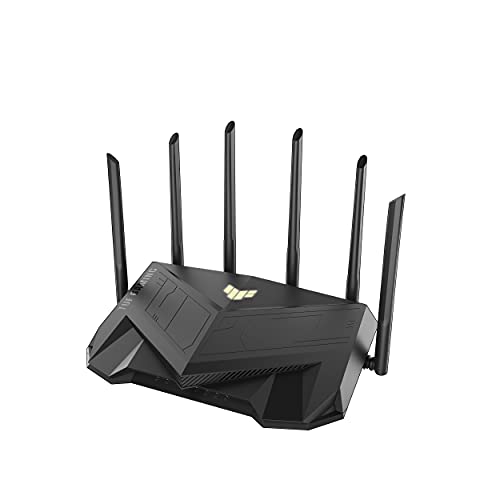
ASUS TUF Gaming WiFi 6 Router (TUF-AX5400) – Features & Prices in Saudi Arabia :
ASUS TUF Gaming WiFi 6 Router (TUF-AX5400) – Dedicated Gaming Port, Mobile Game Mode, WAN Aggregation, Durable and Stable, RGB Light, VPN Fusion, AiMesh Compatible, Subscription-free Internet Security
Wireless Type
802.11ax, 802.11b, 802.11a, 802.11ac, 802.11g
Series
TUF-AX5400
Item model number
TUF-AX5400
Item Weight
1.46 pounds
Product Dimensions
11.69 x 6.85 x 8.5 inches
Item Dimensions LxWxH
11.69 x 6.85 x 8.5 inches
Voltage
1 Volts
Manufacturer
Asus
ASIN
B09M9463CY
Country of Origin
China
Date First Available
November 18, 2021
Test video – ASUS TUF Gaming WiFi 6 Router (TUF-AX5400) :
Product highlights :
Ultrafast WiFi 6 – Enjoy speeds up to 5400 Mbps and 4X network efficiency with OFDMA and 160 MHz channels
Fast & Stable Wired Gaming – Dedicated gaming port to prioritize connected gaming device
Easy Port Forwarding in 3 Steps – Open NAT makes port forwarding simple, eliminating frustrating and complicated manual configuration
ASUS AiMesh Support – Create a flexible, seamless whole-home mesh network with AiMesh-compatible routers
Tested Durability and Stable Operation – TUF Gaming AX5400 is built to be durable and undergoes verified testing to ensure reliable, stable operation
➕ What is the price of ASUS TUF Gaming WiFi 6 Router (TUF-AX5400) in Saudi Arabia ?
The price of ASUS TUF Gaming WiFi 6 Router (TUF-AX5400) in-store is 600 SAR VAT.
➕ When ASUS TUF Gaming WiFi 6 Router (TUF-AX5400) was released ?
The release date was November 18, 2021.
➕ What is the price of ASUS TUF Gaming WiFi 6 Router (TUF-AX5400) cheap used ?
The price of ASUS TUF Gaming WiFi 6 Router (TUF-AX5400) used is 420 SAR VAT.
➕ What are the main characteristics of ASUS TUF Gaming WiFi 6 Router (TUF-AX5400) ?
Special specifications :
Ultrafast WiFi 6 – Enjoy speeds up to 5400 Mbps and 4X network efficiency with OFDMA and 160 MHz channels
➕ Is it interesting to buy this product ?
The best people who can answer you are customers who have already bought and tested this product (See Customer Reviews). This product is rated 4.5 / 5 on Amazon.
➕ Where to buy ASUS TUF Gaming WiFi 6 Router (TUF-AX5400) in Saudi Arabia ?
Check the duration of the warranty and also the faults and defects it covers. Is it complete or limited? and What is included in the warranty (parts, repairs or both)?
Shipping :
Is delivery offered? And how long does it take to get delivered (Delivery time)
Proof of purchase :
Does the shop give you an invoice ?
After-sales service :
Do they have an after-sales service to have information about the installation or operation (instructions for use). Also in case of problem, it is the seller who takes charge or you must contact the manufacturer or supplier yourself.
_____________________________
12 reviews for ASUS TUF Gaming WiFi 6 Router (TUF-AX5400)
Rated 5 out of 5
M. E (verified owner)–
Good Asus product – Good performance and reliability so far, easy to setup. It’s a nice upgrade from my 10 year old asus router.
Rated 5 out of 5
L. G (verified owner)–
Excellent for wireless PCVR – I’ll preface this by saying i use this router specifically to play PCVR games on my Oculus (Meta) Quest 2 with the Wireless Link option.
Rated 5 out of 5
K. E (verified owner)–
Powerful wireless router and access point packed with features. – Pros:
Rated 5 out of 5
R. S (verified owner)–
Good router, but dial down your 5g expectations – I got this to replace my landlords 802.11n router which I get ~20mpbs when i’m 1 floor away from it. I’m only using it for myself. This router gives me ~900mpbs when i’m right next to it; about ~400mbps when i’m 1 floor away, which does saturate my internet plan but not my ethernet NAS. but WHY is this? ain’t this supposed to be a 5400mbps router hence the name AX5400?
Rated 5 out of 5
K. E (verified owner)–
Powerful wireless router and access point packed with features. – Pros:
Rated 4 out of 5
K. D (verified owner)–
Wifi6 great! – Wifi6 works great! Even helps with setting up IPv6 if you want to go there with lan I hope you will if your isp supports it. Only con is the RGB light is very particular on colors (for some reason gold is green) but you can turn it off.
Rated 5 out of 5
R. S (verified owner)–
Good router, but dial down your 5g expectations – I got this to replace my landlords 802.11n router which I get ~20mpbs when i’m 1 floor away from it. I’m only using it for myself. This router gives me ~900mpbs when i’m right next to it; about ~400mbps when i’m 1 floor away, which does saturate my internet plan but not my ethernet NAS. but WHY is this? ain’t this supposed to be a 5400mbps router hence the name AX5400?
Rated 4 out of 5
R. F (verified owner)–
Strong signal and fast wifi 6 speed but not 100% compatable – First off I did enjoy this router, the additional speed of AX and the simplicity of setup for the 2 weeks It was running great but had to return. This is why, I have 50+ connected devices at any given time about every smart device you can think of. The problem is with older 2.4 or 5 N or AC only devices. After every setting combination possible and professional setting I found the only way to get everything working correctly without disconnect issues was to disable AX which defeats the purpose of this new router. I was hoping for extra coverage and speed which I did get on AX compatible devices but any N or AC only devices continued to have sporadic problems. Changing 2.4ghz to N only and 5ghz to AC only did fix my issues, with some extra pro changes but then why spend $200 just to go back to the previous speeds. I wouldn’t consider this the routers fault but I don’t want to drop thousands to upgrade all other devices for the additional speed. For example my smart fridge and garage door opener are N and AC but also cheaper devices like smart plugs all had issues with AX enabled. 802.11ax brings some major benefits over wifi 5 but unless you are planning on upgrading everything else in your home I don’t see the need at this time.
Rated 4 out of 5
K. D (verified owner)–
Wifi6 great! – Wifi6 works great! Even helps with setting up IPv6 if you want to go there with lan I hope you will if your isp supports it. Only con is the RGB light is very particular on colors (for some reason gold is green) but you can turn it off.
Rated 4 out of 5
R. F (verified owner)–
Strong signal and fast wifi 6 speed but not 100% compatable – First off I did enjoy this router, the additional speed of AX and the simplicity of setup for the 2 weeks It was running great but had to return. This is why, I have 50+ connected devices at any given time about every smart device you can think of. The problem is with older 2.4 or 5 N or AC only devices. After every setting combination possible and professional setting I found the only way to get everything working correctly without disconnect issues was to disable AX which defeats the purpose of this new router. I was hoping for extra coverage and speed which I did get on AX compatible devices but any N or AC only devices continued to have sporadic problems. Changing 2.4ghz to N only and 5ghz to AC only did fix my issues, with some extra pro changes but then why spend $200 just to go back to the previous speeds. I wouldn’t consider this the routers fault but I don’t want to drop thousands to upgrade all other devices for the additional speed. For example my smart fridge and garage door opener are N and AC but also cheaper devices like smart plugs all had issues with AX enabled. 802.11ax brings some major benefits over wifi 5 but unless you are planning on upgrading everything else in your home I don’t see the need at this time.
Rated 5 out of 5
M. E (verified owner)–
Good Asus product – Good performance and reliability so far, easy to setup. It’s a nice upgrade from my 10 year old asus router.
Rated 5 out of 5
L. G (verified owner)–
Excellent for wireless PCVR – I’ll preface this by saying i use this router specifically to play PCVR games on my Oculus (Meta) Quest 2 with the Wireless Link option.


M. E (verified owner) –
Good Asus product – Good performance and reliability so far, easy to setup. It’s a nice upgrade from my 10 year old asus router.
L. G (verified owner) –
Excellent for wireless PCVR – I’ll preface this by saying i use this router specifically to play PCVR games on my Oculus (Meta) Quest 2 with the Wireless Link option.
K. E (verified owner) –
Powerful wireless router and access point packed with features. – Pros:
R. S (verified owner) –
Good router, but dial down your 5g expectations – I got this to replace my landlords 802.11n router which I get ~20mpbs when i’m 1 floor away from it. I’m only using it for myself. This router gives me ~900mpbs when i’m right next to it; about ~400mbps when i’m 1 floor away, which does saturate my internet plan but not my ethernet NAS. but WHY is this? ain’t this supposed to be a 5400mbps router hence the name AX5400?
K. E (verified owner) –
Powerful wireless router and access point packed with features. – Pros:
K. D (verified owner) –
Wifi6 great! – Wifi6 works great! Even helps with setting up IPv6 if you want to go there with lan I hope you will if your isp supports it. Only con is the RGB light is very particular on colors (for some reason gold is green) but you can turn it off.
R. S (verified owner) –
Good router, but dial down your 5g expectations – I got this to replace my landlords 802.11n router which I get ~20mpbs when i’m 1 floor away from it. I’m only using it for myself. This router gives me ~900mpbs when i’m right next to it; about ~400mbps when i’m 1 floor away, which does saturate my internet plan but not my ethernet NAS. but WHY is this? ain’t this supposed to be a 5400mbps router hence the name AX5400?
R. F (verified owner) –
Strong signal and fast wifi 6 speed but not 100% compatable – First off I did enjoy this router, the additional speed of AX and the simplicity of setup for the 2 weeks It was running great but had to return. This is why, I have 50+ connected devices at any given time about every smart device you can think of. The problem is with older 2.4 or 5 N or AC only devices. After every setting combination possible and professional setting I found the only way to get everything working correctly without disconnect issues was to disable AX which defeats the purpose of this new router. I was hoping for extra coverage and speed which I did get on AX compatible devices but any N or AC only devices continued to have sporadic problems. Changing 2.4ghz to N only and 5ghz to AC only did fix my issues, with some extra pro changes but then why spend $200 just to go back to the previous speeds. I wouldn’t consider this the routers fault but I don’t want to drop thousands to upgrade all other devices for the additional speed. For example my smart fridge and garage door opener are N and AC but also cheaper devices like smart plugs all had issues with AX enabled. 802.11ax brings some major benefits over wifi 5 but unless you are planning on upgrading everything else in your home I don’t see the need at this time.
K. D (verified owner) –
Wifi6 great! – Wifi6 works great! Even helps with setting up IPv6 if you want to go there with lan I hope you will if your isp supports it. Only con is the RGB light is very particular on colors (for some reason gold is green) but you can turn it off.
R. F (verified owner) –
Strong signal and fast wifi 6 speed but not 100% compatable – First off I did enjoy this router, the additional speed of AX and the simplicity of setup for the 2 weeks It was running great but had to return. This is why, I have 50+ connected devices at any given time about every smart device you can think of. The problem is with older 2.4 or 5 N or AC only devices. After every setting combination possible and professional setting I found the only way to get everything working correctly without disconnect issues was to disable AX which defeats the purpose of this new router. I was hoping for extra coverage and speed which I did get on AX compatible devices but any N or AC only devices continued to have sporadic problems. Changing 2.4ghz to N only and 5ghz to AC only did fix my issues, with some extra pro changes but then why spend $200 just to go back to the previous speeds. I wouldn’t consider this the routers fault but I don’t want to drop thousands to upgrade all other devices for the additional speed. For example my smart fridge and garage door opener are N and AC but also cheaper devices like smart plugs all had issues with AX enabled. 802.11ax brings some major benefits over wifi 5 but unless you are planning on upgrading everything else in your home I don’t see the need at this time.
M. E (verified owner) –
Good Asus product – Good performance and reliability so far, easy to setup. It’s a nice upgrade from my 10 year old asus router.
L. G (verified owner) –
Excellent for wireless PCVR – I’ll preface this by saying i use this router specifically to play PCVR games on my Oculus (Meta) Quest 2 with the Wireless Link option.