ASUS ROG Rapture WiFi 6 AX Gaming – Features & Prices in Saudi Arabia :
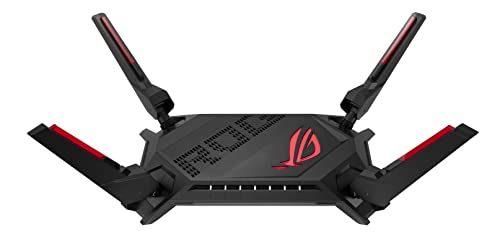
ASUS ROG Rapture WiFi 6 AX Gaming Router (GT-AX6000) – Dual Band 2.5G WAN/LAN Ports, Quad-Core 2.0Ghz CPU, Triple-Level Game Acceleration, AiMesh Compatible, Lifetime Internet Security, Instant Guard
Product Dimensions
13.3 x 7.72 x 8.7 inches
Item Weight
2.47 pounds
ASIN
B09L8PCTPT
Item model number
GT-AX6000
Date First Available
November 26, 2021
Manufacturer
Asus
Country of Origin
China
Test video – ASUS ROG Rapture WiFi 6 AX Gaming :
Product highlights :
Connector Type : USB
High-Efficiency WiFi 6 – Ultrafast WiFi 6 dual-band router boosts speed up to 6000 Mbps, with 160 MHz channels for better efficiency and throughput
Dual 2.5G Ports – Traffic via 2.5G ports has top priority; flexible WAN/LAN network port configurations
Extreme Quad-Core CPU Power – High-performance 2.0 GHz quad-core CPU takes computational capabilities to the next level
Triple-Level Game Acceleration – Accelerate game traffic every step of the way from device to game server
Mobile Game Mode – Minimize lag and latency for mobile gaming with just a tap on the ASUS Router app. OFDMA (Orthogonal Frequency Division Multiple Access), Beamforming: standard-based and universal, 1024-QAM high data rate,20/40/80/160 MHz bandwidth
➕ What is the price of ASUS ROG Rapture WiFi 6 AX Gaming in Saudi Arabia ?
The price of ASUS ROG Rapture WiFi 6 AX Gaming in-store is 1210 SAR VAT.
➕ When ASUS ROG Rapture WiFi 6 AX Gaming was released ?
The release date was November 26, 2021.
➕ What is the price of ASUS ROG Rapture WiFi 6 AX Gaming cheap used ?
The price of ASUS ROG Rapture WiFi 6 AX Gaming used is 840 SAR VAT.
➕ What are the main characteristics of ASUS ROG Rapture WiFi 6 AX Gaming ?
Special specifications :
Connector Type : USB
➕ Is it interesting to buy this product ?
The best people who can answer you are customers who have already bought and tested this product (See Customer Reviews). This product is rated 4.5 / 5 on Amazon.
➕ Where to buy ASUS ROG Rapture WiFi 6 AX Gaming in Saudi Arabia ?
Check the duration of the warranty and also the faults and defects it covers. Is it complete or limited? and What is included in the warranty (parts, repairs or both)?
Shipping :
Is delivery offered? And how long does it take to get delivered (Delivery time)
Proof of purchase :
Does the shop give you an invoice ?
After-sales service :
Do they have an after-sales service to have information about the installation or operation (instructions for use). Also in case of problem, it is the seller who takes charge or you must contact the manufacturer or supplier yourself.
_____________________________
10 reviews for ASUS ROG Rapture WiFi 6 AX Gaming
Rated 4 out of 5
Z. A (verified owner)–
Of the ‘con’sumer routers out there, this is one of the best – Bought this after Dong recommended it in one of his blog posts for the 2.5gbit throughput from wan to lan since our 600mbit comcast plan is over provisioned at almost 1.5gbits down. I flashed the Merlin open source firmware onto it almost immediately since I prefer the security and power user features of open source projects like OpenWrt and DD-wrt. Then I almost returned it as the wifi connection to our android phones disconnected/reconnected every 10 seconds plus numerous other software bugs, glitches and inability to setup any advanced features via cli. Turned out the problem wasn’t the hardware. It was Merlin. That open source project is a useless joke compared to OpenWrt. I realize that Merlin is constrained by the closed source nature of the newer AX chips, but still I could not figure out what it added beyond what you can actually do since the stock firmware is Linux based and the GUI lets you set up SSH CLI access to a vast and complete set of Linux networking and firewall executables of which the GUI (stock or Merlin) barely scrapes the surface. IMO the ssh -> Linux access, which I have not seen in any other consumer grade router allows these to be turned into PROsumer network devices including multi vlan (port and 801q) support, outbound and inter-subnet firewall configs, dual wan, wan and lan port aggregation plus many more features unavailable on the ‘consumer’ grade crap. Decided to de-install Merlin and it could not be any more stable now. So not only decided to keep it, but I’m adding an additional AX86S as an access point with a 2gbit wired backhaul. My network consists of about 40ish wifi IoT devices, many more non wifi IoT, some streaming cams plus a lot of streamed TV, plus multiple phones and laptops that require network segmentation (a buzzword that is alien in the home user market). But the ASUS can do it if you are willing to roll up your sleeves and wrestle with the CLI. Having a professional network and software engineering background doesn’t hurt, but it’s easy enough to hire a skilled IT/Linux programmer to assist in configuring the enterprise grade features not supported by the GUI. IMO this ~$300 ‘consumer/gamer’ router can be transformed into $1-2K enterprise grade security gateway, and it is one of the only consumer brands where the stock firmware allows (not to mention it is also one of the few remaining CONsumer brands that does not spy on you via required cloud accounts and phone apps just to configure the router) CLI access. All in all, on the surface it seems like a fairly good, 3.5 star product, but the hidden value with full access to Linux CLI networking commands like vlanctl, brctl, ifconfig, ip, iptables, ebtables, etc places the overall value off the charts.
Rated 2 out of 5
E. G (verified owner)–
AiMesh has major issues. Im on the fence of recommendation – Initial review timestamp: 2/28/2020. Stock Firmware Version 3.0.0.4.384.7977. Asus merlin firmware version 384.15 :
Rated 2 out of 5
E. G (verified owner)–
AiMesh has major issues. Im on the fence of recommendation – Initial review timestamp: 2/28/2020. Stock Firmware Version 3.0.0.4.384.7977. Asus merlin firmware version 384.15 :
Z. G (verified owner)–
– Buscaba instalar un router que me permitiera generar nuevas redes de WiFi en casa, con buena cobertura y velocidad, y leyendo reseñas me decidí por este. Lamentablemente nunca lo pude echar a funcionar. Traté de encontrar indicaciones sencillas que me indicaran qué tendría que hacer, pero no las encontré. Creo que requiere más conocimiento técnico. También algo dice que es tecnología WiFi de última generación, y a lo mejor esto todavía no es compatible en México…
F. S (verified owner)–
– Compré este después de regresar el Netgear RAX80.
D. Z (verified owner)–
– Handles 30+ devices nicely, no congestions and no disconnects. The garage openers historically used to have weak signals but not with this router. Web GUI and IOS APP are an amazing way to quickly configure the router.
F. S (verified owner)–
– Compré este después de regresar el Netgear RAX80.
Rated 4 out of 5
Z. A (verified owner)–
Of the ‘con’sumer routers out there, this is one of the best – Bought this after Dong recommended it in one of his blog posts for the 2.5gbit throughput from wan to lan since our 600mbit comcast plan is over provisioned at almost 1.5gbits down. I flashed the Merlin open source firmware onto it almost immediately since I prefer the security and power user features of open source projects like OpenWrt and DD-wrt. Then I almost returned it as the wifi connection to our android phones disconnected/reconnected every 10 seconds plus numerous other software bugs, glitches and inability to setup any advanced features via cli. Turned out the problem wasn’t the hardware. It was Merlin. That open source project is a useless joke compared to OpenWrt. I realize that Merlin is constrained by the closed source nature of the newer AX chips, but still I could not figure out what it added beyond what you can actually do since the stock firmware is Linux based and the GUI lets you set up SSH CLI access to a vast and complete set of Linux networking and firewall executables of which the GUI (stock or Merlin) barely scrapes the surface. IMO the ssh -> Linux access, which I have not seen in any other consumer grade router allows these to be turned into PROsumer network devices including multi vlan (port and 801q) support, outbound and inter-subnet firewall configs, dual wan, wan and lan port aggregation plus many more features unavailable on the ‘consumer’ grade crap. Decided to de-install Merlin and it could not be any more stable now. So not only decided to keep it, but I’m adding an additional AX86S as an access point with a 2gbit wired backhaul. My network consists of about 40ish wifi IoT devices, many more non wifi IoT, some streaming cams plus a lot of streamed TV, plus multiple phones and laptops that require network segmentation (a buzzword that is alien in the home user market). But the ASUS can do it if you are willing to roll up your sleeves and wrestle with the CLI. Having a professional network and software engineering background doesn’t hurt, but it’s easy enough to hire a skilled IT/Linux programmer to assist in configuring the enterprise grade features not supported by the GUI. IMO this ~$300 ‘consumer/gamer’ router can be transformed into $1-2K enterprise grade security gateway, and it is one of the only consumer brands where the stock firmware allows (not to mention it is also one of the few remaining CONsumer brands that does not spy on you via required cloud accounts and phone apps just to configure the router) CLI access. All in all, on the surface it seems like a fairly good, 3.5 star product, but the hidden value with full access to Linux CLI networking commands like vlanctl, brctl, ifconfig, ip, iptables, ebtables, etc places the overall value off the charts.
Z. G (verified owner)–
– Buscaba instalar un router que me permitiera generar nuevas redes de WiFi en casa, con buena cobertura y velocidad, y leyendo reseñas me decidí por este. Lamentablemente nunca lo pude echar a funcionar. Traté de encontrar indicaciones sencillas que me indicaran qué tendría que hacer, pero no las encontré. Creo que requiere más conocimiento técnico. También algo dice que es tecnología WiFi de última generación, y a lo mejor esto todavía no es compatible en México…
D. Z (verified owner)–
– Handles 30+ devices nicely, no congestions and no disconnects. The garage openers historically used to have weak signals but not with this router. Web GUI and IOS APP are an amazing way to quickly configure the router.


Z. A (verified owner) –
Of the ‘con’sumer routers out there, this is one of the best – Bought this after Dong recommended it in one of his blog posts for the 2.5gbit throughput from wan to lan since our 600mbit comcast plan is over provisioned at almost 1.5gbits down. I flashed the Merlin open source firmware onto it almost immediately since I prefer the security and power user features of open source projects like OpenWrt and DD-wrt. Then I almost returned it as the wifi connection to our android phones disconnected/reconnected every 10 seconds plus numerous other software bugs, glitches and inability to setup any advanced features via cli. Turned out the problem wasn’t the hardware. It was Merlin. That open source project is a useless joke compared to OpenWrt. I realize that Merlin is constrained by the closed source nature of the newer AX chips, but still I could not figure out what it added beyond what you can actually do since the stock firmware is Linux based and the GUI lets you set up SSH CLI access to a vast and complete set of Linux networking and firewall executables of which the GUI (stock or Merlin) barely scrapes the surface. IMO the ssh -> Linux access, which I have not seen in any other consumer grade router allows these to be turned into PROsumer network devices including multi vlan (port and 801q) support, outbound and inter-subnet firewall configs, dual wan, wan and lan port aggregation plus many more features unavailable on the ‘consumer’ grade crap. Decided to de-install Merlin and it could not be any more stable now. So not only decided to keep it, but I’m adding an additional AX86S as an access point with a 2gbit wired backhaul. My network consists of about 40ish wifi IoT devices, many more non wifi IoT, some streaming cams plus a lot of streamed TV, plus multiple phones and laptops that require network segmentation (a buzzword that is alien in the home user market). But the ASUS can do it if you are willing to roll up your sleeves and wrestle with the CLI. Having a professional network and software engineering background doesn’t hurt, but it’s easy enough to hire a skilled IT/Linux programmer to assist in configuring the enterprise grade features not supported by the GUI. IMO this ~$300 ‘consumer/gamer’ router can be transformed into $1-2K enterprise grade security gateway, and it is one of the only consumer brands where the stock firmware allows (not to mention it is also one of the few remaining CONsumer brands that does not spy on you via required cloud accounts and phone apps just to configure the router) CLI access. All in all, on the surface it seems like a fairly good, 3.5 star product, but the hidden value with full access to Linux CLI networking commands like vlanctl, brctl, ifconfig, ip, iptables, ebtables, etc places the overall value off the charts.
E. G (verified owner) –
AiMesh has major issues. Im on the fence of recommendation – Initial review timestamp: 2/28/2020. Stock Firmware Version 3.0.0.4.384.7977. Asus merlin firmware version 384.15 :
E. G (verified owner) –
AiMesh has major issues. Im on the fence of recommendation – Initial review timestamp: 2/28/2020. Stock Firmware Version 3.0.0.4.384.7977. Asus merlin firmware version 384.15 :
Z. G (verified owner) –
– Buscaba instalar un router que me permitiera generar nuevas redes de WiFi en casa, con buena cobertura y velocidad, y leyendo reseñas me decidí por este. Lamentablemente nunca lo pude echar a funcionar. Traté de encontrar indicaciones sencillas que me indicaran qué tendría que hacer, pero no las encontré. Creo que requiere más conocimiento técnico. También algo dice que es tecnología WiFi de última generación, y a lo mejor esto todavía no es compatible en México…
F. S (verified owner) –
– Compré este después de regresar el Netgear RAX80.
D. Z (verified owner) –
– Handles 30+ devices nicely, no congestions and no disconnects. The garage openers historically used to have weak signals but not with this router. Web GUI and IOS APP are an amazing way to quickly configure the router.
F. S (verified owner) –
– Compré este después de regresar el Netgear RAX80.
Z. A (verified owner) –
Of the ‘con’sumer routers out there, this is one of the best – Bought this after Dong recommended it in one of his blog posts for the 2.5gbit throughput from wan to lan since our 600mbit comcast plan is over provisioned at almost 1.5gbits down. I flashed the Merlin open source firmware onto it almost immediately since I prefer the security and power user features of open source projects like OpenWrt and DD-wrt. Then I almost returned it as the wifi connection to our android phones disconnected/reconnected every 10 seconds plus numerous other software bugs, glitches and inability to setup any advanced features via cli. Turned out the problem wasn’t the hardware. It was Merlin. That open source project is a useless joke compared to OpenWrt. I realize that Merlin is constrained by the closed source nature of the newer AX chips, but still I could not figure out what it added beyond what you can actually do since the stock firmware is Linux based and the GUI lets you set up SSH CLI access to a vast and complete set of Linux networking and firewall executables of which the GUI (stock or Merlin) barely scrapes the surface. IMO the ssh -> Linux access, which I have not seen in any other consumer grade router allows these to be turned into PROsumer network devices including multi vlan (port and 801q) support, outbound and inter-subnet firewall configs, dual wan, wan and lan port aggregation plus many more features unavailable on the ‘consumer’ grade crap. Decided to de-install Merlin and it could not be any more stable now. So not only decided to keep it, but I’m adding an additional AX86S as an access point with a 2gbit wired backhaul. My network consists of about 40ish wifi IoT devices, many more non wifi IoT, some streaming cams plus a lot of streamed TV, plus multiple phones and laptops that require network segmentation (a buzzword that is alien in the home user market). But the ASUS can do it if you are willing to roll up your sleeves and wrestle with the CLI. Having a professional network and software engineering background doesn’t hurt, but it’s easy enough to hire a skilled IT/Linux programmer to assist in configuring the enterprise grade features not supported by the GUI. IMO this ~$300 ‘consumer/gamer’ router can be transformed into $1-2K enterprise grade security gateway, and it is one of the only consumer brands where the stock firmware allows (not to mention it is also one of the few remaining CONsumer brands that does not spy on you via required cloud accounts and phone apps just to configure the router) CLI access. All in all, on the surface it seems like a fairly good, 3.5 star product, but the hidden value with full access to Linux CLI networking commands like vlanctl, brctl, ifconfig, ip, iptables, ebtables, etc places the overall value off the charts.
Z. G (verified owner) –
– Buscaba instalar un router que me permitiera generar nuevas redes de WiFi en casa, con buena cobertura y velocidad, y leyendo reseñas me decidí por este. Lamentablemente nunca lo pude echar a funcionar. Traté de encontrar indicaciones sencillas que me indicaran qué tendría que hacer, pero no las encontré. Creo que requiere más conocimiento técnico. También algo dice que es tecnología WiFi de última generación, y a lo mejor esto todavía no es compatible en México…
D. Z (verified owner) –
– Handles 30+ devices nicely, no congestions and no disconnects. The garage openers historically used to have weak signals but not with this router. Web GUI and IOS APP are an amazing way to quickly configure the router.