
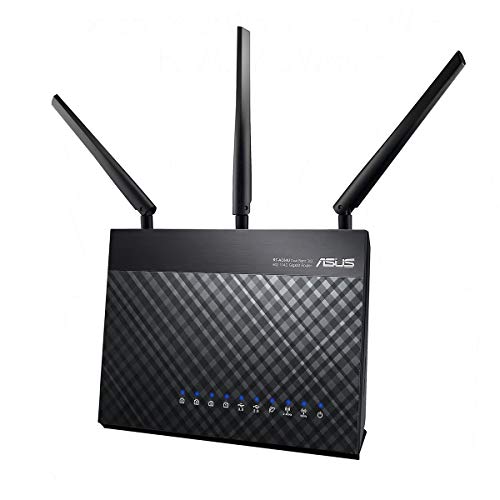
Description
ASUS AC1900 WiFi Gaming Router (RT-AC68U) – – Features & Prices in Saudi Arabia :
ASUS AC1900 WiFi Gaming Router (RT-AC68U) – Dual Band Gigabit Wireless Internet Router, Gaming & Streaming, AiMesh Compatible, Included Lifetime Internet Security, Adaptive QoS, Parental Control
Test video – ASUS AC1900 WiFi Gaming Router (RT-AC68U) – :
Product highlights :
Questions & Answers – ASUS AC1900 WiFi Gaming Router (RT-AC68U) – :
Technical specifications – ASUS AC1900 WiFi Gaming Router (RT-AC68U) – :
Purchase advice :
-
Warranty :
Check the duration of the warranty and also the faults and defects it covers. Is it complete or limited? and What is included in the warranty (parts, repairs or both)?
-
Shipping :
Is delivery offered? And how long does it take to get delivered (Delivery time)
-
Proof of purchase :
Does the shop give you an invoice ?
-
After-sales service :
Do they have an after-sales service to have information about the installation or operation (instructions for use). Also in case of problem, it is the seller who takes charge or you must contact the manufacturer or supplier yourself.
_____________________________
K. S (verified owner) –
– I have two sons who spend (as do many of their age) far too much time on their game systems (PS4s). The BT router’s parental controls are basically very poor (once set they apply to the entire home network and not just their Playstations). I therefore wanted a router where I could be more specific about which devices were limited, and this router had a lot of good reviews.
N. K (verified owner) –
– I have an old RT-AC69U and thought it worth using a second one to provide a WiFi link for the TV and media. I spent all weekend getting them to work and the useless one covering the TV keeps dropping out. Its only 6-8 feet from the old RT-AC69U set up as a node using Ethernet. Frustratingly the old one not set up as a AiMesh node provided a better WiFi signal to rooms above. I have no idea if other routers would work better using AiMesh but I don’t see why. Avoid it as a system at all costs.
A. E (verified owner) –
upgrade on performance vs n66u, ac66u—But – Updated vs r7000 – 10/11/13 UPDATE : Received router on 10/8 and review was written with 1st day experiences, I ranked it a 5 star purchase at the time. I’ll leave that review intact as a basis of the overall experience but will add a brief update first and my score is going to go down based off of that. since first day, I have started to notice diminished performance that gets alleviated with reboots, obviously not ideal though. Others are reporting degrading signal strength over time on the 5ghz band too. It feels like a fw update could fix it but it’s a lot to pay for a hope and a prayer. This sent me to test out the r7000 so today I tried out the netgear r7000 to compare/contrast. tested via ipad4 and iphone 5s at distances of ~40 feet, ~65 feet, and ~85 feet all on the 5ghz band. In general, the ac68u was 10-20 mbps faster then the r7000 on downstream, at times a few mbps faster on the uploads. at the furthest distance, the ac68u was upwards of 30mbps better although i’ll note, the iphone 5s connection at that distance was fairly sporadic for both routers. At times could get decent speeds, at times couldn’t get connected so I went to the 2.4 band on the 5s and on average kept a decent connection but not great and the ac68u frankly had a pronounced speed advantage on the 2.4 band here. Not all roses hence why I have dinged the router a star though. On average, the r7000 was noticeably more consistent with its speeds at each distance while the ac68u had wilder fluctuations in either direction. 20mbps better on one reading, 40 worse on another. In my rankings, I tried to show what they got on the high end of results but the ac68u definitely had moments well below as well. It was easier to assess what the r7000 was going to give me, it typically differed in results by 3-5 mbps. At this point I’m torn, not sure what to do. On one hand, the ac68u is giving me better speeds at longer distances, something anyone would want. On the other hand, the signal may be degrading over time and the speeds are not as consistent as the r7000(frankly, these issues may be related). With the netgear, it seemed more reliable and while the speeds are not as high as the ac68u, its still more then good enuf and close enuf to the ac68u. But conversely, it doesn’t give me the range I wanted that had me upgrading in the first place. I may sit on this for a few days and pray a asus fw is coming within that time. Either way, I’ve dropped 1 star and not 2 mainly because while its not the hero I once thought it was, at its diminished moments, its still better then what I got out of the rt-n66u, the router that the following review will tell you, was my previous champ over the ac66u.
T. S (verified owner) –
– Bought this as my virgin media hub2 didn’t give the WiFi coverage I required. I set my hub2 into modem mode and plugged in the ASUS router. Set is fairly straight forward, plus you download an app for Android and iOS to control your router setting and view stats. I’m on a 200mb package, I can now achieve download speeds of 220mb via 5g wifi anywhere in the house. Even at the bottom of the garden I’m hitting 142mb and the router is at the opposite side of the house. No more black spots, no more power line adaptors. Just super internet .
G. K (verified owner) –
ASUS BLUE CAVE is AWESOME! – Pros:
A. E (verified owner) –
upgrade on performance vs n66u, ac66u—But – Updated vs r7000 – 10/11/13 UPDATE : Received router on 10/8 and review was written with 1st day experiences, I ranked it a 5 star purchase at the time. I’ll leave that review intact as a basis of the overall experience but will add a brief update first and my score is going to go down based off of that. since first day, I have started to notice diminished performance that gets alleviated with reboots, obviously not ideal though. Others are reporting degrading signal strength over time on the 5ghz band too. It feels like a fw update could fix it but it’s a lot to pay for a hope and a prayer. This sent me to test out the r7000 so today I tried out the netgear r7000 to compare/contrast. tested via ipad4 and iphone 5s at distances of ~40 feet, ~65 feet, and ~85 feet all on the 5ghz band. In general, the ac68u was 10-20 mbps faster then the r7000 on downstream, at times a few mbps faster on the uploads. at the furthest distance, the ac68u was upwards of 30mbps better although i’ll note, the iphone 5s connection at that distance was fairly sporadic for both routers. At times could get decent speeds, at times couldn’t get connected so I went to the 2.4 band on the 5s and on average kept a decent connection but not great and the ac68u frankly had a pronounced speed advantage on the 2.4 band here. Not all roses hence why I have dinged the router a star though. On average, the r7000 was noticeably more consistent with its speeds at each distance while the ac68u had wilder fluctuations in either direction. 20mbps better on one reading, 40 worse on another. In my rankings, I tried to show what they got on the high end of results but the ac68u definitely had moments well below as well. It was easier to assess what the r7000 was going to give me, it typically differed in results by 3-5 mbps. At this point I’m torn, not sure what to do. On one hand, the ac68u is giving me better speeds at longer distances, something anyone would want. On the other hand, the signal may be degrading over time and the speeds are not as consistent as the r7000(frankly, these issues may be related). With the netgear, it seemed more reliable and while the speeds are not as high as the ac68u, its still more then good enuf and close enuf to the ac68u. But conversely, it doesn’t give me the range I wanted that had me upgrading in the first place. I may sit on this for a few days and pray a asus fw is coming within that time. Either way, I’ve dropped 1 star and not 2 mainly because while its not the hero I once thought it was, at its diminished moments, its still better then what I got out of the rt-n66u, the router that the following review will tell you, was my previous champ over the ac66u.
T. S (verified owner) –
– Bought this as my virgin media hub2 didn’t give the WiFi coverage I required. I set my hub2 into modem mode and plugged in the ASUS router. Set is fairly straight forward, plus you download an app for Android and iOS to control your router setting and view stats. I’m on a 200mb package, I can now achieve download speeds of 220mb via 5g wifi anywhere in the house. Even at the bottom of the garden I’m hitting 142mb and the router is at the opposite side of the house. No more black spots, no more power line adaptors. Just super internet .
G. K (verified owner) –
ASUS BLUE CAVE is AWESOME! – Pros:
N. K (verified owner) –
– I have an old RT-AC69U and thought it worth using a second one to provide a WiFi link for the TV and media. I spent all weekend getting them to work and the useless one covering the TV keeps dropping out. Its only 6-8 feet from the old RT-AC69U set up as a node using Ethernet. Frustratingly the old one not set up as a AiMesh node provided a better WiFi signal to rooms above. I have no idea if other routers would work better using AiMesh but I don’t see why. Avoid it as a system at all costs.
K. S (verified owner) –
– I have two sons who spend (as do many of their age) far too much time on their game systems (PS4s). The BT router’s parental controls are basically very poor (once set they apply to the entire home network and not just their Playstations). I therefore wanted a router where I could be more specific about which devices were limited, and this router had a lot of good reviews.