2022 Newest WiFi Extender Signal Booster, Covers – Features & Prices in Saudi Arabia :
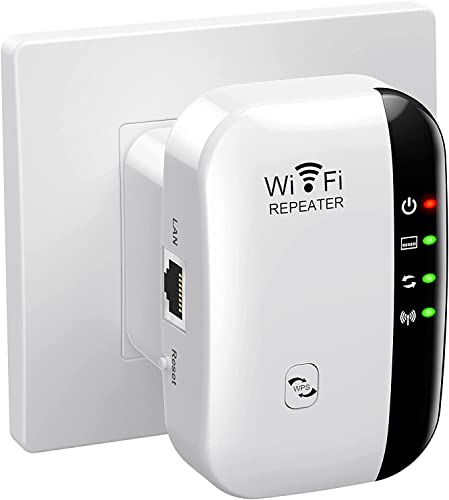
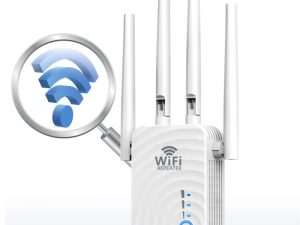
2022 Newest WiFi Extender Signal Booster, Covers Up to 3000sq.ft and 35 Devices, WiFi Range Extender, WiFi boosters for The House ,with Ethernet Port, Easy Setup,Router Extender for Wireless Internet
Package Dimensions
4.65 x 4.57 x 2.64 inches
Item Weight
5 ounces
ASIN
B0B71K2XZ8
Date First Available
July 19, 2022
Manufacturer
VAIYI
Country of Origin
China
Test video – 2022 Newest WiFi Extender Signal Booster, Covers :
Product highlights :
【Extend Wi-Fi Coverage 】This wifi extender Boost Internet Wi-Fi coverage up to 3000 square feet and connects up to 35 devices – Compatible with any Wi-Fi Router, Gateway, Access Point
【Say Good Bye to WIFI Dead Zone】WiFi range extender Coverage up to 3000 square feet ,with Newest 2022 Generation advanced powerful chips can better extend wireless signals to hard-to-reach areas,Wi-Fi range booster penetrates walls, floors and extending your internet wireless network to every corner of your house for online gaming, video chat,Eliminate Wi-Fi Dead Zones ,Enjoy Lag-Free Connection to any type of devices
【Easy to set up】Just press the WPS button ,the wifi booster will be quickly matched with existing router,It takes less than a minute to setup and connect to the WIFI.so that every corner of your home has a stable and secure WiFi signal. Setup can also be completed within 3 minutes via your Mobile devices’s web browser according to the user manual, without complicated steps and techniques
【Supports 2 Modes】Wi-Fi Extender has Ethernet Ports with Repeater/AP, can easily turn your wired Internet connection into a wireless access point.we set it up in one of two ways: Range extender (it connects to your existing wireless network wirelessly and extends the signal) or Access Point (it connects to the Internet or your existing network via Ethernet and then broadcasts the wireless signal
【US WiFi Security Protocol】This Internet Booster is Engineered in the US. WiFi repeater wireless signal internet booster is compatible with spectrum, xfinity, verizon, att and other ISPs routers or modems.Bank-level financial and personal data high-end security WEP/WPA/WPA2 crypto protocols that make your personal data bulletproof, It creates an ultimate formidable wall of safety and defense for business and privacy protection.and We provide 24-HOUR technical service and 24-MONTH Warranty.
➕ What is the price of 2022 Newest WiFi Extender Signal Booster, Covers in Saudi Arabia ?
The price of 2022 Newest WiFi Extender Signal Booster, Covers in-store is 70 SAR VAT.
➕ When 2022 Newest WiFi Extender Signal Booster, Covers was released ?
The release date was July 19, 2022.
➕ What is the price of 2022 Newest WiFi Extender Signal Booster, Covers cheap used ?
The price of 2022 Newest WiFi Extender Signal Booster, Covers used is 50 SAR VAT.
➕ What are the main characteristics of 2022 Newest WiFi Extender Signal Booster, Covers ?
Special specifications :
【Extend Wi-Fi Coverage 】This wifi extender Boost Internet Wi-Fi coverage up to 3000 square feet and connects up to 35 devices – Compatible with any Wi-Fi Router, Gateway, Access Point
➕ Is it interesting to buy this product ?
The best people who can answer you are customers who have already bought and tested this product (See Customer Reviews). This product is rated 3.9 / 5 on Amazon.
➕ Where to buy 2022 Newest WiFi Extender Signal Booster, Covers in Saudi Arabia ?
RJ45 Ethernet Cable, User Manual, WiFI Extender Range Booster
Compatible Devices
Router
Purchase advice :
Warranty :
Check the duration of the warranty and also the faults and defects it covers. Is it complete or limited? and What is included in the warranty (parts, repairs or both)?
Shipping :
Is delivery offered? And how long does it take to get delivered (Delivery time)
Proof of purchase :
Does the shop give you an invoice ?
After-sales service :
Do they have an after-sales service to have information about the installation or operation (instructions for use). Also in case of problem, it is the seller who takes charge or you must contact the manufacturer or supplier yourself.
_____________________________
16 reviews for 2022 Newest WiFi Extender Signal Booster, Covers
Rated 5 out of 5
K. N (verified owner)–
No issues! – I had been struggling with my internet in my two story home. I am in a bad area. that’s just it. The internet company can do nothing about my internet issue but recommended an extender which would cost me almost $150 with AT&T. NO WAY. I got this extender, hooked it up, took me all of 5 minutes and i was connected. Easy to do. I have NO ISSUES with my internet upstairs in my home. My tv works with no problem, i can connect my alexa. it’s awesome.
Rated 5 out of 5
S. H (verified owner)–
Installed super simple via WPS in repeater mode – I was waiting a while for this product and it didn’t disappoint. My home has the wireless access point (the main modem/router) in the front den which leaves the upstairs and downstairs rear of the home and the patio in a bit of a dead zone. I have moved this extender right in the back of that area and the whole upstairs and downstairs has a full meter display in testing. Setup was a breeze, in my case I am using the repeater mode which basically means it is repeating the signal from the modem/router I use and it is basically boosting it. The plan with these always is to put them just outside the dead zone or a spot where they can boost the coverage and fill in the gaps perfectly in your home’s wifi. In this case and in speed testing it seems to have a wonderful solid connection and it did install in no time. The device has a fairly thin plastic and the LED lights do sort of light up the whole device a bit but that isn’t really a knock. I will continue to test with this in different times of day and with different devices and will update the review if anything falters however my early tests show this is working quite well and because I used my router’s WPS capabilities it did the integration very simply and all I was asked for is my modem’s wifi password.
Rated 3 out of 5
E. A (verified owner)–
Speeds Not as Advertised! – I set it up in repeater mode about 5ft from the router, I was getting 15mbps upload and 10.5mbps download. When connecting to my router’s 2.4GHZ network, I was getting 80 down and 11.6 up. This was the best case scenario, so when I relocated it to my garage, about 30 ft from the house, I didn’t expect much. It only dropped slightly, 10mbps down and 9 up. I’m still going to use it, since some wifi in the garage is better than none, but I’m disappointed the speed is nowhere near advertised.
Rated 1 out of 5
B. Z (verified owner)–
I could not get this extender to work – I went step by step to set up this Wi-Fi extender. It appeared as though everything was fine until I moved the extender and tried to set up my laptop through the extender. I kept getting the message that the extender wasn’t connected to the Wi-Fi. I attempted a couple more times to set up the extender using the alternate directions. At this point, I couldn’t even get the extender to connect to the Wi-Fi. I’m not giving up as I see other reviewers were able to get the extender to connect. If I have luck, I will come back and edit my review. Unfortunately for me, it is a no go.
Rated 1 out of 5
B. Z (verified owner)–
I could not get this extender to work – I went step by step to set up this Wi-Fi extender. It appeared as though everything was fine until I moved the extender and tried to set up my laptop through the extender. I kept getting the message that the extender wasn’t connected to the Wi-Fi. I attempted a couple more times to set up the extender using the alternate directions. At this point, I couldn’t even get the extender to connect to the Wi-Fi. I’m not giving up as I see other reviewers were able to get the extender to connect. If I have luck, I will come back and edit my review. Unfortunately for me, it is a no go.
Rated 4 out of 5
M. Z (verified owner)–
It works!! – The instructions were easy to follow even for someone technologically challenged like me. I ordered this because my wireless printer is in my library which is a ways away from where I normally use my tablet and I had problems with it going offline a lot. This has solved that problem
Rated 5 out of 5
S. H (verified owner)–
Installed super simple via WPS in repeater mode – I was waiting a while for this product and it didn’t disappoint. My home has the wireless access point (the main modem/router) in the front den which leaves the upstairs and downstairs rear of the home and the patio in a bit of a dead zone. I have moved this extender right in the back of that area and the whole upstairs and downstairs has a full meter display in testing. Setup was a breeze, in my case I am using the repeater mode which basically means it is repeating the signal from the modem/router I use and it is basically boosting it. The plan with these always is to put them just outside the dead zone or a spot where they can boost the coverage and fill in the gaps perfectly in your home’s wifi. In this case and in speed testing it seems to have a wonderful solid connection and it did install in no time. The device has a fairly thin plastic and the LED lights do sort of light up the whole device a bit but that isn’t really a knock. I will continue to test with this in different times of day and with different devices and will update the review if anything falters however my early tests show this is working quite well and because I used my router’s WPS capabilities it did the integration very simply and all I was asked for is my modem’s wifi password.
Rated 5 out of 5
K. N (verified owner)–
No issues! – I had been struggling with my internet in my two story home. I am in a bad area. that’s just it. The internet company can do nothing about my internet issue but recommended an extender which would cost me almost $150 with AT&T. NO WAY. I got this extender, hooked it up, took me all of 5 minutes and i was connected. Easy to do. I have NO ISSUES with my internet upstairs in my home. My tv works with no problem, i can connect my alexa. it’s awesome.
Rated 4 out of 5
M. Z (verified owner)–
It works!! – The instructions were easy to follow even for someone technologically challenged like me. I ordered this because my wireless printer is in my library which is a ways away from where I normally use my tablet and I had problems with it going offline a lot. This has solved that problem
Rated 5 out of 5
A. S (verified owner)–
Exactly as described – I was worried about the setup on this but it wasn’t too bad. You plug it in and it shows up in your available wifi networks. Using your phone, connect to it and then open the admin configuration page. From there you can choose which wifi network to amplify. Like, I have a 2G and a 5G wifi, so I picked the 2G. Enter your wifi password and you are good to go. After you’re done setting it up you can plug it in to a different outlet that is closer to where you need a signal boost. Took about 10 minutes overall, so not bad. Seems to give me a stronger signal than I had before, so I’m good with this.
Rated 4 out of 5
J. D (verified owner)–
…update bad news – UPDATE: This is a downgrade as I’ve been running speed test on it and without the extended I’m getting 780mbps and running through the extender I’m getting approximately 107mbps max!
Rated 5 out of 5
B. J (verified owner)–
Quick and easy set up – The set up for this was super easy. I live in a brick building so my router signal couldn’t quite make it where i needed it to go which was killing me since i work from home. I was constantly losing my VPN. It took about 3 minutes to set this up, moved it to the halfway point i needed it to be at, and i haven’t lost my VPN once since using it. Definitely recommend it
Rated 5 out of 5
B. J (verified owner)–
Quick and easy set up – The set up for this was super easy. I live in a brick building so my router signal couldn’t quite make it where i needed it to go which was killing me since i work from home. I was constantly losing my VPN. It took about 3 minutes to set this up, moved it to the halfway point i needed it to be at, and i haven’t lost my VPN once since using it. Definitely recommend it
Rated 4 out of 5
J. D (verified owner)–
…update bad news – UPDATE: This is a downgrade as I’ve been running speed test on it and without the extended I’m getting 780mbps and running through the extender I’m getting approximately 107mbps max!
Rated 3 out of 5
E. A (verified owner)–
Speeds Not as Advertised! – I set it up in repeater mode about 5ft from the router, I was getting 15mbps upload and 10.5mbps download. When connecting to my router’s 2.4GHZ network, I was getting 80 down and 11.6 up. This was the best case scenario, so when I relocated it to my garage, about 30 ft from the house, I didn’t expect much. It only dropped slightly, 10mbps down and 9 up. I’m still going to use it, since some wifi in the garage is better than none, but I’m disappointed the speed is nowhere near advertised.
Rated 5 out of 5
A. S (verified owner)–
Exactly as described – I was worried about the setup on this but it wasn’t too bad. You plug it in and it shows up in your available wifi networks. Using your phone, connect to it and then open the admin configuration page. From there you can choose which wifi network to amplify. Like, I have a 2G and a 5G wifi, so I picked the 2G. Enter your wifi password and you are good to go. After you’re done setting it up you can plug it in to a different outlet that is closer to where you need a signal boost. Took about 10 minutes overall, so not bad. Seems to give me a stronger signal than I had before, so I’m good with this.

K. N (verified owner) –
No issues! – I had been struggling with my internet in my two story home. I am in a bad area. that’s just it. The internet company can do nothing about my internet issue but recommended an extender which would cost me almost $150 with AT&T. NO WAY. I got this extender, hooked it up, took me all of 5 minutes and i was connected. Easy to do. I have NO ISSUES with my internet upstairs in my home. My tv works with no problem, i can connect my alexa. it’s awesome.
S. H (verified owner) –
Installed super simple via WPS in repeater mode – I was waiting a while for this product and it didn’t disappoint. My home has the wireless access point (the main modem/router) in the front den which leaves the upstairs and downstairs rear of the home and the patio in a bit of a dead zone. I have moved this extender right in the back of that area and the whole upstairs and downstairs has a full meter display in testing. Setup was a breeze, in my case I am using the repeater mode which basically means it is repeating the signal from the modem/router I use and it is basically boosting it. The plan with these always is to put them just outside the dead zone or a spot where they can boost the coverage and fill in the gaps perfectly in your home’s wifi. In this case and in speed testing it seems to have a wonderful solid connection and it did install in no time. The device has a fairly thin plastic and the LED lights do sort of light up the whole device a bit but that isn’t really a knock. I will continue to test with this in different times of day and with different devices and will update the review if anything falters however my early tests show this is working quite well and because I used my router’s WPS capabilities it did the integration very simply and all I was asked for is my modem’s wifi password.
E. A (verified owner) –
Speeds Not as Advertised! – I set it up in repeater mode about 5ft from the router, I was getting 15mbps upload and 10.5mbps download. When connecting to my router’s 2.4GHZ network, I was getting 80 down and 11.6 up. This was the best case scenario, so when I relocated it to my garage, about 30 ft from the house, I didn’t expect much. It only dropped slightly, 10mbps down and 9 up. I’m still going to use it, since some wifi in the garage is better than none, but I’m disappointed the speed is nowhere near advertised.
B. Z (verified owner) –
I could not get this extender to work – I went step by step to set up this Wi-Fi extender. It appeared as though everything was fine until I moved the extender and tried to set up my laptop through the extender. I kept getting the message that the extender wasn’t connected to the Wi-Fi. I attempted a couple more times to set up the extender using the alternate directions. At this point, I couldn’t even get the extender to connect to the Wi-Fi. I’m not giving up as I see other reviewers were able to get the extender to connect. If I have luck, I will come back and edit my review. Unfortunately for me, it is a no go.
B. Z (verified owner) –
I could not get this extender to work – I went step by step to set up this Wi-Fi extender. It appeared as though everything was fine until I moved the extender and tried to set up my laptop through the extender. I kept getting the message that the extender wasn’t connected to the Wi-Fi. I attempted a couple more times to set up the extender using the alternate directions. At this point, I couldn’t even get the extender to connect to the Wi-Fi. I’m not giving up as I see other reviewers were able to get the extender to connect. If I have luck, I will come back and edit my review. Unfortunately for me, it is a no go.
M. Z (verified owner) –
It works!! – The instructions were easy to follow even for someone technologically challenged like me. I ordered this because my wireless printer is in my library which is a ways away from where I normally use my tablet and I had problems with it going offline a lot. This has solved that problem
S. H (verified owner) –
Installed super simple via WPS in repeater mode – I was waiting a while for this product and it didn’t disappoint. My home has the wireless access point (the main modem/router) in the front den which leaves the upstairs and downstairs rear of the home and the patio in a bit of a dead zone. I have moved this extender right in the back of that area and the whole upstairs and downstairs has a full meter display in testing. Setup was a breeze, in my case I am using the repeater mode which basically means it is repeating the signal from the modem/router I use and it is basically boosting it. The plan with these always is to put them just outside the dead zone or a spot where they can boost the coverage and fill in the gaps perfectly in your home’s wifi. In this case and in speed testing it seems to have a wonderful solid connection and it did install in no time. The device has a fairly thin plastic and the LED lights do sort of light up the whole device a bit but that isn’t really a knock. I will continue to test with this in different times of day and with different devices and will update the review if anything falters however my early tests show this is working quite well and because I used my router’s WPS capabilities it did the integration very simply and all I was asked for is my modem’s wifi password.
K. N (verified owner) –
No issues! – I had been struggling with my internet in my two story home. I am in a bad area. that’s just it. The internet company can do nothing about my internet issue but recommended an extender which would cost me almost $150 with AT&T. NO WAY. I got this extender, hooked it up, took me all of 5 minutes and i was connected. Easy to do. I have NO ISSUES with my internet upstairs in my home. My tv works with no problem, i can connect my alexa. it’s awesome.
M. Z (verified owner) –
It works!! – The instructions were easy to follow even for someone technologically challenged like me. I ordered this because my wireless printer is in my library which is a ways away from where I normally use my tablet and I had problems with it going offline a lot. This has solved that problem
A. S (verified owner) –
Exactly as described – I was worried about the setup on this but it wasn’t too bad. You plug it in and it shows up in your available wifi networks. Using your phone, connect to it and then open the admin configuration page. From there you can choose which wifi network to amplify. Like, I have a 2G and a 5G wifi, so I picked the 2G. Enter your wifi password and you are good to go. After you’re done setting it up you can plug it in to a different outlet that is closer to where you need a signal boost. Took about 10 minutes overall, so not bad. Seems to give me a stronger signal than I had before, so I’m good with this.
J. D (verified owner) –
…update bad news – UPDATE: This is a downgrade as I’ve been running speed test on it and without the extended I’m getting 780mbps and running through the extender I’m getting approximately 107mbps max!
B. J (verified owner) –
Quick and easy set up – The set up for this was super easy. I live in a brick building so my router signal couldn’t quite make it where i needed it to go which was killing me since i work from home. I was constantly losing my VPN. It took about 3 minutes to set this up, moved it to the halfway point i needed it to be at, and i haven’t lost my VPN once since using it. Definitely recommend it
B. J (verified owner) –
Quick and easy set up – The set up for this was super easy. I live in a brick building so my router signal couldn’t quite make it where i needed it to go which was killing me since i work from home. I was constantly losing my VPN. It took about 3 minutes to set this up, moved it to the halfway point i needed it to be at, and i haven’t lost my VPN once since using it. Definitely recommend it
J. D (verified owner) –
…update bad news – UPDATE: This is a downgrade as I’ve been running speed test on it and without the extended I’m getting 780mbps and running through the extender I’m getting approximately 107mbps max!
E. A (verified owner) –
Speeds Not as Advertised! – I set it up in repeater mode about 5ft from the router, I was getting 15mbps upload and 10.5mbps download. When connecting to my router’s 2.4GHZ network, I was getting 80 down and 11.6 up. This was the best case scenario, so when I relocated it to my garage, about 30 ft from the house, I didn’t expect much. It only dropped slightly, 10mbps down and 9 up. I’m still going to use it, since some wifi in the garage is better than none, but I’m disappointed the speed is nowhere near advertised.
A. S (verified owner) –
Exactly as described – I was worried about the setup on this but it wasn’t too bad. You plug it in and it shows up in your available wifi networks. Using your phone, connect to it and then open the admin configuration page. From there you can choose which wifi network to amplify. Like, I have a 2G and a 5G wifi, so I picked the 2G. Enter your wifi password and you are good to go. After you’re done setting it up you can plug it in to a different outlet that is closer to where you need a signal boost. Took about 10 minutes overall, so not bad. Seems to give me a stronger signal than I had before, so I’m good with this.