ZTE Z64 | Mobile Wifi Hotspot 4G – Features & Prices in Saudi Arabia :
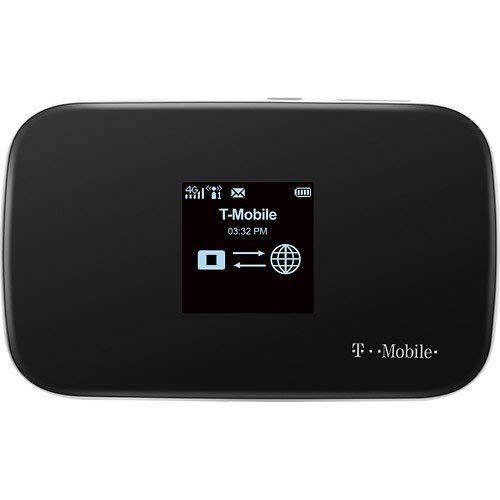
ZTE Z64 | Mobile Wifi Hotspot 4G Router MF64 | Up to 21Mbps Download Speed | Up to 8 connected devices | Create A WLAN Anywhere | (T-Mobile)
Product Dimensions
6 x 8 x 2 inches
Item Weight
8.8 ounces
ASIN
B00Q9EDPI0
Item model number
MF64
Batteries
1 Lithium Polymer batteries required.
Is Discontinued By Manufacturer
No
Wireless communication technologies
4G, Wi-Fi, 3G
Connectivity technologies
Wi-Fi
Other display features
Wireless
Colour
Black
Manufacturer
ZTE
Date First Available
November 27, 2014
Test video – ZTE Z64 | Mobile Wifi Hotspot 4G :
Product highlights :
DOES THIS DEVICE NEED A SIM CARD: Yes it does Being that this device is T-Mobile locked it will work on any active T-Mobile Micro size SIM Card THE SIM CARD WILL NOT BE INCLUDED, (You can go into any T-Mobile store and get a SIM card activated for only $10)
WHAT T-MOBILE FREQUENCIES ARE SUPPORTED BY THIS DEVICE: The Hotspot supports Frequencies GSM/EDGE/3G/4G: 850/1900. MHz – UMTS/HSPA: 850/AWS/1900MHZ. Please contact T-Mobile and inquire whether they support these bands in your area to ensure the device will work Properly for you.
WELL, HOW LONG CAN IT LAST ME: A removable 2,300mAh battery that lasted for 6 hours of continuous streaming
HOW STRONG OF A SIGNAL DOES THIS DEVICE HAVE: WIFI for up to 8 Devices in our tests that’s reasonable for a Small slick hotspot as well as a STANDBY TIME of 300 hours.
THIS DEVICE IS NOT UNLOCKED: This device will be locked unto the T-Mobile Network. THIS DEVICE WILL ONLY WORK ON THE T-Mobile NETWORK AS IT IS A T-MOBILE BRANDED DEVICE and only supports 2 T-Mobile frequencies and will only function for their Network
➕ What is the price of ZTE Z64 | Mobile Wifi Hotspot 4G in Saudi Arabia ?
The price of ZTE Z64 | Mobile Wifi Hotspot 4G in-store is 220 SAR VAT.
➕ When ZTE Z64 | Mobile Wifi Hotspot 4G was released ?
The release date was November 27, 2014.
➕ What is the price of ZTE Z64 | Mobile Wifi Hotspot 4G cheap used ?
The price of ZTE Z64 | Mobile Wifi Hotspot 4G used is 150 SAR VAT.
➕ What are the main characteristics of ZTE Z64 | Mobile Wifi Hotspot 4G ?
Special specifications :
DOES THIS DEVICE NEED A SIM CARD: Yes it does Being that this device is T-Mobile locked it will work on any active T-Mobile Micro size SIM Card THE SIM CARD WILL NOT BE INCLUDED, (You can go into any T-Mobile store and get a SIM card activated for only $10)
WHAT T-MOBILE FREQUENCIES ARE SUPPORTED BY THIS DEVICE: The Hotspot supports Frequencies GSM/EDGE/3G/4G: 850/1900. MHz – UMTS/HSPA: 850/AWS/1900MHZ. Please contact T-Mobile and inquire whether they support these bands in your area to ensure the device will work Properly for you.
➕ Is it interesting to buy this product ?
The best people who can answer you are customers who have already bought and tested this product (See Customer Reviews). This product is rated 3.3 / 5 on Amazon.
➕ Where to buy ZTE Z64 | Mobile Wifi Hotspot 4G in Saudi Arabia ?
Check the duration of the warranty and also the faults and defects it covers. Is it complete or limited? and What is included in the warranty (parts, repairs or both)?
Shipping :
Is delivery offered? And how long does it take to get delivered (Delivery time)
Proof of purchase :
Does the shop give you an invoice ?
After-sales service :
Do they have an after-sales service to have information about the installation or operation (instructions for use). Also in case of problem, it is the seller who takes charge or you must contact the manufacturer or supplier yourself.
_____________________________
16 reviews for ZTE Z64 | Mobile Wifi Hotspot 4G
Rated 4 out of 5
D. B (verified owner)–
Not LTE compatible, but works great with 4G/2G signals on TMobile (as of Feb. 2016) – First off: As of February 2016, this device only works with 4G/2G signals – so if you’re expecting T-Mobiles new LTE coverage (which has been expanded, and is wonderful), don’t! It’s a fine device to use in big cities, but once you start heading out on the highways, small towns, etc, all you’ll get is 2G signal.
Rated 4 out of 5
C. J (verified owner)–
Cheap and reliable, but needs to be unlocked to be used with other GSM operators. – My copy wasn’t unlocked but I unlocked (hacked) it with DC-Unlocker. Later I found out that you can also buy unlock codes on eBay for around $2, which is cheaper and requires less work (no need to install softwares). Although T-Mobile advertises this ZTE Hotspot as “4G”, it only supports up to HSPA, which is a fairly old form of the 3G network, instead of LTE, the actual 4G network. However, it is very reliable. I use it in my car with a Project Fi data-only sim card for navigation, and the data connection is very stable. I don’t recommend it for gaming because the ping or latency is quite high on this hotspot (100-200ms) due to the old network technology, but it’s still very reliable for regular tasks such as navigation or mobile video streaming.
Rated 3 out of 5
L. F (verified owner)–
Quality products. – Fast shipping & convenience of good products.
Rated 4 out of 5
K. N (verified owner)–
because it is working fine now so far – After nearly 24 hours of searching and researching, and reading and cussing, i finally figured it out . I firstly want to retract my previous 2 star rating, because it is working fine now so far. I dont know if it is all t-mobile web sites redirecting my searche’s, they’re lack of clarity and instruction, or what.1: After finally getting to the wifi admin page, I could not turn on the data until i unplugged the unit from the charger. This should be made known to customers! 2: The t-mobile help pages are not helpful in my opinion at all.3:the instruction manual that comes with the sim card and/or the hotspot do not mention anything about unpluging the hot spot so it can connect and are extremely vague in content. 4:I want to apologize to the seller and/or amazon for my premature assumption that the unit might be defective.Frustrastion can make you do that somtimes.i have had it working now for about seven hrs with no problems except the crappy data plans from t-mobile. in summary, all i have bought through amazon has been fine and satisfactory, and delivered on or before time. P.S….. If it keeps working fine, i will give it and seller’s 5 star in a few day’s. Thank you.
Rated 4 out of 5
K. N (verified owner)–
because it is working fine now so far – After nearly 24 hours of searching and researching, and reading and cussing, i finally figured it out . I firstly want to retract my previous 2 star rating, because it is working fine now so far. I dont know if it is all t-mobile web sites redirecting my searche’s, they’re lack of clarity and instruction, or what.1: After finally getting to the wifi admin page, I could not turn on the data until i unplugged the unit from the charger. This should be made known to customers! 2: The t-mobile help pages are not helpful in my opinion at all.3:the instruction manual that comes with the sim card and/or the hotspot do not mention anything about unpluging the hot spot so it can connect and are extremely vague in content. 4:I want to apologize to the seller and/or amazon for my premature assumption that the unit might be defective.Frustrastion can make you do that somtimes.i have had it working now for about seven hrs with no problems except the crappy data plans from t-mobile. in summary, all i have bought through amazon has been fine and satisfactory, and delivered on or before time. P.S….. If it keeps working fine, i will give it and seller’s 5 star in a few day’s. Thank you.
Rated 4 out of 5
D. L (verified owner)–
Almost perfect – battery cover won’t stay connected – Almost perfect – battery cover won’t stay connected
Rated 4 out of 5
K. Z (verified owner)–
T-Mobile Z64 4G MiFi Review – It does what is advertised. It readily connect to the T-Mobile 4G network. It does not show how much data you have used for the billing month, so it will take several billing cycles to know if my data plan is adequate. The other issue is that as the monthly data plan gets larger and the bill gets larger the faster the data transfers become. But for my purposes my present upload and download speeds are adequate for what I use my portable computer for. Note, the above has little to do with the actual MiFi device and more to do with T-Mobile and my learning curve. The staff at my local T-Mobile store were very helpful setting up the MiFi: Getting a phone number; Explaining the data plans and costs; Setting everything up so MiFi worked with my computer I brought to the store; Instructions on use.
Rated 4 out of 5
D. B (verified owner)–
Not LTE compatible, but works great with 4G/2G signals on TMobile (as of Feb. 2016) – First off: As of February 2016, this device only works with 4G/2G signals – so if you’re expecting T-Mobiles new LTE coverage (which has been expanded, and is wonderful), don’t! It’s a fine device to use in big cities, but once you start heading out on the highways, small towns, etc, all you’ll get is 2G signal.
Rated 3 out of 5
N. T (verified owner)–
Locked by T-Mobile – This Hot Spot works perfectly. The internet connection is fast. I have used it for e-mail and social networks and for online navigation with the cell phone’s GPS without any problem or interruption. On the other hand, internet browsing is somewhat slow. The battery life is very good.
Rated 1 out of 5
J. K (verified owner)–
pretty sure this was refurbished and sold as new – I can not get this to connect to the internet. I spent over 4 hours with T-Mobile. everything is good with the sims card and the registration to the product. must be this product. when I first open the package. the plastic film for the back was wrinkled up in the box, the battery was loose, and the front screen is a little scratched up. When I went to activate the sims card to the devise, they told me that it looks like this devise was registered back in 2017. Then I later found out that the location defaulted to Brazil. It had my current address but had me in Brazil. Another rep said that it always defaults to the last activated spot. So please tell me – how can this be a new devise???
Rated 3 out of 5
L. F (verified owner)–
Quality products. – Fast shipping & convenience of good products.
Rated 4 out of 5
C. J (verified owner)–
Cheap and reliable, but needs to be unlocked to be used with other GSM operators. – My copy wasn’t unlocked but I unlocked (hacked) it with DC-Unlocker. Later I found out that you can also buy unlock codes on eBay for around $2, which is cheaper and requires less work (no need to install softwares). Although T-Mobile advertises this ZTE Hotspot as “4G”, it only supports up to HSPA, which is a fairly old form of the 3G network, instead of LTE, the actual 4G network. However, it is very reliable. I use it in my car with a Project Fi data-only sim card for navigation, and the data connection is very stable. I don’t recommend it for gaming because the ping or latency is quite high on this hotspot (100-200ms) due to the old network technology, but it’s still very reliable for regular tasks such as navigation or mobile video streaming.
Rated 4 out of 5
D. L (verified owner)–
Almost perfect – battery cover won’t stay connected – Almost perfect – battery cover won’t stay connected
Rated 4 out of 5
K. Z (verified owner)–
T-Mobile Z64 4G MiFi Review – It does what is advertised. It readily connect to the T-Mobile 4G network. It does not show how much data you have used for the billing month, so it will take several billing cycles to know if my data plan is adequate. The other issue is that as the monthly data plan gets larger and the bill gets larger the faster the data transfers become. But for my purposes my present upload and download speeds are adequate for what I use my portable computer for. Note, the above has little to do with the actual MiFi device and more to do with T-Mobile and my learning curve. The staff at my local T-Mobile store were very helpful setting up the MiFi: Getting a phone number; Explaining the data plans and costs; Setting everything up so MiFi worked with my computer I brought to the store; Instructions on use.
Rated 3 out of 5
N. T (verified owner)–
Locked by T-Mobile – This Hot Spot works perfectly. The internet connection is fast. I have used it for e-mail and social networks and for online navigation with the cell phone’s GPS without any problem or interruption. On the other hand, internet browsing is somewhat slow. The battery life is very good.
Rated 1 out of 5
J. K (verified owner)–
pretty sure this was refurbished and sold as new – I can not get this to connect to the internet. I spent over 4 hours with T-Mobile. everything is good with the sims card and the registration to the product. must be this product. when I first open the package. the plastic film for the back was wrinkled up in the box, the battery was loose, and the front screen is a little scratched up. When I went to activate the sims card to the devise, they told me that it looks like this devise was registered back in 2017. Then I later found out that the location defaulted to Brazil. It had my current address but had me in Brazil. Another rep said that it always defaults to the last activated spot. So please tell me – how can this be a new devise???

D. B (verified owner) –
Not LTE compatible, but works great with 4G/2G signals on TMobile (as of Feb. 2016) – First off: As of February 2016, this device only works with 4G/2G signals – so if you’re expecting T-Mobiles new LTE coverage (which has been expanded, and is wonderful), don’t! It’s a fine device to use in big cities, but once you start heading out on the highways, small towns, etc, all you’ll get is 2G signal.
C. J (verified owner) –
Cheap and reliable, but needs to be unlocked to be used with other GSM operators. – My copy wasn’t unlocked but I unlocked (hacked) it with DC-Unlocker. Later I found out that you can also buy unlock codes on eBay for around $2, which is cheaper and requires less work (no need to install softwares). Although T-Mobile advertises this ZTE Hotspot as “4G”, it only supports up to HSPA, which is a fairly old form of the 3G network, instead of LTE, the actual 4G network. However, it is very reliable. I use it in my car with a Project Fi data-only sim card for navigation, and the data connection is very stable. I don’t recommend it for gaming because the ping or latency is quite high on this hotspot (100-200ms) due to the old network technology, but it’s still very reliable for regular tasks such as navigation or mobile video streaming.
L. F (verified owner) –
Quality products. – Fast shipping & convenience of good products.
K. N (verified owner) –
because it is working fine now so far – After nearly 24 hours of searching and researching, and reading and cussing, i finally figured it out . I firstly want to retract my previous 2 star rating, because it is working fine now so far. I dont know if it is all t-mobile web sites redirecting my searche’s, they’re lack of clarity and instruction, or what.1: After finally getting to the wifi admin page, I could not turn on the data until i unplugged the unit from the charger. This should be made known to customers! 2: The t-mobile help pages are not helpful in my opinion at all.3:the instruction manual that comes with the sim card and/or the hotspot do not mention anything about unpluging the hot spot so it can connect and are extremely vague in content. 4:I want to apologize to the seller and/or amazon for my premature assumption that the unit might be defective.Frustrastion can make you do that somtimes.i have had it working now for about seven hrs with no problems except the crappy data plans from t-mobile. in summary, all i have bought through amazon has been fine and satisfactory, and delivered on or before time. P.S….. If it keeps working fine, i will give it and seller’s 5 star in a few day’s. Thank you.
K. N (verified owner) –
because it is working fine now so far – After nearly 24 hours of searching and researching, and reading and cussing, i finally figured it out . I firstly want to retract my previous 2 star rating, because it is working fine now so far. I dont know if it is all t-mobile web sites redirecting my searche’s, they’re lack of clarity and instruction, or what.1: After finally getting to the wifi admin page, I could not turn on the data until i unplugged the unit from the charger. This should be made known to customers! 2: The t-mobile help pages are not helpful in my opinion at all.3:the instruction manual that comes with the sim card and/or the hotspot do not mention anything about unpluging the hot spot so it can connect and are extremely vague in content. 4:I want to apologize to the seller and/or amazon for my premature assumption that the unit might be defective.Frustrastion can make you do that somtimes.i have had it working now for about seven hrs with no problems except the crappy data plans from t-mobile. in summary, all i have bought through amazon has been fine and satisfactory, and delivered on or before time. P.S….. If it keeps working fine, i will give it and seller’s 5 star in a few day’s. Thank you.
D. L (verified owner) –
Almost perfect – battery cover won’t stay connected – Almost perfect – battery cover won’t stay connected
K. Z (verified owner) –
T-Mobile Z64 4G MiFi Review – It does what is advertised. It readily connect to the T-Mobile 4G network. It does not show how much data you have used for the billing month, so it will take several billing cycles to know if my data plan is adequate. The other issue is that as the monthly data plan gets larger and the bill gets larger the faster the data transfers become. But for my purposes my present upload and download speeds are adequate for what I use my portable computer for. Note, the above has little to do with the actual MiFi device and more to do with T-Mobile and my learning curve. The staff at my local T-Mobile store were very helpful setting up the MiFi: Getting a phone number; Explaining the data plans and costs; Setting everything up so MiFi worked with my computer I brought to the store; Instructions on use.
D. B (verified owner) –
Not LTE compatible, but works great with 4G/2G signals on TMobile (as of Feb. 2016) – First off: As of February 2016, this device only works with 4G/2G signals – so if you’re expecting T-Mobiles new LTE coverage (which has been expanded, and is wonderful), don’t! It’s a fine device to use in big cities, but once you start heading out on the highways, small towns, etc, all you’ll get is 2G signal.
N. T (verified owner) –
Locked by T-Mobile – This Hot Spot works perfectly. The internet connection is fast. I have used it for e-mail and social networks and for online navigation with the cell phone’s GPS without any problem or interruption. On the other hand, internet browsing is somewhat slow. The battery life is very good.
J. K (verified owner) –
pretty sure this was refurbished and sold as new – I can not get this to connect to the internet. I spent over 4 hours with T-Mobile. everything is good with the sims card and the registration to the product. must be this product. when I first open the package. the plastic film for the back was wrinkled up in the box, the battery was loose, and the front screen is a little scratched up. When I went to activate the sims card to the devise, they told me that it looks like this devise was registered back in 2017. Then I later found out that the location defaulted to Brazil. It had my current address but had me in Brazil. Another rep said that it always defaults to the last activated spot. So please tell me – how can this be a new devise???
L. F (verified owner) –
Quality products. – Fast shipping & convenience of good products.
C. J (verified owner) –
Cheap and reliable, but needs to be unlocked to be used with other GSM operators. – My copy wasn’t unlocked but I unlocked (hacked) it with DC-Unlocker. Later I found out that you can also buy unlock codes on eBay for around $2, which is cheaper and requires less work (no need to install softwares). Although T-Mobile advertises this ZTE Hotspot as “4G”, it only supports up to HSPA, which is a fairly old form of the 3G network, instead of LTE, the actual 4G network. However, it is very reliable. I use it in my car with a Project Fi data-only sim card for navigation, and the data connection is very stable. I don’t recommend it for gaming because the ping or latency is quite high on this hotspot (100-200ms) due to the old network technology, but it’s still very reliable for regular tasks such as navigation or mobile video streaming.
D. L (verified owner) –
Almost perfect – battery cover won’t stay connected – Almost perfect – battery cover won’t stay connected
K. Z (verified owner) –
T-Mobile Z64 4G MiFi Review – It does what is advertised. It readily connect to the T-Mobile 4G network. It does not show how much data you have used for the billing month, so it will take several billing cycles to know if my data plan is adequate. The other issue is that as the monthly data plan gets larger and the bill gets larger the faster the data transfers become. But for my purposes my present upload and download speeds are adequate for what I use my portable computer for. Note, the above has little to do with the actual MiFi device and more to do with T-Mobile and my learning curve. The staff at my local T-Mobile store were very helpful setting up the MiFi: Getting a phone number; Explaining the data plans and costs; Setting everything up so MiFi worked with my computer I brought to the store; Instructions on use.
N. T (verified owner) –
Locked by T-Mobile – This Hot Spot works perfectly. The internet connection is fast. I have used it for e-mail and social networks and for online navigation with the cell phone’s GPS without any problem or interruption. On the other hand, internet browsing is somewhat slow. The battery life is very good.
J. K (verified owner) –
pretty sure this was refurbished and sold as new – I can not get this to connect to the internet. I spent over 4 hours with T-Mobile. everything is good with the sims card and the registration to the product. must be this product. when I first open the package. the plastic film for the back was wrinkled up in the box, the battery was loose, and the front screen is a little scratched up. When I went to activate the sims card to the devise, they told me that it looks like this devise was registered back in 2017. Then I later found out that the location defaulted to Brazil. It had my current address but had me in Brazil. Another rep said that it always defaults to the last activated spot. So please tell me – how can this be a new devise???