WiFi Range Extender Signal Booster 300Mbps Wireless is available in Saudi Arabia.
Find out all you need to know about WiFi Range Extender Signal Booster 300Mbps Wireless before buying : Price, Test video, Datasheet, Similar products.
WiFi Range Extender Signal Booster 300Mbps Wireless – Features & Prices in Saudi Arabia :
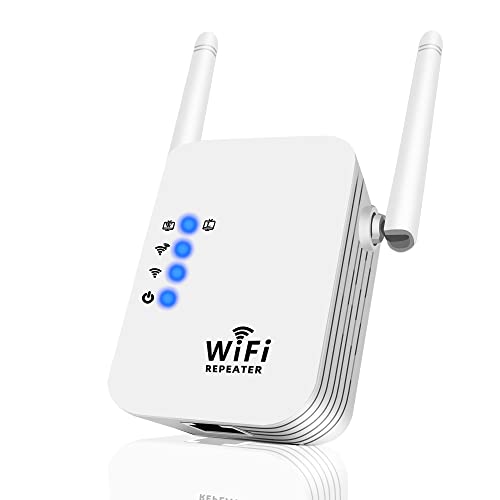
WiFi Range Extender Signal Booster 300Mbps Wireless Repeater Network Extender for Home Coverage Up to 2800 Sq Ft & 25 Devices Compact Design
Package Dimensions
4.72 x 3.62 x 2.99 inches
Item Weight
3.52 ounces
ASIN
B0BL3MH8QN
Date First Available
November 1, 2022
Manufacturer
RKTPOGS
Country of Origin
China
Test video – WiFi Range Extender Signal Booster 300Mbps Wireless :
Product highlights :
✔️Goodbye to WiFi Dead Spots: The wireless extender provides up to 300 Mbps performance with an upgraded processor chip, covering all-round network dead spots in your home, breaking through walls, doors and appliances, allowing your devices to enjoy stable and high-speed network connections anywhere.
✔️Repeater with Ethernet Port: The wireless repeater includes an Ethernet port through which you can connect to any wired Ethernet devices such as smart TVs, desktops, etc. All WIFI boosters are designed to improve WiFi coverage, not to increase speed. WiFi speed may be affected when there are more devices connected.
✔️Support 2 Modes: The wireless extender supports AP mode and repeater mode to easily meet different needs. Repeater mode will extend the wireless range and AP mode will change the wired network to the wireless network, creating a new WiFi access point.
✔️Secure Internet Access: The WIFi repeater supports WEP/WPA/WPA2 encryption protocol to protect your data from others stealing your network, protect your important data from Wi-Fi interference and privacy issues.
✔️Easy to use: Easily access and manage your network with any iOS or Android mobile device. Extend the range of your wireless network in just 3 simple steps. We offer a 24-hour technical support service for extend WIFI booster, so feel free to contact us if you need any help!
Questions & Answers – WiFi Range Extender Signal Booster 300Mbps Wireless :
➕ What is the price of WiFi Range Extender Signal Booster 300Mbps Wireless in Saudi Arabia ?
The price of WiFi Range Extender Signal Booster 300Mbps Wireless in-store is 80 SAR VAT.
➕ When WiFi Range Extender Signal Booster 300Mbps Wireless was released ?
The release date was November 1, 2022.
➕ What is the price of WiFi Range Extender Signal Booster 300Mbps Wireless cheap used ?
The price of WiFi Range Extender Signal Booster 300Mbps Wireless used is 50 SAR VAT.
➕ What are the main characteristics of WiFi Range Extender Signal Booster 300Mbps Wireless ?
Special specifications :
✔️Goodbye to WiFi Dead Spots: The wireless extender provides up to 300 Mbps performance with an upgraded processor chip, covering all-round network dead spots in your home, breaking through walls, doors and appliances, allowing your devices to enjoy stable and high-speed network connections anywhere.
➕ Is it interesting to buy this product ?
The best people who can answer you are customers who have already bought and tested this product (See Customer Reviews). This product is rated 4 / 5 on Amazon.
➕ Where to buy WiFi Range Extender Signal Booster 300Mbps Wireless in Saudi Arabia ?
Technical specifications – WiFi Range Extender Signal Booster 300Mbps Wireless :
Brand
RKTPOGS
Wireless Communication Standard
2.4 GHz Radio Frequency
Data Transfer Rate
300 MB
Frequency Band Class
Single-Band
Color
White
Purchase advice :
Warranty :
Check the duration of the warranty and also the faults and defects it covers. Is it complete or limited? and What is included in the warranty (parts, repairs or both)?
Shipping :
Is delivery offered? And how long does it take to get delivered (Delivery time)
Proof of purchase :
Does the shop give you an invoice ?
After-sales service :
Do they have an after-sales service to have information about the installation or operation (instructions for use). Also in case of problem, it is the seller who takes charge or you must contact the manufacturer or supplier yourself.
_____________________________
14 reviews for WiFi Range Extender Signal Booster 300Mbps Wireless
Rated 1 out of 5
N. K (verified owner)–
Junk pure junk and the customers service is terrible – Junk. And guess I will have to keep it because I can’t get any customer service to help return it.
Rated 4 out of 5
H. K (verified owner)–
Pretty good – The main reason I ordered this WiFi range extender is I always have problems on one side of my home where the WiFi reception is too weak. Now the signal in most parts is five bars, and the speed has improved significantly. I’m surprised since this device is not expensive but is doing a good job. The installation is easy. You first connect it to your router with an Ethernet cable, and then you have to find it in your WiFi options from your phone; once you click on it will ask you for a few options and a password. After that, you can disconnect the cable and move it to the area where you have a weak signal, but make sure it is a middle point, not too far from the main router. It’s a reasonable solution for a weak signal for a low price.
Rated 4 out of 5
E. P (verified owner)–
Maybe it was just me? – I bought this to put in my garage, because I have a Roku TV that just gets a “fair” signal from my home Wi-Fi. It’s always buffering if I’m trying to play music videos or anything else. At first, I couldn’t get this repeater to connect like the instructions describe. I would plug it in, the “Repeater-XXXXXX” would show up, I would select it to connect, and it would start to take me to the setup page, and then stop. I tried numerous times with no luck. Finally, I tried just using the WPS feature, and it connected to my Wi-Fi. I then tried going into the xxx.xxx.11.1 address as shown to try and do the setup there with no luck, but now it appears to be working because I now have the addition of an extension to my network that shows up at “my network name _EXT”. You can see by the pictures that when I looked for available connections to my TV, my main Wi-Fi shows up with a “fair” signal, but you can see that “my network EXT” shows up as an “excellent” signal. I connected to it using the same password as my house router and it connected. I went to YouTube and played a number of videos with no buffering and the picture was great. You might have better luck connecting and configuring than me, but I do know that it truly extended and boosted my signal as promised!
Rated 2 out of 5
D. D (verified owner)–
Easy setup. – Instructions easy to understand. Simple setup.
Rated 4 out of 5
C. N (verified owner)–
Mixed results compared to my TP-Link product – I have a room in the basement with a Roku tv that struggles to get a decent internet connection. I already have a TP-Link product in place down there, but it didn’t help much–even though the TP-Link app said I had it located perfectly for my needs. I thought I would try this device. It connected easily, though the instructions were a bit confusing, in my opinion, because the pictures gave me the impression an app was required, and I couldn’t find any information about an app. It doesn’t use an app–just your phone’s wifi set up, so once I realized this, it connected very quickly. When looking at my downstairs tv and testing my connection with TP-Link, I would get an Excellent WiFi signal, but a poor internet signal. When I put this unit in place instead, I would get a Fair WiFi signal, at best, and still a poor internet signal. So, day 2, I put this unit in my main floor bedroom instead, which really shouldn’t need one, but it sits above the room downstairs. The basement Roku actually lets you connect directly to the extender instead of the main WiFi, so I tried that this time. My initial test showed the basement now receiving an Excellent WiFi signal, but still a poor internet connection…then a retest, and I was back to Fair. So, I’m not sure there is anything bad about this product, but at least my TP-Link was more consistent. With all that said, I stream on my main floor with absolutely no issues, so why I can get an Excellent signal, but poor internet in the basement is an absolute mystery to me, because if my signal is excellent, then I should be able to stream the same as I do on the main level. Unfortunately, I have Satellite internet (ViaSat) and I’m convinced that until I can replace that with something better, I will always have these mysterious issues using their service and router, so take my review for what it is. The reason for one less star is because having an app to test and evaluate the signal would make this product better.
Rated 4 out of 5
K. P (verified owner)–
It works but setup was really annoying – I followed the directions exactly and it took me about 5 times trying it to get it to take. I’m not a techie person and I wanted plug and go with minimal 0’s and 1’s. It’s got the minimal techie stuff down, but it could be a little more user friendly at first. Overall though it did boost my wifi out in my garage and it’s not very large and bulky, both things I wanted.
Rated 1 out of 5
N. K (verified owner)–
Junk pure junk and the customers service is terrible – Junk. And guess I will have to keep it because I can’t get any customer service to help return it.
Rated 4 out of 5
H. K (verified owner)–
Pretty good – The main reason I ordered this WiFi range extender is I always have problems on one side of my home where the WiFi reception is too weak. Now the signal in most parts is five bars, and the speed has improved significantly. I’m surprised since this device is not expensive but is doing a good job. The installation is easy. You first connect it to your router with an Ethernet cable, and then you have to find it in your WiFi options from your phone; once you click on it will ask you for a few options and a password. After that, you can disconnect the cable and move it to the area where you have a weak signal, but make sure it is a middle point, not too far from the main router. It’s a reasonable solution for a weak signal for a low price.
Rated 4 out of 5
K. P (verified owner)–
It works but setup was really annoying – I followed the directions exactly and it took me about 5 times trying it to get it to take. I’m not a techie person and I wanted plug and go with minimal 0’s and 1’s. It’s got the minimal techie stuff down, but it could be a little more user friendly at first. Overall though it did boost my wifi out in my garage and it’s not very large and bulky, both things I wanted.
Rated 5 out of 5
I. P (verified owner)–
TMobile can go straight to….. well never mind. – Bought for one stupid reason, and it worked perfectly. I was looking for the cheapest solution to TMobile’s home internet closed port issue. If you don’t know about it, maybe this review will help. We have their home internet, but due to some stupid administrative reason, they close a port (8300 or 8800 or something). What this means is our Chamberlain garage door opener will not connect with TMobile’s gateway. After about 5 hours of tech support (which they knew the issue and decided not to share it with lower level support) I finally found out that there is no way to connect the device. I read that an extender would fix the issue. This is the cheapest I could find and it worked perfectly. Took about 90 seconds to set up with the iPhone. Named a new network with it’s own password and the Chamberlain opener connected instantly. Now my MyQ app works and we can get Amazon packages delivered to the garage while away. What a mess. If I could dump TMobile I would, but it is the only internet available in our area.
Rated 5 out of 5
I. P (verified owner)–
TMobile can go straight to….. well never mind. – Bought for one stupid reason, and it worked perfectly. I was looking for the cheapest solution to TMobile’s home internet closed port issue. If you don’t know about it, maybe this review will help. We have their home internet, but due to some stupid administrative reason, they close a port (8300 or 8800 or something). What this means is our Chamberlain garage door opener will not connect with TMobile’s gateway. After about 5 hours of tech support (which they knew the issue and decided not to share it with lower level support) I finally found out that there is no way to connect the device. I read that an extender would fix the issue. This is the cheapest I could find and it worked perfectly. Took about 90 seconds to set up with the iPhone. Named a new network with it’s own password and the Chamberlain opener connected instantly. Now my MyQ app works and we can get Amazon packages delivered to the garage while away. What a mess. If I could dump TMobile I would, but it is the only internet available in our area.
Rated 4 out of 5
C. N (verified owner)–
Mixed results compared to my TP-Link product – I have a room in the basement with a Roku tv that struggles to get a decent internet connection. I already have a TP-Link product in place down there, but it didn’t help much–even though the TP-Link app said I had it located perfectly for my needs. I thought I would try this device. It connected easily, though the instructions were a bit confusing, in my opinion, because the pictures gave me the impression an app was required, and I couldn’t find any information about an app. It doesn’t use an app–just your phone’s wifi set up, so once I realized this, it connected very quickly. When looking at my downstairs tv and testing my connection with TP-Link, I would get an Excellent WiFi signal, but a poor internet signal. When I put this unit in place instead, I would get a Fair WiFi signal, at best, and still a poor internet signal. So, day 2, I put this unit in my main floor bedroom instead, which really shouldn’t need one, but it sits above the room downstairs. The basement Roku actually lets you connect directly to the extender instead of the main WiFi, so I tried that this time. My initial test showed the basement now receiving an Excellent WiFi signal, but still a poor internet connection…then a retest, and I was back to Fair. So, I’m not sure there is anything bad about this product, but at least my TP-Link was more consistent. With all that said, I stream on my main floor with absolutely no issues, so why I can get an Excellent signal, but poor internet in the basement is an absolute mystery to me, because if my signal is excellent, then I should be able to stream the same as I do on the main level. Unfortunately, I have Satellite internet (ViaSat) and I’m convinced that until I can replace that with something better, I will always have these mysterious issues using their service and router, so take my review for what it is. The reason for one less star is because having an app to test and evaluate the signal would make this product better.
Rated 2 out of 5
D. D (verified owner)–
Easy setup. – Instructions easy to understand. Simple setup.
Rated 4 out of 5
E. P (verified owner)–
Maybe it was just me? – I bought this to put in my garage, because I have a Roku TV that just gets a “fair” signal from my home Wi-Fi. It’s always buffering if I’m trying to play music videos or anything else. At first, I couldn’t get this repeater to connect like the instructions describe. I would plug it in, the “Repeater-XXXXXX” would show up, I would select it to connect, and it would start to take me to the setup page, and then stop. I tried numerous times with no luck. Finally, I tried just using the WPS feature, and it connected to my Wi-Fi. I then tried going into the xxx.xxx.11.1 address as shown to try and do the setup there with no luck, but now it appears to be working because I now have the addition of an extension to my network that shows up at “my network name _EXT”. You can see by the pictures that when I looked for available connections to my TV, my main Wi-Fi shows up with a “fair” signal, but you can see that “my network EXT” shows up as an “excellent” signal. I connected to it using the same password as my house router and it connected. I went to YouTube and played a number of videos with no buffering and the picture was great. You might have better luck connecting and configuring than me, but I do know that it truly extended and boosted my signal as promised!


N. K (verified owner) –
Junk pure junk and the customers service is terrible – Junk. And guess I will have to keep it because I can’t get any customer service to help return it.
H. K (verified owner) –
Pretty good – The main reason I ordered this WiFi range extender is I always have problems on one side of my home where the WiFi reception is too weak. Now the signal in most parts is five bars, and the speed has improved significantly. I’m surprised since this device is not expensive but is doing a good job. The installation is easy. You first connect it to your router with an Ethernet cable, and then you have to find it in your WiFi options from your phone; once you click on it will ask you for a few options and a password. After that, you can disconnect the cable and move it to the area where you have a weak signal, but make sure it is a middle point, not too far from the main router. It’s a reasonable solution for a weak signal for a low price.
E. P (verified owner) –
Maybe it was just me? – I bought this to put in my garage, because I have a Roku TV that just gets a “fair” signal from my home Wi-Fi. It’s always buffering if I’m trying to play music videos or anything else. At first, I couldn’t get this repeater to connect like the instructions describe. I would plug it in, the “Repeater-XXXXXX” would show up, I would select it to connect, and it would start to take me to the setup page, and then stop. I tried numerous times with no luck. Finally, I tried just using the WPS feature, and it connected to my Wi-Fi. I then tried going into the xxx.xxx.11.1 address as shown to try and do the setup there with no luck, but now it appears to be working because I now have the addition of an extension to my network that shows up at “my network name _EXT”. You can see by the pictures that when I looked for available connections to my TV, my main Wi-Fi shows up with a “fair” signal, but you can see that “my network EXT” shows up as an “excellent” signal. I connected to it using the same password as my house router and it connected. I went to YouTube and played a number of videos with no buffering and the picture was great. You might have better luck connecting and configuring than me, but I do know that it truly extended and boosted my signal as promised!
D. D (verified owner) –
Easy setup. – Instructions easy to understand. Simple setup.
C. N (verified owner) –
Mixed results compared to my TP-Link product – I have a room in the basement with a Roku tv that struggles to get a decent internet connection. I already have a TP-Link product in place down there, but it didn’t help much–even though the TP-Link app said I had it located perfectly for my needs. I thought I would try this device. It connected easily, though the instructions were a bit confusing, in my opinion, because the pictures gave me the impression an app was required, and I couldn’t find any information about an app. It doesn’t use an app–just your phone’s wifi set up, so once I realized this, it connected very quickly. When looking at my downstairs tv and testing my connection with TP-Link, I would get an Excellent WiFi signal, but a poor internet signal. When I put this unit in place instead, I would get a Fair WiFi signal, at best, and still a poor internet signal. So, day 2, I put this unit in my main floor bedroom instead, which really shouldn’t need one, but it sits above the room downstairs. The basement Roku actually lets you connect directly to the extender instead of the main WiFi, so I tried that this time. My initial test showed the basement now receiving an Excellent WiFi signal, but still a poor internet connection…then a retest, and I was back to Fair. So, I’m not sure there is anything bad about this product, but at least my TP-Link was more consistent. With all that said, I stream on my main floor with absolutely no issues, so why I can get an Excellent signal, but poor internet in the basement is an absolute mystery to me, because if my signal is excellent, then I should be able to stream the same as I do on the main level. Unfortunately, I have Satellite internet (ViaSat) and I’m convinced that until I can replace that with something better, I will always have these mysterious issues using their service and router, so take my review for what it is. The reason for one less star is because having an app to test and evaluate the signal would make this product better.
K. P (verified owner) –
It works but setup was really annoying – I followed the directions exactly and it took me about 5 times trying it to get it to take. I’m not a techie person and I wanted plug and go with minimal 0’s and 1’s. It’s got the minimal techie stuff down, but it could be a little more user friendly at first. Overall though it did boost my wifi out in my garage and it’s not very large and bulky, both things I wanted.
N. K (verified owner) –
Junk pure junk and the customers service is terrible – Junk. And guess I will have to keep it because I can’t get any customer service to help return it.
H. K (verified owner) –
Pretty good – The main reason I ordered this WiFi range extender is I always have problems on one side of my home where the WiFi reception is too weak. Now the signal in most parts is five bars, and the speed has improved significantly. I’m surprised since this device is not expensive but is doing a good job. The installation is easy. You first connect it to your router with an Ethernet cable, and then you have to find it in your WiFi options from your phone; once you click on it will ask you for a few options and a password. After that, you can disconnect the cable and move it to the area where you have a weak signal, but make sure it is a middle point, not too far from the main router. It’s a reasonable solution for a weak signal for a low price.
K. P (verified owner) –
It works but setup was really annoying – I followed the directions exactly and it took me about 5 times trying it to get it to take. I’m not a techie person and I wanted plug and go with minimal 0’s and 1’s. It’s got the minimal techie stuff down, but it could be a little more user friendly at first. Overall though it did boost my wifi out in my garage and it’s not very large and bulky, both things I wanted.
I. P (verified owner) –
TMobile can go straight to….. well never mind. – Bought for one stupid reason, and it worked perfectly. I was looking for the cheapest solution to TMobile’s home internet closed port issue. If you don’t know about it, maybe this review will help. We have their home internet, but due to some stupid administrative reason, they close a port (8300 or 8800 or something). What this means is our Chamberlain garage door opener will not connect with TMobile’s gateway. After about 5 hours of tech support (which they knew the issue and decided not to share it with lower level support) I finally found out that there is no way to connect the device. I read that an extender would fix the issue. This is the cheapest I could find and it worked perfectly. Took about 90 seconds to set up with the iPhone. Named a new network with it’s own password and the Chamberlain opener connected instantly. Now my MyQ app works and we can get Amazon packages delivered to the garage while away. What a mess. If I could dump TMobile I would, but it is the only internet available in our area.
I. P (verified owner) –
TMobile can go straight to….. well never mind. – Bought for one stupid reason, and it worked perfectly. I was looking for the cheapest solution to TMobile’s home internet closed port issue. If you don’t know about it, maybe this review will help. We have their home internet, but due to some stupid administrative reason, they close a port (8300 or 8800 or something). What this means is our Chamberlain garage door opener will not connect with TMobile’s gateway. After about 5 hours of tech support (which they knew the issue and decided not to share it with lower level support) I finally found out that there is no way to connect the device. I read that an extender would fix the issue. This is the cheapest I could find and it worked perfectly. Took about 90 seconds to set up with the iPhone. Named a new network with it’s own password and the Chamberlain opener connected instantly. Now my MyQ app works and we can get Amazon packages delivered to the garage while away. What a mess. If I could dump TMobile I would, but it is the only internet available in our area.
C. N (verified owner) –
Mixed results compared to my TP-Link product – I have a room in the basement with a Roku tv that struggles to get a decent internet connection. I already have a TP-Link product in place down there, but it didn’t help much–even though the TP-Link app said I had it located perfectly for my needs. I thought I would try this device. It connected easily, though the instructions were a bit confusing, in my opinion, because the pictures gave me the impression an app was required, and I couldn’t find any information about an app. It doesn’t use an app–just your phone’s wifi set up, so once I realized this, it connected very quickly. When looking at my downstairs tv and testing my connection with TP-Link, I would get an Excellent WiFi signal, but a poor internet signal. When I put this unit in place instead, I would get a Fair WiFi signal, at best, and still a poor internet signal. So, day 2, I put this unit in my main floor bedroom instead, which really shouldn’t need one, but it sits above the room downstairs. The basement Roku actually lets you connect directly to the extender instead of the main WiFi, so I tried that this time. My initial test showed the basement now receiving an Excellent WiFi signal, but still a poor internet connection…then a retest, and I was back to Fair. So, I’m not sure there is anything bad about this product, but at least my TP-Link was more consistent. With all that said, I stream on my main floor with absolutely no issues, so why I can get an Excellent signal, but poor internet in the basement is an absolute mystery to me, because if my signal is excellent, then I should be able to stream the same as I do on the main level. Unfortunately, I have Satellite internet (ViaSat) and I’m convinced that until I can replace that with something better, I will always have these mysterious issues using their service and router, so take my review for what it is. The reason for one less star is because having an app to test and evaluate the signal would make this product better.
D. D (verified owner) –
Easy setup. – Instructions easy to understand. Simple setup.
E. P (verified owner) –
Maybe it was just me? – I bought this to put in my garage, because I have a Roku TV that just gets a “fair” signal from my home Wi-Fi. It’s always buffering if I’m trying to play music videos or anything else. At first, I couldn’t get this repeater to connect like the instructions describe. I would plug it in, the “Repeater-XXXXXX” would show up, I would select it to connect, and it would start to take me to the setup page, and then stop. I tried numerous times with no luck. Finally, I tried just using the WPS feature, and it connected to my Wi-Fi. I then tried going into the xxx.xxx.11.1 address as shown to try and do the setup there with no luck, but now it appears to be working because I now have the addition of an extension to my network that shows up at “my network name _EXT”. You can see by the pictures that when I looked for available connections to my TV, my main Wi-Fi shows up with a “fair” signal, but you can see that “my network EXT” shows up as an “excellent” signal. I connected to it using the same password as my house router and it connected. I went to YouTube and played a number of videos with no buffering and the picture was great. You might have better luck connecting and configuring than me, but I do know that it truly extended and boosted my signal as promised!