USB C Hub Ethernet for MacBook, USB – Features & Prices in Saudi Arabia :
USB C Hub Ethernet for MacBook, USB C Hub Multiport Adapter with Multifunctional USB C Port(Support 5K@60Hz,Data Transmission,100W Power Delivery), Gigabit Ethernet,2*USB 3.2,for M1、M2 MacBook Air/Pro
Product Dimensions
5.4 x 3 x 0.5 inches
Item Weight
2.89 ounces
ASIN
B0BFD1B9FV
Date First Available
September 15, 2022
Manufacturer
PULWTOP
Test video – USB C Hub Ethernet for MacBook, USB :
Product highlights :
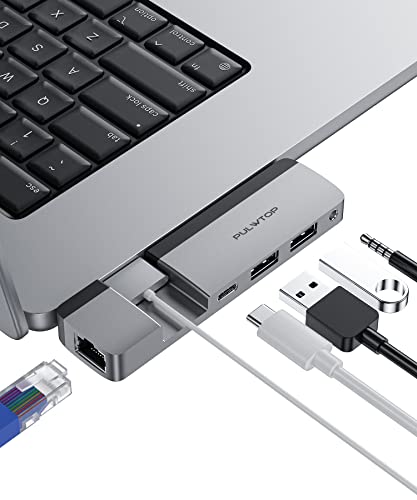
5 in 1 USB-C Hub: The type C hub expands a USB C port on your laptop into 1 Gigabit Ethernet, 1 Multifunction USB C port, 2*5Gbps USB ports, 1 3.5mm microphone and headphone 2-in-1 port. Just one USB C hub, you can easily meet your daily needs.☆Please note: When using MacBook accessories 3.5mm headphone/microphone combo port, please enter the sound option in “Settings” and select: USB Audio System.
Full-featured USB C Port: The Multiport Adapter is equipped with a multi-function USB C port, which supports 5K@60Hz video output, 40Gbps ultra-high-speed data transmission, and 100W PD fast charging. ☆Please note: When you use Thunderbolt 3 to output video, it supports 4K60Hz , support 5K60Hz when using Thunderbolt 4 interface, in addition, your monitor also needs to support the corresponding resolution
USB C to Gigabit Ethernet: USB C network adapter supports RJ45 1000M Ethernet port, and is backward compatible with 100Mbps/10Mbps, USB C network adapter provides you with a secure wired network connection, which is more stable and faster
USB C to Gigabit Ethernet: USB C network adapter supports RJ45 1000M Ethernet port, and is backward compatible with 100Mbps/10Mbps, Laptop docking station provides you with a secure wired network connection, which is more stable and faster
Portable MacBook Pro adapter: Type C hub is a MacBook accessory specially designed for the MacBook series, it fits perfectly with MacBook Pro/Air laptops. No driver installation required, plug and play, suitable for home, office, and travel use. ☆ 1、Please note : Please do not wear a MacBook protective case when using the MacBook Pro adapter, to avoid the unstable connection caused by the MacBook hub not fitting the MacBook perfectly.2、This USB HUB is recently supported on the MacBook Air/Pro series
Questions & Answers – USB C Hub Ethernet for MacBook, USB :
➕ What is the price of USB C Hub Ethernet for MacBook, USB in Saudi Arabia ?
The price of USB C Hub Ethernet for MacBook, USB in-store is 120 SAR VAT.
➕ When USB C Hub Ethernet for MacBook, USB was released ?
The release date was September 15, 2022.
➕ What is the price of USB C Hub Ethernet for MacBook, USB cheap used ?
The price of USB C Hub Ethernet for MacBook, USB used is 80 SAR VAT.
➕ What are the main characteristics of USB C Hub Ethernet for MacBook, USB ?
Special specifications :
5 in 1 USB-C Hub: The type C hub expands a USB C port on your laptop into 1 Gigabit Ethernet, 1 Multifunction USB C port, 2*5Gbps USB ports, 1 3.5mm microphone and headphone 2-in-1 port. Just one USB C hub, you can easily meet your daily needs.☆Please note: When using MacBook accessories 3.5mm headphone/microphone combo port, please enter the sound option in “Settings” and select: USB Audio System.
➕ Is it interesting to buy this product ?
The best people who can answer you are customers who have already bought and tested this product (See Customer Reviews). This product is rated 4.6 / 5 on Amazon.
➕ Where to buy USB C Hub Ethernet for MacBook, USB in Saudi Arabia ?
Check the duration of the warranty and also the faults and defects it covers. Is it complete or limited? and What is included in the warranty (parts, repairs or both)?
Shipping :
Is delivery offered? And how long does it take to get delivered (Delivery time)
Proof of purchase :
Does the shop give you an invoice ?
After-sales service :
Do they have an after-sales service to have information about the installation or operation (instructions for use). Also in case of problem, it is the seller who takes charge or you must contact the manufacturer or supplier yourself.
_____________________________
16 reviews for USB C Hub Ethernet for MacBook, USB
Rated 5 out of 5
I. I (verified owner)–
Form fit is solid winning feature – Standout item at the price point. The form fit is really nice. Solid connection to the computer both form and function done well.
Rated 5 out of 5
N. I (verified owner)–
Docking works perfect – This docking station turns my home office into a user friendly work space with 2 monitors, key board and wireless mouse. Truly a life saver.
Rated 5 out of 5
I. I (verified owner)–
Form fit is solid winning feature – Standout item at the price point. The form fit is really nice. Solid connection to the computer both form and function done well.
Rated 4 out of 5
R. M (verified owner)–
Almost perfect – I needed a hub like this since my newest computer came with a single Thunderbolt 4 port.
Rated 5 out of 5
F. E (verified owner)–
Excellent 14 in 1 USB docking station. It works perfect with my laptop. – Absolutely love my new 14 in 1 USB docking station. It works perfectly with my MAC pro laptop and has plenty of USB ports to use. I have several computer monitors, a wireless mouse and keyboard, laptop and countless of other devices that works with this device. I highly recommend it and would purchase again.
Rated 5 out of 5
J. K (verified owner)–
USB-C docking station – Plug and play. Works great.
Rated 5 out of 5
J. K (verified owner)–
USB-C docking station – Plug and play. Works great.
Rated 4 out of 5
R. M (verified owner)–
Almost perfect – I needed a hub like this since my newest computer came with a single Thunderbolt 4 port.
Rated 5 out of 5
K. M (verified owner)–
Great value – This docking station is awesome, it’s worked great for me this far and was a fraction of the price of my old Dell docking station. Awesome product for the price!
Rated 5 out of 5
F. E (verified owner)–
Excellent 14 in 1 USB docking station. It works perfect with my laptop. – Absolutely love my new 14 in 1 USB docking station. It works perfectly with my MAC pro laptop and has plenty of USB ports to use. I have several computer monitors, a wireless mouse and keyboard, laptop and countless of other devices that works with this device. I highly recommend it and would purchase again.
Rated 5 out of 5
S. P (verified owner)–
Overcomes the Air having only two ports to let me do all my tasks – First, this hub does not block the mag safe port on my 13″ MacBook Air M2. Plus, it offers a variety of ports that accomodate all my needs. See photo showing the use of a USB C port to connect my monitor with excellent images, and use an ethernet cable, a wireless mouse, and a card reader to input photos. It’s sturdy enough to attach a multi-USB hub, for additional needs. I do wish it had an SD card slot, which I would use often, while not needing the mike/audio-jack, with the jack on the other side of the Air.
Rated 5 out of 5
N. I (verified owner)–
Docking works perfect – This docking station turns my home office into a user friendly work space with 2 monitors, key board and wireless mouse. Truly a life saver.
Rated 5 out of 5
K. M (verified owner)–
Great value – This docking station is awesome, it’s worked great for me this far and was a fraction of the price of my old Dell docking station. Awesome product for the price!
Rated 5 out of 5
P. A (verified owner)–
Portable & Easy to Use at GREAT Price! – This is super convenient and so inexpensive! No driver downloads required like the pricey name-brand one at my office, just plug & play! It’s portable so if I’m going on a business trip I can tote it in a backpack/purse and connect to the hotel TV monitor (there’s an HDMI port per photo). Look at how excited my boss-cat is to see me be more productive at home! He especially loves that I can connect to the printer (grey wire plugged into USB port in photo)!
Rated 5 out of 5
P. A (verified owner)–
Portable & Easy to Use at GREAT Price! – This is super convenient and so inexpensive! No driver downloads required like the pricey name-brand one at my office, just plug & play! It’s portable so if I’m going on a business trip I can tote it in a backpack/purse and connect to the hotel TV monitor (there’s an HDMI port per photo). Look at how excited my boss-cat is to see me be more productive at home! He especially loves that I can connect to the printer (grey wire plugged into USB port in photo)!
Rated 5 out of 5
S. P (verified owner)–
Overcomes the Air having only two ports to let me do all my tasks – First, this hub does not block the mag safe port on my 13″ MacBook Air M2. Plus, it offers a variety of ports that accomodate all my needs. See photo showing the use of a USB C port to connect my monitor with excellent images, and use an ethernet cable, a wireless mouse, and a card reader to input photos. It’s sturdy enough to attach a multi-USB hub, for additional needs. I do wish it had an SD card slot, which I would use often, while not needing the mike/audio-jack, with the jack on the other side of the Air.

I. I (verified owner) –
Form fit is solid winning feature – Standout item at the price point. The form fit is really nice. Solid connection to the computer both form and function done well.
N. I (verified owner) –
Docking works perfect – This docking station turns my home office into a user friendly work space with 2 monitors, key board and wireless mouse. Truly a life saver.
I. I (verified owner) –
Form fit is solid winning feature – Standout item at the price point. The form fit is really nice. Solid connection to the computer both form and function done well.
R. M (verified owner) –
Almost perfect – I needed a hub like this since my newest computer came with a single Thunderbolt 4 port.
F. E (verified owner) –
Excellent 14 in 1 USB docking station. It works perfect with my laptop. – Absolutely love my new 14 in 1 USB docking station. It works perfectly with my MAC pro laptop and has plenty of USB ports to use. I have several computer monitors, a wireless mouse and keyboard, laptop and countless of other devices that works with this device. I highly recommend it and would purchase again.
J. K (verified owner) –
USB-C docking station – Plug and play. Works great.
J. K (verified owner) –
USB-C docking station – Plug and play. Works great.
R. M (verified owner) –
Almost perfect – I needed a hub like this since my newest computer came with a single Thunderbolt 4 port.
K. M (verified owner) –
Great value – This docking station is awesome, it’s worked great for me this far and was a fraction of the price of my old Dell docking station. Awesome product for the price!
F. E (verified owner) –
Excellent 14 in 1 USB docking station. It works perfect with my laptop. – Absolutely love my new 14 in 1 USB docking station. It works perfectly with my MAC pro laptop and has plenty of USB ports to use. I have several computer monitors, a wireless mouse and keyboard, laptop and countless of other devices that works with this device. I highly recommend it and would purchase again.
S. P (verified owner) –
Overcomes the Air having only two ports to let me do all my tasks – First, this hub does not block the mag safe port on my 13″ MacBook Air M2. Plus, it offers a variety of ports that accomodate all my needs. See photo showing the use of a USB C port to connect my monitor with excellent images, and use an ethernet cable, a wireless mouse, and a card reader to input photos. It’s sturdy enough to attach a multi-USB hub, for additional needs. I do wish it had an SD card slot, which I would use often, while not needing the mike/audio-jack, with the jack on the other side of the Air.
N. I (verified owner) –
Docking works perfect – This docking station turns my home office into a user friendly work space with 2 monitors, key board and wireless mouse. Truly a life saver.
K. M (verified owner) –
Great value – This docking station is awesome, it’s worked great for me this far and was a fraction of the price of my old Dell docking station. Awesome product for the price!
P. A (verified owner) –
Portable & Easy to Use at GREAT Price! – This is super convenient and so inexpensive! No driver downloads required like the pricey name-brand one at my office, just plug & play! It’s portable so if I’m going on a business trip I can tote it in a backpack/purse and connect to the hotel TV monitor (there’s an HDMI port per photo). Look at how excited my boss-cat is to see me be more productive at home! He especially loves that I can connect to the printer (grey wire plugged into USB port in photo)!
P. A (verified owner) –
Portable & Easy to Use at GREAT Price! – This is super convenient and so inexpensive! No driver downloads required like the pricey name-brand one at my office, just plug & play! It’s portable so if I’m going on a business trip I can tote it in a backpack/purse and connect to the hotel TV monitor (there’s an HDMI port per photo). Look at how excited my boss-cat is to see me be more productive at home! He especially loves that I can connect to the printer (grey wire plugged into USB port in photo)!
S. P (verified owner) –
Overcomes the Air having only two ports to let me do all my tasks – First, this hub does not block the mag safe port on my 13″ MacBook Air M2. Plus, it offers a variety of ports that accomodate all my needs. See photo showing the use of a USB C port to connect my monitor with excellent images, and use an ethernet cable, a wireless mouse, and a card reader to input photos. It’s sturdy enough to attach a multi-USB hub, for additional needs. I do wish it had an SD card slot, which I would use often, while not needing the mike/audio-jack, with the jack on the other side of the Air.