
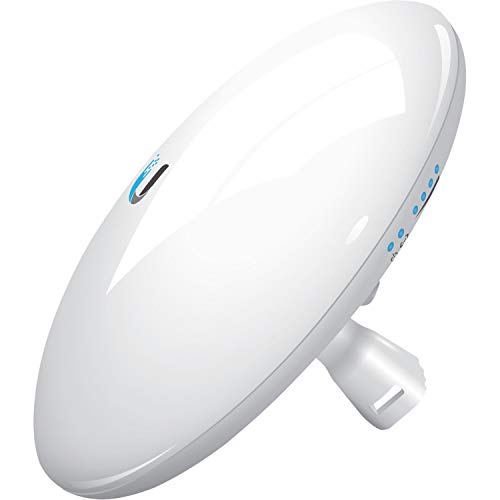
Description
Ubiquiti NanoBeam ac Gen2 High-Performance airMAX ac – Features & Prices in Saudi Arabia :
Ubiquiti NanoBeam ac Gen2 High-Performance airMAX ac Bridge (NBE-5AC-Gen2-US)
Product Dimensions
8.9 x 9.5 x 3.8 inches
Item Weight
2.4 pounds
ASIN
B0713XMHH9
Item model number
NBE-5AC-GEN2-US
Is Discontinued By Manufacturer
No
Date First Available
May 3, 2017
Manufacturer
Ubiquiti
Test video – Ubiquiti NanoBeam ac Gen2 High-Performance airMAX ac :
Product highlights :
Questions & Answers – Ubiquiti NanoBeam ac Gen2 High-Performance airMAX ac :
Technical specifications – Ubiquiti NanoBeam ac Gen2 High-Performance airMAX ac :
Purchase advice :
-
Warranty :
Check the duration of the warranty and also the faults and defects it covers. Is it complete or limited? and What is included in the warranty (parts, repairs or both)?
-
Shipping :
Is delivery offered? And how long does it take to get delivered (Delivery time)
-
Proof of purchase :
Does the shop give you an invoice ?
-
After-sales service :
Do they have an after-sales service to have information about the installation or operation (instructions for use). Also in case of problem, it is the seller who takes charge or you must contact the manufacturer or supplier yourself.
_____________________________
L. N (verified owner) –
First wireless bridge that I actually *like*! – I have been using wireless bridges for almost as long as 802.11b has been around. But usually, they have been access points, with some form of bridge functionality that has been tacked on as an afterthought — often not terribly reliable, always a pain to set up (with terrible documentation on how to do so). I have gone through ~3 different models over the years.
P. H (verified owner) –
Well worth the price and easy to install – This is the second set of Nanobeans I have used to spread our businesses Internet across numerous buildings in a wooded campsite. They work extremely well. I would recommend them. You must make sure if you are in you in the USA to order the FCC compliant -US model. I do wish that ubiquity included better user manuals with them and had configuration and installation videos of their own on their YouTube channel.
N. K (verified owner) –
This is the goto device for PTP or MPTP, configure it once and then walk away!! – These devices are bullet proof as long as you know what you are doing and install them correctly. Correct cabling “Cat6 Shielded” patch cables and make sure you ground them with the correct Ubiquity surge protectors. You also need to do a AP scan to detect what is running around your intended installation area. This way you know where to set the radios bands up for best performance in a saturated WiFi area.
P. H (verified owner) –
Well worth the price and easy to install – This is the second set of Nanobeans I have used to spread our businesses Internet across numerous buildings in a wooded campsite. They work extremely well. I would recommend them. You must make sure if you are in you in the USA to order the FCC compliant -US model. I do wish that ubiquity included better user manuals with them and had configuration and installation videos of their own on their YouTube channel.
E. N (verified owner) –
Great product for less than a month of Cable TV costs you – I am NOT a network guru / tech but I have been setting up network hardware off and on for a couple years now for our small business. Ubiquiti makes great stuff and as we replace old hardware we almost always end up with their stuff for bang-for-your-buck reasons. This is not a product that comes setup, it is what you make of it. Don’t buy it expecting to be linking your distant cousins 100 miles away to your internet through a forest of trees building etc. They say 10km + but I’d say if you want really good throughput stick with that sub 10km links.
E. N (verified owner) –
Great product for less than a month of Cable TV costs you – I am NOT a network guru / tech but I have been setting up network hardware off and on for a couple years now for our small business. Ubiquiti makes great stuff and as we replace old hardware we almost always end up with their stuff for bang-for-your-buck reasons. This is not a product that comes setup, it is what you make of it. Don’t buy it expecting to be linking your distant cousins 100 miles away to your internet through a forest of trees building etc. They say 10km + but I’d say if you want really good throughput stick with that sub 10km links.
L. N (verified owner) –
First wireless bridge that I actually *like*! – I have been using wireless bridges for almost as long as 802.11b has been around. But usually, they have been access points, with some form of bridge functionality that has been tacked on as an afterthought — often not terribly reliable, always a pain to set up (with terrible documentation on how to do so). I have gone through ~3 different models over the years.
N. K (verified owner) –
This is the goto device for PTP or MPTP, configure it once and then walk away!! – These devices are bullet proof as long as you know what you are doing and install them correctly. Correct cabling “Cat6 Shielded” patch cables and make sure you ground them with the correct Ubiquity surge protectors. You also need to do a AP scan to detect what is running around your intended installation area. This way you know where to set the radios bands up for best performance in a saturated WiFi area.