TP-Link USB Bluetooth Adapter for PC, 5.0 – Features & Prices in Saudi Arabia :
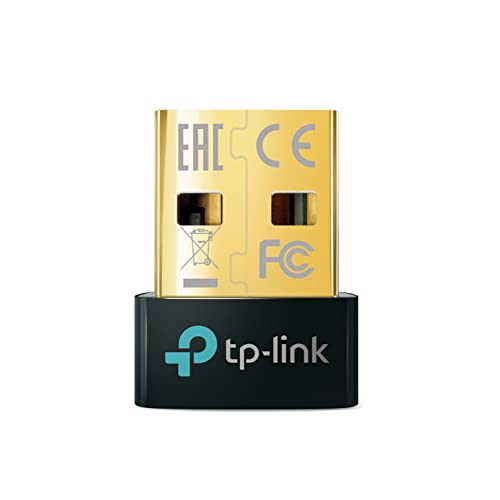
TP-Link USB Bluetooth Adapter for PC, 5.0 Bluetooth Dongle Receiver (UB500) Supports Windows 11/10/8.1/7 for Desktop, Laptop, Mouse, Keyboard, Printers, Headsets, Speakers, PS4/ Xbox Controllers
Brand
TP-Link
Series
UB500
Item model number
UB500
Operating System
Windows 11/10/8.1/7
Item Weight
0.071 ounces
Product Dimensions
0.74 x 0.58 x 0.27 inches
Item Dimensions LxWxH
0.74 x 0.58 x 0.27 inches
Color
Black
Manufacturer
TP-Link
ASIN
B09DMP6T22
Country of Origin
Vietnam
Date First Available
August 26, 2021
Test video – TP-Link USB Bluetooth Adapter for PC, 5.0 :
Product highlights :
Bluetooth 5.0 adapter for PC – Applies the latest Bluetooth 5.0 plus EDR technology and is backward compatible with Bluetooth V4.2/4.0/3.0/2.1/2.0/1.1. UB500 turns non-Bluetooth PC, desktop or laptop into Bluetooth-capable ( PS4 and XBox Controllers for PC Only)
Faster Speed, Farther Coverage – With the more advanced technology, this USB Bluetooth adapter will grant you up to twice the speed and four times the coverage compared to Bluetooth 4.0.
EDR and BLE Technology -This Bluetooth dongle is quipped with enhanced data rate and Bluetooth low energy, UB500 has greatly improved data transfer speed and operates at the optimal rate of power consumption.
Nano-sized – A sleek, ultra-small design means you can insert the Nano Bluetooth receiver into any USB port and simply keep it there regardless of whether you are traveling or at home
Plug and Play or Free Driver – Plug and play for Windows 8.1, 10, and 11 (make sure your computer is connected to the internet). Supports Win7 (driver required for Win7 and could be downloaded from website free of charge)
Reliability – Enables wireless communication with Bluetooth-enabled desktop, printers, phones and headsets. Utilizes Bluetooth low energy technology for energy-saving wireless connectivity. Operating Temperature-0℃-40℃ (32℉ -104℉)
Questions & Answers – TP-Link USB Bluetooth Adapter for PC, 5.0 :
➕ What is the price of TP-Link USB Bluetooth Adapter for PC, 5.0 in Saudi Arabia ?
The price of TP-Link USB Bluetooth Adapter for PC, 5.0 in-store is 40 SAR VAT.
➕ When TP-Link USB Bluetooth Adapter for PC, 5.0 was released ?
The release date was August 26, 2021.
➕ What is the price of TP-Link USB Bluetooth Adapter for PC, 5.0 cheap used ?
The price of TP-Link USB Bluetooth Adapter for PC, 5.0 used is 30 SAR VAT.
➕ What are the main characteristics of TP-Link USB Bluetooth Adapter for PC, 5.0 ?
Special specifications :
Bluetooth 5.0 adapter for PC – Applies the latest Bluetooth 5.0 plus EDR technology and is backward compatible with Bluetooth V4.2/4.0/3.0/2.1/2.0/1.1. UB500 turns non-Bluetooth PC, desktop or laptop into Bluetooth-capable ( PS4 and XBox Controllers for PC Only)
➕ Is it interesting to buy this product ?
The best people who can answer you are customers who have already bought and tested this product (See Customer Reviews). This product is rated 4.5 / 5 on Amazon.
➕ Where to buy TP-Link USB Bluetooth Adapter for PC, 5.0 in Saudi Arabia ?
Technical specifications – TP-Link USB Bluetooth Adapter for PC, 5.0 :
Brand
TP-Link
Hardware Interface
Bluetooth, USB, Bluetooth 5
Operating System
Windows 11/10/8.1/7
Color
Black
Compatible Devices
Laptop, Desktop, Mouse, Keyboard
Item Dimensions LxWxH
0.74 x 0.58 x 0.27 inches
Data Link Protocol
Bluetooth
Item Weight
2 Grams
Purchase advice :
Warranty :
Check the duration of the warranty and also the faults and defects it covers. Is it complete or limited? and What is included in the warranty (parts, repairs or both)?
Shipping :
Is delivery offered? And how long does it take to get delivered (Delivery time)
Proof of purchase :
Does the shop give you an invoice ?
After-sales service :
Do they have an after-sales service to have information about the installation or operation (instructions for use). Also in case of problem, it is the seller who takes charge or you must contact the manufacturer or supplier yourself.
_____________________________
16 reviews for TP-Link USB Bluetooth Adapter for PC, 5.0
Rated 5 out of 5
J. O (verified owner)–
Plug&Play device – I brought this one because my latest device stopped working with the latest Windows 11 update.
Rated 5 out of 5
E. S (verified owner)–
Working in Fedora 37 linux – Works perfectly in Fedora 37 Linux using the gnome desktop(Linux kernel 6). Sound quality is perfectly fine when just using it to play audio through Pixel buds pro as a headset. But if you use it as a handsfree device to use as a mic, the sound quality does significantly degrade, though that’s probably a Linux/gnome issue.
Rated 5 out of 5
N. M (verified owner)–
Great product! – I purchased this to use at work to connect my Apple AirPods to my dell desktop computer. The installation was super easy to figure out and took only a few minutes at most. The price of the product is very fair and honestly, I would’ve paid more for it. If you’re looking for an easy Bluetooth connection, you need this!!
Rated 5 out of 5
M. K (verified owner)–
Worth the money – I bought this for my pc because I just recently moved into my dorm and need to use a headphone. I have one that is a bit old and it doesn’t work very well, it would break up once in a while and the delay is more than two seconds, that’s unacceptable if you want to game with it. But this Bluetooth transmitter uses Bluetooth 5.0 and the connectivity is very good, I can use it around my dorm and even outside in the hallway too. The delay is there, but it’s not bad and you can get used to it after a few hours. I think this is a very good product
Rated 4 out of 5
N. K (verified owner)–
Small, but amazing for most things. – For such a small adapter, I expected issues in functionality on more than one level, yet I only found issues with audio devices being both delayed and not sounding correctly.
Rated 5 out of 5
H. E (verified owner)–
Extended the life of my workhorse Dell Precision 7710 – When my 2 year old HP laptop failed and had to be returned for a warranty repair I wanted to use my old Dell Precision to keep me from having to purchase another laptop whilst my HP was being repaired. My laptop serves as TV and media player all of which connect to my amplifier or headphones for output. Unfortunately the old Dell doesn’t have Bluetooth which would have made it a no-go except for this adapter. It connects quickly and reliably, which I can’t say for the HP laptop. I highly recommend it.
Rated 5 out of 5
G. M (verified owner)–
Works great on first attempt to connect, and continues working great forever – Bought a brand new HP desktop with bluetooth built in. Could not get bluetooth to connect to anything. Spent 3 hours on the phone with 2 different HP tech guys. No joy. Just happened to have the TP-Link adaoter lying around from another computer I no longer had. Plugged it in and everything connected – on the first try! And stayed connected after numerous restarts for testing. For $12.99! What a beautiful thing. I have to wonder about the handful of people that gave this product bad reviews. You can’t go wrong with this product!
Rated 5 out of 5
F. K (verified owner)–
Best option for adding bluetooth connectivity to any computer – I’ve owned a nonbluetooth computer since 2017, and it only recently hit me, can I manually add Bluetooth to my computer? Searching this up on amazon, many options for Bluetooth connectivity greeted me, but this TP-link one stood out. As I currently own a TP-link internet device, I was compelled towards this listing.
Rated 5 out of 5
J. O (verified owner)–
Plug&Play device – I brought this one because my latest device stopped working with the latest Windows 11 update.
Rated 5 out of 5
H. E (verified owner)–
Extended the life of my workhorse Dell Precision 7710 – When my 2 year old HP laptop failed and had to be returned for a warranty repair I wanted to use my old Dell Precision to keep me from having to purchase another laptop whilst my HP was being repaired. My laptop serves as TV and media player all of which connect to my amplifier or headphones for output. Unfortunately the old Dell doesn’t have Bluetooth which would have made it a no-go except for this adapter. It connects quickly and reliably, which I can’t say for the HP laptop. I highly recommend it.
Rated 5 out of 5
M. K (verified owner)–
Worth the money – I bought this for my pc because I just recently moved into my dorm and need to use a headphone. I have one that is a bit old and it doesn’t work very well, it would break up once in a while and the delay is more than two seconds, that’s unacceptable if you want to game with it. But this Bluetooth transmitter uses Bluetooth 5.0 and the connectivity is very good, I can use it around my dorm and even outside in the hallway too. The delay is there, but it’s not bad and you can get used to it after a few hours. I think this is a very good product
Rated 5 out of 5
N. M (verified owner)–
Great product! – I purchased this to use at work to connect my Apple AirPods to my dell desktop computer. The installation was super easy to figure out and took only a few minutes at most. The price of the product is very fair and honestly, I would’ve paid more for it. If you’re looking for an easy Bluetooth connection, you need this!!
Rated 5 out of 5
E. S (verified owner)–
Working in Fedora 37 linux – Works perfectly in Fedora 37 Linux using the gnome desktop(Linux kernel 6). Sound quality is perfectly fine when just using it to play audio through Pixel buds pro as a headset. But if you use it as a handsfree device to use as a mic, the sound quality does significantly degrade, though that’s probably a Linux/gnome issue.
Rated 4 out of 5
N. K (verified owner)–
Small, but amazing for most things. – For such a small adapter, I expected issues in functionality on more than one level, yet I only found issues with audio devices being both delayed and not sounding correctly.
Rated 5 out of 5
F. K (verified owner)–
Best option for adding bluetooth connectivity to any computer – I’ve owned a nonbluetooth computer since 2017, and it only recently hit me, can I manually add Bluetooth to my computer? Searching this up on amazon, many options for Bluetooth connectivity greeted me, but this TP-link one stood out. As I currently own a TP-link internet device, I was compelled towards this listing.
Rated 5 out of 5
G. M (verified owner)–
Works great on first attempt to connect, and continues working great forever – Bought a brand new HP desktop with bluetooth built in. Could not get bluetooth to connect to anything. Spent 3 hours on the phone with 2 different HP tech guys. No joy. Just happened to have the TP-Link adaoter lying around from another computer I no longer had. Plugged it in and everything connected – on the first try! And stayed connected after numerous restarts for testing. For $12.99! What a beautiful thing. I have to wonder about the handful of people that gave this product bad reviews. You can’t go wrong with this product!


J. O (verified owner) –
Plug&Play device – I brought this one because my latest device stopped working with the latest Windows 11 update.
E. S (verified owner) –
Working in Fedora 37 linux – Works perfectly in Fedora 37 Linux using the gnome desktop(Linux kernel 6). Sound quality is perfectly fine when just using it to play audio through Pixel buds pro as a headset. But if you use it as a handsfree device to use as a mic, the sound quality does significantly degrade, though that’s probably a Linux/gnome issue.
N. M (verified owner) –
Great product! – I purchased this to use at work to connect my Apple AirPods to my dell desktop computer. The installation was super easy to figure out and took only a few minutes at most. The price of the product is very fair and honestly, I would’ve paid more for it. If you’re looking for an easy Bluetooth connection, you need this!!
M. K (verified owner) –
Worth the money – I bought this for my pc because I just recently moved into my dorm and need to use a headphone. I have one that is a bit old and it doesn’t work very well, it would break up once in a while and the delay is more than two seconds, that’s unacceptable if you want to game with it. But this Bluetooth transmitter uses Bluetooth 5.0 and the connectivity is very good, I can use it around my dorm and even outside in the hallway too. The delay is there, but it’s not bad and you can get used to it after a few hours. I think this is a very good product
N. K (verified owner) –
Small, but amazing for most things. – For such a small adapter, I expected issues in functionality on more than one level, yet I only found issues with audio devices being both delayed and not sounding correctly.
H. E (verified owner) –
Extended the life of my workhorse Dell Precision 7710 – When my 2 year old HP laptop failed and had to be returned for a warranty repair I wanted to use my old Dell Precision to keep me from having to purchase another laptop whilst my HP was being repaired. My laptop serves as TV and media player all of which connect to my amplifier or headphones for output. Unfortunately the old Dell doesn’t have Bluetooth which would have made it a no-go except for this adapter. It connects quickly and reliably, which I can’t say for the HP laptop. I highly recommend it.
G. M (verified owner) –
Works great on first attempt to connect, and continues working great forever – Bought a brand new HP desktop with bluetooth built in. Could not get bluetooth to connect to anything. Spent 3 hours on the phone with 2 different HP tech guys. No joy. Just happened to have the TP-Link adaoter lying around from another computer I no longer had. Plugged it in and everything connected – on the first try! And stayed connected after numerous restarts for testing. For $12.99! What a beautiful thing. I have to wonder about the handful of people that gave this product bad reviews. You can’t go wrong with this product!
F. K (verified owner) –
Best option for adding bluetooth connectivity to any computer – I’ve owned a nonbluetooth computer since 2017, and it only recently hit me, can I manually add Bluetooth to my computer? Searching this up on amazon, many options for Bluetooth connectivity greeted me, but this TP-link one stood out. As I currently own a TP-link internet device, I was compelled towards this listing.
J. O (verified owner) –
Plug&Play device – I brought this one because my latest device stopped working with the latest Windows 11 update.
H. E (verified owner) –
Extended the life of my workhorse Dell Precision 7710 – When my 2 year old HP laptop failed and had to be returned for a warranty repair I wanted to use my old Dell Precision to keep me from having to purchase another laptop whilst my HP was being repaired. My laptop serves as TV and media player all of which connect to my amplifier or headphones for output. Unfortunately the old Dell doesn’t have Bluetooth which would have made it a no-go except for this adapter. It connects quickly and reliably, which I can’t say for the HP laptop. I highly recommend it.
M. K (verified owner) –
Worth the money – I bought this for my pc because I just recently moved into my dorm and need to use a headphone. I have one that is a bit old and it doesn’t work very well, it would break up once in a while and the delay is more than two seconds, that’s unacceptable if you want to game with it. But this Bluetooth transmitter uses Bluetooth 5.0 and the connectivity is very good, I can use it around my dorm and even outside in the hallway too. The delay is there, but it’s not bad and you can get used to it after a few hours. I think this is a very good product
N. M (verified owner) –
Great product! – I purchased this to use at work to connect my Apple AirPods to my dell desktop computer. The installation was super easy to figure out and took only a few minutes at most. The price of the product is very fair and honestly, I would’ve paid more for it. If you’re looking for an easy Bluetooth connection, you need this!!
E. S (verified owner) –
Working in Fedora 37 linux – Works perfectly in Fedora 37 Linux using the gnome desktop(Linux kernel 6). Sound quality is perfectly fine when just using it to play audio through Pixel buds pro as a headset. But if you use it as a handsfree device to use as a mic, the sound quality does significantly degrade, though that’s probably a Linux/gnome issue.
N. K (verified owner) –
Small, but amazing for most things. – For such a small adapter, I expected issues in functionality on more than one level, yet I only found issues with audio devices being both delayed and not sounding correctly.
F. K (verified owner) –
Best option for adding bluetooth connectivity to any computer – I’ve owned a nonbluetooth computer since 2017, and it only recently hit me, can I manually add Bluetooth to my computer? Searching this up on amazon, many options for Bluetooth connectivity greeted me, but this TP-link one stood out. As I currently own a TP-link internet device, I was compelled towards this listing.
G. M (verified owner) –
Works great on first attempt to connect, and continues working great forever – Bought a brand new HP desktop with bluetooth built in. Could not get bluetooth to connect to anything. Spent 3 hours on the phone with 2 different HP tech guys. No joy. Just happened to have the TP-Link adaoter lying around from another computer I no longer had. Plugged it in and everything connected – on the first try! And stayed connected after numerous restarts for testing. For $12.99! What a beautiful thing. I have to wonder about the handful of people that gave this product bad reviews. You can’t go wrong with this product!