TP-Link Nano USB WiFi Adapter for PC(Archer – Features & Prices in Saudi Arabia :
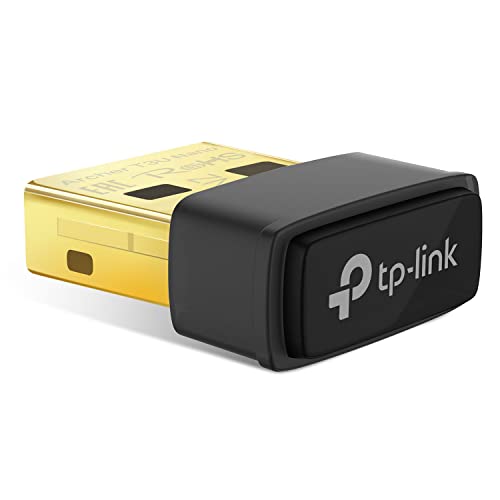
TP-Link Nano USB WiFi Adapter for PC(Archer T3U Nano)-AC1300 2.4G/5G Dual Band Wireless Network Adapter for Desktop PC, Mini Travel Size, Supports Windows 11,10, 8.1, 8, 7 / Mac OS X 10.15 or Earlier
Product Dimensions
0.78 x 0.62 x 0.29 inches
Item Weight
0.106 ounces
ASIN
B09KTDXPY3
Item model number
Archer T3U Nano
Date First Available
November 14, 2022
Manufacturer
TP-Link
Country of Origin
Vietnam
Test video – TP-Link Nano USB WiFi Adapter for PC(Archer :
Product highlights :
Nano Sized Wireless USB WiFi adapter – AC1300 Dual band for fast and high speed Wi-Fi connection (867 Mbps on the 5 GHz band or 400 Mbps on the 2.4 GHz band)
Wireless Network Adapter with Dual Band Connection – Strong 2.4G/5G connection allows the user to use the Internet with lag-free experience.
Nano Design – Sleek and miniature sized design allows the user to plug the wireless adapter and leave the device in its place.
PC Wifi Adapter with MU-MIMO Technology – Improves the throughput and efficiency of the whole network with MU-MIMO technology.
Wide Compatibility – This wifi adapter is fully compatible for PC with Windows 11/10/8.1/8/7 and MacOS 10.15 or earlier
WPA3 Support- Improve your cybersecurity with more secure and individualized protection while being on the internet with WPA3
Questions & Answers – TP-Link Nano USB WiFi Adapter for PC(Archer :
➕ What is the price of TP-Link Nano USB WiFi Adapter for PC(Archer in Saudi Arabia ?
The price of TP-Link Nano USB WiFi Adapter for PC(Archer in-store is 80 SAR VAT.
➕ When TP-Link Nano USB WiFi Adapter for PC(Archer was released ?
The release date was November 14, 2022.
➕ What is the price of TP-Link Nano USB WiFi Adapter for PC(Archer cheap used ?
The price of TP-Link Nano USB WiFi Adapter for PC(Archer used is 50 SAR VAT.
➕ What are the main characteristics of TP-Link Nano USB WiFi Adapter for PC(Archer ?
Special specifications :
Nano Sized Wireless USB WiFi adapter – AC1300 Dual band for fast and high speed Wi-Fi connection (867 Mbps on the 5 GHz band or 400 Mbps on the 2.4 GHz band)
➕ Is it interesting to buy this product ?
The best people who can answer you are customers who have already bought and tested this product (See Customer Reviews). This product is rated 4.5 / 5 on Amazon.
➕ Where to buy TP-Link Nano USB WiFi Adapter for PC(Archer in Saudi Arabia ?
Technical specifications – TP-Link Nano USB WiFi Adapter for PC(Archer :
Brand
TP-Link
Hardware Interface
USB, USB 2.0
Operating System
Windows 11/10/8.1/8/7, Mac OS 10.15 Or earlier
Compatible Devices
compatible with Windows 11/10/8.1/8/7, Mac OS 10.15 or earlier
Item Dimensions LxWxH
0.78 x 0.62 x 0.29 inches
Data Link Protocol
USB
Data Transfer Rate
867 Megabits Per Second
Item Weight
0.01 Pounds
Purchase advice :
Warranty :
Check the duration of the warranty and also the faults and defects it covers. Is it complete or limited? and What is included in the warranty (parts, repairs or both)?
Shipping :
Is delivery offered? And how long does it take to get delivered (Delivery time)
Proof of purchase :
Does the shop give you an invoice ?
After-sales service :
Do they have an after-sales service to have information about the installation or operation (instructions for use). Also in case of problem, it is the seller who takes charge or you must contact the manufacturer or supplier yourself.
_____________________________
14 reviews for TP-Link Nano USB WiFi Adapter for PC(Archer
Rated 5 out of 5
R. H (verified owner)–
Was pretty shocked that this was absolutely Plug n Play – Remember how with Windows 95 they touted that as everything would be plug n play and of course it wasn’t. I figured I would have to plug this in and download some software. I did not. I use this product to take my wired Dell desktop computer so that it could communicate with my new wireless printer. When I first went to print something from the computer it presented me with two options, the old disconnected one that is sitting in the corner or the new wireless HP. The easiest accessory I have ever used with a PC or laptop. Okay I’ll clean you up
Rated 5 out of 5
E. P (verified owner)–
Fantastic wifi signal coverage an throughput. – I was honestly shocked when I started testing it, I didn’t think I could get download speeds this high. My desktop is on the other side of the apartment with a lot of walls in between, I have excellent signal strength (all my phones and laptops have very good or good coverage only) and side by side with my work laptop it complelty beats it terms of performance (get around 40/50 MB/s vs the 25/30 MB/s on my work laptop)
Rated 3 out of 5
J. H (verified owner)–
Started with 5 star, changed to 1, now up to 3 – 5 Star. This is replacing a simple plugin wireless N adapter. We were unable to stream 4K movies on the home network so we figured we’d give this a try.
Rated 5 out of 5
E. P (verified owner)–
Fantastic wifi signal coverage an throughput. – I was honestly shocked when I started testing it, I didn’t think I could get download speeds this high. My desktop is on the other side of the apartment with a lot of walls in between, I have excellent signal strength (all my phones and laptops have very good or good coverage only) and side by side with my work laptop it complelty beats it terms of performance (get around 40/50 MB/s vs the 25/30 MB/s on my work laptop)
Rated 5 out of 5
K. D (verified owner)–
Plug and go – Opening the packaging was the hardest part. I took the plug-in out, plugged it into a usb port, Windows 11 found it and installed it natively (without the use of the accompanying CD), and this wireless NIC was up and running. Simple, really. Signal is good. Speed is good. It replaces the on-board wireless NIC on a laptop. The on-board one kept losing its speed until the connection crawled. I reset it, reinstalled it, etc. and got tired of playing with it. This product was plug and go. Wireless connectivity solved. I may never know why the old NIC did not work well but I do know this: this product works well and its installation and use are beyond simple and satisfying.
Rated 5 out of 5
P. A (verified owner)–
Great bargain – Super high speed – We got fiber optic internet installed to our office to get rid of the cable company internet. They promised download and upload speeds of almost 100mbps. When we did a speed check, it was only about 10 on the download and 2.5 on the upload; dreadful. The tech guy said it was my wifi card in my 6 year old computer, which wasn’t built for the super high speeds allowed by fiber. He recommended these so at $17, I bought two; one for each computer. They were super easy to install, and even though my computer only had 2.0 USB ports (not 3.0 USB) I was still able to get 95mbps on both the download and upload speeds on the very first speed check. What a bargain, and SO easy to install. Highly recommend!
Rated 3 out of 5
J. H (verified owner)–
Started with 5 star, changed to 1, now up to 3 – 5 Star. This is replacing a simple plugin wireless N adapter. We were unable to stream 4K movies on the home network so we figured we’d give this a try.
Rated 5 out of 5
F. F (verified owner)–
Simple, easy to use, and provides fanominal signal. – I bought this particular wi-fi adapter for a desktop computer that needed something ten times better. The unit that was included with the PC was a simple finger tip sized USB dongle that only had a weak signal and poor quality. That said, I installed the TP-link to combat this issue. This adapter can either plug directly into a USB3.0 port, or plugged into a cradle that gives the unit more room to stand straight up. This in turn offered the best signal. There are two dual band routers installed in the home, and even the main router had about three bars although it was all the way on the second floor. The router that I use I had installed myself close to my area, but if I hadn’t, this little gem still would have performed well. This unit is amazing, and is easy to unpack and install even for a totally blind person like myself. Just decide how you wish your device to be placed, either straight up on a desk or plugged into the computer’s USB port, then plug it in and get back in business.
Rated 5 out of 5
R. G (verified owner)–
WOW! Buy this one. – If you shop around for a wifi dongle and carefully read the specs, you’ll see that this one has the fastest speed. All I can say is, “Oh yeah.” This thing is just awesome. I am going to buy at least one more for another PC in the house.
Rated 5 out of 5
K. D (verified owner)–
Plug and go – Opening the packaging was the hardest part. I took the plug-in out, plugged it into a usb port, Windows 11 found it and installed it natively (without the use of the accompanying CD), and this wireless NIC was up and running. Simple, really. Signal is good. Speed is good. It replaces the on-board wireless NIC on a laptop. The on-board one kept losing its speed until the connection crawled. I reset it, reinstalled it, etc. and got tired of playing with it. This product was plug and go. Wireless connectivity solved. I may never know why the old NIC did not work well but I do know this: this product works well and its installation and use are beyond simple and satisfying.
Rated 5 out of 5
R. G (verified owner)–
WOW! Buy this one. – If you shop around for a wifi dongle and carefully read the specs, you’ll see that this one has the fastest speed. All I can say is, “Oh yeah.” This thing is just awesome. I am going to buy at least one more for another PC in the house.
Rated 5 out of 5
P. A (verified owner)–
Great bargain – Super high speed – We got fiber optic internet installed to our office to get rid of the cable company internet. They promised download and upload speeds of almost 100mbps. When we did a speed check, it was only about 10 on the download and 2.5 on the upload; dreadful. The tech guy said it was my wifi card in my 6 year old computer, which wasn’t built for the super high speeds allowed by fiber. He recommended these so at $17, I bought two; one for each computer. They were super easy to install, and even though my computer only had 2.0 USB ports (not 3.0 USB) I was still able to get 95mbps on both the download and upload speeds on the very first speed check. What a bargain, and SO easy to install. Highly recommend!
Rated 5 out of 5
R. H (verified owner)–
Was pretty shocked that this was absolutely Plug n Play – Remember how with Windows 95 they touted that as everything would be plug n play and of course it wasn’t. I figured I would have to plug this in and download some software. I did not. I use this product to take my wired Dell desktop computer so that it could communicate with my new wireless printer. When I first went to print something from the computer it presented me with two options, the old disconnected one that is sitting in the corner or the new wireless HP. The easiest accessory I have ever used with a PC or laptop. Okay I’ll clean you up
Rated 5 out of 5
F. F (verified owner)–
Simple, easy to use, and provides fanominal signal. – I bought this particular wi-fi adapter for a desktop computer that needed something ten times better. The unit that was included with the PC was a simple finger tip sized USB dongle that only had a weak signal and poor quality. That said, I installed the TP-link to combat this issue. This adapter can either plug directly into a USB3.0 port, or plugged into a cradle that gives the unit more room to stand straight up. This in turn offered the best signal. There are two dual band routers installed in the home, and even the main router had about three bars although it was all the way on the second floor. The router that I use I had installed myself close to my area, but if I hadn’t, this little gem still would have performed well. This unit is amazing, and is easy to unpack and install even for a totally blind person like myself. Just decide how you wish your device to be placed, either straight up on a desk or plugged into the computer’s USB port, then plug it in and get back in business.

R. H (verified owner) –
Was pretty shocked that this was absolutely Plug n Play – Remember how with Windows 95 they touted that as everything would be plug n play and of course it wasn’t. I figured I would have to plug this in and download some software. I did not. I use this product to take my wired Dell desktop computer so that it could communicate with my new wireless printer. When I first went to print something from the computer it presented me with two options, the old disconnected one that is sitting in the corner or the new wireless HP. The easiest accessory I have ever used with a PC or laptop. Okay I’ll clean you up
E. P (verified owner) –
Fantastic wifi signal coverage an throughput. – I was honestly shocked when I started testing it, I didn’t think I could get download speeds this high. My desktop is on the other side of the apartment with a lot of walls in between, I have excellent signal strength (all my phones and laptops have very good or good coverage only) and side by side with my work laptop it complelty beats it terms of performance (get around 40/50 MB/s vs the 25/30 MB/s on my work laptop)
J. H (verified owner) –
Started with 5 star, changed to 1, now up to 3 – 5 Star. This is replacing a simple plugin wireless N adapter. We were unable to stream 4K movies on the home network so we figured we’d give this a try.
E. P (verified owner) –
Fantastic wifi signal coverage an throughput. – I was honestly shocked when I started testing it, I didn’t think I could get download speeds this high. My desktop is on the other side of the apartment with a lot of walls in between, I have excellent signal strength (all my phones and laptops have very good or good coverage only) and side by side with my work laptop it complelty beats it terms of performance (get around 40/50 MB/s vs the 25/30 MB/s on my work laptop)
K. D (verified owner) –
Plug and go – Opening the packaging was the hardest part. I took the plug-in out, plugged it into a usb port, Windows 11 found it and installed it natively (without the use of the accompanying CD), and this wireless NIC was up and running. Simple, really. Signal is good. Speed is good. It replaces the on-board wireless NIC on a laptop. The on-board one kept losing its speed until the connection crawled. I reset it, reinstalled it, etc. and got tired of playing with it. This product was plug and go. Wireless connectivity solved. I may never know why the old NIC did not work well but I do know this: this product works well and its installation and use are beyond simple and satisfying.
P. A (verified owner) –
Great bargain – Super high speed – We got fiber optic internet installed to our office to get rid of the cable company internet. They promised download and upload speeds of almost 100mbps. When we did a speed check, it was only about 10 on the download and 2.5 on the upload; dreadful. The tech guy said it was my wifi card in my 6 year old computer, which wasn’t built for the super high speeds allowed by fiber. He recommended these so at $17, I bought two; one for each computer. They were super easy to install, and even though my computer only had 2.0 USB ports (not 3.0 USB) I was still able to get 95mbps on both the download and upload speeds on the very first speed check. What a bargain, and SO easy to install. Highly recommend!
J. H (verified owner) –
Started with 5 star, changed to 1, now up to 3 – 5 Star. This is replacing a simple plugin wireless N adapter. We were unable to stream 4K movies on the home network so we figured we’d give this a try.
F. F (verified owner) –
Simple, easy to use, and provides fanominal signal. – I bought this particular wi-fi adapter for a desktop computer that needed something ten times better. The unit that was included with the PC was a simple finger tip sized USB dongle that only had a weak signal and poor quality. That said, I installed the TP-link to combat this issue. This adapter can either plug directly into a USB3.0 port, or plugged into a cradle that gives the unit more room to stand straight up. This in turn offered the best signal. There are two dual band routers installed in the home, and even the main router had about three bars although it was all the way on the second floor. The router that I use I had installed myself close to my area, but if I hadn’t, this little gem still would have performed well. This unit is amazing, and is easy to unpack and install even for a totally blind person like myself. Just decide how you wish your device to be placed, either straight up on a desk or plugged into the computer’s USB port, then plug it in and get back in business.
R. G (verified owner) –
WOW! Buy this one. – If you shop around for a wifi dongle and carefully read the specs, you’ll see that this one has the fastest speed. All I can say is, “Oh yeah.” This thing is just awesome. I am going to buy at least one more for another PC in the house.
K. D (verified owner) –
Plug and go – Opening the packaging was the hardest part. I took the plug-in out, plugged it into a usb port, Windows 11 found it and installed it natively (without the use of the accompanying CD), and this wireless NIC was up and running. Simple, really. Signal is good. Speed is good. It replaces the on-board wireless NIC on a laptop. The on-board one kept losing its speed until the connection crawled. I reset it, reinstalled it, etc. and got tired of playing with it. This product was plug and go. Wireless connectivity solved. I may never know why the old NIC did not work well but I do know this: this product works well and its installation and use are beyond simple and satisfying.
R. G (verified owner) –
WOW! Buy this one. – If you shop around for a wifi dongle and carefully read the specs, you’ll see that this one has the fastest speed. All I can say is, “Oh yeah.” This thing is just awesome. I am going to buy at least one more for another PC in the house.
P. A (verified owner) –
Great bargain – Super high speed – We got fiber optic internet installed to our office to get rid of the cable company internet. They promised download and upload speeds of almost 100mbps. When we did a speed check, it was only about 10 on the download and 2.5 on the upload; dreadful. The tech guy said it was my wifi card in my 6 year old computer, which wasn’t built for the super high speeds allowed by fiber. He recommended these so at $17, I bought two; one for each computer. They were super easy to install, and even though my computer only had 2.0 USB ports (not 3.0 USB) I was still able to get 95mbps on both the download and upload speeds on the very first speed check. What a bargain, and SO easy to install. Highly recommend!
R. H (verified owner) –
Was pretty shocked that this was absolutely Plug n Play – Remember how with Windows 95 they touted that as everything would be plug n play and of course it wasn’t. I figured I would have to plug this in and download some software. I did not. I use this product to take my wired Dell desktop computer so that it could communicate with my new wireless printer. When I first went to print something from the computer it presented me with two options, the old disconnected one that is sitting in the corner or the new wireless HP. The easiest accessory I have ever used with a PC or laptop. Okay I’ll clean you up
F. F (verified owner) –
Simple, easy to use, and provides fanominal signal. – I bought this particular wi-fi adapter for a desktop computer that needed something ten times better. The unit that was included with the PC was a simple finger tip sized USB dongle that only had a weak signal and poor quality. That said, I installed the TP-link to combat this issue. This adapter can either plug directly into a USB3.0 port, or plugged into a cradle that gives the unit more room to stand straight up. This in turn offered the best signal. There are two dual band routers installed in the home, and even the main router had about three bars although it was all the way on the second floor. The router that I use I had installed myself close to my area, but if I hadn’t, this little gem still would have performed well. This unit is amazing, and is easy to unpack and install even for a totally blind person like myself. Just decide how you wish your device to be placed, either straight up on a desk or plugged into the computer’s USB port, then plug it in and get back in business.