
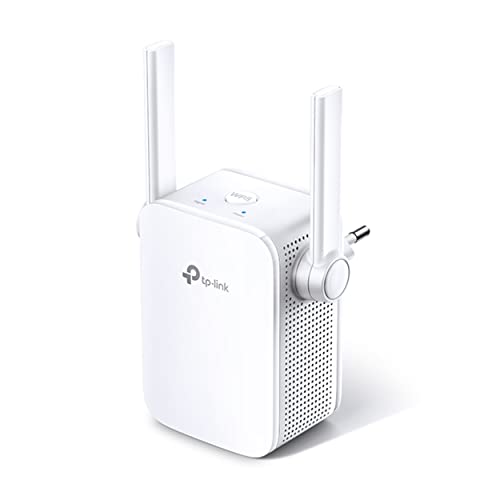
Description
TP-Link N300 WiFi Extender(TL-WA855RE)-WiFi Range Extender, up – Features & Prices in Saudi Arabia :
TP-Link N300 WiFi Extender(TL-WA855RE)-WiFi Range Extender, up to 300Mbps speed, Wireless Signal Booster and Access Point, Single Band 2.4Ghz Only
Wireless Type
802.11bgn
Series
N300 Antenas externas
Item model number
TL-WA855RE
Operating System
Microsoft Windows 98SE, NT, 2000, XP, Vista or Windows 7, 8, 8.1, 10, Mac OS, NetWare, UNIX or Linux.
Item Weight
4.2 ounces
Product Dimensions
3.15 x 3.06 x 3.04 inches
Item Dimensions LxWxH
3.15 x 3.06 x 3.04 inches
Color
White
Power Source
AC
Manufacturer
TP-Link
ASIN
B0195Y0A42
Is Discontinued By Manufacturer
No
Date First Available
January 6, 2016
Test video – TP-Link N300 WiFi Extender(TL-WA855RE)-WiFi Range Extender, up :
Product highlights :
Questions & Answers – TP-Link N300 WiFi Extender(TL-WA855RE)-WiFi Range Extender, up :
Technical specifications – TP-Link N300 WiFi Extender(TL-WA855RE)-WiFi Range Extender, up :
Brand
TP-Link
Series
N300 Antenas externas
Frequency Band Class
Single-Band
Wireless Type
802.11bgn
Compatible Devices
Smart Television, Smartphone
Included Components
300Mbps Wi-Fi Range Extender TL-WA855RE, RJ-45 Ethernet Cable, Quick Installation Guide
Connectivity Technology
Ethernet, wireless
Color
White
Item Weight
0.12 Kilograms
Operating System
,
Purchase advice :
-
Warranty :
Check the duration of the warranty and also the faults and defects it covers. Is it complete or limited? and What is included in the warranty (parts, repairs or both)?
-
Shipping :
Is delivery offered? And how long does it take to get delivered (Delivery time)
-
Proof of purchase :
Does the shop give you an invoice ?
-
After-sales service :
Do they have an after-sales service to have information about the installation or operation (instructions for use). Also in case of problem, it is the seller who takes charge or you must contact the manufacturer or supplier yourself.
_____________________________
M. I (verified owner) –
FINALLY! WIFI everywhere! – This is by far the best WIFI extender I have ever used. I have a multi level house and wifi is challenging. Full signal in some parts of the house and in others,..there is none. I have tried MANY MANY wifi units similar to this. I’m very tech savvy and pride myself in figuring stuff out with out directions. However, that is very different with some wifi extenders. They are complicated to set up and do not work good at all. I had good luck with the TP-Link light sockets with the echo and setup was a breeze. So I decided to take one more shot at yet another wifi extender. Choosing the TP-Link in hopes it would work just as good. I really don’t understand these other reviews that state how hard it is to set up. This wifi extender is truly easy to set up. This is what i did,….Quick instructions right on the side of the box. Plug in the TP-Link, close to your router, the green light flashes, press the WPS button on your router, then press the signal button on the extender. The green light flashes, goes solid green, goes solid red then after 5-10 seconds the light stays solid green. The unit is now paired with your router. Now, Unplug the extender, walk to a midway point in your house close to the dead spot and plug it back in. It will blink green again, then solid green, then solid red, 5-10 seconds it turns solid green. Open any device you want to use for wifi, go to wifi settings and find your wifi name. Except the word _EXT will be after the device name. So if your normal wifi is GOOBER616 for example. It would now show as GOOBER616_EXT, Choose the Ext one and enter your normal password for wifi, and BOOM, FULL wifi signal. I now have wifi in every room in the house. If you plug the unit in and the light stays on solid yellow? Then move it to another socket closer to the router. Hope this helps anyone who has or has had a problem.
K. J (verified owner) –
More than I needed, works well. – I just needed an extra 10-15′ of coverage for the master bedroom/bathroom. This more than covered what I needed and the speed doesn’t seem slowed much as opposed to directly from the base router. Our Internet speed is 1gb/sec from the router, so I’m not really sure how much it slows it down. Google Internet speed check still showed “very fast” but I don’t remember what the reading was.
K. J (verified owner) –
More than I needed, works well. – I just needed an extra 10-15′ of coverage for the master bedroom/bathroom. This more than covered what I needed and the speed doesn’t seem slowed much as opposed to directly from the base router. Our Internet speed is 1gb/sec from the router, so I’m not really sure how much it slows it down. Google Internet speed check still showed “very fast” but I don’t remember what the reading was.
P. P (verified owner) –
It does a pretty good job. – This works pretty good in my house but it is fighting against walls that are four inches of solid, thick plaster. Not drywall, which I have been told is more transparent than an old fashioned plaster wall. I’m not complaining. It has increased my ability to get WiFi in the room I placed it in.
A. B (verified owner) –
Dropped the wifi signal from 25MBPS to 0.6MBPS – Pretty much an internet killer. If it extended the range at all it would be impossible to tell as it also dropped the siglal strength to such a low level that it was irrelevant. Here is the transcript from my tech support call so you can see how you might expect to spend an hour or so of your time after buying this product:
D. F (verified owner) –
It works – My router is in the study with most of my electronics, desk top computer, laptop, printer and more. The big flat screen, SMART TV is in the living room at the other end of the house. The previous TV was fed by a Co-ax cable and satellite receiver. Now I have added the need for WI-Fi or a cable from the router and that would have to cross a hall and a room (not happening). The answer was this inexpensive, entry level range extender. It worked first time and the signals are great. The bonus was that because the range extender is in a window (aluminum siding) I now have WI-Fi and cell phone (no cell signal in rural Indiana) coverage in my back yard, including the back yard swing.
D. F (verified owner) –
It works – My router is in the study with most of my electronics, desk top computer, laptop, printer and more. The big flat screen, SMART TV is in the living room at the other end of the house. The previous TV was fed by a Co-ax cable and satellite receiver. Now I have added the need for WI-Fi or a cable from the router and that would have to cross a hall and a room (not happening). The answer was this inexpensive, entry level range extender. It worked first time and the signals are great. The bonus was that because the range extender is in a window (aluminum siding) I now have WI-Fi and cell phone (no cell signal in rural Indiana) coverage in my back yard, including the back yard swing.
B. C (verified owner) –
It actually works. – The router we have is olllld and weak. The signal up to my bedroom was weak and intermittent, requiring lots of buffering and reloading. Watching my Roku was aggravating in the extreme. As a first step, prior to buying a new router or signing up for a more expensive service, I tried this little device. Installation was not as easy as I had hoped, but I got through it. AND IT WORKS! The signal is strong and constant. I don’t know how long it will last, but so far, so good
P. P (verified owner) –
It does a pretty good job. – This works pretty good in my house but it is fighting against walls that are four inches of solid, thick plaster. Not drywall, which I have been told is more transparent than an old fashioned plaster wall. I’m not complaining. It has increased my ability to get WiFi in the room I placed it in.
M. I (verified owner) –
FINALLY! WIFI everywhere! – This is by far the best WIFI extender I have ever used. I have a multi level house and wifi is challenging. Full signal in some parts of the house and in others,..there is none. I have tried MANY MANY wifi units similar to this. I’m very tech savvy and pride myself in figuring stuff out with out directions. However, that is very different with some wifi extenders. They are complicated to set up and do not work good at all. I had good luck with the TP-Link light sockets with the echo and setup was a breeze. So I decided to take one more shot at yet another wifi extender. Choosing the TP-Link in hopes it would work just as good. I really don’t understand these other reviews that state how hard it is to set up. This wifi extender is truly easy to set up. This is what i did,….Quick instructions right on the side of the box. Plug in the TP-Link, close to your router, the green light flashes, press the WPS button on your router, then press the signal button on the extender. The green light flashes, goes solid green, goes solid red then after 5-10 seconds the light stays solid green. The unit is now paired with your router. Now, Unplug the extender, walk to a midway point in your house close to the dead spot and plug it back in. It will blink green again, then solid green, then solid red, 5-10 seconds it turns solid green. Open any device you want to use for wifi, go to wifi settings and find your wifi name. Except the word _EXT will be after the device name. So if your normal wifi is GOOBER616 for example. It would now show as GOOBER616_EXT, Choose the Ext one and enter your normal password for wifi, and BOOM, FULL wifi signal. I now have wifi in every room in the house. If you plug the unit in and the light stays on solid yellow? Then move it to another socket closer to the router. Hope this helps anyone who has or has had a problem.
B. C (verified owner) –
It actually works. – The router we have is olllld and weak. The signal up to my bedroom was weak and intermittent, requiring lots of buffering and reloading. Watching my Roku was aggravating in the extreme. As a first step, prior to buying a new router or signing up for a more expensive service, I tried this little device. Installation was not as easy as I had hoped, but I got through it. AND IT WORKS! The signal is strong and constant. I don’t know how long it will last, but so far, so good
A. B (verified owner) –
Dropped the wifi signal from 25MBPS to 0.6MBPS – Pretty much an internet killer. If it extended the range at all it would be impossible to tell as it also dropped the siglal strength to such a low level that it was irrelevant. Here is the transcript from my tech support call so you can see how you might expect to spend an hour or so of your time after buying this product: