
Description
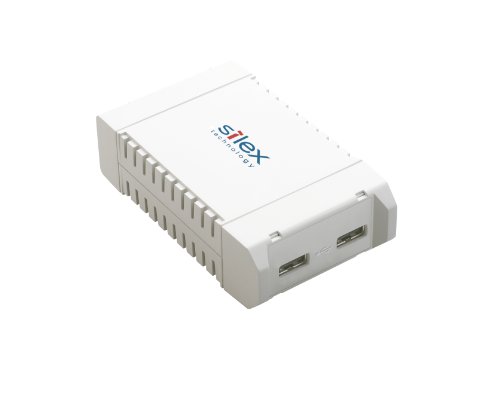
Silex SX-3000GB – Device server – 10Mb – Features & Prices in Saudi Arabia :
Silex SX-3000GB – Device server – 10Mb LAN, 100Mb LAN, GigE, USB 2.0 (SX-3000GB-US)
Product Dimensions
2.36 x 3.94 x 1.1 inches
Item Weight
3.53 ounces
Manufacturer
SILEX
ASIN
B003AM0DNY
Item model number
E1195
Is Discontinued By Manufacturer
No
Date First Available
March 2, 2010
Test video – Silex SX-3000GB – Device server – 10Mb :
Product highlights :
Questions & Answers – Silex SX-3000GB – Device server – 10Mb :
Technical specifications – Silex SX-3000GB – Device server – 10Mb :
Purchase advice :
-
Warranty :
Check the duration of the warranty and also the faults and defects it covers. Is it complete or limited? and What is included in the warranty (parts, repairs or both)?
-
Shipping :
Is delivery offered? And how long does it take to get delivered (Delivery time)
-
Proof of purchase :
Does the shop give you an invoice ?
-
After-sales service :
Do they have an after-sales service to have information about the installation or operation (instructions for use). Also in case of problem, it is the seller who takes charge or you must contact the manufacturer or supplier yourself.
_____________________________

K. N (verified owner) –
Fantastic Results! – All my gear is upstairs with my four year old MacBook Pro while my new Mac Mini is downstairs in my entertainment center. I have printers that are both USB and network attachable so it’s easy to share the printers between computers in the house but USB scanners are a different story. Let’s face it, some really good Windows based software isn’t available for mac o/s and some of the best graphics software isn’t available for Windows, so I run Windows under Fusion on the mac downstairs. I also scan and store photos on the mac downstairs and my old MacBook Pro doesn’t have the horsepower to get the job done any more. What I don’t want is to move a couple of scanners into my entertainment cabinet and USB cables won’t reach upstairs. With the Silex SX-3000GB, I was able to solve the problem. The Silex is great at sharing both USB scanners on the network while leaving them upstairs where I normally work. One scanner is an Epson GT-S50 for high speed duplex scanning of documents and the other is an Epson V600 for flatbed scanning of documents, photos, and negatives. The Silex works very well with both of these scanners. I don’t notice any delays or speed degradation for either of these scanners. It might be different if I were to mount a USB hard drive to the Silex, but for scanners this device is fantastic. I initially had difficulty on the virtual Windows o/s because I forgot to install the scanners via USB first. That is a very important first lesson. Get the devices working as USB attached devices first to get the correct drivers installed, then move them to the Silex. Since doing that everything has been great. I can attach either scanner to the mac o/s or to the windows o/s. There is no difference in functionality or capability. My house is wired with Cat5E and I run Linksys Gig switches so I get very good throughput even if not true Gig speed. Come on, they’re USB scanners. What should you expect? I can’t give exact measurements but perception is good enough for me and they seem as fast as if direct connected via USB. I’ve had the Silex in operation for a couple of months now and once I got the scanners working correctly, there have been few if any problems. At most, I had to reboot the device server when a scanner got confused but that’s only happened once. For simple installations on Windows or Mac OS, I’d rate the Silex a 1.5 on a 1 to 5 point scale of difficulty. For something more complex like Windows and Mac OS and VMware Fusion, I’d give it a 2.0 on a 1 to 5 scale of difficulty. Generally easy.
K. N (verified owner) –
Fantastic Results! – All my gear is upstairs with my four year old MacBook Pro while my new Mac Mini is downstairs in my entertainment center. I have printers that are both USB and network attachable so it’s easy to share the printers between computers in the house but USB scanners are a different story. Let’s face it, some really good Windows based software isn’t available for mac o/s and some of the best graphics software isn’t available for Windows, so I run Windows under Fusion on the mac downstairs. I also scan and store photos on the mac downstairs and my old MacBook Pro doesn’t have the horsepower to get the job done any more. What I don’t want is to move a couple of scanners into my entertainment cabinet and USB cables won’t reach upstairs. With the Silex SX-3000GB, I was able to solve the problem. The Silex is great at sharing both USB scanners on the network while leaving them upstairs where I normally work. One scanner is an Epson GT-S50 for high speed duplex scanning of documents and the other is an Epson V600 for flatbed scanning of documents, photos, and negatives. The Silex works very well with both of these scanners. I don’t notice any delays or speed degradation for either of these scanners. It might be different if I were to mount a USB hard drive to the Silex, but for scanners this device is fantastic. I initially had difficulty on the virtual Windows o/s because I forgot to install the scanners via USB first. That is a very important first lesson. Get the devices working as USB attached devices first to get the correct drivers installed, then move them to the Silex. Since doing that everything has been great. I can attach either scanner to the mac o/s or to the windows o/s. There is no difference in functionality or capability. My house is wired with Cat5E and I run Linksys Gig switches so I get very good throughput even if not true Gig speed. Come on, they’re USB scanners. What should you expect? I can’t give exact measurements but perception is good enough for me and they seem as fast as if direct connected via USB. I’ve had the Silex in operation for a couple of months now and once I got the scanners working correctly, there have been few if any problems. At most, I had to reboot the device server when a scanner got confused but that’s only happened once. For simple installations on Windows or Mac OS, I’d rate the Silex a 1.5 on a 1 to 5 point scale of difficulty. For something more complex like Windows and Mac OS and VMware Fusion, I’d give it a 2.0 on a 1 to 5 scale of difficulty. Generally easy.
C. P (verified owner) –
Works well with all Windows versions, but speed is disappointing and so is tech support. – I’ve only had the SX-3000GB for a couple of days now, so this is a preliminary review. I already own several Belkin F5L009 network usb hubs and I also own a Digi Anywhere USB network hub, so I’m familiar with the technology. I purchased the SX-3000GB to overcome some of the limitations of the other devices, and because I was expecting much greater throughput speeds from the SX-3000GB since it has a gigabit ethernet adapter versus the 10/100 adapters on the other two models.
C. P (verified owner) –
Works well with all Windows versions, but speed is disappointing and so is tech support. – I’ve only had the SX-3000GB for a couple of days now, so this is a preliminary review. I already own several Belkin F5L009 network usb hubs and I also own a Digi Anywhere USB network hub, so I’m familiar with the technology. I purchased the SX-3000GB to overcome some of the limitations of the other devices, and because I was expecting much greater throughput speeds from the SX-3000GB since it has a gigabit ethernet adapter versus the 10/100 adapters on the other two models.