
Description
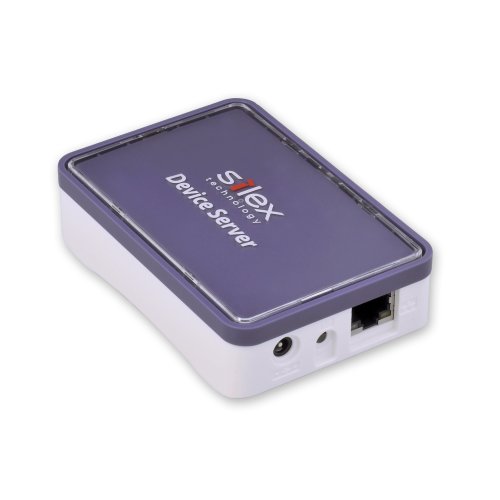
Silex Device Server (SX-DS-4000U2) – Features & Prices in Saudi Arabia :
Silex Device Server (SX-DS-4000U2)
Number of USB 2.0 Ports
2
Item model number
SX-DS-4000U2
Operating System
PC; Mac
Item Weight
12.8 ounces
Product Dimensions
6.75 x 5.25 x 2.5 inches
Item Dimensions LxWxH
6.75 x 5.25 x 2.5 inches
Voltage
110 Volts
Manufacturer
Silex
ASIN
B006D3RCN6
Is Discontinued By Manufacturer
No
Date First Available
June 14, 2012
Test video – Silex Device Server (SX-DS-4000U2) :
https://www.youtube.com/www.youtube.com/wat
Product highlights :
Questions & Answers – Silex Device Server (SX-DS-4000U2) :
Technical specifications – Silex Device Server (SX-DS-4000U2) :
Purchase advice :
-
Warranty :
Check the duration of the warranty and also the faults and defects it covers. Is it complete or limited? and What is included in the warranty (parts, repairs or both)?
-
Shipping :
Is delivery offered? And how long does it take to get delivered (Delivery time)
-
Proof of purchase :
Does the shop give you an invoice ?
-
After-sales service :
Do they have an after-sales service to have information about the installation or operation (instructions for use). Also in case of problem, it is the seller who takes charge or you must contact the manufacturer or supplier yourself.
_____________________________

I. H (verified owner) –
Not good for more than 1 printer on the network. – Item worked great out of the box. But after setting up static IP addresses to the units and attaching 2 printers to the ports, it does not connect the printers in the same order every time.
T. K (verified owner) –
My second one, love these things – See my earlier review, this is now my second device for a second location install. Not only works with normal devices but, now, proven to work with isosynchronous USB video devices (cameras)!
J. G (verified owner) –
Good unit, but had to return it because it … – Good unit, but had to return it because it doesn’t work well for speaker/telephony applications. However, for mounting thumb drives, sharing printers, etc, it seems to do well.
K. I (verified owner) –
Very good product. – We were able to get 2 3D printers working with this device.
F. B (verified owner) –
Won’t work for my application – I purchased this device in hopes of connecting remotely to a telescope with a USB connection. It doesn’t work even on my local network and any attempts to connect from the internet couldn’t even find the USB server. I will give it 3 stars though because it does connect successfully to my cameras, scanners and other such devices. Documentation is very poor so don’t expect any help there.
I. H (verified owner) –
Not good for more than 1 printer on the network. – Item worked great out of the box. But after setting up static IP addresses to the units and attaching 2 printers to the ports, it does not connect the printers in the same order every time.
M. D (verified owner) –
It’s Like Magic In a Box! – There is nothing not to like about this device. I’ve used them for everything from sharing printers across a network to implementing them into long-range WiFi based telemetry system on experimental vehicles. These things work great and are super simple to setup. They are a little pricey but they are worth every penny given how well they work and how reliable they are. They work like this, on the computers you want to have access, you have an app that will show you what is connected to each USB port, and with a click you can connect or disconnect from that device. Sweet and simple. Ever wonder how is the best way to connect to an Alltrax SPM motor controller’s USB port remotely? With this thing! Oh they are just magic in a box!
I. N (verified owner) –
Great operation and stable software – This is my second USB to Ethernet bridge, purchased to replace my trusty ‘original’ USB to Ethernet device, the Keyspan US-4A USB Server. Keyspan, once bought up by Tripp Lite, ceased all product and software development leaving us users pretty much high and dry for upgrade compatibility beyond Windows XP. As I upgraded the system to Windows 7 Professional x64, the Keyspan was no longer supported.
J. G (verified owner) –
Good unit, but had to return it because it … – Good unit, but had to return it because it doesn’t work well for speaker/telephony applications. However, for mounting thumb drives, sharing printers, etc, it seems to do well.
E. M (verified owner) –
Works Great – Works with Dremel 3D Printer and MatterForm 3D Scanner – OK so I was skeptical having tried a similar product that would only work on windows anbd refused to work on Mac. But this DOES work on a MAC. Event better I have to say that it works both with my Dremel 3D Printer and also MatterForms 3D Scanner too, so I get to free up some of my desk space while having the Scanner and 3D Printer in the garage. This is a greta addition for all Makers that want some distance between the Printer and you machine
K. I (verified owner) –
Very good product. – We were able to get 2 3D printers working with this device.
I. N (verified owner) –
Great operation and stable software – This is my second USB to Ethernet bridge, purchased to replace my trusty ‘original’ USB to Ethernet device, the Keyspan US-4A USB Server. Keyspan, once bought up by Tripp Lite, ceased all product and software development leaving us users pretty much high and dry for upgrade compatibility beyond Windows XP. As I upgraded the system to Windows 7 Professional x64, the Keyspan was no longer supported.
T. K (verified owner) –
My second one, love these things – See my earlier review, this is now my second device for a second location install. Not only works with normal devices but, now, proven to work with isosynchronous USB video devices (cameras)!
M. D (verified owner) –
It’s Like Magic In a Box! – There is nothing not to like about this device. I’ve used them for everything from sharing printers across a network to implementing them into long-range WiFi based telemetry system on experimental vehicles. These things work great and are super simple to setup. They are a little pricey but they are worth every penny given how well they work and how reliable they are. They work like this, on the computers you want to have access, you have an app that will show you what is connected to each USB port, and with a click you can connect or disconnect from that device. Sweet and simple. Ever wonder how is the best way to connect to an Alltrax SPM motor controller’s USB port remotely? With this thing! Oh they are just magic in a box!
E. M (verified owner) –
Works Great – Works with Dremel 3D Printer and MatterForm 3D Scanner – OK so I was skeptical having tried a similar product that would only work on windows anbd refused to work on Mac. But this DOES work on a MAC. Event better I have to say that it works both with my Dremel 3D Printer and also MatterForms 3D Scanner too, so I get to free up some of my desk space while having the Scanner and 3D Printer in the garage. This is a greta addition for all Makers that want some distance between the Printer and you machine
F. B (verified owner) –
Won’t work for my application – I purchased this device in hopes of connecting remotely to a telescope with a USB connection. It doesn’t work even on my local network and any attempts to connect from the internet couldn’t even find the USB server. I will give it 3 stars though because it does connect successfully to my cameras, scanners and other such devices. Documentation is very poor so don’t expect any help there.