Ooma Wireless Plus Bluetooth Adapter – Features & Prices in Saudi Arabia :
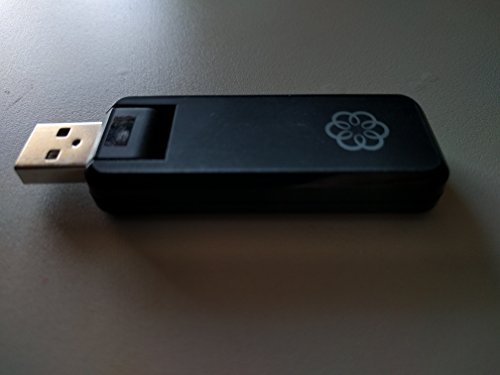
Ooma Wireless Plus Bluetooth Adapter
Product Dimensions
6.8 x 4.52 x 1.18 inches
Item Weight
3.2 ounces
ASIN
B00NZTL1Y2
Item model number
Ooma Wireless Plus Bluetooth Adapter
Is Discontinued By Manufacturer
No
Date First Available
September 18, 2014
Manufacturer
ooma, Inc.
Test video – Ooma Wireless Plus Bluetooth Adapter :
Product highlights :
Works only with Ooma Telo. Not for use with other devices. Ooma Wireless + Bluetooth Adapter enables your Ooma Telo to connect to the Internet wirelessly using your Wi-Fi network.
Listen to voice mail and engage advanced features where it is most convenient. Take your Telo with you when you travel to call for FREE wherever you have Wi-Fi. Pair up to 7 Devices – Pair up to 7 mobile phones or Bluetooth headsets.
Transfer Calls – If you’re using the Telo handset, you can transfer your call to your Bluetooth headset and be hands-free. Use your Bluetooth earpiece to talk on your home phone with up to 30-Feet of transmission range.
Multiply your Ring – Add the convenience of answering your mobile phone calls on any phone in your home.
Listen to voicemail and engage advanced features where it is most convenient. Install Ooma in dorm rooms, apartments, and other locations without a wired Internet connection. ( User Guide – Troubleshooting information is on pages 9 to 10)
Questions & Answers – Ooma Wireless Plus Bluetooth Adapter :
➕ What is the price of Ooma Wireless Plus Bluetooth Adapter in Saudi Arabia ?
The price of Ooma Wireless Plus Bluetooth Adapter in-store is 90 SAR VAT.
➕ When Ooma Wireless Plus Bluetooth Adapter was released ?
The release date was September 18, 2014.
➕ What is the price of Ooma Wireless Plus Bluetooth Adapter cheap used ?
The price of Ooma Wireless Plus Bluetooth Adapter used is 60 SAR VAT.
➕ What are the main characteristics of Ooma Wireless Plus Bluetooth Adapter ?
Special specifications :
Works only with Ooma Telo. Not for use with other devices. Ooma Wireless + Bluetooth Adapter enables your Ooma Telo to connect to the Internet wirelessly using your Wi-Fi network.
➕ Is it interesting to buy this product ?
The best people who can answer you are customers who have already bought and tested this product (See Customer Reviews). This product is rated 3.7 / 5 on Amazon.
➕ Where to buy Ooma Wireless Plus Bluetooth Adapter in Saudi Arabia ?
Technical specifications – Ooma Wireless Plus Bluetooth Adapter :
Brand
ooma
Hardware Interface
Bluetooth, USB
Color
black
Compatible Devices
Smartphone
Item Dimensions LxWxH
6.8 x 4.52 x 1.18 inches
Data Link Protocol
Bluetooth, USB
Item Weight
0.2 Pounds
Purchase advice :
Warranty :
Check the duration of the warranty and also the faults and defects it covers. Is it complete or limited? and What is included in the warranty (parts, repairs or both)?
Shipping :
Is delivery offered? And how long does it take to get delivered (Delivery time)
Proof of purchase :
Does the shop give you an invoice ?
After-sales service :
Do they have an after-sales service to have information about the installation or operation (instructions for use). Also in case of problem, it is the seller who takes charge or you must contact the manufacturer or supplier yourself.
_____________________________
14 reviews for Ooma Wireless Plus Bluetooth Adapter
Rated 4 out of 5
K. I (verified owner)–
Works perfectly! See note about installation – I wish I had bought my Ooma Telo with the wireless/BT adapter included, it would have cost less overall – but at the time, I had no plan to do anything but plug the Ooma wired into my modem… Fast forward a few months, and yeah, now it’s a good idea. So I got this. It works perfectly for us. I don’t notice any less quality than the direct wired method. Glad we did it!
Rated 5 out of 5
H. F (verified owner)–
Great addition to slightly older Telo – Needed a wireless solution for my exhisting Telo unit. This item fits the bill. For once I read the directions and followed them. The connection to the network will take a little bit of time but it loged in and connected just fine. Happily talking on Ooma again.
Rated 5 out of 5
R. S (verified owner)–
Ooma doesn’t sell this anymore, so I was glad to still find one – I wanted to convert my Ooma Telo 2 from wired to wireless. What I had not realized was that Ooma stopped selling their custom WiFi adapter, instead selling a “Telo Air” model base station with WiFi built in. Luckily this Amazon seller had some available, at a reasonable price. As best as I can tell, the unit was new and it works perfectly. You WILL need wired access to the Telo in order to configure the adapter, but once that is done you can disconnect the Ethernet cable.
Rated 5 out of 5
R. S (verified owner)–
Ooma doesn’t sell this anymore, so I was glad to still find one – I wanted to convert my Ooma Telo 2 from wired to wireless. What I had not realized was that Ooma stopped selling their custom WiFi adapter, instead selling a “Telo Air” model base station with WiFi built in. Luckily this Amazon seller had some available, at a reasonable price. As best as I can tell, the unit was new and it works perfectly. You WILL need wired access to the Telo in order to configure the adapter, but once that is done you can disconnect the Ethernet cable.
Rated 2 out of 5
H. B (verified owner)–
Nightmare to install – I spent over two hours installing this for what was suppose to be a ten minute job. It simply did not want to connect to my mesh router even though it was ten feet from it. The signal seems to go in and out. The thing is connected one time and disconnected the next. I am going to hardwire it to my wifi extender and send this back. Just so you know the wifi extender works like a charm.
Rated 4 out of 5
K. I (verified owner)–
Works perfectly! See note about installation – I wish I had bought my Ooma Telo with the wireless/BT adapter included, it would have cost less overall – but at the time, I had no plan to do anything but plug the Ooma wired into my modem… Fast forward a few months, and yeah, now it’s a good idea. So I got this. It works perfectly for us. I don’t notice any less quality than the direct wired method. Glad we did it!
Rated 5 out of 5
H. F (verified owner)–
Great addition to slightly older Telo – Needed a wireless solution for my exhisting Telo unit. This item fits the bill. For once I read the directions and followed them. The connection to the network will take a little bit of time but it loged in and connected just fine. Happily talking on Ooma again.
Rated 4 out of 5
O. H (verified owner)–
I am into going as wireless as possible – I begin the setup by taking a couple Valium. The setup directions are terrible. To connect an Ooma Telo equipped with the wifi/bluetooth transceiver you must not be connected to the internet via ethernet or wifi! Just run setup with ethernet connected via cable between the computer ethernet port and the Ooma Telo “Home” ethernet port. After that can you reconnect the Ooma Telo back to the internet in which ever is your preferred mode.
Rated 4 out of 5
C. O (verified owner)–
Works once you figure it out – I bought this so I could use a Bluetooth speakerphone with our home phone since I have trouble hearing on the built-in speakerphones in the handsets. I was able to get it connected fairly easily but that’s where the directions ended! OK the phone rings and I hit the call button to answer. Pretty straightforward there. Then I stood with the phone handset and couldn’t figure out how to make an outgoing call. I found the code in an Ooma forum but not how to use it. Seems you have to dial *15 then the number which causes the speakerphone to ring. The call is sent through after you pick up with the call button. After that it may be a few seconds before you hear ringing on the other side and it eventually connects. I got it after a few trials and errors of hanging up on the other party. It would have been nice for Ooma to put how to use this device in the instruction book. I am happy that it works even in the kitchen although my Telo is upstairs. But the best feature is both our lines can be used with the same Bluetooth without additional setup.
Rated 5 out of 5
Z. C (verified owner)–
Wireless at last. I hate wires. – If you are reading this, you already know Ooma is a great alternative to paying high prices for phone service. If you take their basic plan, your only monthly bill is just the taxes required by law, which in New York is about $3.50 per month. Compare that to nearly $80 per month for Verizon home service.
Rated 2 out of 5
H. B (verified owner)–
Nightmare to install – I spent over two hours installing this for what was suppose to be a ten minute job. It simply did not want to connect to my mesh router even though it was ten feet from it. The signal seems to go in and out. The thing is connected one time and disconnected the next. I am going to hardwire it to my wifi extender and send this back. Just so you know the wifi extender works like a charm.
Rated 4 out of 5
C. O (verified owner)–
Works once you figure it out – I bought this so I could use a Bluetooth speakerphone with our home phone since I have trouble hearing on the built-in speakerphones in the handsets. I was able to get it connected fairly easily but that’s where the directions ended! OK the phone rings and I hit the call button to answer. Pretty straightforward there. Then I stood with the phone handset and couldn’t figure out how to make an outgoing call. I found the code in an Ooma forum but not how to use it. Seems you have to dial *15 then the number which causes the speakerphone to ring. The call is sent through after you pick up with the call button. After that it may be a few seconds before you hear ringing on the other side and it eventually connects. I got it after a few trials and errors of hanging up on the other party. It would have been nice for Ooma to put how to use this device in the instruction book. I am happy that it works even in the kitchen although my Telo is upstairs. But the best feature is both our lines can be used with the same Bluetooth without additional setup.
Rated 4 out of 5
O. H (verified owner)–
I am into going as wireless as possible – I begin the setup by taking a couple Valium. The setup directions are terrible. To connect an Ooma Telo equipped with the wifi/bluetooth transceiver you must not be connected to the internet via ethernet or wifi! Just run setup with ethernet connected via cable between the computer ethernet port and the Ooma Telo “Home” ethernet port. After that can you reconnect the Ooma Telo back to the internet in which ever is your preferred mode.
Rated 5 out of 5
Z. C (verified owner)–
Wireless at last. I hate wires. – If you are reading this, you already know Ooma is a great alternative to paying high prices for phone service. If you take their basic plan, your only monthly bill is just the taxes required by law, which in New York is about $3.50 per month. Compare that to nearly $80 per month for Verizon home service.


K. I (verified owner) –
Works perfectly! See note about installation – I wish I had bought my Ooma Telo with the wireless/BT adapter included, it would have cost less overall – but at the time, I had no plan to do anything but plug the Ooma wired into my modem… Fast forward a few months, and yeah, now it’s a good idea. So I got this. It works perfectly for us. I don’t notice any less quality than the direct wired method. Glad we did it!
H. F (verified owner) –
Great addition to slightly older Telo – Needed a wireless solution for my exhisting Telo unit. This item fits the bill. For once I read the directions and followed them. The connection to the network will take a little bit of time but it loged in and connected just fine. Happily talking on Ooma again.
R. S (verified owner) –
Ooma doesn’t sell this anymore, so I was glad to still find one – I wanted to convert my Ooma Telo 2 from wired to wireless. What I had not realized was that Ooma stopped selling their custom WiFi adapter, instead selling a “Telo Air” model base station with WiFi built in. Luckily this Amazon seller had some available, at a reasonable price. As best as I can tell, the unit was new and it works perfectly. You WILL need wired access to the Telo in order to configure the adapter, but once that is done you can disconnect the Ethernet cable.
R. S (verified owner) –
Ooma doesn’t sell this anymore, so I was glad to still find one – I wanted to convert my Ooma Telo 2 from wired to wireless. What I had not realized was that Ooma stopped selling their custom WiFi adapter, instead selling a “Telo Air” model base station with WiFi built in. Luckily this Amazon seller had some available, at a reasonable price. As best as I can tell, the unit was new and it works perfectly. You WILL need wired access to the Telo in order to configure the adapter, but once that is done you can disconnect the Ethernet cable.
H. B (verified owner) –
Nightmare to install – I spent over two hours installing this for what was suppose to be a ten minute job. It simply did not want to connect to my mesh router even though it was ten feet from it. The signal seems to go in and out. The thing is connected one time and disconnected the next. I am going to hardwire it to my wifi extender and send this back. Just so you know the wifi extender works like a charm.
K. I (verified owner) –
Works perfectly! See note about installation – I wish I had bought my Ooma Telo with the wireless/BT adapter included, it would have cost less overall – but at the time, I had no plan to do anything but plug the Ooma wired into my modem… Fast forward a few months, and yeah, now it’s a good idea. So I got this. It works perfectly for us. I don’t notice any less quality than the direct wired method. Glad we did it!
H. F (verified owner) –
Great addition to slightly older Telo – Needed a wireless solution for my exhisting Telo unit. This item fits the bill. For once I read the directions and followed them. The connection to the network will take a little bit of time but it loged in and connected just fine. Happily talking on Ooma again.
O. H (verified owner) –
I am into going as wireless as possible – I begin the setup by taking a couple Valium. The setup directions are terrible. To connect an Ooma Telo equipped with the wifi/bluetooth transceiver you must not be connected to the internet via ethernet or wifi! Just run setup with ethernet connected via cable between the computer ethernet port and the Ooma Telo “Home” ethernet port. After that can you reconnect the Ooma Telo back to the internet in which ever is your preferred mode.
C. O (verified owner) –
Works once you figure it out – I bought this so I could use a Bluetooth speakerphone with our home phone since I have trouble hearing on the built-in speakerphones in the handsets. I was able to get it connected fairly easily but that’s where the directions ended! OK the phone rings and I hit the call button to answer. Pretty straightforward there. Then I stood with the phone handset and couldn’t figure out how to make an outgoing call. I found the code in an Ooma forum but not how to use it. Seems you have to dial *15 then the number which causes the speakerphone to ring. The call is sent through after you pick up with the call button. After that it may be a few seconds before you hear ringing on the other side and it eventually connects. I got it after a few trials and errors of hanging up on the other party. It would have been nice for Ooma to put how to use this device in the instruction book. I am happy that it works even in the kitchen although my Telo is upstairs. But the best feature is both our lines can be used with the same Bluetooth without additional setup.
Z. C (verified owner) –
Wireless at last. I hate wires. – If you are reading this, you already know Ooma is a great alternative to paying high prices for phone service. If you take their basic plan, your only monthly bill is just the taxes required by law, which in New York is about $3.50 per month. Compare that to nearly $80 per month for Verizon home service.
H. B (verified owner) –
Nightmare to install – I spent over two hours installing this for what was suppose to be a ten minute job. It simply did not want to connect to my mesh router even though it was ten feet from it. The signal seems to go in and out. The thing is connected one time and disconnected the next. I am going to hardwire it to my wifi extender and send this back. Just so you know the wifi extender works like a charm.
C. O (verified owner) –
Works once you figure it out – I bought this so I could use a Bluetooth speakerphone with our home phone since I have trouble hearing on the built-in speakerphones in the handsets. I was able to get it connected fairly easily but that’s where the directions ended! OK the phone rings and I hit the call button to answer. Pretty straightforward there. Then I stood with the phone handset and couldn’t figure out how to make an outgoing call. I found the code in an Ooma forum but not how to use it. Seems you have to dial *15 then the number which causes the speakerphone to ring. The call is sent through after you pick up with the call button. After that it may be a few seconds before you hear ringing on the other side and it eventually connects. I got it after a few trials and errors of hanging up on the other party. It would have been nice for Ooma to put how to use this device in the instruction book. I am happy that it works even in the kitchen although my Telo is upstairs. But the best feature is both our lines can be used with the same Bluetooth without additional setup.
O. H (verified owner) –
I am into going as wireless as possible – I begin the setup by taking a couple Valium. The setup directions are terrible. To connect an Ooma Telo equipped with the wifi/bluetooth transceiver you must not be connected to the internet via ethernet or wifi! Just run setup with ethernet connected via cable between the computer ethernet port and the Ooma Telo “Home” ethernet port. After that can you reconnect the Ooma Telo back to the internet in which ever is your preferred mode.
Z. C (verified owner) –
Wireless at last. I hate wires. – If you are reading this, you already know Ooma is a great alternative to paying high prices for phone service. If you take their basic plan, your only monthly bill is just the taxes required by law, which in New York is about $3.50 per month. Compare that to nearly $80 per month for Verizon home service.