
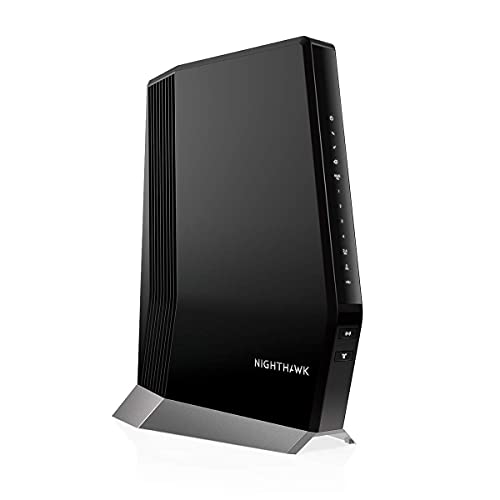
Description
NETGEAR Nighthawk Cable Modem with Built-in WiFi – Features & Prices in Saudi Arabia :
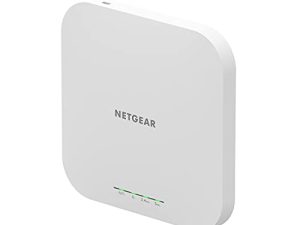
NETGEAR Nighthawk Cable Modem with Built-in WiFi 6 Router (CAX80) – Compatible with All Major Cable Providers | Cable Plans Up to 6Gbps | AX6000 WiFi 6 speed | DOCSIS 3.1 (Renewed)
Manufacturer
Netgear
Brand
NETGEAR
Item Weight
5.68 pounds
Package Dimensions
15.59 x 12.68 x 5.67 inches
Item model number
AX6000
Number of Items
1
Manufacturer Part Number
CAX80-100NAS-cr
Test video – NETGEAR Nighthawk Cable Modem with Built-in WiFi :
Product highlights :
Questions & Answers – NETGEAR Nighthawk Cable Modem with Built-in WiFi :
Technical specifications – NETGEAR Nighthawk Cable Modem with Built-in WiFi :
Brand
NETGEAR
Compatible Devices
Printer
Connectivity Technology
Wi-Fi, USB, Ethernet
Control Method
App
Purchase advice :
-
Warranty :
Check the duration of the warranty and also the faults and defects it covers. Is it complete or limited? and What is included in the warranty (parts, repairs or both)?
-
Shipping :
Is delivery offered? And how long does it take to get delivered (Delivery time)
-
Proof of purchase :
Does the shop give you an invoice ?
-
After-sales service :
Do they have an after-sales service to have information about the installation or operation (instructions for use). Also in case of problem, it is the seller who takes charge or you must contact the manufacturer or supplier yourself.
_____________________________
N. R (verified owner) –
Good Value – This item was a good value for the price resolved a continuous wifi issue we’d been having.
J. P (verified owner) –
La señal no es tan fuerte como dice – Lo compré pues tenía uno alquilado de Xfinity pero pensé que era tan fuerte la señal como decían y creo que no es así pues lo coloqué en el segundo piso y tiene que estar bien expuesto en el pasillo para que la señal alcance arriba y abajo. Entiendo que debería ser más potente la señal por el precio.
R. Z (verified owner) –
It seem that NETGEAR Xfinity are in bed with each other – I haven’t used the product long enough to comment
G. S (verified owner) –
Tech support was awful for this device. – It has not allowed me to connect cameras, flex or ring back up. If we lose power, even ablup you have to reset almost everything. For the price not sure it is worth the hassle. If you want it to just your internet with multiple devices and nothing else this is a decent product.
G. S (verified owner) –
Tech support was awful for this device. – It has not allowed me to connect cameras, flex or ring back up. If we lose power, even ablup you have to reset almost everything. For the price not sure it is worth the hassle. If you want it to just your internet with multiple devices and nothing else this is a decent product.
F. H (verified owner) –
The setup was flawless and works well – My last router that I bought not that long ago (different vendor) caused havoc with all the devices like Alexa, etc. even though the network and password remained the same. This was flawless – everything just worked. No complaints with the function.
M. B (verified owner) –
The speed of this router – This router was easy to attache and the improved speed that it has in down loading movies is out of this world.
F. H (verified owner) –
The setup was flawless and works well – My last router that I bought not that long ago (different vendor) caused havoc with all the devices like Alexa, etc. even though the network and password remained the same. This was flawless – everything just worked. No complaints with the function.
K. B (verified owner) –
I don’t know why/how people are having issues – I needed a new modem router for xfinity so I can get the speeds I’m paying for. Took it out of the box and downloaded the apps that were needed for easy installation and it took me about 30 mins but that’s bc I forgot my account passwords haha. Not amazons fault but the last step in the app kept getting hung up and would finish but on the xfinity app side it showed its connected and working properly
J. I (verified owner) –
This is a great quality product! – I would have given this product, a 5 star, but the reason why I gave it a 4 star instead is because the manual is correct, but it is missing a very important piece of data. I sent the first box back, thinking that it was broken because that’s what the Xfinity Comcast guy told me to do. He couldn’t figure out how to get it set up. We both worked on it together. After having the 2nd cable Modem/Router sent to me 2 days later, I sent another Comcast Xfinity guy to my home to help me with this product installation. I have read the book all the way through. But I really think that they need to redo the manual and make it in big letters that you need to create a Netgear account before you get started. I never created a Netgear account with my first one and that’s why it did not start up in the first place. There is nothing wrong with the cable Modem/Router at all…. It won’t connect unless you create an account first. Now y’all know!!
R. Z (verified owner) –
It seem that NETGEAR Xfinity are in bed with each other – I haven’t used the product long enough to comment
M. B (verified owner) –
The speed of this router – This router was easy to attache and the improved speed that it has in down loading movies is out of this world.
N. R (verified owner) –
Good Value – This item was a good value for the price resolved a continuous wifi issue we’d been having.
K. B (verified owner) –
I don’t know why/how people are having issues – I needed a new modem router for xfinity so I can get the speeds I’m paying for. Took it out of the box and downloaded the apps that were needed for easy installation and it took me about 30 mins but that’s bc I forgot my account passwords haha. Not amazons fault but the last step in the app kept getting hung up and would finish but on the xfinity app side it showed its connected and working properly
J. P (verified owner) –
La señal no es tan fuerte como dice – Lo compré pues tenía uno alquilado de Xfinity pero pensé que era tan fuerte la señal como decían y creo que no es así pues lo coloqué en el segundo piso y tiene que estar bien expuesto en el pasillo para que la señal alcance arriba y abajo. Entiendo que debería ser más potente la señal por el precio.
J. I (verified owner) –
This is a great quality product! – I would have given this product, a 5 star, but the reason why I gave it a 4 star instead is because the manual is correct, but it is missing a very important piece of data. I sent the first box back, thinking that it was broken because that’s what the Xfinity Comcast guy told me to do. He couldn’t figure out how to get it set up. We both worked on it together. After having the 2nd cable Modem/Router sent to me 2 days later, I sent another Comcast Xfinity guy to my home to help me with this product installation. I have read the book all the way through. But I really think that they need to redo the manual and make it in big letters that you need to create a Netgear account before you get started. I never created a Netgear account with my first one and that’s why it did not start up in the first place. There is nothing wrong with the cable Modem/Router at all…. It won’t connect unless you create an account first. Now y’all know!!