
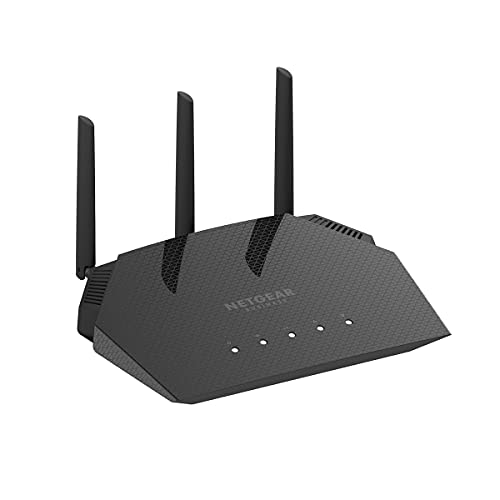
Description
NETGEAR 4-Stream WiFi 6 Dual-Band Gigabit Router – Features & Prices in Saudi Arabia :
NETGEAR 4-Stream WiFi 6 Dual-Band Gigabit Router (WAX204) – AX1800 Wireless Speed (Up to 1.8 Gbps) | Coverage up to 1,500 sq. ft, 40 Devices
Wireless Type
802.11ax
Series
WAX204-100NAS
Item model number
WAX204-100NAS
Item Weight
2.3 pounds
Package Dimensions
10.87 x 8.11 x 4.41 inches
Manufacturer
Netgear
ASIN
B08LHJZ2NJ
Date First Available
November 19, 2020
Test video – NETGEAR 4-Stream WiFi 6 Dual-Band Gigabit Router :
Product highlights :
Questions & Answers – NETGEAR 4-Stream WiFi 6 Dual-Band Gigabit Router :
Technical specifications – NETGEAR 4-Stream WiFi 6 Dual-Band Gigabit Router :
Brand
NETGEAR
Series
WAX204-100NAS
Frequency Band Class
Dual-Band
Wireless Type
802.11ax
Compatible Devices
Phone, Mac, PC, Wireless Devices, Media Streaming Devices, Laptops, Computers, Tablets
Included Components
,
Connectivity Technology
Wi-Fi, Ethernet
Item Weight
2.3 Pounds
Security Protocol
WPA-PSK, WPA2-PSK
Number of Ports
6
Purchase advice :
-
Warranty :
Check the duration of the warranty and also the faults and defects it covers. Is it complete or limited? and What is included in the warranty (parts, repairs or both)?
-
Shipping :
Is delivery offered? And how long does it take to get delivered (Delivery time)
-
Proof of purchase :
Does the shop give you an invoice ?
-
After-sales service :
Do they have an after-sales service to have information about the installation or operation (instructions for use). Also in case of problem, it is the seller who takes charge or you must contact the manufacturer or supplier yourself.
_____________________________
C. I (verified owner) –
Great for home use too! – My home outgrew our previous Netgear router and needed something that could handle several devices through three levels (basement, ground floor, upstairs). This one may be a bit overkill, but at the time of purchase it was cheaper than the consumer grade home routers across multiple brands. So decided to take a chance and grab it.
P. T (verified owner) –
Easy to setup but do NOT like the forced registration – I don’t understand why people complaining this is hard to install. It is not. This is a Netgear business access point. Says so right on the box. Even though it’s very self explanatory. There even a setup guide that you can follow. You don’t even have to have it connected to the internet to set it up. I wasn’t connected to the internet and setup it up, gives you 3 options. Just choose the middle manual option, setup your SSID and wifi password and you good. Literally all you have to do and you up and running.
B. Z (verified owner) –
Perfect Router – I am a home user currently with Spectrum 1GB internet plan. Spectrum internet service is excellent in my area (NE of San Antonio). I have some minor issue with the new Spectrum equipment especially with the Wi-Fi router since this router is lacking of the wps button and it is frequently dropping Wi-Fi for older devices even the device is next to it. The Wi-Fi to my new Motorola phone is perfect but not for the 5-years old Sony phone.
E. P (verified owner) –
working now – Update, I contacted support and was able to get into the router and enable the ports for a connection . All is well now.
G. N (verified owner) –
Works for what it is. – A decent budget option, simple to setup but very basic router.
C. I (verified owner) –
Great for home use too! – My home outgrew our previous Netgear router and needed something that could handle several devices through three levels (basement, ground floor, upstairs). This one may be a bit overkill, but at the time of purchase it was cheaper than the consumer grade home routers across multiple brands. So decided to take a chance and grab it.
S. D (verified owner) –
Great Solution for Wired, Distributed AP (non-mesh) Network Configuration – Bought 3 WAX204s (after testing one) to replace outdated Airport Extremes to provide Wi-Fi access throughout home and detached garage. Network configuration had a central fiber gateway/router (BGW320-505) connected to the 3 Airports via CAT6 cables. Could get the performance I wanted out a mesh system (borrowed a friends to test) due to the age of the home (with thick plaster walls) and distance to detached garage, so I ran dedicated CAT6 cables to AP locations in house (first and second floor) and garage. Replacing the Airports was a breeze using the 204’s clear admin user interface with a direct wired connection to a laptop. Device initially configures as a router. Changed each device to Access Point mode (after updating firmware) via the user interface and … voila! Now roaming throughout the house/garage at 600+ mbps on iPhone13. Tried several several wireless configurations (separate 2.4GHz/5GHz networks, different SSIDs, ….) to determine best roaming configuration. Using same SSID (and encryption) and allowing 204s to Band Steer (basically, the default configuration) resulted in the best “seamless” (not using VOIP, so no concerns for me there) roaming performance. There are lots of Wi-Fi 6 APs to choose from, but the 4 GB ports (for connecting wired devices and offloading wireless network traffic) and the small form-factor led me to purchase the 204s. So far … so great!
B. Z (verified owner) –
Perfect Router – I am a home user currently with Spectrum 1GB internet plan. Spectrum internet service is excellent in my area (NE of San Antonio). I have some minor issue with the new Spectrum equipment especially with the Wi-Fi router since this router is lacking of the wps button and it is frequently dropping Wi-Fi for older devices even the device is next to it. The Wi-Fi to my new Motorola phone is perfect but not for the 5-years old Sony phone.
P. T (verified owner) –
Easy to setup but do NOT like the forced registration – I don’t understand why people complaining this is hard to install. It is not. This is a Netgear business access point. Says so right on the box. Even though it’s very self explanatory. There even a setup guide that you can follow. You don’t even have to have it connected to the internet to set it up. I wasn’t connected to the internet and setup it up, gives you 3 options. Just choose the middle manual option, setup your SSID and wifi password and you good. Literally all you have to do and you up and running.
S. D (verified owner) –
Great Solution for Wired, Distributed AP (non-mesh) Network Configuration – Bought 3 WAX204s (after testing one) to replace outdated Airport Extremes to provide Wi-Fi access throughout home and detached garage. Network configuration had a central fiber gateway/router (BGW320-505) connected to the 3 Airports via CAT6 cables. Could get the performance I wanted out a mesh system (borrowed a friends to test) due to the age of the home (with thick plaster walls) and distance to detached garage, so I ran dedicated CAT6 cables to AP locations in house (first and second floor) and garage. Replacing the Airports was a breeze using the 204’s clear admin user interface with a direct wired connection to a laptop. Device initially configures as a router. Changed each device to Access Point mode (after updating firmware) via the user interface and … voila! Now roaming throughout the house/garage at 600+ mbps on iPhone13. Tried several several wireless configurations (separate 2.4GHz/5GHz networks, different SSIDs, ….) to determine best roaming configuration. Using same SSID (and encryption) and allowing 204s to Band Steer (basically, the default configuration) resulted in the best “seamless” (not using VOIP, so no concerns for me there) roaming performance. There are lots of Wi-Fi 6 APs to choose from, but the 4 GB ports (for connecting wired devices and offloading wireless network traffic) and the small form-factor led me to purchase the 204s. So far … so great!
N. K (verified owner) –
Slow wired speeds, slow wireless speeds – Have 1.2 Gigabit service at my home. Using this as a router would only get ~400-500 mbit throughput hard wired through it. Wireless i would get even less. Using this as an AP and a different hard wired router i get over 900mbit and 700 mbit wireless.
E. P (verified owner) –
working now – Update, I contacted support and was able to get into the router and enable the ports for a connection . All is well now.
G. N (verified owner) –
Works for what it is. – A decent budget option, simple to setup but very basic router.
N. K (verified owner) –
Slow wired speeds, slow wireless speeds – Have 1.2 Gigabit service at my home. Using this as a router would only get ~400-500 mbit throughput hard wired through it. Wireless i would get even less. Using this as an AP and a different hard wired router i get over 900mbit and 700 mbit wireless.