Linksys MX5503 Atlas WiFi 6 Router Home – Features & Prices in Saudi Arabia :
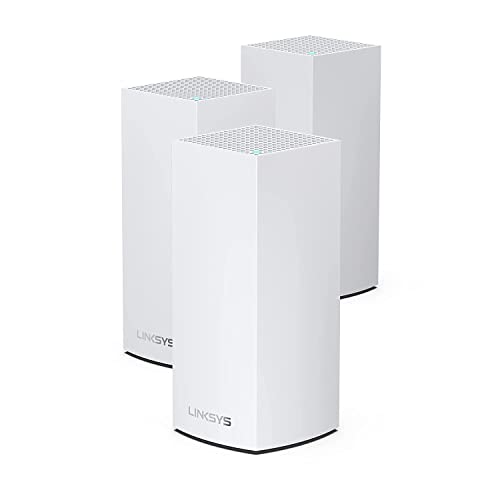
Linksys MX5503 Atlas WiFi 6 Router Home WiFi Mesh System, Dual-Band, 8,100 Sq. ft Coverage, 90+ Devices, Replaces WiFi Router and Extender, Full House Coverage, Speeds up to (AX5400) 5.4Gbps
Product Dimensions
3.39 x 3.39 x 11.22 inches
Item Weight
4.49 pounds
ASIN
B099FHWNSF
Item model number
MX5503-AMZ
Date First Available
July 14, 2021
Manufacturer
Linksys
Test video – Linksys MX5503 Atlas WiFi 6 Router Home :
Product highlights :
A BETTER WIFI HAS ARRIVED – Linksys Atlas Pro 6 with Velop Intelligent Mesh is a dual-band WiFi 6 router that simultaneously delivers premium performance to more than 30 devices per node. Access to 160 MHz unleashes the true power of WiFi 6 technology—the least-congested channels on the 5GHz band offer incredibly fast connectivity. With easy setup, advanced security and parental controls, Linksys Atlas Pro 6 is an essential upgrade to any home.
POWERFUL MESH COVERAGE – Velop Intelligent Mesh technology combined with WiFi 6 is designed to deliver gigabit WiFi speeds to every corner of your home, including the backyard and outdoor smart home devices.
160 MHZ CAPABLE – Access to 160 MHz unleashes the true power of WiFi 6 technology—these are the least congested channels available on the 5GHz band and offer incredibly fast connectivity. Faster peak data rates allow work-from-home, online learning, streaming, and gaming devices to operate simultaneously without diminished bandwidth.
INDUSTRY-LEADING TECHNOLOGY – The Qualcomm Immersive Home 216 Platform delivers the ultimate WiFi 6 experience. This next-generation technology transforms home and business WiFi with its wire-like stability and blazing-fast performance.
UP TO 4X MORE CAPACITY – The Linksys Atlas Pro 6 Dual-Band WiFi 6 Mesh system uses the latest WiFi 6 (802.11ax) standard to deliver true gigabit mesh WiFi speeds throughout your entire home, up to 5.4 Gbps with 6-stream connectivity
EASY SETUP AND CONTROL – It’s simple to set up, lets you access your network from anywhere, and view or prioritize which connected devices are using the most WiFi—all from the free Linksys app.
➕ What is the price of Linksys MX5503 Atlas WiFi 6 Router Home in Saudi Arabia ?
The price of Linksys MX5503 Atlas WiFi 6 Router Home in-store is 1620 SAR VAT.
➕ When Linksys MX5503 Atlas WiFi 6 Router Home was released ?
The release date was July 14, 2021.
➕ What is the price of Linksys MX5503 Atlas WiFi 6 Router Home cheap used ?
The price of Linksys MX5503 Atlas WiFi 6 Router Home used is 1130 SAR VAT.
➕ What are the main characteristics of Linksys MX5503 Atlas WiFi 6 Router Home ?
Special specifications :
A BETTER WIFI HAS ARRIVED – Linksys Atlas Pro 6 with Velop Intelligent Mesh is a dual-band WiFi 6 router that simultaneously delivers premium performance to more than 30 devices per node. Access to 160 MHz unleashes the true power of WiFi 6 technology—the least-congested channels on the 5GHz band offer incredibly fast connectivity. With easy setup, advanced security and parental controls, Linksys Atlas Pro 6 is an essential upgrade to any home.
➕ Is it interesting to buy this product ?
The best people who can answer you are customers who have already bought and tested this product (See Customer Reviews). This product is rated 4.1 / 5 on Amazon.
➕ Where to buy Linksys MX5503 Atlas WiFi 6 Router Home in Saudi Arabia ?
Check the duration of the warranty and also the faults and defects it covers. Is it complete or limited? and What is included in the warranty (parts, repairs or both)?
Shipping :
Is delivery offered? And how long does it take to get delivered (Delivery time)
Proof of purchase :
Does the shop give you an invoice ?
After-sales service :
Do they have an after-sales service to have information about the installation or operation (instructions for use). Also in case of problem, it is the seller who takes charge or you must contact the manufacturer or supplier yourself.
_____________________________
16 reviews for Linksys MX5503 Atlas WiFi 6 Router Home
Rated 3 out of 5
S. J (verified owner)–
Terrible Mesh Connection – Im not an IT guy, but perhaps a “Prosumer”. After upgrading my internet to Gigabit, I was looking to replace my “good enough” older Google wifi which covered my house quite well. Being limited to the neighborhood of 700 Mbps on the Google, I wanted to upgrade my wifi. Since Mesh worked fine before I figured it would work again. The MX8500 is expensive and disappointing. in my 3000sqft house, the system that claims to cover 6000sqft could barely connect nodes, and the signal degraded much more rapidly through walls. I had to put both nodes in the same room within sight of each other for them to get setup. When I moved them to the locations I wanted (20ft apart through 1 floor and 1 wall) they had a hard time getting better than a -70dBm signal. After talking to level 2 support, they said there was no way of seeing the data rate in the wireless backhaul for me to asses whether -70 was good enough. Their final recommendation was to move them closer. If I did that, I’d need the third (expensive) node. Why? This system has limited controls for the network and terrible mesh coverage. I will say if you got within 5′ of the node connected to the modem, the wifi did scream. the rest of the house, not so much.
Rated 5 out of 5
K. L (verified owner)–
Great product easy to install – I moved from ASUS network to Linksys and I am very happy. I have the system around 1 month and no single issue with HomeKit accessories, no problems with range and even SONOS speakers in garage working previously on extenders are easily connecting to main network. Installation took me around 40 minutes. I moved from wireless ASUS nodes to wired Linksys nodes. I recommend.
Rated 4 out of 5
A. T (verified owner)–
Great mesh network product – Setup was a breeze. Coverage and performance is great! Had one minor issue getting my HP 8610 printer connected as it didn’t work with the default encryption setting. I didn’t need tech support as I was able to troubleshoot on my own.
Rated 4 out of 5
A. T (verified owner)–
Great mesh network product – Setup was a breeze. Coverage and performance is great! Had one minor issue getting my HP 8610 printer connected as it didn’t work with the default encryption setting. I didn’t need tech support as I was able to troubleshoot on my own.
Rated 4 out of 5
I. G (verified owner)–
BELOW THE EXPECTED – It’s good but below what I’ve expected in terms of speed and signal level.
Rated 5 out of 5
A. I (verified owner)–
Easy install and great Mesh Router – I like the simplicity and yet configurability of these mesh routers. I have wonderful WIFI coverage in and around my house. The IOS app is a nice tool to configure them. It does provide for WIFI 6E devices which I have none at the moment but I am ready when I do.
Rated 5 out of 5
N. J (verified owner)–
Strong signal that is usable on entire property – My goal was to get a usable signal at all areas of my property. I have spectrum 1 gig cable service and the provided router was not cutting it. I purchased the MX8502 Atlas max 6E tri band rated at 6000 sq ft 2 routers package. These routers accomplished my goal. My house is 3000 sq feet single story on a lot that is 200 feet long 66 feet wide. My office is located in the front of the house which is 15 feet from the front of the lot. My garage is separate from the house at the very back of the lot.
Rated 5 out of 5
A. I (verified owner)–
Easy install and great Mesh Router – I like the simplicity and yet configurability of these mesh routers. I have wonderful WIFI coverage in and around my house. The IOS app is a nice tool to configure them. It does provide for WIFI 6E devices which I have none at the moment but I am ready when I do.
Rated 5 out of 5
S. B (verified owner)–
Switched from Eero Pro and couldn’t be happier – I had ongoing issues with my Eero Pro with DNS issues not being able to load web pages. This has been going on for months. Finally I decided to switch to the Linksys Atlas 6E and I couldn’t be happier. The signal and download speeds are better and finally no DNS issues. I went from a Linksys Mesh system a few years back to Eero Pro and was very happy for a year until a firmware update caused the DNS issues.
Rated 3 out of 5
S. J (verified owner)–
Terrible Mesh Connection – Im not an IT guy, but perhaps a “Prosumer”. After upgrading my internet to Gigabit, I was looking to replace my “good enough” older Google wifi which covered my house quite well. Being limited to the neighborhood of 700 Mbps on the Google, I wanted to upgrade my wifi. Since Mesh worked fine before I figured it would work again. The MX8500 is expensive and disappointing. in my 3000sqft house, the system that claims to cover 6000sqft could barely connect nodes, and the signal degraded much more rapidly through walls. I had to put both nodes in the same room within sight of each other for them to get setup. When I moved them to the locations I wanted (20ft apart through 1 floor and 1 wall) they had a hard time getting better than a -70dBm signal. After talking to level 2 support, they said there was no way of seeing the data rate in the wireless backhaul for me to asses whether -70 was good enough. Their final recommendation was to move them closer. If I did that, I’d need the third (expensive) node. Why? This system has limited controls for the network and terrible mesh coverage. I will say if you got within 5′ of the node connected to the modem, the wifi did scream. the rest of the house, not so much.
Rated 5 out of 5
S. B (verified owner)–
Switched from Eero Pro and couldn’t be happier – I had ongoing issues with my Eero Pro with DNS issues not being able to load web pages. This has been going on for months. Finally I decided to switch to the Linksys Atlas 6E and I couldn’t be happier. The signal and download speeds are better and finally no DNS issues. I went from a Linksys Mesh system a few years back to Eero Pro and was very happy for a year until a firmware update caused the DNS issues.
Rated 5 out of 5
K. L (verified owner)–
Great product easy to install – I moved from ASUS network to Linksys and I am very happy. I have the system around 1 month and no single issue with HomeKit accessories, no problems with range and even SONOS speakers in garage working previously on extenders are easily connecting to main network. Installation took me around 40 minutes. I moved from wireless ASUS nodes to wired Linksys nodes. I recommend.
Rated 5 out of 5
N. J (verified owner)–
Strong signal that is usable on entire property – My goal was to get a usable signal at all areas of my property. I have spectrum 1 gig cable service and the provided router was not cutting it. I purchased the MX8502 Atlas max 6E tri band rated at 6000 sq ft 2 routers package. These routers accomplished my goal. My house is 3000 sq feet single story on a lot that is 200 feet long 66 feet wide. My office is located in the front of the house which is 15 feet from the front of the lot. My garage is separate from the house at the very back of the lot.
Rated 5 out of 5
M. P (verified owner)–
Sets up easy on mobile app, strong signal and works well. – I have purchased several of these now for different people.
Rated 4 out of 5
I. G (verified owner)–
BELOW THE EXPECTED – It’s good but below what I’ve expected in terms of speed and signal level.
Rated 5 out of 5
M. P (verified owner)–
Sets up easy on mobile app, strong signal and works well. – I have purchased several of these now for different people.



S. J (verified owner) –
Terrible Mesh Connection – Im not an IT guy, but perhaps a “Prosumer”. After upgrading my internet to Gigabit, I was looking to replace my “good enough” older Google wifi which covered my house quite well. Being limited to the neighborhood of 700 Mbps on the Google, I wanted to upgrade my wifi. Since Mesh worked fine before I figured it would work again. The MX8500 is expensive and disappointing. in my 3000sqft house, the system that claims to cover 6000sqft could barely connect nodes, and the signal degraded much more rapidly through walls. I had to put both nodes in the same room within sight of each other for them to get setup. When I moved them to the locations I wanted (20ft apart through 1 floor and 1 wall) they had a hard time getting better than a -70dBm signal. After talking to level 2 support, they said there was no way of seeing the data rate in the wireless backhaul for me to asses whether -70 was good enough. Their final recommendation was to move them closer. If I did that, I’d need the third (expensive) node. Why? This system has limited controls for the network and terrible mesh coverage. I will say if you got within 5′ of the node connected to the modem, the wifi did scream. the rest of the house, not so much.
K. L (verified owner) –
Great product easy to install – I moved from ASUS network to Linksys and I am very happy. I have the system around 1 month and no single issue with HomeKit accessories, no problems with range and even SONOS speakers in garage working previously on extenders are easily connecting to main network. Installation took me around 40 minutes. I moved from wireless ASUS nodes to wired Linksys nodes. I recommend.
A. T (verified owner) –
Great mesh network product – Setup was a breeze. Coverage and performance is great! Had one minor issue getting my HP 8610 printer connected as it didn’t work with the default encryption setting. I didn’t need tech support as I was able to troubleshoot on my own.
A. T (verified owner) –
Great mesh network product – Setup was a breeze. Coverage and performance is great! Had one minor issue getting my HP 8610 printer connected as it didn’t work with the default encryption setting. I didn’t need tech support as I was able to troubleshoot on my own.
I. G (verified owner) –
BELOW THE EXPECTED – It’s good but below what I’ve expected in terms of speed and signal level.
A. I (verified owner) –
Easy install and great Mesh Router – I like the simplicity and yet configurability of these mesh routers. I have wonderful WIFI coverage in and around my house. The IOS app is a nice tool to configure them. It does provide for WIFI 6E devices which I have none at the moment but I am ready when I do.
N. J (verified owner) –
Strong signal that is usable on entire property – My goal was to get a usable signal at all areas of my property. I have spectrum 1 gig cable service and the provided router was not cutting it. I purchased the MX8502 Atlas max 6E tri band rated at 6000 sq ft 2 routers package. These routers accomplished my goal. My house is 3000 sq feet single story on a lot that is 200 feet long 66 feet wide. My office is located in the front of the house which is 15 feet from the front of the lot. My garage is separate from the house at the very back of the lot.
A. I (verified owner) –
Easy install and great Mesh Router – I like the simplicity and yet configurability of these mesh routers. I have wonderful WIFI coverage in and around my house. The IOS app is a nice tool to configure them. It does provide for WIFI 6E devices which I have none at the moment but I am ready when I do.
S. B (verified owner) –
Switched from Eero Pro and couldn’t be happier – I had ongoing issues with my Eero Pro with DNS issues not being able to load web pages. This has been going on for months. Finally I decided to switch to the Linksys Atlas 6E and I couldn’t be happier. The signal and download speeds are better and finally no DNS issues. I went from a Linksys Mesh system a few years back to Eero Pro and was very happy for a year until a firmware update caused the DNS issues.
S. J (verified owner) –
Terrible Mesh Connection – Im not an IT guy, but perhaps a “Prosumer”. After upgrading my internet to Gigabit, I was looking to replace my “good enough” older Google wifi which covered my house quite well. Being limited to the neighborhood of 700 Mbps on the Google, I wanted to upgrade my wifi. Since Mesh worked fine before I figured it would work again. The MX8500 is expensive and disappointing. in my 3000sqft house, the system that claims to cover 6000sqft could barely connect nodes, and the signal degraded much more rapidly through walls. I had to put both nodes in the same room within sight of each other for them to get setup. When I moved them to the locations I wanted (20ft apart through 1 floor and 1 wall) they had a hard time getting better than a -70dBm signal. After talking to level 2 support, they said there was no way of seeing the data rate in the wireless backhaul for me to asses whether -70 was good enough. Their final recommendation was to move them closer. If I did that, I’d need the third (expensive) node. Why? This system has limited controls for the network and terrible mesh coverage. I will say if you got within 5′ of the node connected to the modem, the wifi did scream. the rest of the house, not so much.
S. B (verified owner) –
Switched from Eero Pro and couldn’t be happier – I had ongoing issues with my Eero Pro with DNS issues not being able to load web pages. This has been going on for months. Finally I decided to switch to the Linksys Atlas 6E and I couldn’t be happier. The signal and download speeds are better and finally no DNS issues. I went from a Linksys Mesh system a few years back to Eero Pro and was very happy for a year until a firmware update caused the DNS issues.
K. L (verified owner) –
Great product easy to install – I moved from ASUS network to Linksys and I am very happy. I have the system around 1 month and no single issue with HomeKit accessories, no problems with range and even SONOS speakers in garage working previously on extenders are easily connecting to main network. Installation took me around 40 minutes. I moved from wireless ASUS nodes to wired Linksys nodes. I recommend.
N. J (verified owner) –
Strong signal that is usable on entire property – My goal was to get a usable signal at all areas of my property. I have spectrum 1 gig cable service and the provided router was not cutting it. I purchased the MX8502 Atlas max 6E tri band rated at 6000 sq ft 2 routers package. These routers accomplished my goal. My house is 3000 sq feet single story on a lot that is 200 feet long 66 feet wide. My office is located in the front of the house which is 15 feet from the front of the lot. My garage is separate from the house at the very back of the lot.
M. P (verified owner) –
Sets up easy on mobile app, strong signal and works well. – I have purchased several of these now for different people.
I. G (verified owner) –
BELOW THE EXPECTED – It’s good but below what I’ve expected in terms of speed and signal level.
M. P (verified owner) –
Sets up easy on mobile app, strong signal and works well. – I have purchased several of these now for different people.