
Description
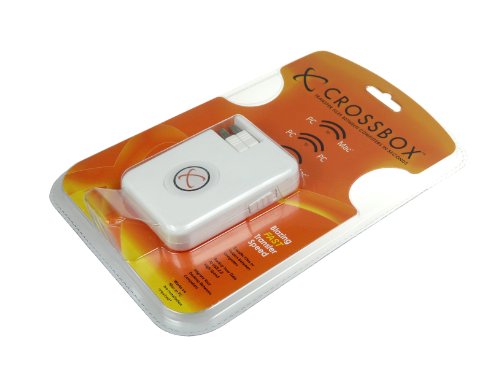
JMTEK UDC201 CROSSBOX – PC to PC – Features & Prices in Saudi Arabia :
JMTEK UDC201 CROSSBOX – PC to PC Data Transfer & Backup Device
Product Dimensions
3.7 x 0.75 x 2.7 inches
Item Weight
1.6 ounces
ASIN
B0001YW1LQ
Item model number
UDC201
Is Discontinued By Manufacturer
No
Date First Available
March 26, 2004
Test video – JMTEK UDC201 CROSSBOX – PC to PC :
Product highlights :
Questions & Answers – JMTEK UDC201 CROSSBOX – PC to PC :
Technical specifications – JMTEK UDC201 CROSSBOX – PC to PC :
Purchase advice :
-
Warranty :
Check the duration of the warranty and also the faults and defects it covers. Is it complete or limited? and What is included in the warranty (parts, repairs or both)?
-
Shipping :
Is delivery offered? And how long does it take to get delivered (Delivery time)
-
Proof of purchase :
Does the shop give you an invoice ?
-
After-sales service :
Do they have an after-sales service to have information about the installation or operation (instructions for use). Also in case of problem, it is the seller who takes charge or you must contact the manufacturer or supplier yourself.
_____________________________
G. N (verified owner) –
GREAT idea, but… – This is a great idea, and in most instances I find it quite useful. However, I bought it to transfer large files which I cannot transfer via a 16Gb USB stick, and the CrossBox has a 4Gb file size limitation!!! Basically, if you transfer a 40Gb file, it takes the time it actually would need to do it all, but at the receiving end the file is truncated at 4Gb… Too bad. A poor execution of a great idea.
T. M (verified owner) –
Great Product – It’s really a great product. I was told that this unit is a newer generation and it’s bug free. So far, I don’t have any problems with it. I have multiple computers (PCs & Mac) and this product really saves me a bunch of time. Plug & drag, that’s all you have to do. I highly recommend it to everyone.
F. K (verified owner) –
Most Amazing Useful PC item – did I say AMAZING????? – Say you bought a new laptop or desktop. How do you get your old data into the new system. Well you could pay a tech person. But how would they know what to copy? You could write important items to cds but if you have a regular 20gb hard drive, that would be about 30 cds. You could write to dvd. But again, a lot of dvds, time and effort.
J. O (verified owner) –
Useful but with problems – The Crossbox is useful but has problems so I give it only 2 stars. The price is too high ($40-$50) and you can use a network crossover cable to connect two computers for about $5.00. The 4gb limitation mentioned above is definitely a problem. The device may not show both the local and remote computers if you have any other USB or network devices connected. I found that it was necessary to remove all other USB and network connections to get it to work on all the computers I tried it with. This is a real pain. The software is also immature and not very robust. A big problem for me was that it changed the dates of all the files that it transferred to the current date and time. This is very annoying with photos and with files that you have not used and would like to have the original date left untouched. There are no options to change this or any other behavior. I would not recommend this product unless the software is updated to fix this and other problems. The site given in the manual is not available ([…]) but a Google search will bring you to jmtekstore.com where you can download the manual and Win98 drivers but no software updates (The software is at least 5 years old (2004)).
H. P (verified owner) –
PC to Mac does not work – I just bought this because i use a MacBook Air and a PC (thinkpad) laptop, and I want to transfer powerppoints back & forth.
H. P (verified owner) –
PC to Mac does not work – I just bought this because i use a MacBook Air and a PC (thinkpad) laptop, and I want to transfer powerppoints back & forth.
E. J (verified owner) –
Next best thing since the USB pen! – I’ve just received my CROSSBOX and it’s wonderful. I wish I’d had one years ago! Despite the fact that Vista is not mentioned on the list of compatible operating systems, the CROSSBOX works fine on Vista Home Premium, but I’ve no doubt that it will work on the other 32bit versions as well.
F. K (verified owner) –
Most Amazing Useful PC item – did I say AMAZING????? – Say you bought a new laptop or desktop. How do you get your old data into the new system. Well you could pay a tech person. But how would they know what to copy? You could write important items to cds but if you have a regular 20gb hard drive, that would be about 30 cds. You could write to dvd. But again, a lot of dvds, time and effort.
J. O (verified owner) –
Useful but with problems – The Crossbox is useful but has problems so I give it only 2 stars. The price is too high ($40-$50) and you can use a network crossover cable to connect two computers for about $5.00. The 4gb limitation mentioned above is definitely a problem. The device may not show both the local and remote computers if you have any other USB or network devices connected. I found that it was necessary to remove all other USB and network connections to get it to work on all the computers I tried it with. This is a real pain. The software is also immature and not very robust. A big problem for me was that it changed the dates of all the files that it transferred to the current date and time. This is very annoying with photos and with files that you have not used and would like to have the original date left untouched. There are no options to change this or any other behavior. I would not recommend this product unless the software is updated to fix this and other problems. The site given in the manual is not available ([…]) but a Google search will bring you to jmtekstore.com where you can download the manual and Win98 drivers but no software updates (The software is at least 5 years old (2004)).
E. J (verified owner) –
Next best thing since the USB pen! – I’ve just received my CROSSBOX and it’s wonderful. I wish I’d had one years ago! Despite the fact that Vista is not mentioned on the list of compatible operating systems, the CROSSBOX works fine on Vista Home Premium, but I’ve no doubt that it will work on the other 32bit versions as well.
G. N (verified owner) –
GREAT idea, but… – This is a great idea, and in most instances I find it quite useful. However, I bought it to transfer large files which I cannot transfer via a 16Gb USB stick, and the CrossBox has a 4Gb file size limitation!!! Basically, if you transfer a 40Gb file, it takes the time it actually would need to do it all, but at the receiving end the file is truncated at 4Gb… Too bad. A poor execution of a great idea.
T. M (verified owner) –
Great Product – It’s really a great product. I was told that this unit is a newer generation and it’s bug free. So far, I don’t have any problems with it. I have multiple computers (PCs & Mac) and this product really saves me a bunch of time. Plug & drag, that’s all you have to do. I highly recommend it to everyone.