BrosTrend Wireless Access Point, Home WiFi Access – Features & Prices in Saudi Arabia :
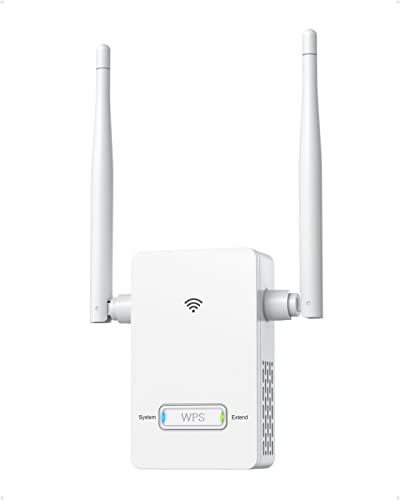
BrosTrend Wireless Access Point, Home WiFi Access Point Wall Plug Design 300Mbps Wireless AP Easy Setup Works with All Routers Ethernet Access Point for Smartphone Tablet iPad PC TV, Up to 15 Devices
Product Dimensions
3.8 x 1.4 x 7 inches
Item Weight
3.2 ounces
ASIN
B0B45MBDLB
Item model number
N300 Wireless Access Point Home WiFi AP
Date First Available
June 15, 2022
Manufacturer
BrosTrend Technology LLC
Test video – BrosTrend Wireless Access Point, Home WiFi Access :
Product highlights :
Create a New WiFi Network: Use an Ethernet cable to connect this wireless access point to an Internet-enabled Ethernet port or your router to set up another wireless network. Easily blends into your home décor with compact wall-plug design
300Mbps Fast Speed on 2.4GHz WiFi: Excellent for online 4K video streaming, high-quality music, gaming, etc. You can install this WiFi access point in your places with poor WiFi signals, such as your basement, garage, attic, etc
Works Better than WiFi Extenders: Uplinked with your home router with wired Ethernet cable, this home WiFi access point creates a more stable and faster network than a WiFi range extender does, which delivers fake WiFi signals with lagging and low speed
Better Signal: 2 external high-gain antennas of the wireless ap boost broader WiFi range. You can also adjust the angel of both antennas for better WiFi coverage
Universal Compatibility: Easy to use as it works with any routers or ISP gateways. Supports power voltage range of 100V-240V
Advanced Encryption: Supporting WPA2/WPA-PSK, the wireless access point creates a secure network that you can count on
Questions & Answers – BrosTrend Wireless Access Point, Home WiFi Access :
➕ What is the price of BrosTrend Wireless Access Point, Home WiFi Access in Saudi Arabia ?
The price of BrosTrend Wireless Access Point, Home WiFi Access in-store is 110 SAR VAT.
➕ When BrosTrend Wireless Access Point, Home WiFi Access was released ?
The release date was June 15, 2022.
➕ What is the price of BrosTrend Wireless Access Point, Home WiFi Access cheap used ?
The price of BrosTrend Wireless Access Point, Home WiFi Access used is 70 SAR VAT.
➕ What are the main characteristics of BrosTrend Wireless Access Point, Home WiFi Access ?
Special specifications :
Create a New WiFi Network: Use an Ethernet cable to connect this wireless access point to an Internet-enabled Ethernet port or your router to set up another wireless network. Easily blends into your home décor with compact wall-plug design
➕ Is it interesting to buy this product ?
The best people who can answer you are customers who have already bought and tested this product (See Customer Reviews). This product is rated 4.2 / 5 on Amazon.
➕ Where to buy BrosTrend Wireless Access Point, Home WiFi Access in Saudi Arabia ?
Technical specifications – BrosTrend Wireless Access Point, Home WiFi Access :
Brand
BrosTrend
Model Name
N300 Wireless Access Point
Special Feature
Access Point
Frequency Band Class
Single-Band
Wireless Communication Standard
802.11n, 802.11b, 802.11g
Compatible Devices
,
Frequency
2.4 GHz
Recommended Uses For Product
,
Included Components
Wireless Access Point, Ethernet Cable
Connectivity Technology
Wi-Fi, Ethernet
Purchase advice :
Warranty :
Check the duration of the warranty and also the faults and defects it covers. Is it complete or limited? and What is included in the warranty (parts, repairs or both)?
Shipping :
Is delivery offered? And how long does it take to get delivered (Delivery time)
Proof of purchase :
Does the shop give you an invoice ?
After-sales service :
Do they have an after-sales service to have information about the installation or operation (instructions for use). Also in case of problem, it is the seller who takes charge or you must contact the manufacturer or supplier yourself.
_____________________________
16 reviews for BrosTrend Wireless Access Point, Home WiFi Access
Rated 5 out of 5
G. E (verified owner)–
Worked Perfectly for my 30X60 shop Building – Would recommend
Rated 4 out of 5
R. B (verified owner)–
Good wifi signal booster – Other than an issue trying to personalize the password the installation was very simple. Tested WiFi with speed test and saw a boost of 100 KBS through a wall.
Rated 4 out of 5
T. N (verified owner)–
Works fairly well – Very easy to hook-up and setup. I didn’t realize when I got it that it could be used either as a Wireless Access Point to extend your wireless network or as a WiFi to Ethernet device. It worked for what I needed to get better coverage to a couple of bedrooms but the signal isn’t anything too amazing thus the 4 stars. The signal strength is medium to a laptop about 30 feet away and through one interior wall. If you’re wanting a longer distance you might need something else.
Rated 4 out of 5
R. B (verified owner)–
Good wifi signal booster – Other than an issue trying to personalize the password the installation was very simple. Tested WiFi with speed test and saw a boost of 100 KBS through a wall.
Rated 5 out of 5
J. B (verified owner)–
Plug and play – Very easy and quick set up. Added a second Wi-Fi gateway for one of my security cameras that was a little too far from the main Wi-Fi gate. Working as intended.
Rated 4 out of 5
T. N (verified owner)–
Works fairly well – Very easy to hook-up and setup. I didn’t realize when I got it that it could be used either as a Wireless Access Point to extend your wireless network or as a WiFi to Ethernet device. It worked for what I needed to get better coverage to a couple of bedrooms but the signal isn’t anything too amazing thus the 4 stars. The signal strength is medium to a laptop about 30 feet away and through one interior wall. If you’re wanting a longer distance you might need something else.
Rated 4 out of 5
C. M (verified owner)–
Works Ok as Wireless Access Point – Like most video doorbells, I needed a 2.4hz WiFi signal that reached my entrance door. As most video doorbells they require user/password access to your router for they employ cloud services that may not be in US. That is why I decided to create a Wireless Access Point, using Ethernet cable from my router. I defined a WIFI with only 2.4hz connection with a name that will be used only for the doorbell. It was easy following instructions from the manual. The signal is OK for a 1100 sf apartment.
Rated 3 out of 5
K. G (verified owner)–
We are waiting for some teenage assistance – This was too challenging to set up. Our son will be here over the holidays and will assist with the install. I will amend our review when it’s up and working. To be fair, we are absolutely inept when it comes to anything electronic. We didn’t try customer support. We will use them if need be.
Rated 4 out of 5
T. C (verified owner)–
Worked for sister not me – I had some difficulty getting this to work with my network. While it immediately picked up the WiFi signal I could not get it integrated into my network. I passed it on to my sister and her husband got it up and working in no time. I feel bad not rating this higher, but while it was successful for my sister my attempts did not work out. To also be fair, I did not reach out to try their tech support do to time constraints.
Rated 4 out of 5
C. M (verified owner)–
Works Ok as Wireless Access Point – Like most video doorbells, I needed a 2.4hz WiFi signal that reached my entrance door. As most video doorbells they require user/password access to your router for they employ cloud services that may not be in US. That is why I decided to create a Wireless Access Point, using Ethernet cable from my router. I defined a WIFI with only 2.4hz connection with a name that will be used only for the doorbell. It was easy following instructions from the manual. The signal is OK for a 1100 sf apartment.
Rated 4 out of 5
T. C (verified owner)–
Worked for sister not me – I had some difficulty getting this to work with my network. While it immediately picked up the WiFi signal I could not get it integrated into my network. I passed it on to my sister and her husband got it up and working in no time. I feel bad not rating this higher, but while it was successful for my sister my attempts did not work out. To also be fair, I did not reach out to try their tech support do to time constraints.
Rated 4 out of 5
I. K (verified owner)–
It works if you’re young enough – I wanted to say this was so easy to install even my mom could do it. She couldn’t. It was just a little quirky is all and most people should be able to handle it. It’s only a 2.4 extender, but that works for just about everything still – especially cameras and that sort of thing. It’s good for a smaller home if you just need to push wifi to the furthest corner from your router.
Rated 3 out of 5
K. G (verified owner)–
We are waiting for some teenage assistance – This was too challenging to set up. Our son will be here over the holidays and will assist with the install. I will amend our review when it’s up and working. To be fair, we are absolutely inept when it comes to anything electronic. We didn’t try customer support. We will use them if need be.
Rated 5 out of 5
G. E (verified owner)–
Worked Perfectly for my 30X60 shop Building – Would recommend
Rated 4 out of 5
I. K (verified owner)–
It works if you’re young enough – I wanted to say this was so easy to install even my mom could do it. She couldn’t. It was just a little quirky is all and most people should be able to handle it. It’s only a 2.4 extender, but that works for just about everything still – especially cameras and that sort of thing. It’s good for a smaller home if you just need to push wifi to the furthest corner from your router.
Rated 5 out of 5
J. B (verified owner)–
Plug and play – Very easy and quick set up. Added a second Wi-Fi gateway for one of my security cameras that was a little too far from the main Wi-Fi gate. Working as intended.


G. E (verified owner) –
Worked Perfectly for my 30X60 shop Building – Would recommend
R. B (verified owner) –
Good wifi signal booster – Other than an issue trying to personalize the password the installation was very simple. Tested WiFi with speed test and saw a boost of 100 KBS through a wall.
T. N (verified owner) –
Works fairly well – Very easy to hook-up and setup. I didn’t realize when I got it that it could be used either as a Wireless Access Point to extend your wireless network or as a WiFi to Ethernet device. It worked for what I needed to get better coverage to a couple of bedrooms but the signal isn’t anything too amazing thus the 4 stars. The signal strength is medium to a laptop about 30 feet away and through one interior wall. If you’re wanting a longer distance you might need something else.
R. B (verified owner) –
Good wifi signal booster – Other than an issue trying to personalize the password the installation was very simple. Tested WiFi with speed test and saw a boost of 100 KBS through a wall.
J. B (verified owner) –
Plug and play – Very easy and quick set up. Added a second Wi-Fi gateway for one of my security cameras that was a little too far from the main Wi-Fi gate. Working as intended.
T. N (verified owner) –
Works fairly well – Very easy to hook-up and setup. I didn’t realize when I got it that it could be used either as a Wireless Access Point to extend your wireless network or as a WiFi to Ethernet device. It worked for what I needed to get better coverage to a couple of bedrooms but the signal isn’t anything too amazing thus the 4 stars. The signal strength is medium to a laptop about 30 feet away and through one interior wall. If you’re wanting a longer distance you might need something else.
C. M (verified owner) –
Works Ok as Wireless Access Point – Like most video doorbells, I needed a 2.4hz WiFi signal that reached my entrance door. As most video doorbells they require user/password access to your router for they employ cloud services that may not be in US. That is why I decided to create a Wireless Access Point, using Ethernet cable from my router. I defined a WIFI with only 2.4hz connection with a name that will be used only for the doorbell. It was easy following instructions from the manual. The signal is OK for a 1100 sf apartment.
K. G (verified owner) –
We are waiting for some teenage assistance – This was too challenging to set up. Our son will be here over the holidays and will assist with the install. I will amend our review when it’s up and working. To be fair, we are absolutely inept when it comes to anything electronic. We didn’t try customer support. We will use them if need be.
T. C (verified owner) –
Worked for sister not me – I had some difficulty getting this to work with my network. While it immediately picked up the WiFi signal I could not get it integrated into my network. I passed it on to my sister and her husband got it up and working in no time. I feel bad not rating this higher, but while it was successful for my sister my attempts did not work out. To also be fair, I did not reach out to try their tech support do to time constraints.
C. M (verified owner) –
Works Ok as Wireless Access Point – Like most video doorbells, I needed a 2.4hz WiFi signal that reached my entrance door. As most video doorbells they require user/password access to your router for they employ cloud services that may not be in US. That is why I decided to create a Wireless Access Point, using Ethernet cable from my router. I defined a WIFI with only 2.4hz connection with a name that will be used only for the doorbell. It was easy following instructions from the manual. The signal is OK for a 1100 sf apartment.
T. C (verified owner) –
Worked for sister not me – I had some difficulty getting this to work with my network. While it immediately picked up the WiFi signal I could not get it integrated into my network. I passed it on to my sister and her husband got it up and working in no time. I feel bad not rating this higher, but while it was successful for my sister my attempts did not work out. To also be fair, I did not reach out to try their tech support do to time constraints.
I. K (verified owner) –
It works if you’re young enough – I wanted to say this was so easy to install even my mom could do it. She couldn’t. It was just a little quirky is all and most people should be able to handle it. It’s only a 2.4 extender, but that works for just about everything still – especially cameras and that sort of thing. It’s good for a smaller home if you just need to push wifi to the furthest corner from your router.
K. G (verified owner) –
We are waiting for some teenage assistance – This was too challenging to set up. Our son will be here over the holidays and will assist with the install. I will amend our review when it’s up and working. To be fair, we are absolutely inept when it comes to anything electronic. We didn’t try customer support. We will use them if need be.
G. E (verified owner) –
Worked Perfectly for my 30X60 shop Building – Would recommend
I. K (verified owner) –
It works if you’re young enough – I wanted to say this was so easy to install even my mom could do it. She couldn’t. It was just a little quirky is all and most people should be able to handle it. It’s only a 2.4 extender, but that works for just about everything still – especially cameras and that sort of thing. It’s good for a smaller home if you just need to push wifi to the furthest corner from your router.
J. B (verified owner) –
Plug and play – Very easy and quick set up. Added a second Wi-Fi gateway for one of my security cameras that was a little too far from the main Wi-Fi gate. Working as intended.