
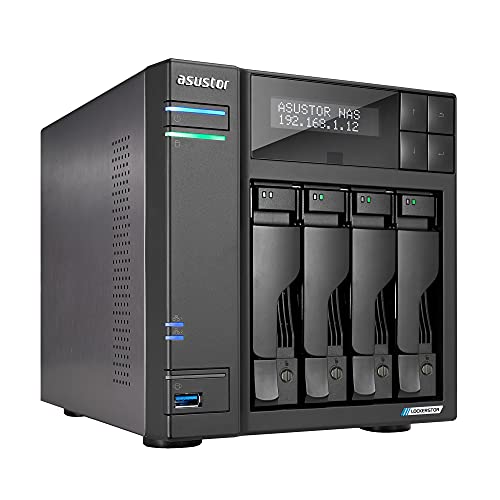
Description
Asustor Lockerstor 4 Gen2 AS6704T – 4 – Features & Prices in Saudi Arabia :
Asustor Lockerstor 4 Gen2 AS6704T – 4 Bay NAS, Quad-Core 2.0 GHz CPU, 4 M.2 NVMe Slots, Dual 2.5GbE, Upgradable to 10GbE, 4GB DDR4 RAM, Network Attached Storage (Diskless)
Product Dimensions
9.06 x 6.69 x 7.28 inches
Item Weight
7.7 pounds
Manufacturer
Asustor
Language
Spanish
ASIN
B09VX5RB6N
Item model number
AS6704T
Is Discontinued By Manufacturer
No
Date First Available
March 18, 2022
Test video – Asustor Lockerstor 4 Gen2 AS6704T – 4 :
Product highlights :
Questions & Answers – Asustor Lockerstor 4 Gen2 AS6704T – 4 :
Technical specifications – Asustor Lockerstor 4 Gen2 AS6704T – 4 :
Brand
Asustor
Color
AS67
Item Dimensions LxWxH
9.06 x 6.69 x 7.28 inches
Size
4 Bay
Compatible Devices
CPU
Purchase advice :
-
Warranty :
Check the duration of the warranty and also the faults and defects it covers. Is it complete or limited? and What is included in the warranty (parts, repairs or both)?
-
Shipping :
Is delivery offered? And how long does it take to get delivered (Delivery time)
-
Proof of purchase :
Does the shop give you an invoice ?
-
After-sales service :
Do they have an after-sales service to have information about the installation or operation (instructions for use). Also in case of problem, it is the seller who takes charge or you must contact the manufacturer or supplier yourself.
_____________________________
J. D (verified owner) –
Not perfect but great value, very solid – I am an IT professional of over 25 years so I will review from this perspective. Overall this unit provides great specs for the price. Immediately upgraded RAM to 16GB. Not difficult but you need to disassemble the unit to get at the motherboard. Any good set of DDR4 SODIMMs should do the trick. Strongly recommend a UPS for any NAS. These file systems do not like ungraceful shutdowns. I was pleasantly surprised when it immediately recognized my UPS when I plugged it in to a USB port. I set it to shut down after 5 min of power loss. I recommend just one SSD for read cache. Write cache needs 2, is overkill for most and a really great way to corrupt your file system. If you do write cache, a UPS is a must. I’ve installed a few apps including surveillance center which works great. Use the smartphone app for playback. I have external access disabled, many ransomware attacks for the EZ services. Don’t enable them if you like your data. A VPN on your router with clients on your mobile devices is the right solution for remote access. I have not set this up yet. Waiting on a newer router to do this. Use Raid 5 or 1. You are asking for trouble with Raid 0 as you have no redundancy. I used older hard drives and already had 1 fail. This is inevitable with hard drives. When not if they fail.
K. N (verified owner) –
– Ich habe mich für dieses Gehäuse entschieden, da es verspricht die eierlegende Wollmilchsau zu sein, nach der ich gesucht habe.
J. D (verified owner) –
Not perfect but great value, very solid – I am an IT professional of over 25 years so I will review from this perspective. Overall this unit provides great specs for the price. Immediately upgraded RAM to 16GB. Not difficult but you need to disassemble the unit to get at the motherboard. Any good set of DDR4 SODIMMs should do the trick. Strongly recommend a UPS for any NAS. These file systems do not like ungraceful shutdowns. I was pleasantly surprised when it immediately recognized my UPS when I plugged it in to a USB port. I set it to shut down after 5 min of power loss. I recommend just one SSD for read cache. Write cache needs 2, is overkill for most and a really great way to corrupt your file system. If you do write cache, a UPS is a must. I’ve installed a few apps including surveillance center which works great. Use the smartphone app for playback. I have external access disabled, many ransomware attacks for the EZ services. Don’t enable them if you like your data. A VPN on your router with clients on your mobile devices is the right solution for remote access. I have not set this up yet. Waiting on a newer router to do this. Use Raid 5 or 1. You are asking for trouble with Raid 0 as you have no redundancy. I used older hard drives and already had 1 fail. This is inevitable with hard drives. When not if they fail.
K. N (verified owner) –
– Ich habe mich für dieses Gehäuse entschieden, da es verspricht die eierlegende Wollmilchsau zu sein, nach der ich gesucht habe.
H. P (verified owner) –
I like it. Big improvement over my previous NAS. – This is an upgrade from a Buffalo LinkStation LS-QVL, that I picked up in Japan. Overall it was a solid performer for the most part. I finally upgraded to a PS5, and come to find out that it does not have native support for a NAS currently. The only way I can use it with my PS5 is through the PLEX app. I found out rather quickly that my Buffalo does not have PLEX nor the capability to add it on.
B. A (verified owner) –
– I’ve had Asustor NAS for many years, but this is the best format / power so far. Having 6 bays makes it much more versatile, especially when buying drives. I was thinking of 4 x 20TB under Raid5, but with this I could go with 5 x 16TB, and a massive saving on the drive prices alone. I’ve not yet populated the 4 x M.2 slots, still debating what function and capacity to use, I’m leaning toward cache rather than volumes, but need to think it through properly still.
H. P (verified owner) –
I like it. Big improvement over my previous NAS. – This is an upgrade from a Buffalo LinkStation LS-QVL, that I picked up in Japan. Overall it was a solid performer for the most part. I finally upgraded to a PS5, and come to find out that it does not have native support for a NAS currently. The only way I can use it with my PS5 is through the PLEX app. I found out rather quickly that my Buffalo does not have PLEX nor the capability to add it on.
P. P (verified owner) –
Good price for 6 bays with all the features – Works great, no issues with my 24TB RAID 5 setup. The dual 2.5Gb ethernet ports and 4x m.2 slots are features you don’t get anywhere else in the same price range. Get read/write speeds that are limited only by my network and drive speeds, run Plex without any issues streaming 4k video locally and remotely while transferring files. I upgraded to 16GB ram and installed 2x 500GB m.2 drives for read/write caching. I’m able to stream videos and edit RAW photos in Lightroom right from the NAS. Very impressed and happy with my purchase, especially considering the price compared to competitors. I’ve trust Asus for motherboards, routers, laptops, and now NAS.
P. P (verified owner) –
Good price for 6 bays with all the features – Works great, no issues with my 24TB RAID 5 setup. The dual 2.5Gb ethernet ports and 4x m.2 slots are features you don’t get anywhere else in the same price range. Get read/write speeds that are limited only by my network and drive speeds, run Plex without any issues streaming 4k video locally and remotely while transferring files. I upgraded to 16GB ram and installed 2x 500GB m.2 drives for read/write caching. I’m able to stream videos and edit RAW photos in Lightroom right from the NAS. Very impressed and happy with my purchase, especially considering the price compared to competitors. I’ve trust Asus for motherboards, routers, laptops, and now NAS.
B. A (verified owner) –
– I’ve had Asustor NAS for many years, but this is the best format / power so far. Having 6 bays makes it much more versatile, especially when buying drives. I was thinking of 4 x 20TB under Raid5, but with this I could go with 5 x 16TB, and a massive saving on the drive prices alone. I’ve not yet populated the 4 x M.2 slots, still debating what function and capacity to use, I’m leaning toward cache rather than volumes, but need to think it through properly still.