Ancatus AX1800 WiFi 6 Router – Dual – Features & Prices in Saudi Arabia :
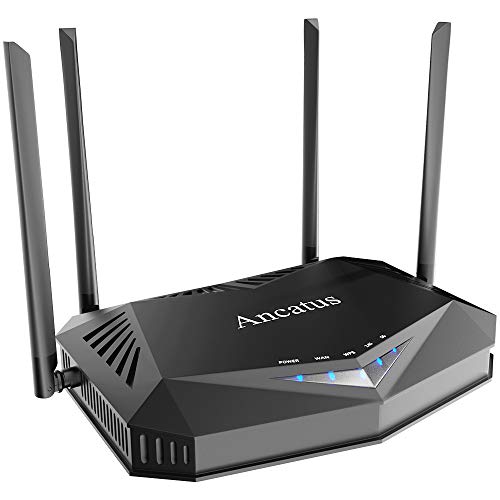
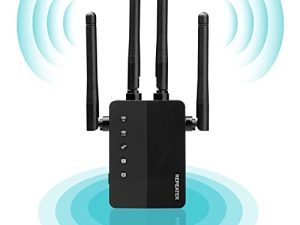
Ancatus AX1800 WiFi 6 Router – Dual Band Gigabit Wireless Internet Router for Home, Speeds Up to 1.8Gbps丨Up to 2100 Sq. Ft Coverage & 40 Devices, 802.11ax Router, MU-MIMO, OFDMA
Package Dimensions
11.1 x 10.24 x 1.81 inches
Item Weight
1.75 pounds
ASIN
B08TTWYHBB
Item model number
A1
Date First Available
January 23, 2021
Manufacturer
Ancatus
Country of Origin
China
Test video – Ancatus AX1800 WiFi 6 Router – Dual :
Product highlights :
▲ULTRAFAST SPEED – the latest Wi-Fi standard 802 11AX (Wi-Fi 6),80MHz bandwidth and 1024QAM support dramatically faster wireless connections with a total speed of about 1800Mbps — 574 Mbps on the 2 4GHz band and 1200 Mbps on the 5GHz band, A6 has achieved incredible capacity, excellent efficiency and minimal latency.
▲INCREDIBLE COVERAGE:Beamforming technology, 4 FEMs and 4 high-gain antennas have extended the wifi coverge to a new level,with inner strong penetrating power, A6 truly enables WiFi to reach every corner of your home and is an ideal choice for large and medium-sized residence.
▲CONNECT MORE DEVICES: The latest OFDMA and MU-MIMO technology enable the wifi 6 router to connect up 40 devices while mantain a high transmission rate and reduced latency,a powerful processor of 900MHz satifies the needs of most families that have a lot of smart devices to connect.
▲UNIVERSAL COMPATIBILITY: A6 supports wifi standards 802.11 ax/n/g/b on 2.4GHz and ax/ac/n/a on 5GHz,and is compatible nearly all Internet Service Providers including Verizon,At&T and 90 more in USA; Moreover, it supports wireless, wired and hybrid networking and uselful features like DOS/Firewall
▲EASY SETUP/MANAGEMENT: Designed for everyone,no technical experience is requeired, even a tech newbie can set it up in minutes following our detailed setup video, and the caring manual which includes 3 modes commonly used in American family to meet all your needs. TIP: Some devices do not support WPA3. If you cannot find the network or the the network is abnormal, please change the security setting to WPA-PSK/WPA2-PSK in “Net-2.4G/5G-security setting” then try to connect again. .
➕ What is the price of Ancatus AX1800 WiFi 6 Router - Dual in Saudi Arabia ?
The price of Ancatus AX1800 WiFi 6 Router – Dual in-store is 350 SAR VAT.
➕ When Ancatus AX1800 WiFi 6 Router - Dual was released ?
The release date was January 23, 2021.
➕ What is the price of Ancatus AX1800 WiFi 6 Router - Dual cheap used ?
The price of Ancatus AX1800 WiFi 6 Router – Dual used is 240 SAR VAT.
➕ What are the main characteristics of Ancatus AX1800 WiFi 6 Router - Dual ?
Special specifications :
▲ULTRAFAST SPEED – the latest Wi-Fi standard 802 11AX (Wi-Fi 6),80MHz bandwidth and 1024QAM support dramatically faster wireless connections with a total speed of about 1800Mbps — 574 Mbps on the 2 4GHz band and 1200 Mbps on the 5GHz band, A6 has achieved incredible capacity, excellent efficiency and minimal latency.
➕ Is it interesting to buy this product ?
The best people who can answer you are customers who have already bought and tested this product (See Customer Reviews). This product is rated 3.5 / 5 on Amazon.
➕ Where to buy Ancatus AX1800 WiFi 6 Router - Dual in Saudi Arabia ?
Check the duration of the warranty and also the faults and defects it covers. Is it complete or limited? and What is included in the warranty (parts, repairs or both)?
Shipping :
Is delivery offered? And how long does it take to get delivered (Delivery time)
Proof of purchase :
Does the shop give you an invoice ?
After-sales service :
Do they have an after-sales service to have information about the installation or operation (instructions for use). Also in case of problem, it is the seller who takes charge or you must contact the manufacturer or supplier yourself.
_____________________________
16 reviews for Ancatus AX1800 WiFi 6 Router – Dual
Rated 4 out of 5
I. T (verified owner)–
Works as advertised – Unnecessarily complicated to set up without an app. This router can only be set up on the web url. My Dish hopper could not recognize the network setup without a network name. No instructions are provided on the website. I could use it on all my other wifi setups with no problem and the speed was very good. I could not extend the network without instructions. I am more knowledgeable than the average person. I sent the router back. The dish technician could not figure it out even with a new hopper!
Rated 2 out of 5
L. T (verified owner)–
Buy a name brand router and save the headaches – Router is fast, and that is where the good ends. The interface to set it up can be confusing. I am using it as a wireless access point in bridge mode. I had to select from a dropdown box to get it into that mode, then save it. But when you go back into setup, it ‘looks’ like it is in the standard router mode because they leave that as the default dropdown, so you have to trust that it is in the correct mode. Then when you go to the LAN section, it looks like it is setup for DHCP, which I am using my cable modem/router for DHCP, but if you try to disable DHCP, it says you have to be in router mode. So I assume it is off and I have to trust it again. Every time the power goes out, it loses its settings and my home automation stuff can’t connect, so I put it on a UPS. My last issue stems from anything connected to this router seems to get the IP address of the router for DNS, and then nothing can get to the internet. I assumed my other router would hand out DNS with the DHCP requests, because when i hook up an Apple Airport Express in bridge mode, it shows the DNS as the cable modem/router, but this thing seems to take over. So much for trusting that DHCP is off on it.
Rated 3 out of 5
O. P (verified owner)–
Caps out at 200 MBPS on WIFI – So I’ve had this unit for little over a year. Worked fine until I upgraded my internet to 1Gbps down.
Rated 3 out of 5
T. M (verified owner)–
Can you judge a book by it’s cover? – The router arrived the next day in perfect sealed packaging…no damage.
Rated 3 out of 5
O. P (verified owner)–
Caps out at 200 MBPS on WIFI – So I’ve had this unit for little over a year. Worked fine until I upgraded my internet to 1Gbps down.
Rated 4 out of 5
I. T (verified owner)–
Works as advertised – Unnecessarily complicated to set up without an app. This router can only be set up on the web url. My Dish hopper could not recognize the network setup without a network name. No instructions are provided on the website. I could use it on all my other wifi setups with no problem and the speed was very good. I could not extend the network without instructions. I am more knowledgeable than the average person. I sent the router back. The dish technician could not figure it out even with a new hopper!
Rated 2 out of 5
K. T (verified owner)–
DOA but does have great signal strength. – DOA. But Wifi signal is good and have two ssid, one for 5g and the other for 2.4g. I have smart thermometer which only connect to 2.4g network. I am willing to give it another try. Hope, my 2nd one is good. Wait and see…..
Rated 2 out of 5
L. T (verified owner)–
Buy a name brand router and save the headaches – Router is fast, and that is where the good ends. The interface to set it up can be confusing. I am using it as a wireless access point in bridge mode. I had to select from a dropdown box to get it into that mode, then save it. But when you go back into setup, it ‘looks’ like it is in the standard router mode because they leave that as the default dropdown, so you have to trust that it is in the correct mode. Then when you go to the LAN section, it looks like it is setup for DHCP, which I am using my cable modem/router for DHCP, but if you try to disable DHCP, it says you have to be in router mode. So I assume it is off and I have to trust it again. Every time the power goes out, it loses its settings and my home automation stuff can’t connect, so I put it on a UPS. My last issue stems from anything connected to this router seems to get the IP address of the router for DNS, and then nothing can get to the internet. I assumed my other router would hand out DNS with the DHCP requests, because when i hook up an Apple Airport Express in bridge mode, it shows the DNS as the cable modem/router, but this thing seems to take over. So much for trusting that DHCP is off on it.
Rated 5 out of 5
G. T (verified owner)–
Works well, strong wifi coverage throughout the entire house – This is a solid router with very strong wifi coverage throughout the house. The 5 GHZ signal reaches further than my previous router (Linksys EA7300) and 2.4 GHZ signal was also fairly strong even in the upper bedrooms. The interface was also very easy to use and the best part was that it comes preloaded with WIFI networks already installed so that you can just plug it in and connect to it wirelessly to do the setup rather than having run an ethernet cable to it from a computer. I’m only on a 100/100 Mbps connection but it fully delivered those speeds on both bands (2.4 & 5) throughout the entire house. The only downside is that it only has 3 LAN ports whereas most routers have 4.
Rated 4 out of 5
E. K (verified owner)–
Good once connected – I had difficulty with staying connected to the unit. I had to reset it several times for it to keep my devices connected for a longer period of time. I am not sure if I had hard line connectivity issues, or if the unit was having problems, I am in the process of moving, the unit is packed up, the verict is still out for me.
Rated 2 out of 5
K. T (verified owner)–
DOA but does have great signal strength. – DOA. But Wifi signal is good and have two ssid, one for 5g and the other for 2.4g. I have smart thermometer which only connect to 2.4g network. I am willing to give it another try. Hope, my 2nd one is good. Wait and see…..
Rated 2 out of 5
G. D (verified owner)–
No supporting Mesh Extender – The router has Mesh, why wouldn’t the extender from the same brand? Big loss. Getting rid of both and going with a router and extender that works together with Mesh.
Rated 2 out of 5
G. D (verified owner)–
No supporting Mesh Extender – The router has Mesh, why wouldn’t the extender from the same brand? Big loss. Getting rid of both and going with a router and extender that works together with Mesh.
Rated 3 out of 5
T. M (verified owner)–
Can you judge a book by it’s cover? – The router arrived the next day in perfect sealed packaging…no damage.
Rated 4 out of 5
E. K (verified owner)–
Good once connected – I had difficulty with staying connected to the unit. I had to reset it several times for it to keep my devices connected for a longer period of time. I am not sure if I had hard line connectivity issues, or if the unit was having problems, I am in the process of moving, the unit is packed up, the verict is still out for me.
Rated 5 out of 5
G. T (verified owner)–
Works well, strong wifi coverage throughout the entire house – This is a solid router with very strong wifi coverage throughout the house. The 5 GHZ signal reaches further than my previous router (Linksys EA7300) and 2.4 GHZ signal was also fairly strong even in the upper bedrooms. The interface was also very easy to use and the best part was that it comes preloaded with WIFI networks already installed so that you can just plug it in and connect to it wirelessly to do the setup rather than having run an ethernet cable to it from a computer. I’m only on a 100/100 Mbps connection but it fully delivered those speeds on both bands (2.4 & 5) throughout the entire house. The only downside is that it only has 3 LAN ports whereas most routers have 4.

I. T (verified owner) –
Works as advertised – Unnecessarily complicated to set up without an app. This router can only be set up on the web url. My Dish hopper could not recognize the network setup without a network name. No instructions are provided on the website. I could use it on all my other wifi setups with no problem and the speed was very good. I could not extend the network without instructions. I am more knowledgeable than the average person. I sent the router back. The dish technician could not figure it out even with a new hopper!
L. T (verified owner) –
Buy a name brand router and save the headaches – Router is fast, and that is where the good ends. The interface to set it up can be confusing. I am using it as a wireless access point in bridge mode. I had to select from a dropdown box to get it into that mode, then save it. But when you go back into setup, it ‘looks’ like it is in the standard router mode because they leave that as the default dropdown, so you have to trust that it is in the correct mode. Then when you go to the LAN section, it looks like it is setup for DHCP, which I am using my cable modem/router for DHCP, but if you try to disable DHCP, it says you have to be in router mode. So I assume it is off and I have to trust it again. Every time the power goes out, it loses its settings and my home automation stuff can’t connect, so I put it on a UPS. My last issue stems from anything connected to this router seems to get the IP address of the router for DNS, and then nothing can get to the internet. I assumed my other router would hand out DNS with the DHCP requests, because when i hook up an Apple Airport Express in bridge mode, it shows the DNS as the cable modem/router, but this thing seems to take over. So much for trusting that DHCP is off on it.
O. P (verified owner) –
Caps out at 200 MBPS on WIFI – So I’ve had this unit for little over a year. Worked fine until I upgraded my internet to 1Gbps down.
T. M (verified owner) –
Can you judge a book by it’s cover? – The router arrived the next day in perfect sealed packaging…no damage.
O. P (verified owner) –
Caps out at 200 MBPS on WIFI – So I’ve had this unit for little over a year. Worked fine until I upgraded my internet to 1Gbps down.
I. T (verified owner) –
Works as advertised – Unnecessarily complicated to set up without an app. This router can only be set up on the web url. My Dish hopper could not recognize the network setup without a network name. No instructions are provided on the website. I could use it on all my other wifi setups with no problem and the speed was very good. I could not extend the network without instructions. I am more knowledgeable than the average person. I sent the router back. The dish technician could not figure it out even with a new hopper!
K. T (verified owner) –
DOA but does have great signal strength. – DOA. But Wifi signal is good and have two ssid, one for 5g and the other for 2.4g. I have smart thermometer which only connect to 2.4g network. I am willing to give it another try. Hope, my 2nd one is good. Wait and see…..
L. T (verified owner) –
Buy a name brand router and save the headaches – Router is fast, and that is where the good ends. The interface to set it up can be confusing. I am using it as a wireless access point in bridge mode. I had to select from a dropdown box to get it into that mode, then save it. But when you go back into setup, it ‘looks’ like it is in the standard router mode because they leave that as the default dropdown, so you have to trust that it is in the correct mode. Then when you go to the LAN section, it looks like it is setup for DHCP, which I am using my cable modem/router for DHCP, but if you try to disable DHCP, it says you have to be in router mode. So I assume it is off and I have to trust it again. Every time the power goes out, it loses its settings and my home automation stuff can’t connect, so I put it on a UPS. My last issue stems from anything connected to this router seems to get the IP address of the router for DNS, and then nothing can get to the internet. I assumed my other router would hand out DNS with the DHCP requests, because when i hook up an Apple Airport Express in bridge mode, it shows the DNS as the cable modem/router, but this thing seems to take over. So much for trusting that DHCP is off on it.
G. T (verified owner) –
Works well, strong wifi coverage throughout the entire house – This is a solid router with very strong wifi coverage throughout the house. The 5 GHZ signal reaches further than my previous router (Linksys EA7300) and 2.4 GHZ signal was also fairly strong even in the upper bedrooms. The interface was also very easy to use and the best part was that it comes preloaded with WIFI networks already installed so that you can just plug it in and connect to it wirelessly to do the setup rather than having run an ethernet cable to it from a computer. I’m only on a 100/100 Mbps connection but it fully delivered those speeds on both bands (2.4 & 5) throughout the entire house. The only downside is that it only has 3 LAN ports whereas most routers have 4.
E. K (verified owner) –
Good once connected – I had difficulty with staying connected to the unit. I had to reset it several times for it to keep my devices connected for a longer period of time. I am not sure if I had hard line connectivity issues, or if the unit was having problems, I am in the process of moving, the unit is packed up, the verict is still out for me.
K. T (verified owner) –
DOA but does have great signal strength. – DOA. But Wifi signal is good and have two ssid, one for 5g and the other for 2.4g. I have smart thermometer which only connect to 2.4g network. I am willing to give it another try. Hope, my 2nd one is good. Wait and see…..
G. D (verified owner) –
No supporting Mesh Extender – The router has Mesh, why wouldn’t the extender from the same brand? Big loss. Getting rid of both and going with a router and extender that works together with Mesh.
G. D (verified owner) –
No supporting Mesh Extender – The router has Mesh, why wouldn’t the extender from the same brand? Big loss. Getting rid of both and going with a router and extender that works together with Mesh.
T. M (verified owner) –
Can you judge a book by it’s cover? – The router arrived the next day in perfect sealed packaging…no damage.
E. K (verified owner) –
Good once connected – I had difficulty with staying connected to the unit. I had to reset it several times for it to keep my devices connected for a longer period of time. I am not sure if I had hard line connectivity issues, or if the unit was having problems, I am in the process of moving, the unit is packed up, the verict is still out for me.
G. T (verified owner) –
Works well, strong wifi coverage throughout the entire house – This is a solid router with very strong wifi coverage throughout the house. The 5 GHZ signal reaches further than my previous router (Linksys EA7300) and 2.4 GHZ signal was also fairly strong even in the upper bedrooms. The interface was also very easy to use and the best part was that it comes preloaded with WIFI networks already installed so that you can just plug it in and connect to it wirelessly to do the setup rather than having run an ethernet cable to it from a computer. I’m only on a 100/100 Mbps connection but it fully delivered those speeds on both bands (2.4 & 5) throughout the entire house. The only downside is that it only has 3 LAN ports whereas most routers have 4.