1200Mbps WiFi Range Extender Signal Booster, Covers is available in Saudi Arabia.
Find out all you need to know about 1200Mbps WiFi Range Extender Signal Booster, Covers before buying : Price, Test video, Datasheet, Similar products.
1200Mbps WiFi Range Extender Signal Booster, Covers – Features & Prices in Saudi Arabia :
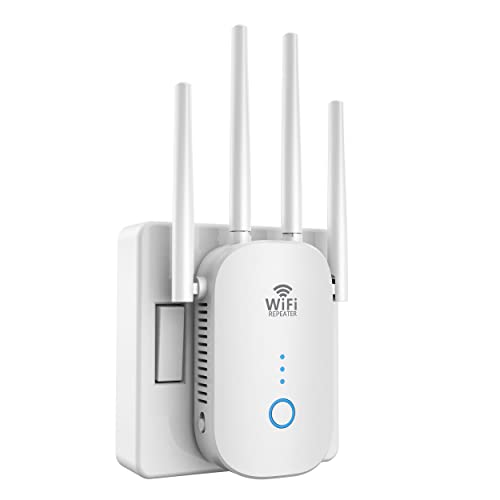
1200Mbps WiFi Range Extender Signal Booster, Covers up to 8500Sq.ft and 45 Devices, 2.4 & 5GHz Dual Band WiFi Repeater with Ethernet/LAN Port1
Package Dimensions
8.15 x 3.86 x 2.24 inches
Item Weight
7 ounces
Manufacturer
Aitour Ever
ASIN
B0BG1T7D5Y
Item model number
CF WR758AC-WT01
Date First Available
September 21, 2022
Test video – 1200Mbps WiFi Range Extender Signal Booster, Covers :
Product highlights :
Stable WiFi Singal Extends——This WiFi repeater equipped with 4 high gain external antenna, covering up to 360 degrees, up to 8500 square feet, higher penetration, no loss signal when passing through the wall , enhance the WiFi network and eliminate dead zones, up to bedroom, floors, restroom, garage, basement and garden, allow you enjoy wifi throughout whole home.
1200Mbps Dual Band Wireless WiFi Extender——The highest transmission rate of Wifi Repeater long range can be up to 1200Mbps(2.4g/300Mbps and 5G/867Mbps). Using the 5GHz channel for data transmission with low interference and excellent performance, so the 5G signal of internet repeaters is more stable, allowing you to enjoy high-speed Internet surfing wirelessly.
Secure Heat Dissipation Design ——The Extender dissipates heat through the shell, and heat dissipation holes are arranged on both sides of the WiFi booster. Equipped with ABS heat resistant material, the thermal temperature is within the controllable range. Do not worry about security issues.
Simple to set up and Automatic memory – You only need a mobile phone/computer/iPad/ to complete the signal amplification settings with 3 steps . And the setting will be automatically memorized. After a successful setting, you can move the wifi range extender to another place without repeated operations.
Intelligent Signal Indicator —-You can find the best placement of the WiFi repeater according to the change of the signal indicator. Three lights means strong signal. Two lights means general signal. (Too far away from the main router.) One light means weak signal. (Please move it closer to the router or reset the extender).
Questions & Answers – 1200Mbps WiFi Range Extender Signal Booster, Covers :
➕ What is the price of 1200Mbps WiFi Range Extender Signal Booster, Covers in Saudi Arabia ?
The price of 1200Mbps WiFi Range Extender Signal Booster, Covers in-store is 140 SAR VAT.
➕ When 1200Mbps WiFi Range Extender Signal Booster, Covers was released ?
The release date was September 21, 2022.
➕ What is the price of 1200Mbps WiFi Range Extender Signal Booster, Covers cheap used ?
The price of 1200Mbps WiFi Range Extender Signal Booster, Covers used is 90 SAR VAT.
➕ What are the main characteristics of 1200Mbps WiFi Range Extender Signal Booster, Covers ?
Special specifications :
Stable WiFi Singal Extends——This WiFi repeater equipped with 4 high gain external antenna, covering up to 360 degrees, up to 8500 square feet, higher penetration, no loss signal when passing through the wall , enhance the WiFi network and eliminate dead zones, up to bedroom, floors, restroom, garage, basement and garden, allow you enjoy wifi throughout whole home.
➕ Is it interesting to buy this product ?
The best people who can answer you are customers who have already bought and tested this product (See Customer Reviews). This product is rated 4.9 / 5 on Amazon.
➕ Where to buy 1200Mbps WiFi Range Extender Signal Booster, Covers in Saudi Arabia ?
Technical specifications – 1200Mbps WiFi Range Extender Signal Booster, Covers :
Brand
BIGtec
Wireless Communication Standard
802.11a/b/g/n/ac
Frequency Band Class
Dual-Band
Special Feature
,
Color
White-RE758
Purchase advice :
Warranty :
Check the duration of the warranty and also the faults and defects it covers. Is it complete or limited? and What is included in the warranty (parts, repairs or both)?
Shipping :
Is delivery offered? And how long does it take to get delivered (Delivery time)
Proof of purchase :
Does the shop give you an invoice ?
After-sales service :
Do they have an after-sales service to have information about the installation or operation (instructions for use). Also in case of problem, it is the seller who takes charge or you must contact the manufacturer or supplier yourself.
_____________________________
14 reviews for 1200Mbps WiFi Range Extender Signal Booster, Covers
Rated 5 out of 5
H. R (verified owner)–
Installed in less then 10 minutes – I accidentally purchased 2. One from Walmart and 1 here on Amazon. The Walmart one I thought would be better. The set up took me forever. Could’nt find the network. So I opened up the Amazon one , this one, and within minutes it was setup. Easiest extender to set up I have purchased.
Rated 5 out of 5
P. N (verified owner)–
We have a winner! – After moving away from cable TV and going to streaming. we tried multiple other brands and experienced loss of signal and low signal strengths on remote devices, we finally tried this unit. It performs as advertised and TV’s located distant from the router and behind walls seem to be functioning better than ever, with no buffering.
Rated 5 out of 5
G. R (verified owner)–
Just what I was looking for – This signal extender was a great help to boost my wifi that was slow due to dead spot prior to installing this device. I follow the video demo on the product page and set it up in 3 minutes. I am very happy with the purchase.
Rated 5 out of 5
G. R (verified owner)–
Just what I was looking for – This signal extender was a great help to boost my wifi that was slow due to dead spot prior to installing this device. I follow the video demo on the product page and set it up in 3 minutes. I am very happy with the purchase.
Rated 5 out of 5
A. R (verified owner)–
Wifi extender – This extender has done everything it’s supposed to. I’ve had it a week and so far I’m very happy with its performance. Coverage is good and it holds the signal.
Rated 4 out of 5
D. P (verified owner)–
Once you figure out the setup it works well – I needed to replace a repeater I have that doesn’t offer enough coverage, so I thought I’d give this one a try. I will say that the manual is a bit confusing, but I figured it out and now I have a much better signal over distances.
Rated 5 out of 5
P. N (verified owner)–
We have a winner! – After moving away from cable TV and going to streaming. we tried multiple other brands and experienced loss of signal and low signal strengths on remote devices, we finally tried this unit. It performs as advertised and TV’s located distant from the router and behind walls seem to be functioning better than ever, with no buffering.
Rated 5 out of 5
A. R (verified owner)–
Wifi extender – This extender has done everything it’s supposed to. I’ve had it a week and so far I’m very happy with its performance. Coverage is good and it holds the signal.
Rated 4 out of 5
D. P (verified owner)–
Once you figure out the setup it works well – I needed to replace a repeater I have that doesn’t offer enough coverage, so I thought I’d give this one a try. I will say that the manual is a bit confusing, but I figured it out and now I have a much better signal over distances.
Rated 5 out of 5
F. B (verified owner)–
but this was a cheap and easily set up repeater… – o I have a dead spot in the basement of my house. There were multiple options to try and remedy this (including ethernet over powerline, a long cord, or a second router), but this was a cheap and easily set up repeater. Set up is very easy. Plugging it into the outlet turns it on and you can connect to the wifi SSID and then open your captive browser page to modify the settings. When you connect to your home network, it will then piggy back off your home router and broadcast a new SSID.I place this repeater at a spot I had 2-3 bars of wifi reception (on my phone). Now areas where I was not able to get reception, I’m getting 4 bars from the repeater (about 2-3 bars from the home router if you consider the chain). this easily extended my range about 30-40 ft including through multiple walls. This is great as I have a few devices that I wanted to use as headless servers int eh basement to keep them out of the way.I also like how this only uses a single outlet without blocking the second outlet (the plug can be rotated by pushing down on the tab). Ethernet is a nice addition, but being a repeater was the main purpose of this device.In terms of usage as a router. Here are the different scenarios for usage:1) Connect directly to the internet through the ethernet and function as a WAN for 5 devices.2) Be a repeater by connected to a wireless internet and rebroadcast the same SSID. This essentially extends the range of your original wireless network.3) Connect to the internet through wifi, but broadcast a separate SSID. This allows you to let people connect to your wireless network using a “guest” SSID and password without allowing them to connect to your actual router/modem.Please note that i was provided a review sample.nksidhvrgch
Rated 5 out of 5
Z. L (verified owner)–
Quick setup, fast enough for me. Does what it is supposed to…. – Setup didn’t take long, though in today’s relative lack of patience, it felt like kind of a long time. Maybe 2 minutes to get some of the lights to come on to the status at which you expect them to – power, wi-fi link, and device link just take a little while to finally come to their senses. It’s probably 45 seconds, but it feels like a good 5 minutes while you’re staring at the stupid thing, waiting for the next step.Plug it in near the router, wait for power light, hit the WPS buttons on this and my TrendNet router, wait for wi-fi link to show, move it closer to the dead/weak zone, plug in, wait for the wi-fi link to change to green, and you’re good!Allegedly, the wi-fi link LED shows you how strong the signal is (red? move it closer to the router. orange? move it a little closer), but when I plugged mine in, it was orange for a while until it finally linked up and then it was green, and it has been working GREAT for me. Our router is about 2/3 of the way toward the back of the house, downstairs. I plugged this in, upstairs, about 1/3 of the way toward the back of the house. I was struggling to get halfway decent speeds from the front room upstairs before, but with this extender, it’s been smooth sailing.Have not yet noticed if my phone (Pixel XL) has been automatically switching between the original and extender, but I know that I’ve manually pushed it to do so before.Regardless, it was an easy setup, I got it cheap on Prime Day ($25) and for that price I couldn’t be happier with the results. We’ll be moving some rooms around in the coming months, which may move them further apart, testing the limits of the range, etc. Hopefully I’ll remember to come back here and update.nksidhvrgch
Rated 5 out of 5
Z. L (verified owner)–
Quick setup, fast enough for me. Does what it is supposed to…. – Setup didn’t take long, though in today’s relative lack of patience, it felt like kind of a long time. Maybe 2 minutes to get some of the lights to come on to the status at which you expect them to – power, wi-fi link, and device link just take a little while to finally come to their senses. It’s probably 45 seconds, but it feels like a good 5 minutes while you’re staring at the stupid thing, waiting for the next step.Plug it in near the router, wait for power light, hit the WPS buttons on this and my TrendNet router, wait for wi-fi link to show, move it closer to the dead/weak zone, plug in, wait for the wi-fi link to change to green, and you’re good!Allegedly, the wi-fi link LED shows you how strong the signal is (red? move it closer to the router. orange? move it a little closer), but when I plugged mine in, it was orange for a while until it finally linked up and then it was green, and it has been working GREAT for me. Our router is about 2/3 of the way toward the back of the house, downstairs. I plugged this in, upstairs, about 1/3 of the way toward the back of the house. I was struggling to get halfway decent speeds from the front room upstairs before, but with this extender, it’s been smooth sailing.Have not yet noticed if my phone (Pixel XL) has been automatically switching between the original and extender, but I know that I’ve manually pushed it to do so before.Regardless, it was an easy setup, I got it cheap on Prime Day ($25) and for that price I couldn’t be happier with the results. We’ll be moving some rooms around in the coming months, which may move them further apart, testing the limits of the range, etc. Hopefully I’ll remember to come back here and update.nksidhvrgch
Rated 5 out of 5
F. B (verified owner)–
but this was a cheap and easily set up repeater… – o I have a dead spot in the basement of my house. There were multiple options to try and remedy this (including ethernet over powerline, a long cord, or a second router), but this was a cheap and easily set up repeater. Set up is very easy. Plugging it into the outlet turns it on and you can connect to the wifi SSID and then open your captive browser page to modify the settings. When you connect to your home network, it will then piggy back off your home router and broadcast a new SSID.I place this repeater at a spot I had 2-3 bars of wifi reception (on my phone). Now areas where I was not able to get reception, I’m getting 4 bars from the repeater (about 2-3 bars from the home router if you consider the chain). this easily extended my range about 30-40 ft including through multiple walls. This is great as I have a few devices that I wanted to use as headless servers int eh basement to keep them out of the way.I also like how this only uses a single outlet without blocking the second outlet (the plug can be rotated by pushing down on the tab). Ethernet is a nice addition, but being a repeater was the main purpose of this device.In terms of usage as a router. Here are the different scenarios for usage:1) Connect directly to the internet through the ethernet and function as a WAN for 5 devices.2) Be a repeater by connected to a wireless internet and rebroadcast the same SSID. This essentially extends the range of your original wireless network.3) Connect to the internet through wifi, but broadcast a separate SSID. This allows you to let people connect to your wireless network using a “guest” SSID and password without allowing them to connect to your actual router/modem.Please note that i was provided a review sample.nksidhvrgch
Rated 5 out of 5
H. R (verified owner)–
Installed in less then 10 minutes – I accidentally purchased 2. One from Walmart and 1 here on Amazon. The Walmart one I thought would be better. The set up took me forever. Could’nt find the network. So I opened up the Amazon one , this one, and within minutes it was setup. Easiest extender to set up I have purchased.

H. R (verified owner) –
Installed in less then 10 minutes – I accidentally purchased 2. One from Walmart and 1 here on Amazon. The Walmart one I thought would be better. The set up took me forever. Could’nt find the network. So I opened up the Amazon one , this one, and within minutes it was setup. Easiest extender to set up I have purchased.
P. N (verified owner) –
We have a winner! – After moving away from cable TV and going to streaming. we tried multiple other brands and experienced loss of signal and low signal strengths on remote devices, we finally tried this unit. It performs as advertised and TV’s located distant from the router and behind walls seem to be functioning better than ever, with no buffering.
G. R (verified owner) –
Just what I was looking for – This signal extender was a great help to boost my wifi that was slow due to dead spot prior to installing this device. I follow the video demo on the product page and set it up in 3 minutes. I am very happy with the purchase.
G. R (verified owner) –
Just what I was looking for – This signal extender was a great help to boost my wifi that was slow due to dead spot prior to installing this device. I follow the video demo on the product page and set it up in 3 minutes. I am very happy with the purchase.
A. R (verified owner) –
Wifi extender – This extender has done everything it’s supposed to. I’ve had it a week and so far I’m very happy with its performance. Coverage is good and it holds the signal.
D. P (verified owner) –
Once you figure out the setup it works well – I needed to replace a repeater I have that doesn’t offer enough coverage, so I thought I’d give this one a try. I will say that the manual is a bit confusing, but I figured it out and now I have a much better signal over distances.
P. N (verified owner) –
We have a winner! – After moving away from cable TV and going to streaming. we tried multiple other brands and experienced loss of signal and low signal strengths on remote devices, we finally tried this unit. It performs as advertised and TV’s located distant from the router and behind walls seem to be functioning better than ever, with no buffering.
A. R (verified owner) –
Wifi extender – This extender has done everything it’s supposed to. I’ve had it a week and so far I’m very happy with its performance. Coverage is good and it holds the signal.
D. P (verified owner) –
Once you figure out the setup it works well – I needed to replace a repeater I have that doesn’t offer enough coverage, so I thought I’d give this one a try. I will say that the manual is a bit confusing, but I figured it out and now I have a much better signal over distances.
F. B (verified owner) –
but this was a cheap and easily set up repeater… – o I have a dead spot in the basement of my house. There were multiple options to try and remedy this (including ethernet over powerline, a long cord, or a second router), but this was a cheap and easily set up repeater. Set up is very easy. Plugging it into the outlet turns it on and you can connect to the wifi SSID and then open your captive browser page to modify the settings. When you connect to your home network, it will then piggy back off your home router and broadcast a new SSID.I place this repeater at a spot I had 2-3 bars of wifi reception (on my phone). Now areas where I was not able to get reception, I’m getting 4 bars from the repeater (about 2-3 bars from the home router if you consider the chain). this easily extended my range about 30-40 ft including through multiple walls. This is great as I have a few devices that I wanted to use as headless servers int eh basement to keep them out of the way.I also like how this only uses a single outlet without blocking the second outlet (the plug can be rotated by pushing down on the tab). Ethernet is a nice addition, but being a repeater was the main purpose of this device.In terms of usage as a router. Here are the different scenarios for usage:1) Connect directly to the internet through the ethernet and function as a WAN for 5 devices.2) Be a repeater by connected to a wireless internet and rebroadcast the same SSID. This essentially extends the range of your original wireless network.3) Connect to the internet through wifi, but broadcast a separate SSID. This allows you to let people connect to your wireless network using a “guest” SSID and password without allowing them to connect to your actual router/modem.Please note that i was provided a review sample.nksidhvrgch
Z. L (verified owner) –
Quick setup, fast enough for me. Does what it is supposed to…. – Setup didn’t take long, though in today’s relative lack of patience, it felt like kind of a long time. Maybe 2 minutes to get some of the lights to come on to the status at which you expect them to – power, wi-fi link, and device link just take a little while to finally come to their senses. It’s probably 45 seconds, but it feels like a good 5 minutes while you’re staring at the stupid thing, waiting for the next step.Plug it in near the router, wait for power light, hit the WPS buttons on this and my TrendNet router, wait for wi-fi link to show, move it closer to the dead/weak zone, plug in, wait for the wi-fi link to change to green, and you’re good!Allegedly, the wi-fi link LED shows you how strong the signal is (red? move it closer to the router. orange? move it a little closer), but when I plugged mine in, it was orange for a while until it finally linked up and then it was green, and it has been working GREAT for me. Our router is about 2/3 of the way toward the back of the house, downstairs. I plugged this in, upstairs, about 1/3 of the way toward the back of the house. I was struggling to get halfway decent speeds from the front room upstairs before, but with this extender, it’s been smooth sailing.Have not yet noticed if my phone (Pixel XL) has been automatically switching between the original and extender, but I know that I’ve manually pushed it to do so before.Regardless, it was an easy setup, I got it cheap on Prime Day ($25) and for that price I couldn’t be happier with the results. We’ll be moving some rooms around in the coming months, which may move them further apart, testing the limits of the range, etc. Hopefully I’ll remember to come back here and update.nksidhvrgch
Z. L (verified owner) –
Quick setup, fast enough for me. Does what it is supposed to…. – Setup didn’t take long, though in today’s relative lack of patience, it felt like kind of a long time. Maybe 2 minutes to get some of the lights to come on to the status at which you expect them to – power, wi-fi link, and device link just take a little while to finally come to their senses. It’s probably 45 seconds, but it feels like a good 5 minutes while you’re staring at the stupid thing, waiting for the next step.Plug it in near the router, wait for power light, hit the WPS buttons on this and my TrendNet router, wait for wi-fi link to show, move it closer to the dead/weak zone, plug in, wait for the wi-fi link to change to green, and you’re good!Allegedly, the wi-fi link LED shows you how strong the signal is (red? move it closer to the router. orange? move it a little closer), but when I plugged mine in, it was orange for a while until it finally linked up and then it was green, and it has been working GREAT for me. Our router is about 2/3 of the way toward the back of the house, downstairs. I plugged this in, upstairs, about 1/3 of the way toward the back of the house. I was struggling to get halfway decent speeds from the front room upstairs before, but with this extender, it’s been smooth sailing.Have not yet noticed if my phone (Pixel XL) has been automatically switching between the original and extender, but I know that I’ve manually pushed it to do so before.Regardless, it was an easy setup, I got it cheap on Prime Day ($25) and for that price I couldn’t be happier with the results. We’ll be moving some rooms around in the coming months, which may move them further apart, testing the limits of the range, etc. Hopefully I’ll remember to come back here and update.nksidhvrgch
F. B (verified owner) –
but this was a cheap and easily set up repeater… – o I have a dead spot in the basement of my house. There were multiple options to try and remedy this (including ethernet over powerline, a long cord, or a second router), but this was a cheap and easily set up repeater. Set up is very easy. Plugging it into the outlet turns it on and you can connect to the wifi SSID and then open your captive browser page to modify the settings. When you connect to your home network, it will then piggy back off your home router and broadcast a new SSID.I place this repeater at a spot I had 2-3 bars of wifi reception (on my phone). Now areas where I was not able to get reception, I’m getting 4 bars from the repeater (about 2-3 bars from the home router if you consider the chain). this easily extended my range about 30-40 ft including through multiple walls. This is great as I have a few devices that I wanted to use as headless servers int eh basement to keep them out of the way.I also like how this only uses a single outlet without blocking the second outlet (the plug can be rotated by pushing down on the tab). Ethernet is a nice addition, but being a repeater was the main purpose of this device.In terms of usage as a router. Here are the different scenarios for usage:1) Connect directly to the internet through the ethernet and function as a WAN for 5 devices.2) Be a repeater by connected to a wireless internet and rebroadcast the same SSID. This essentially extends the range of your original wireless network.3) Connect to the internet through wifi, but broadcast a separate SSID. This allows you to let people connect to your wireless network using a “guest” SSID and password without allowing them to connect to your actual router/modem.Please note that i was provided a review sample.nksidhvrgch
H. R (verified owner) –
Installed in less then 10 minutes – I accidentally purchased 2. One from Walmart and 1 here on Amazon. The Walmart one I thought would be better. The set up took me forever. Could’nt find the network. So I opened up the Amazon one , this one, and within minutes it was setup. Easiest extender to set up I have purchased.