Description
1200Mbps WiFi Range Extender Signal Booster, Covers – Features & Prices in Saudi Arabia :
1200Mbps WiFi Range Extender Signal Booster, Covers up to 5000Sq.ft and 35 Devices, 2.4 & 5GHz Dual Band WiFi Repeater with Ethernet/LAN Port
7.68 x 3.66 x 2.32 inches
Test video – 1200Mbps WiFi Range Extender Signal Booster, Covers :
Product highlights :
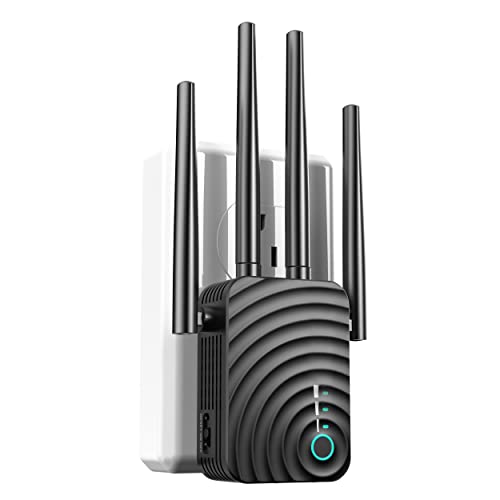
4x 2dBi HIGH PERFORMANCE——This wifi extender with 4*2dBi high-gain antennas enhance the wireless signal for stable data transmission. extending the signal cover every corner of your house, let’s you watch HD movies without lag time or buffering.
WIFI BOOSTER 1200Mpbs DUAL BAND——This 1200Mps WIFI Extender owns dual-band technology, simultaneously issue two WIFI independently, to achieve full-scale wireless strong & stable extension WIFI. 5GHz(900Mps) WIFI is suitable for short-distance high-speed transmission, for high-definition video/ game. And 2.4GHz(300Mps) WIFI is suitable for medium and long distance transmission, for basic network browsing.
360 DEGREE FULL COVERAGE——We specially designed 4pcs high gain antennas for the WiFi Booster, they help to receive the WiFi signal from router and input into the extender, and then transmit the enhanced signal from the extender to all directions, so you will get 360 Degree full signal coverage.
A WIDE RANGE OF COMPATIBILITY——This WiFi repeater has been tested to be compatible with 99% of the routers on the market and can be used with any standard router or gateway. Support for expansion to any device, such as iOS, Android devices, Samsung devices, Echo / Alexa devices, PCs, PlayStations, smart plugs and more. Ideal for high-definition streaming and gaming experiences.
SECURE HEAT DISSIPATION DESIGN——The Extender dissipates heat through the shell, and heat dissipation holes are arranged on both sides of the WIFI booster. Equipped with ABS heat resistant material, the thermal temperature is within the controllable range. NO need to worry about security issues.
Questions & Answers – 1200Mbps WiFi Range Extender Signal Booster, Covers :
➕ What is the price of 1200Mbps WiFi Range Extender Signal Booster, Covers in Saudi Arabia ?
The price of 1200Mbps WiFi Range Extender Signal Booster, Covers in-store is 270 SAR VAT.
➕ When 1200Mbps WiFi Range Extender Signal Booster, Covers was released ?
The release date was August 18, 2022.
➕ What is the price of 1200Mbps WiFi Range Extender Signal Booster, Covers cheap used ?
The price of 1200Mbps WiFi Range Extender Signal Booster, Covers used is 190 SAR VAT.
➕ What are the main characteristics of 1200Mbps WiFi Range Extender Signal Booster, Covers ?
Special specifications :
4x 2dBi HIGH PERFORMANCE——This wifi extender with 4*2dBi high-gain antennas enhance the wireless signal for stable data transmission. extending the signal cover every corner of your house, let’s you watch HD movies without lag time or buffering.
➕ Is it interesting to buy this product ?
The best people who can answer you are customers who have already bought and tested
this product (
See Customer Reviews). This product is rated 5 / 5
on Amazon.
➕ Where to buy 1200Mbps WiFi Range Extender Signal Booster, Covers in Saudi Arabia ?
Mall, Supermarkets, Amazon, Specialized stores, ….
Technical specifications – 1200Mbps WiFi Range Extender Signal Booster, Covers :
Purchase advice :
-
Warranty :
Check the duration of the warranty and also the faults and defects it covers. Is it complete or limited? and What is included in the warranty (parts, repairs or both)?
-
Shipping :
Is delivery offered? And how long does it take to get delivered (Delivery time)
-
Proof of purchase :
Does the shop give you an invoice ?
-
After-sales service :
Do they have an after-sales service to have information about the installation or operation (instructions for use). Also in case of problem, it is the seller who takes charge or you must contact the manufacturer or supplier yourself.
_____________________________


B. G (verified owner) –
Wifi everywhere for all time permanently – The greatest WiFi extender I’ve ever used is this one. I have a house with multiple stories, so WiFi is difficult. In one area of the home, there is no complete signal, and in the other, nothing. I’ve tested a lot of comparable WiFi gadgets. I’m quite tech knowledgeable and take pride in being able to figure things out on my own. With some WLAN extenders, this is quite different, though. The other brands are difficult to set up and is completely useless. The light socket on the Echo made setup simple. I then made the decision to try again with a different WiFi extension. I decided on this brand in the hopes that it will also work. No complaining about how difficult it is to set up. It is quite simple to set up this WiFi extender. I took that action. In the package there is a quick start manual. The green light will flash when the wifi extender is plugged in close to the router. Press the WPS button on the router, then the signal button on the extender. After flashing green for five to ten seconds, the light turns green, turns red, and then remains green. Your device and router have now been linked. Plug the extension back in after moving it to the middle of your home, close to the dead spot. green flashes once again, followed by solid green, solid red, then solid green after 5 to 10 seconds. Find the WiFi name in the WiFi settings of the device you use for WiFi. But the word _EXT comes after the device name. Suppose your standard wifi is GOOBER616. Now it ought to see GOOBER616 EXT. After clicking Exit and entering his regular WiFi password, a FULL WiFi connection appears. Now, Wi-Fi is available in every room of my home.
E. E (verified owner) –
Works great – The product arrived early and i love the design and above all it works for my lounge and garage..perfect
B. G (verified owner) –
Wifi everywhere for all time permanently – The greatest WiFi extender I’ve ever used is this one. I have a house with multiple stories, so WiFi is difficult. In one area of the home, there is no complete signal, and in the other, nothing. I’ve tested a lot of comparable WiFi gadgets. I’m quite tech knowledgeable and take pride in being able to figure things out on my own. With some WLAN extenders, this is quite different, though. The other brands are difficult to set up and is completely useless. The light socket on the Echo made setup simple. I then made the decision to try again with a different WiFi extension. I decided on this brand in the hopes that it will also work. No complaining about how difficult it is to set up. It is quite simple to set up this WiFi extender. I took that action. In the package there is a quick start manual. The green light will flash when the wifi extender is plugged in close to the router. Press the WPS button on the router, then the signal button on the extender. After flashing green for five to ten seconds, the light turns green, turns red, and then remains green. Your device and router have now been linked. Plug the extension back in after moving it to the middle of your home, close to the dead spot. green flashes once again, followed by solid green, solid red, then solid green after 5 to 10 seconds. Find the WiFi name in the WiFi settings of the device you use for WiFi. But the word _EXT comes after the device name. Suppose your standard wifi is GOOBER616. Now it ought to see GOOBER616 EXT. After clicking Exit and entering his regular WiFi password, a FULL WiFi connection appears. Now, Wi-Fi is available in every room of my home.
E. E (verified owner) –
Works great – The product arrived early and i love the design and above all it works for my lounge and garage..perfect
L. H (verified owner) –
Excellent range extender – It’s a cool little plugin range extender and added Ethernet plug gives flexibility to connect PC or laptop temporarily to wired connection. It arrived earlier then expected and same time I was in need for Ethernet at the place where I only can get Ethernet running 100ft cable but this one just ruled that out and just 6ft was enough to get wired connection to my PC. The range is quite excellent considering speed that we get and it easily covers my upstairs bedroom and cottage studio that I have in the backyard.
L. H (verified owner) –
Excellent range extender – It’s a cool little plugin range extender and added Ethernet plug gives flexibility to connect PC or laptop temporarily to wired connection. It arrived earlier then expected and same time I was in need for Ethernet at the place where I only can get Ethernet running 100ft cable but this one just ruled that out and just 6ft was enough to get wired connection to my PC. The range is quite excellent considering speed that we get and it easily covers my upstairs bedroom and cottage studio that I have in the backyard.